FreeformPointLineSeries
FreeformPointLineSeries for arbitrary data (X values can be in any order).
A FreeformPointLineSeries can present a simple line, points (scatter) or both as a point line. FreeformPointLineSeries allows drawing line point to any direction from previous point. All line and point
formatting options from PointLineSeries apply.
The tradeoff for arbitrary data is the lower real-time performance as compare to other lines series. See more Line-series comparison.
Add the series to chart by adding FreeformPointLineSeries objects to FreeformPointLineSeries list.
// Add a FreeformPointLineSeries to the chart
chart.ViewXY.FreeformPointLineSeries.Add(freeformPointLineSeries);
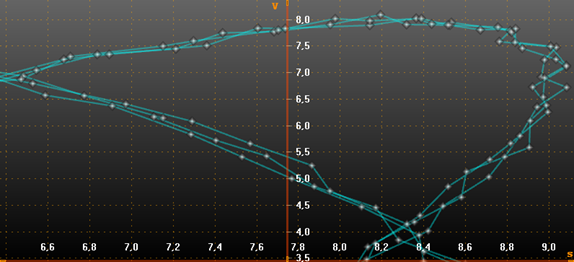
A freeform point line series
Adding points
The series points must be added in code. Use AddPoints(SeriesPoint[], bool invalidate) method to add points to the end of existing points.
//Add points to the end
chart.ViewXY.FreeformPointLineSeries[0].AddPoints(pointsArray);
To set whole series data at once, and overwrite old points, assign the new point array directly:
//Assign the points array
chart.ViewXY.FreeformPointLineSeries[0].Points = pointsArray;
Points can also be added in X and Y values arrays, which turns to be more convenient way in many applications.
chart.ViewXY.FreeformPointLineSeries[0].AddPoints(xValuesArray,yValuesArray,false);
PointCountLimit
Freeform point line series line points are not automatically destroyed even if ViewXY. DropOldSeriesData is enabled, and the points are scrolled out of current view. To automatically destroy old series points in real-time monitoring solution, use point count limiter. Set PointCountLimitEnabled = true and set the limit to PointCountLimit property. If limiter is enabled, the Points array behaves as a ring buffer after the point count limit has been reached. The oldest point from Points array can always be found by retrieving value from OldestPointIndex. If needing to read the existing data out of point count limited buffer, use the following method:
- If OldestPointIndex is 0, read from Points[0] till Points[PointCount-1].
- If OldestPointIndex > 0, first read from Points[OldestPointIndex] till Points[PointCountLimit-1]. Then, read from Points[0] till Points[OldestPointIndex-1].
To directly retrieve the last series point, call GetLastPoint() method.
Line style
Series support LineStyle.
Points style
Series support PointStyle.
SeriesEventMarker
Series support SeriesEventMarker.
Y-value based coloring
Series support UsePalette and Y-value based coloring
Custom shaping and coloring
Series support CustomLinePointColoringAndShaping event.
DataBreaking
Series support DataBreaking by NaN or other value.
ClipAreas
Series support ClipAreas.
DataCursor
Series can be tracked with DataCursor.
LimitYToStackSegment
Series support LimitYToStackSegment.
Rendering data into the Persistent-Rendering-Layer
Series data can be added to either PersistentSeriesRenderingLayer or PersistentSeriesRenderingIntensityLayer.
Examples
To see feature demonstration as example, check LineSeriesXYFeatures, ScatterPoints, CurveNodeEdit and MapRoute from our Demo.