LineCollection
A LineCollection is a collection of line segments. Each line segment is a line going from point A to B. One LineCollection can contain thousands of line segments. LineCollection is extremely efficient in rendering of thousands of distinct line segments, in contrast to SampleDataSeries, PointLineSeries or FreeformPointLineSeries. PointLineSeries, FreeformPointLineSeries or SampleDataSeries are more efficient in rendering continuous polylines of millions of points.
This belong to the group of line-series. See more Line-series comparison.
Add the LineCollection object in ViewXY. LineCollections list property.
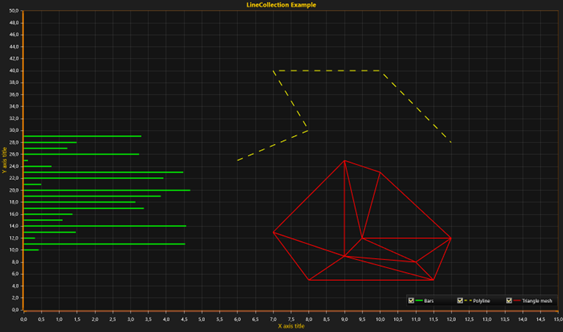
Three LineCollections in use. Green acts as very rapidly rendering bars, yellow as a polyline, and red as an arbitrary triangle wireframe mesh.
Line style
Series support LineStyle.
Setting data to a LineCollection
Set the line segments in Lines property. SegmentLine structure consists of four fields:
AX Start point, X
AY Start point, Y
BX End point, X
BY End point, Y
Add the SegmentLines array to Lines property as follows:
lineCollection.Lines = new SegmentLine[] {
    new SegmentLine(6,25,8,30),
    new SegmentLine(8,30,7,40),
    new SegmentLine(7,40,10,40),
    new SegmentLine(10,40,12,28) };
Solving individual segments
GetSegmentsAtPoint() method allows checking which individual segment line is at given position, for example under mouse coordinates. It returns a list of integers (segment line indexes).
List<int> list = _chart.ViewXY.LineCollections[0].GetSegmentsAtPoint(xCoordinate, yCoordinate);
ClipAreas
Series support ClipAreas.
DataCursor
Series can be tracked with DataCursor.
LimitYToStackSegment
Series support LimitYToStackSegment.
Examples
To see feature demonstration as example, check LineSeriesXYFeatures, LineCollections, StemPlot and BoxWhiskerPlot from our Demo.