PolygonSeries
PolygonSeries renders a fill and a borderline, by given border path.
Set the filling preferences in Fill property. Use Border property of PolygonSeries to set the border line style.
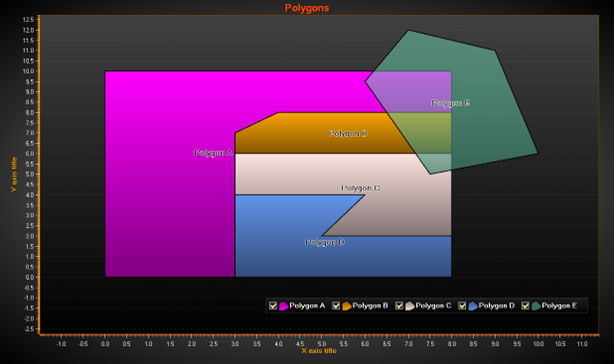
Several polygons.
Setting data to a PolygonSeries
Set the path points in Points property. PolygonSeries has an automatic path closing feature. If the last point is not connected to the first point, the chart will do that automatically.
The following shows how to assign the points of the previous picture’s transparent teal polygon’s path:
polygon.Points = new PointDouble2D[] {
    new PointDouble2D(7,12),
    new PointDouble2D(6,9.5),
    new PointDouble2D(7.5,5),
    new PointDouble2D(10,6),
    new PointDouble2D(9,11)};
Enabling complex / intersecting fills
Set IntersectionsAllowed = True to enable polygon path to intersect itself. Without this property enabled, when intersecting the path, the fill will appear all garbled up. By default, the property is False for performance reasons, as detecting and rendering intersection cases is heavy.
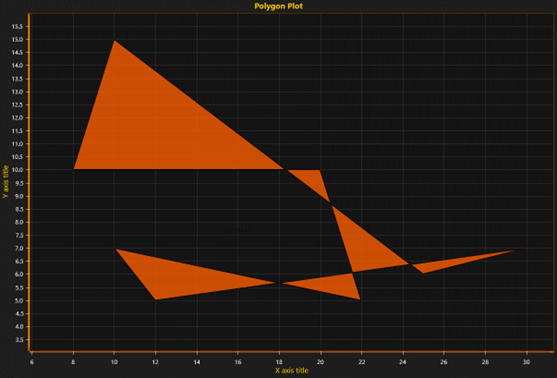
Polygon with intersecting path, with IntersectionsAllowed = True
Examples
To see feature demonstration as example, check ExamplePolygon, BoxWhiskerPlot, Zoomable2DPie and TernaryPlot from our Demo.