IntensityMeshSeries (heatmap)
IntensityMeshSeries is almost similar to IntensityGridSeries. The biggest difference is that series nodes can be positioned arbitrarily in X-Y space. In other words, the series does not have to be rectangular. Wireframe lines can be set visible with WireframeType property, and nodes can be shown by setting ShowNodes true.
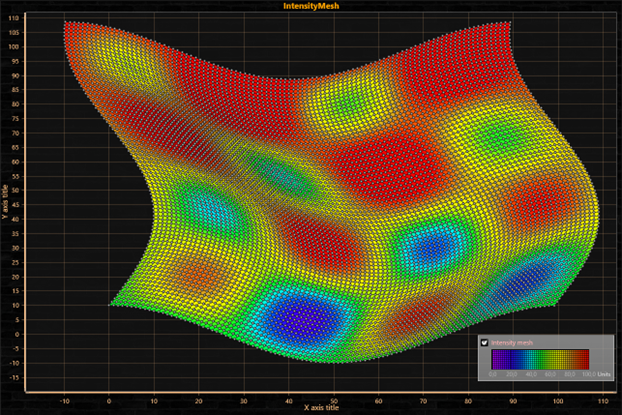
IntensityMeshSeries with freely positioned X and Y values for each node. WireframeType = Wireframe and ShowNodes = true.
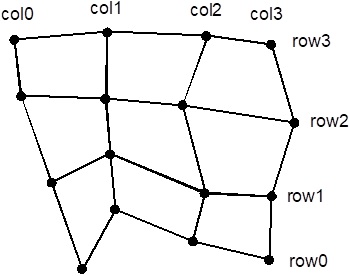
Intensity mesh nodes. SizeX = 4, SizeY =4.
Setting intensity mesh data when geometry changes
Follow these instructions, when the X, Y and Value fields are updated the same time.
- Set SizeX and SizeY properties to give the mesh a size as columns and rows.
- Set X, Y and Value for all nodes:
for (int nodeIndexX = 0; nodeIndexX < columnCount; nodeIndexX ++)
{
	for (int nodeIndexY = 0; nodeIndexY < rowCount; nodeIndexY ++)
     	{
	  meshSeries.Data[nodeIndexX, nodeIndexY].X = xValue;
	  meshSeries.Data[nodeIndexX, nodeIndexY].Y = yValue;
	  meshSeries.Data[nodeIndexX, nodeIndexY].Value = value;
     	}
}
meshSeries.InvalidateData(); //Notify new values are ready to refresh
for (int nodeIndexX = 0; nodeIndexX < columnCount; nodeIndexX ++)
{
	for (int nodeIndexY = 0; nodeIndexY < rowCount; nodeIndexY ++)
     	{
		  meshSeries.SetDataValue(nodeIndexX, nodeIndexY,
		      	xValue,	yValue, value,
                Color.Green); //Source point colors are not used in this example, so use any color here
     	}
}
meshSeries.InvalidateData(); //Notify new values are ready to refresh
Setting intensity mesh data when geometry does not change
Follow these instructions, when only the Value fields of IntensityPoint structures in Data array are updated. This is the performance optimized way for updating data, for example in thermal imaging or environmental data monitoring solutions, where X and Y values of each node stay at the same location.
Creating the series and its geometry
- Set Optimization to DynamicValuesData
- Set SizeX and SizeY properties to give the mesh a size as columns and rows.
- Set X, Y and Value for all nodes:
for (int nodeIndexX = 0; nodeIndexX < columnCount; nodeIndexX ++)
{
	for (int nodeIndexY = 0; nodeIndexY < rowCount; nodeIndexY ++)
     {
	  meshSeries.Data[nodeIndexX, nodeIndexY].X = xValue;
	  meshSeries.Data[nodeIndexX, nodeIndexY].Y = yValue;
	  meshSeries.Data[nodeIndexX, nodeIndexY].Value = value;
     }
}
meshSeries.InvalidateData(); //Rebuild geometry from nodes and repaint
Updating the values periodically
- Set only values for all nodes:
for (int nodeIndexX = 0; nodeIndexX < columnCount; nodeIndexX ++)
{
	for (int nodeIndexY = 0; nodeIndexY < rowCount; nodeIndexY ++)
     {
	    meshSeries.Data[nodeIndexX, nodeIndexY].Value = value;
     }
}
meshSeries.InvalidateValuesDataOnly(); //Only data values are updated
Examples
To see feature demonstration as example, check IntensityMeshXY, IntensityMeshStaticPositions, IntensityMeshCircle from our Demo.