SampleDataBlockSeries
SampleDataBlockSeries is a version of SampleDataSeries, fully optimized for real-time applications. It offers the best possible performance with least CPU and memory consumption, allowing rendering extremely high number of data points simultaneously. As the name of the series suggests, the data is internally managed as blocks, which in turn are individually memory-managed. This removes the need for extremely large continuous linear memory. SampleDataBlockSeries is the optimal series type for realtime medical monitoring applications, such as ECG/EKG, EEG, industrial monitoring applications, telemetry, and waveform vibration monitoring.
SampleDataBlockSeries works almost similarly to SampleDataSeries. It likewise requires the added data to be in progressive order and to have a fixed data interval. SamplingFrequency property (1 / sample interval) can be used to set the fixed sample interval. To set the X value (time stamp) where the samples begin, set FirstSampleTimeStamp property. However, visually SampleDataBlockSeries has fewer formatting options compared to other line series. Color and Width properties are available to change the color and width of the line respectively. Furthermore, SampleDataBlockSeries shows only the (solid) line, not individual points or line-pattern. See more Line-series comparison.
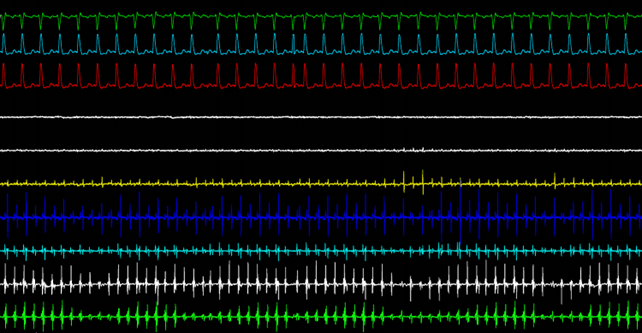
Several SampleDataBlockSeries in a real-time application.
Adding points
New samples can be added in code by using AddSamples method. Unlike SampleDataSeries, SampleDataBlockSeries accepts only float values. PointCount property can be used to get the current number of samples in the series.
Or if SampleFormat is DoubleFloat
// Add samples to the end.
sampleDataBlockSeries.AddSamples(samplesArray, false);

// Get the total number of samples.
int samplesCount =_chart.ViewXY.SampleDataBlockSeries[0].PointCount;
SeriesEventMarker
Series support SeriesEventMarker.
ClipAreas
Series support ClipAreas.
LineSeriesCursors
Series can be tracked with LineSeriesCursors.
DataCursor
Series can be tracked with DataCursor.
LimitYToStackSegment
Series support LimitYToStackSegment.
Examples
To see feature demonstration as example, check LineSeriesXYFeatures, BillionPoints and HiSpeedXY from our Demo.