PersistentSeriesRenderingIntensityLayer
PersistentSeriesRenderingIntensityLayer allows collecting traces into a layer and coloring it by the hit count per pixel. The coloring is made by using a value-range palette. The traces can be used with the same series types as in PersistentSeriesRenderingLayer (that is, all belong to PointLineSeriesBase class) They are very much similar to it, main difference being the coloring. When rendering a trace in a location of a pixel again with second rendering call, the intensity of it grows, increasing its value in the value-range palette.
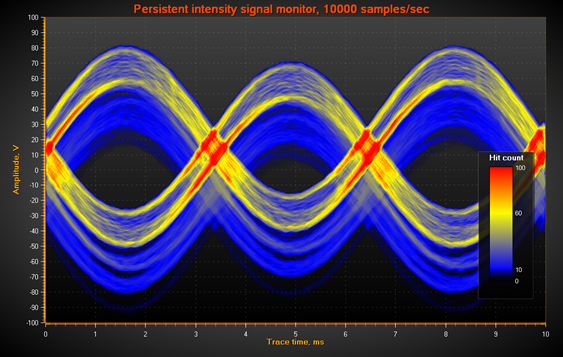
Persistent intensity layer highlights areas of concentrated activity, in this case in yellow and red.
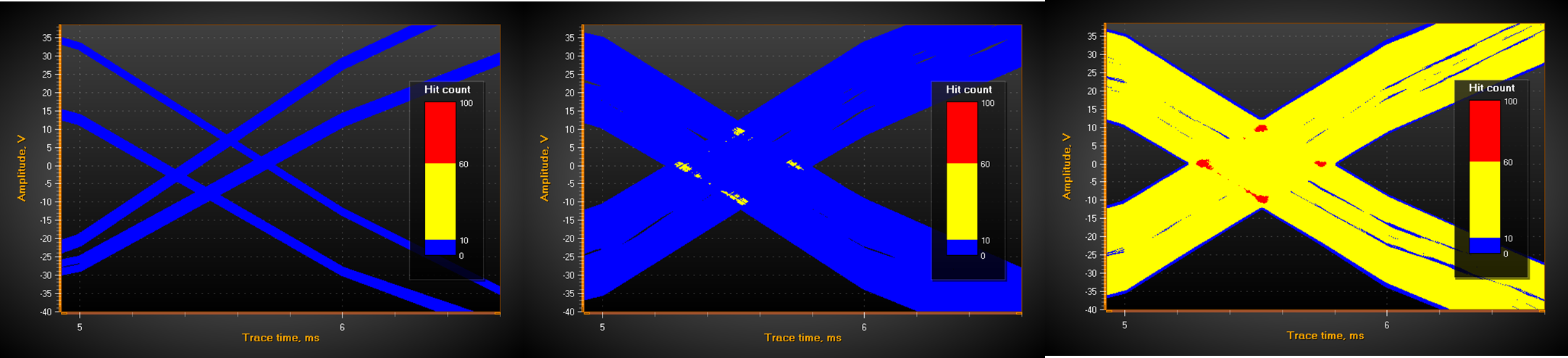
Repetitive signal trace is rendered in the same region. On the left, only a couple of traces have been rendered on the layer, showing all colors in blue. On the middle, a lot of traces have been rendered, but mostly on different coordinates. In the intersections of the traces, the hit count exceeds the trace count of 10 defined in the palette for yellow color threshold. In the rightmost image, hundreds of traces have been rendered in total, and intersections start to exceed threshold defined for red color.
Creating the layer
The PersistentSeriesRenderingIntensityLayer is not a sub-property of ViewXY and can’t be added with Visual Studio’s property grid. PersistentSeriesRenderingIntensityLayer objects must be created in code.
Create it as follows:
using LightningChartLib.[edition].Charting.Views.ViewXY;

PersistentSeriesRenderingIntensityLayer layer = new PersistentSeriesRenderingIntensityLayerngLayer(m_chart.ViewXY, m_chart.ViewXY.XAxes[0]);
Clearing the layer
layer.Clear() clears the layer and resets the counters.
Changing palette colors
Define the palette type and steps in ValueRangePalette property of the layer. ValueRangePalette.Type = Gradient makes a gradient coloring, ValueRangePalette.Type = Uniform makes the layer render with discrete color steps.
Adjusting the intensity effect of new trace and decay of old traces
Use NewTraceIntensity property to control how great intensity effect the new trace rendered with RenderSeries call gets. Typical value is 1…100, depending on how fast the color range is set to fill up with the traces.
Use HistoryIntensityFactor to adjust the decay speed of the old traces. Typical value is in range of 0.5 – 0.99.
Note that setting HistoryIntensityFactor itself doesn’t update the layer until the next call of RenderSeries.
Rendering data into the layer
Render a PointLineSeries, SampleDataSeries, FreeformPointLineSeries, HighLowSeries or AreaSeries to the layer by RenderSeries method. (all belong to PointLineSeriesBase class).
Render one series on the layer call:
layer.RenderSeries(PointLineSeriesBase series)
layer.RenderSeries(List<PointLineSeriesBase> seriesList)
Render all given series on the layer. No performance gain over layer.RenderSeries(PointLineSeriesBase series) though.
Disposing the layer
To dispose the layer and prevent it from rendering with the chart, call
layer.Dispose();
Anti-aliasing data in the layer
To anti-alias the data in the chart rendering stage, set layer.AntiAliasing to True. This enables anti-aliasing also if the hardware doesn’t support it.
Getting list of layers
ViewXY.GetPersistentSeriesRenderingLayers() returns list of all created layers, including PersistentSeriesRenderingLayers.
Examples
To see feature demonstration as example, check PersistentIntensitySignal from our Demo.