DigitalLineSeries
DigitalLineSeries is a specific type of line series, which displays a line alternating between two Y-values, for example 0 and 1. Use DigitalHigh and DigitalLow to set the Y-values the line is alternating between. Series is fully optimized for performance and uses the least amount of memory of all series types. DigitalLineSeries has fewer configuration options compared to many other series, as it draws only the line between the data points but not the points themselves. Furthermore, it has only Color and Width properties to adjust the series appearance. See more Line-series comparison.
Adding points
DigitalLineSeries data points are always in progressive order with fixed intervals. FirstSampleTimeStamp property sets the X-value of the first data point, while SamplingFrequency control the interval between the points. The data points are added via AddBits() method as arrays of type uint[]. Each value in the array is converted to respective binary values, thus representing 32 data points. BitCount property can be used to check the total number of added points.
Following is an example code and resulting chart image
// Adding a DigitalLineSeries.
DigitalLineSeries dls = new DigitalLineSeries(_chart.ViewXY, _chart.ViewXY.XAxes[0], _chart.ViewXY.YAxes[0]);
dls.Color = Colors.Yellow;
dls.Width = 2;
dls.FirstSampleTimeStamp = 0;
dls.DigitalLow = 0;
dls.DigitalHigh = 1;
dls.SamplingFrequency = 32;
uint[] data = new uint[] { 0xFFFFFFFF, 0xFFFFFFFF, 0xFFFFFFFF, 0xFFFFFFFF, 0x00000000, 0xa54df810, 0x00000000, 0xFFFFFFFF };
dls.AddBits(data, false);
_chart.ViewXY.DigitalLineSeries.Add(dls);
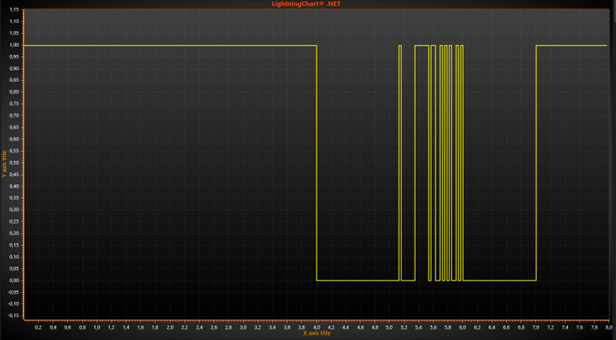
DigitalLineSeries based on the code above.
ClipAreas
Series support ClipAreas.
LineSeriesCursors
Series can be tracked with LineSeriesCursors.
DataCursor
Series can be tracked with DataCursor.
LimitYToStackSegment
Series support LimitYToStackSegment.
Examples
To see feature demonstration as example, check LineSeriesXYFeatures and TrillionDigital from our Demo.