DataBreaking by NaN or other value
These series types support data breaking: PointLineSeries, FreeformPointLineSeries, SampleDataSeries, AreaSeries, HighLowSeries, PointLineSeries3D.

DataBreaking options in series that support it.
LightningChart skips rendering of the data points that match with specified breaking Value. All other values it renders normally.
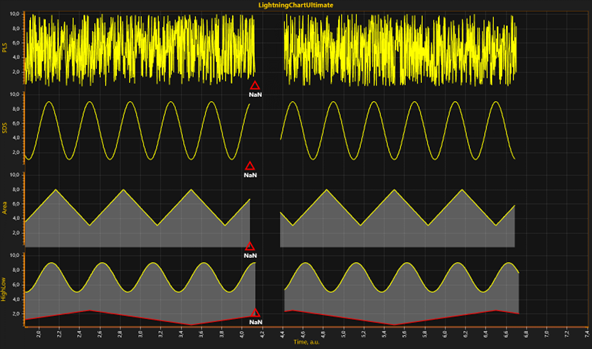
DataBreaking in use for PointLineSeries, SampleDataSeries, AreaSeries and HighLowSeries.
When DataBreaking.Enabled = True, it will cause significant extra overhead, and is not recommended for solutions needing a very high real-time data rates. Consider using ClipAreas instead.
For example, using NaN to break PointLineSeries data:
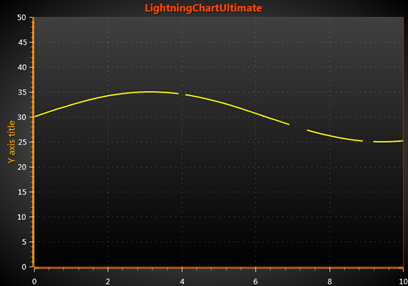
Using NaN to break PointLineSeries
Code:
int pointCount = 101;
double[] xValues = new double[pointCount];
double[] yValues = new double[pointCount];

for (int point = 0; point < pointCount; point++)
{
    xValues[point] = (double)point * interval;
    yValues[point] = 30.0 + 5.0 * Math.Sin((double)point / 20.0);
}

//Add some NaN values in Y array to mark break points
yValues[40] = double.NaN;
yValues[70] = double.NaN;
yValues[71] = double.NaN;
yValues[72] = double.NaN;
yValues[73] = double.NaN;
yValues[90] = double.NaN;
yValues[91] = double.NaN;

//Add new series with DataBreaking Enabled
PointLineSeries pls = new PointLineSeries(_chart.ViewXY, _chart.ViewXY.XAxes[0], _chart.ViewXY.YAxes[0]);
pls.DataBreaking.Enabled = true;

// set data gap defining value (default = NaN)
pls.DataBreaking.Value = double.NaN;
SeriesPoint[] points = new SeriesPoint[pointCount];
for (int point = 0; point < pointCount; point++)
{
    points[point].X = xValues[point];
    points[point].Y = yValues[point];
}
To see feature demonstration as example, check LineSeriesXYFeatures, SeriesDataBreaking and DataBreakingLineByNaN from our Demo.