








Create a Gold Price Prediction Application with LightningChart Python
Tutorial
Assisted by AI
Learn how to create a real-time Python gold price prediction application with real-time and high-performance charts.
Soroush Sohrabian
Software Developer

Introduction to creating a gold price prediction application
This project shows data visualization and machine learning analytics to optimize industrial gold recovery processes. In this project we aimed to show how integrating machine learning models with interactive visualization capabilities gives us real-time insights to make operational decisions. The main goal is to predict gold recovery and optimize profit using real-time visualizations.
LightningChart Python
LightningChart Python is a powerful visualization library that is capable of visualizing real-time and interactive charts with large datasets efficiently in industrial applications. Its advanced charts such as heatmaps, bubble charts, real-time line and area charts, and 3D visualizations provided visual insight into gold recovery data analysis.

Setting Up Python Environment
Before running the project, install Python and the other required libraries using:
pip install pandas numpy scipy scikit-learn smogn trimesh lightningchartSeveral Python libraries were employed in this article:
- Pandas: For loading, cleaning, and structuring data..
- NumPy: For numerical operations.
- scipy & scikit-learn: Provided machine learning techniques like KDE (Kernel Density Estimation), Random Forest regression modeling, and SMOGN for synthetic minority oversampling.
- trimesh: For processing and visualizing 3D mesh models.
- LightningChart: To create interactive visualizations.
Setting Up Your Development Environment
- Set up a virtual environment:
python -m venv env
source env/bin/activate # On Windows use `env\Scripts\activate`- Use Visual Studio Code (VSCode) for a streamlined development experience.
Visualizing Data with LightningChart Python
Here are some examples codes and charts that shows how we created key visualizations for the gold price prediction application:
Static Dashboard Visualization
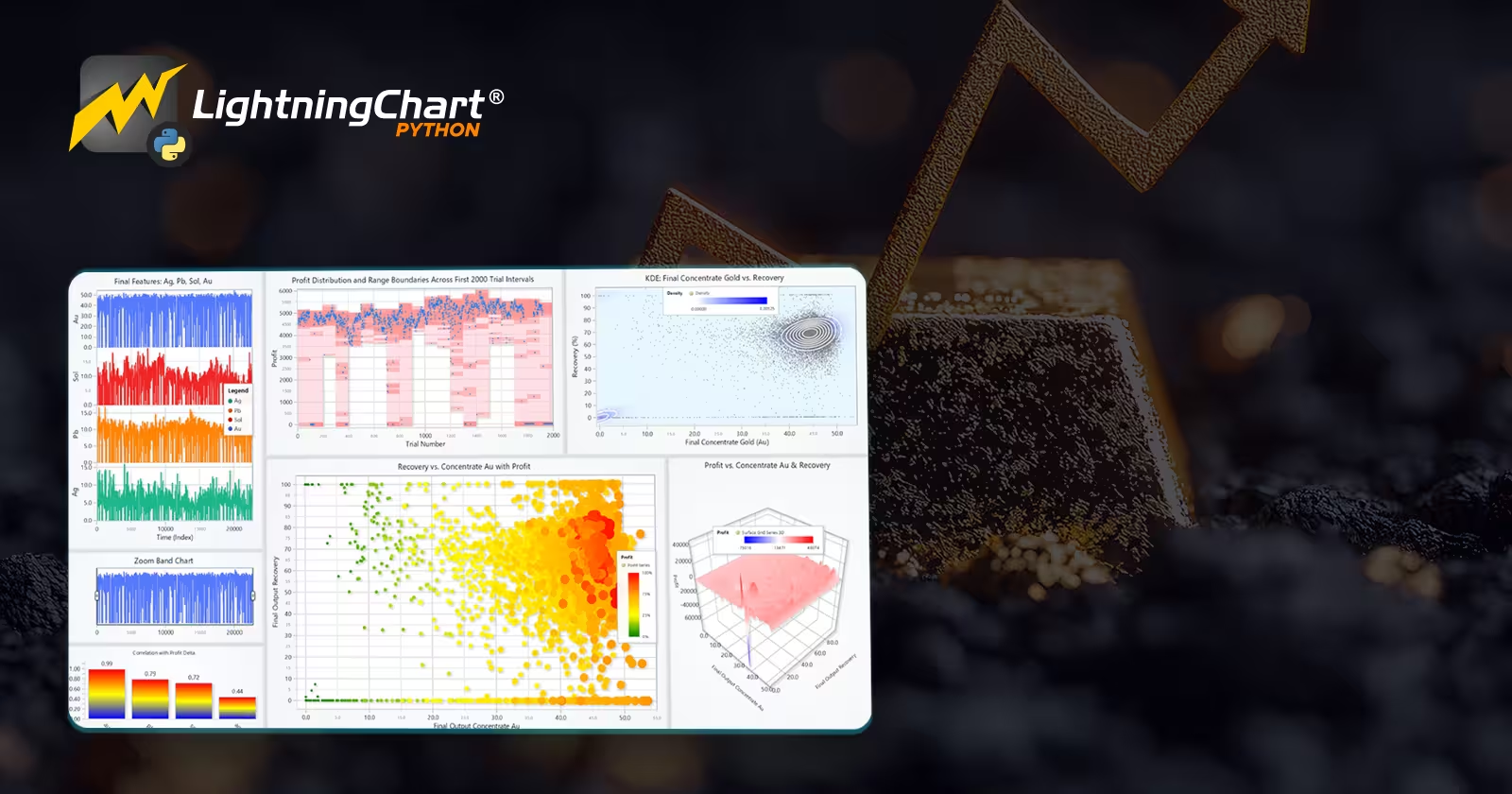
In the dashboard, we could see different charts that help us better understand the dataset. In the first Multi Y-axis chart, we can see final concentrate features (gold, solid, lead, and silver) across the dataset index. To explore the data more effectively through smaller regions in the chart, I added a zoom band chart.
In the Bar Chart, we could see how changes in each concentrate feature are correlated with changes in profit. First, I calculated the difference between two consecutive trial numbers, and it can be seen that fluctuations in gold values during the experiment are more correlated with profit changes than other parameters.
In the Scatter-Rectangle Series, we can see profit versus trial number for the first 2000 trials. I showed profit bands with a semi-transparent pink rectangle for each 100-trial interval to highlight minimum and maximum profit, and we have another smaller red rectangle around each profit point to show profits more clearly.
In the Bubble Chart, we have final concentrate gold (Au) on the x-axis, final output recovery on the y-axis, and bubble size and color representing profit.
In the Contour Plot, we can see a 2D heatmap of data density regions for final concentrate gold and gold recovery, showing where points are most concentrated. We also have contour lines and scatter points. Finally, in the 3D Surface chart, we can see how profit changes with gold concentration and recovery.
df = pd.read_csv("gold_recovery_full_with_profit.csv")
df["time"] = df.index.astype(float)

dashboard = lc.Dashboard(rows=5, columns=8)

chart_final = dashboard.ChartXY(...)
series = chart_final.add_line_series(...)
series.append_samples(x_values=df['time'], y_values=df[col])

correlation_data = [{"category": "au", "value": 0.99}, ...]
chart_corr.set_data(correlation_data)

bubble = chart_bubble.add_point_series(sizes=True, lookup_values=True)
bubble.append_samples(x_values=..., y_values=..., sizes=..., lookup_values=...)

heatmap_series = chart_kde.add_heatmap_grid_series(...)
surface_series = chart3d.add_surface_grid_series(...)
Dynamic 3D Ore and Tail Visualization
In this Real-Time streaming gold price prediction application dashboard as we can see in the first row, color changing in each feature shows its concentration level and below them we can see their concentration value. Similarly, we have the same thing for each feature concentration level in the tailing after processing. In the bottom we have multi y-axis line chart shows how profit and final output gold recovery are related to each other.
vertices, indices, normals = trimesh.load_mesh("rock.OBJ")
model.set_model_geometry(vertices, indices, normals)

model.set_color(lerp_color(start_color, end_color, factor))
tail_model.set_scale(base_scale + scale_range * factor_tail)

txtbox.set_text(f"{name} Value: {value:.2f}")

recovery_series.add(x=[i], y=[recovery])
profit_series.add(x=[i], y=[profit])
Real-Time Prediction and Uncertainty Visualization
In this gold price prediction application dashboard, we can see different ways of visualizing uncertainty in the first two rows. At the bottom, the chart first starts by predicting two values and connecting them with a red line. After a few seconds, it shows the actual values with a cyan line, and at the same time, the model turns the old red line to orange and starts predicting new values and connecting them.
rf = RandomForestRegressor(...)
rf.fit(X_train, y_train)

median_prediction = np.median([tree.predict(X_test) for tree in rf.estimators_], axis=0)

series_5th_95th.add_dict_data([{'position': x, 'low': p5, 'high': p95}])
heatmap_data[:, i] = generate_uncertainty_heatmap(...)
actual_series.add_samples(x=[t], y=[actual]
Interactive Mixing Plan Dashboard
In this Real-Time streaming dashboard, in the first column, we can see profit, gold, solid, lead, and silver changes against the trial number. Minima or maxima in profit are marked with green stars, which show spikes, and red stars, which show dips in the trend, respectively.
I applied a sleep time of about four seconds to let the bar chart update so the user can follow changes more easily. On the right side, the waterfall chart shows how each concentrate feature and profit changed between the current star and the previous star. It helps us see which features have more impact on profit at each star event. At the bottom, we can see a set of text boxes and icons showing the best feature-change combination we have so far.
for y_col in y_columns:
    line_series = chart.add_line_series(...)
    line_series.add([x], [y])

if prev_profit < next_profit:
    min_star_series.add([x], [y])
    waterfall_data = [{"category": "ag", "value": delta_ag}, ...]

best_combo_textboxes["profit"].set_text("profit: 191.01")
tb_icon.add_image("up2.png")
Conclusion
In conclusion, this Predicting Gold Recovery application shows how to combine machine learning methods with the powerful visualization tools provided by LightningChart Python. The visual analytics dashboards give us better insight into profit dynamics, feature importance, and uncertainty prediction.
LightningChart Python significantly improves data interaction, allowing us to quickly interpret real-time predictive analytics, that is really important for optimizing industrial gold recovery processes.
Continue learning with LightningChart
Angular Bubble Chart
Written by a human | Updated on April 11th, 2025Angular Bubble Chart App Hello there, in this tutorial, we'll use Visual Studio Code and typescript to build a brand-new Angular template from scratch. Also, we'll modify a bubble chart's characteristics to fit the...
DataGrid Heatmap Monitoring
Written by a human | Updated on April 10th, 2025JavaScript Monitoring DataGrid Heatmap In our previous articles, we worked on TypeScript projects and as we know, we need a web browser to visualize all those projects. In other cases, you may need to create a...

DataGrid Monitoring
Written by a human | Updated on April 10th, 2025JavaScript DataGrid Monitoring Application In this article, we will carry out an exercise of an XY chart that updates in real-time using the new LC JS DataGrid monitoring component. DataGrid is an additional...



If you have any questions, feel free to contact us!
©LightningChart Ltd 2025. All rights reserved.