





LightningChart JS TraderVariable Index Dynamic Average (VIDYA) Indicator
ArticleImplement the Variable Index Dynamic Average (VIDYA) technical indicator with LightningChart JS Trader.
Written by a human | Updated on April 24th, 2025
About VIDYA Indicator
In the world of technical analysis, traders rely heavily on indicators to forecast market movements and make informed trading decisions. One such adaptive tool is the Variable Index Dynamic Average (VIDYA). The VIDYA indicator adjusts itself based on market volatility, offering traders a more flexible alternative to static moving averages. In this article, we will dive into the theory behind the VIDYA, explore its formula, and demonstrate how to use it with examples from the LightningChart JS Trader interactive platform.
What is the VIDYA Indicator?
The Variable Index Dynamic Average (VIDYA) is a type of variable moving average that adapts to market volatility. It uses an Exponential Moving Average (EMA) as a base and adjusts its smoothing dynamically based on market volatility. The adjustment is done through a smoothing factor (α), which is influenced by the standard deviation of recent price changes. This dynamic nature makes VIDYA more responsive to changes in market conditions, making it especially useful during periods of significant price movement.
Comparison with Other Technical Indicators
Compared to other moving averages, such as the Variable Moving Average (VMA) and Exponential Moving Average (EMA), the VIDYA stands out due to its ability to self-adjust based on volatility. While the EMA responds more quickly to price changes than the Simple Moving Average (SMA), it lacks the dynamic adjustment that VIDYA offers. VIDYA’s approach, using standard deviation to adjust α, allows it to adapt more fluidly to market conditions, making it particularly effective in capturing trends during high volatility.
In general, the Variable Index Dynamic Average (VIDYA) is an Exponential Moving Average that automatically adjusts its smoothing based on the volatility of the price. VIDYA uses standard deviation to calculate the volatility, whereas other similar indicators, such as the Variable Moving Average (VMA), use the Chande Momentum Oscillator (CMO).
Variable Index Dynamic Average Formula
At its core, VIDYA calculates its value using the formula:

Where:
- VIDYAt: The current value of the VIDYA.
- EMAt: The current Exponential Moving Average.
- Pricet: The current day’s price.
- α (Alpha): The dynamically adjusted smoothing factor based on volatility.
The EMA acts as a baseline that smooths the price data over a specific period, while α adjusts based on market volatility. This adjustment allows VIDYA to be more responsive during volatile periods and smoother during calm market conditions.
VIDYA and Its Usage in Market Volatility
The adaptive nature of VIDYA makes it particularly useful during times of high volatility. Traditional moving averages may lag behind during fast-paced markets, but VIDYA’s real-time adjustment allows it to track price changes more accurately. As volatility increases, VIDYA becomes more responsive, making it an ideal tool for traders looking to capitalize on rapid price movements.
Definition of the Dynamic Momentum Index
The Dynamic Momentum Index (DMI) is another technical indicator that complements VIDYA. Similar to the well-known Relative Strength Index (RSI), the DMI measures the momentum of price changes. However, unlike the RSI, which uses a fixed period, the DMI adjusts its period based on market volatility. This makes the DMI more dynamic and capable of offering more accurate overbought or oversold signals during varying market conditions.
DMI Formula and Its Relationship with VIDYA
The Dynamic Momentum Index formula involves calculating the difference between current price levels and previous closing prices. This difference is then adjusted based on volatility, similar to how VIDYA adapts to volatility using standard deviation. Together, the DMI and VIDYA work to give traders a more complete picture of market momentum and trend strength, adjusting their sensitivity based on real-time market conditions.
The Dynamic Momentum Index (DMI) formula is designed to adjust based on market volatility, similar to the Relative Strength Index (RSI) but with a variable period. Here’s the general approach to calculating the DMI:
1. Calculate Upward and Downward Movements:
DownMove = Previous Close − Current Close
If the result is negative, UpMove is set to zero. If positive, DownMove is set to zero.
2. Calculate the Relative Strength (RS): The RS is computed over a specific period (which adapts based on volatility):

The averages can be smoothed using an exponential moving average (EMA) or simple moving average (SMA).
3. Dynamic Period Adjustment: DMI adjusts the look-back period based on the standard deviation of price changes. The period length can vary between a minimum and maximum range, which is typically set by the trader, such as between 5 and 30.
4. Calculate the Dynamic Momentum Index (DMI): Once you have the RS, the DMI is computed similarly to the RSI:

However, in the case of DMI, the period for the moving averages used in RS adjusts based on volatility. The result is a momentum indicator that is more adaptive to market conditions than traditional fixed-period indicators like the RSI, making it particularly useful for volatile markets.
Mathematical Basis Behind VIDYA
The VIDYA formula is designed to integrate an Exponential Moving Average (EMA) with a dynamic smoothing factor:

Where:
- α (Alpha) is calculated based on the standard deviation of recent price movements to adjust for volatility. The formula for α is:

Calculation Example (A 5-day VIDYA): Given prices over 5 days: 100, 102, 101, 105, 110. We will calculate the VIDYA for Day 6 using the data from the previous 5 days.
Step 1: Calculate the EMA for Day 5:
- Use the formula for the EMA:

- For a 9-period EMA:

- Calculating the EMA for Each Day: For simplicity, we assume the EMA for Day 1 is the same as the closing price, of 100.
- Day 2: Price = 102.
- EMA2 = 100 + 0.2 x (102 – 100) = 100 + 0.4 = 100.4
- Day 3: Price = 101
- EMA3 = 100.4 + 0.2 x (101 – 100.4) = 100.4 + 0.12 = 100.52
- Day 4: Price = 105
- EMA4 = 100.52 + 0.2 x (105 – 100.52) = 100.52 + 0.896 = 101.416
- Day 5: Price = 110
- EMA5 = 101.416 + 0.2 x (110 – 101.416) = 101.416 + 1.7168 = 103.1328
- Day 2: Price = 102.
So, calculating the EMA for Day 5 yields 103.1328.
Step 2: Calculate Standard Deviation (Volatility Measure)
To adjust the smoothing factor α, we first calculate the standard deviation of price changes over the past 5 days.
- Calculate the average price:

- Calculate the variance (average squared deviation from the mean):

- Calculate the standard deviation:

Step 3: Adjust Smoothing Factor (α)
The alpha (α) in the Variable Index Dynamic Average (VIDYA) is typically calculated based on market volatility, often using standard deviation as the measure of volatility. Here’s how α is determined and calculated:
The alpha (α) can be computed based on a linear scaling of volatility within a predefined range. The formula often takes the following structure:

Where:
- αmin: The minimum alpha value, usually set by the user, which defines how smooth VIDYA should be in low-volatility conditions.
- αmax: The maximum alpha value, defining how responsive VIDYA should be in high-volatility conditions.
- σ: The current standard deviation of price changes over a specified period.
- σmin: A baseline minimum standard deviation, often set to the lowest historical standard deviation in the data or a predefined low threshold.
- σmax: A baseline maximum standard deviation, which could be set as the highest historical standard deviation or a predefined upper threshold.
Step-by-Step Calculation:
- Determine Volatility Range and Baselines:
- Establish σmin and σmax based on historical data or predefined thresholds. For instance, if historical volatility (standard deviation) has fluctuated between 1 and 5, set σmin = 1 and σmax = 5.
- Set the alpha range, say αmin = 0.05 and αmax = 0.15.
- Calculate Standard Deviation (σ):
- According to the computation of the standard deviation for the recent price changes, the result was 3.61.
- Apply α Formula:
- Substitute the values into the formula. Given:
- αmin = 0.05
- αmax = 0.15
- σ = 3.61
- σmin = 1
- σmax = 5

So, for this level of volatility, α would be approximately 0.115. This dynamically adjusted alpha is then used in the VIDYA formula, allowing it to respond appropriately to the market’s current volatility conditions.
Step 4: Calculate VIDYA for Day 6
As calculated before, the EMA for Day 5 is 103.1328, and suppose the price for Day 6 is 112:
- VIDYA6 = EMA5 + α x (Price6 – EMA5)
- VIDYA6 = 103.1328 + 0.11525 x (112 – 103.1328)
- VIDYA6 = 103.1328 + 0.11525 x 8.8672 ≈ 104.1544
The calculated VIDYA for Day 6 is approximately 104.1544.
Interpretation of Results
- EMA Calculation: The EMA for Day 5 is 103.1328, serving as the basis for the VIDYA calculation.
- Smoothing Factor (α): Based on a standard deviation of 3.61, α is dynamically adjusted to 0.11525, reflecting moderate market volatility.
- Trend Analysis: The calculated VIDYA of 104.1544 suggests an upward trend, as it is higher than the previous EMA value. This helps traders confirm the market’s positive direction.
- Trading Signal: The VIDYA moving closer to the Day 6 price of 112 suggests a potential buying signal, as the market is in an upward trend.
The calculation of the VIDYA value of 104.1544 for Day 6 effectively demonstrates how the indicator adapts to recent market conditions using both the EMA and the dynamic smoothing factor. This example showcases VIDYA’s strength in capturing trend direction while managing sensitivity to price volatility. For traders, this adaptability means more accurate trend-following signals and a reduction in false signals, making it a valuable tool for trading in markets with varying volatility.
The Role of LightningChart JS Trader in Financial Analysis

Financial analysis involves examining historical data to forecast future trends, make informed decisions, and assess risk. In this domain, applications like LightningChart JS Trader serve a critical role by providing real-time, high-performance data visualization tools that help traders and analysts better interpret complex datasets. It enables traders to track market trends using built-in indicators.
The platform’s ability to handle large datasets and real-time updates makes it essential for fast decision-making in dynamic markets. Additionally, its customization options allow users to create tailored charts and apply statistical indicators, enhancing both the precision of analysis and risk management. This tool helps streamline financial analysis and supports more informed, data-driven trading strategies.
Implementation with LightningChart JS Trader
Advanced charting platforms like LightningChart JS offer traders a range of technical indicators, including the Variable Index Dynamic Average (VIDYA) indicator. LightningChart JS allows traders to create interactive, high-performance charts, ensuring real-time data visualization. This platform is particularly useful for traders who rely on technical indicators such as the Variable Index Dynamic Average (VIDYA) indicator to make quick, informed decisions.
Step 1: Get LightningChart JS Trader
To begin, you’ll need access to LightningChart JS Trader. This library provides the tools necessary to create advanced technical indicators, including the Variable Index Dynamic Average (VIDYA) indicator. Visit the LightningChart JS Trader page to download the required components and review the documentation.
Step 2: Review the Interactive Example
LightningChart JS Trader includes interactive examples that demonstrate how to create custom technical indicators. Start by reviewing the documentation, focusing on how to integrate the Variable Index Dynamic Average (VIDYA) indicator into your chart setup. The interactive examples will guide you through the process of setting up the Variable Index Dynamic Average (VIDYA) indicator, from importing the necessary modules to modify the chart settings.
Step 3: Code Explanation
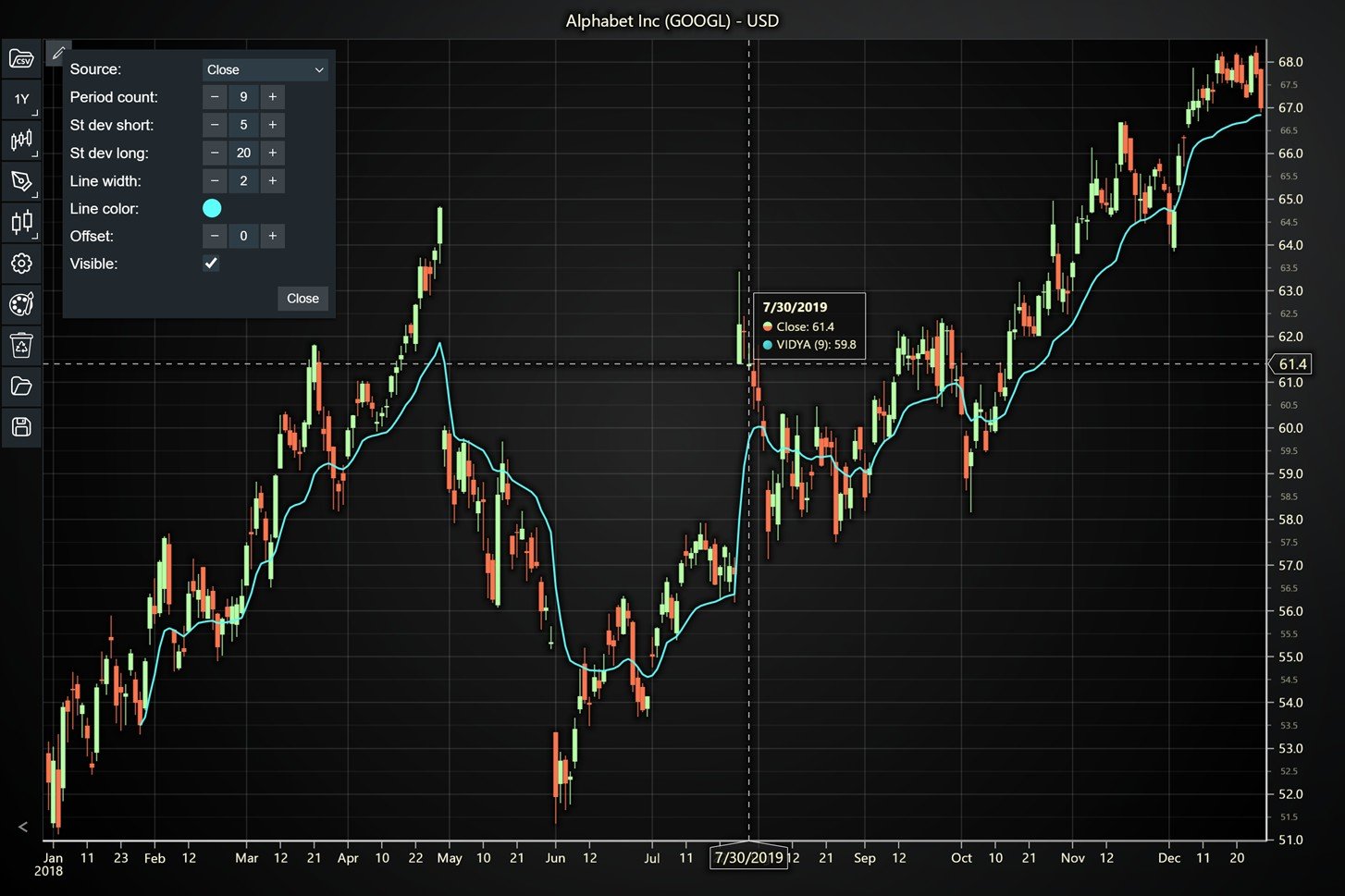
In this step, we will break down the code that creates the chart with the Variable Index Dynamic Average (VIDYA) indicator, as shown in the image, using LightningChart JS Trader. The code demonstrates how to initialize a trading chart, apply the Variable Index Dynamic Average (VIDYA) indicator, and customize its appearance.
Here’s a detailed breakdown of each section:
A. Importing the Required Libraries:
   const lcjsTrader = require('@arction/lcjs-trader')
   const lcjs = require('@arction/lcjs')
const { Themes } = lcjs- lcjsTrader: This library provides access to the LightningChart JS Trader functionalities, allowing you to create advanced financial charts.
- lcjs: The main LightningChart JS library is used for general charting functionality.
- Themes: A property within lcjs that provides access to pre-built themes. In this case, we are using the
darkGoldtheme to style the chart.
B. Initializing the Trading Chart:
lcjsTrader.trader(TRADER_LICENSE).then(async (trader) => {
    // Create a trading chart.
const tradingChart = trader.tradingChart({ loadFromStorage: false, colorTheme: Themes.darkGold })- trader(TRADER_LICENSE): Initializes the LightningChart JS Trader with the provided license key (TRADER_LICENSE). This is required to access the charting functionalities for financial data.
Note you can request a LightningChart JS Trader trial license, which is free.
tradingChart(): This function creates a trading chart with certain options. In this example:
loadFromStorage: false: This disables the loading of previously stored chart data from local storage, ensuring a fresh chart setup.colorTheme: Themes.darkGold: This applies the darkGold theme to the chart which influences the background color, grid lines, and other visual elements.
C. Adding and Customizing the Indicator
    // Add a Variable Index Dynamic Average (VIDYA) indicator
    const vidya = tradingChart.indicators().addVIDYA()
    vidya.setPeriodCount(9)
    vidya.setStandardDeviationPeriodCounts(5, 20)
    vidya.setLineColor('#46FFFA')
vidya.setLineWidth(2)addVIDYA(): VIDYA is an Exponential Moving Average that automatically adjusts its smoothing based on the volatility of the price. Uses standard deviation to calculate the volatility.
setPeriodCount(9): This method sets the period count of the VIDYA to 9. This means the indicator will calculate the moving average based on the last 9 data points, providing a shorter-term view of market trends.
setStandardDeviationPeriodCounts(5, 20): This function defines the period range for calculating the standard deviation, which adjusts the smoothing factor in the VIDYA. The first number (5) sets the minimum period, and the second number (20) sets the maximum period, making VIDYA more adaptable to changes in market volatility.
vidya.setLineColor('#46FFFA): This method changes the color of the VIDYA line to a bright cyan color. The unique color makes the VIDYA line visually distinct on the chart, improving readability for the user.
vidya.setLineWidth(2): This function increases the thickness of the VIDYA line to 2 pixels. A thicker line makes the VIDYA indicator more visible and prominent on the chart, ensuring clarity when analyzing market trends.
D. Loading Data from a CSV File
    // Reading data from a file.
    await fetch(`${document.head.baseURI}examples/assets/0000/Alphabet Inc (GOOGL).csv`).then((res) => res.text()).then((text) => {
        tradingChart.readCsvString(text, 'Alphabet Inc (GOOGL)')
})fetch(): This function retrieves a CSV file containing historical data for Alphabet Inc. (GOOGL). The CSV file includes pricing information for the company’s stock, which is plotted on the chart.
readCsvString(): This function reads the CSV data and interprets it as pricing data for Alphabet Inc. The second argument (‘Alphabet Inc (GOOGL)’) sets the label for the chart, as seen at the top of the chart image.
E. Setting the Currency for the Chart
    tradingChart.setCurrency('USD')
})setCurrency('USD'): This sets the currency of the chart to USD, ensuring that the pricing data is interpreted and displayed in US dollars.
Advantages and Limitations of the Time-Series Moving Average
- Advantages:
- Adaptivity: VIDYA adjusts to market volatility, providing more accurate signals during periods of high volatility.
- Smoother Performance: By adapting to market conditions, VIDYA offers smoother performance than static moving averages, reducing noise in the price chart.
- Versatility: Useful for both short-term and long-term traders, as it can adjust to varying market conditions.
- Limitations:
- Complexity: Understanding and calculating the smoothing factor based on volatility may be more complex than traditional indicators.
- Lag in Low Volatility: During periods of low volatility, VIDYA may behave similarly to other moving averages, losing its adaptive edge.
Conclusion
The Variable Index Dynamic Average (VIDYA) is an invaluable tool for traders who seek a more adaptive moving average that adjusts based on market volatility. By utilizing standard deviation to fine-tune the smoothing factor, VIDYA provides a responsive measure of market trends, making it more effective during periods of volatility compared to traditional moving averages.
The importance of using LightningChart JS Trader in this context cannot be overstated. LightningChart provides an interactive platform where traders can visualize and experiment with technical indicators like VIDYA in real-time. It allows for the seamless integration of complex calculations and dynamic adjustments, empowering users to fully utilize the adaptive nature of the VIDYA indicator in diverse market conditions. This not only enhances the accuracy of trend analysis but also supports more informed trading decisions by presenting real-time, interactive data.
Key Takeaways:
- The Variable Index Dynamic Average (VIDYA) adapts based on market volatility, offering a more accurate reflection of trends during high volatility periods.
- VIDYA leverages standard deviation to adjust its sensitivity, allowing it to respond dynamically to price changes.
- LightningChart JS Trader enhances the use of VIDYA by providing real-time, interactive visualizations, enabling traders to optimize their strategy with precision and adaptability.
- Despite its benefits, VIDYA may lag slightly in low-volatility markets, where it behaves similarly to other moving averages. However, it remains a valuable tool for navigating fast-moving markets.

Ahmad Omid
Data Science Developer


Continue learning with LightningChart
Ionic app development
Written by a human | Updated on April 10th, 2025Beginning Ionic App Development with Capacitor, Angular & LightningChart JS [This is the second part of the article "Data Visualization with Ionic Capacitor, Angular & JS Charts (Part 1)"] In the previous...
Ionic Capacitor
Learn how to use Ionic Capacitor for data visualization and build a mobile charting application with Angular & LightningChart JS
Create a JavaScript Pie Chart with NodeJS, TypeScript & LightningChart
Written by a human | Updated on April 10th, 2025JavaScript Pie Chart with NodeJS & TypeScript Today, we are going to do a short tutorial on how to generate a pie chart using Node JS, TypeScript, and LigningCharts JS. To see how to get LightningChart JS for...





If you have any questions, feel free to contact us!
©LightningChart Ltd 2026. All rights reserved.