








What is the Stochastic Oscillator trading indicator?
Article
Assisted by AI
Integrate the Stochastic Oscillator into your fintech applications to track market momentum and identify potential reversal points effectively.
Ahmad Omid
Data Science Developer

Introduction to the Stochastic Oscillator
The Stochastic Oscillator is a popular technical analysis indicator that compares the closing price of an asset to a specified range of its prices over a set period. It helps traders identify overbought and oversold market conditions by generating values that fluctuate between 0 and 100.
Developed by George Lane in the 1950s, the Stochastic Oscillator is based on the idea that prices tend to close near their highs in an uptrend and near their lows in a downtrend. This indicator consists of two lines:
- %K Line: The main stochastic line, representing the current closing price’s position relative to the price range over a given period.
- %D Line: A moving average of the %K line, acting as a signal line.
How to Use the Stochastic Oscillator in Forex Trading?
Forex traders utilize the Stochastic Oscillator to identify momentum shifts and potential reversals. The indicator is particularly effective in range-bound markets, where price movements remain within specific highs and lows.
Trading Signals:
- Overbought Conditions (Above 80): If the oscillator rises above 80, the asset is considered overbought, indicating a potential sell signal.
- Oversold Conditions (Below 20): If the oscillator falls below 20, the asset is considered oversold, signaling a potential buy opportunity.
- Crossovers: When the %K line crosses above the %D line in the oversold region, it suggests a bullish move. Conversely, when the %K line crosses below the %D line in the overbought region, it indicates a bearish signal.
- Divergences: When the price makes new highs/lows but the oscillator fails to follow, it indicates potential trend reversals.
Stochastic Oscillator vs. Stochastic Smoothed
The Stochastic Smoothed version, particularly the LightningChart version, offers a refined approach by applying smoothing techniques to the %K line, reducing market noise.
Key differences:
- The Stochastic Smoothed version applies additional moving averages to smoothen the stochastic lines, reducing false signals.
- The LightningChart
setPeriodCounts()andsetMovingAverageTypes()methods allow traders to configure the smoothing period and moving average types for customized analysis.
Formula
The Stochastic Oscillator is calculated using the following formula:
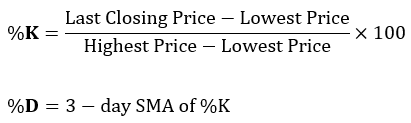
Where:
- Last Closing Price = Most recent closing price
- Lowest Price = Lowest price over the selected time period
- Highest Price = Highest price over the selected time period
Interpretation
- When %K crosses above %D in the oversold region, it suggests a buying opportunity.
- When %K crosses below %D in the overbought region, it signals a selling opportunity.
- Divergences between price action and the indicator hint at potential trend reversals.
Calculation Example
Suppose the last 14-day high was $150, the low was $120, and the closing price was $135. If the previous %K values were 40 and 45, then this means:
- %K (50) is above %D (45), suggesting increasing momentum.
- If this occurs in the oversold region, it may indicate a bullish reversal.
How to Create the Technical Indicator Using LC JS Trader
Step 1: Get LightningChart JS Trader
To begin, you’ll need access to LightningChart JS Trader. This library provides the tools necessary to create advanced technical indicators, including the Stochastic Oscillator/ Smoothed Indicator. Visit the LightningChart JS Trader page to download the required components and review the documentation.
Step 2: Review the Interactive Example
LightningChart JS Trader includes interactive examples that demonstrate how to create custom technical indicators. Start by reviewing the documentation, focusing on how to integrate the Stochastic Oscillator/Smoothed Indicator into your chart setup. The interactive examples will guide you through the process of setting up the Stochastic Oscillator/ Smoothed Indicator, from importing the necessary modules to modify the chart settings.
Step 3: Code Explanation
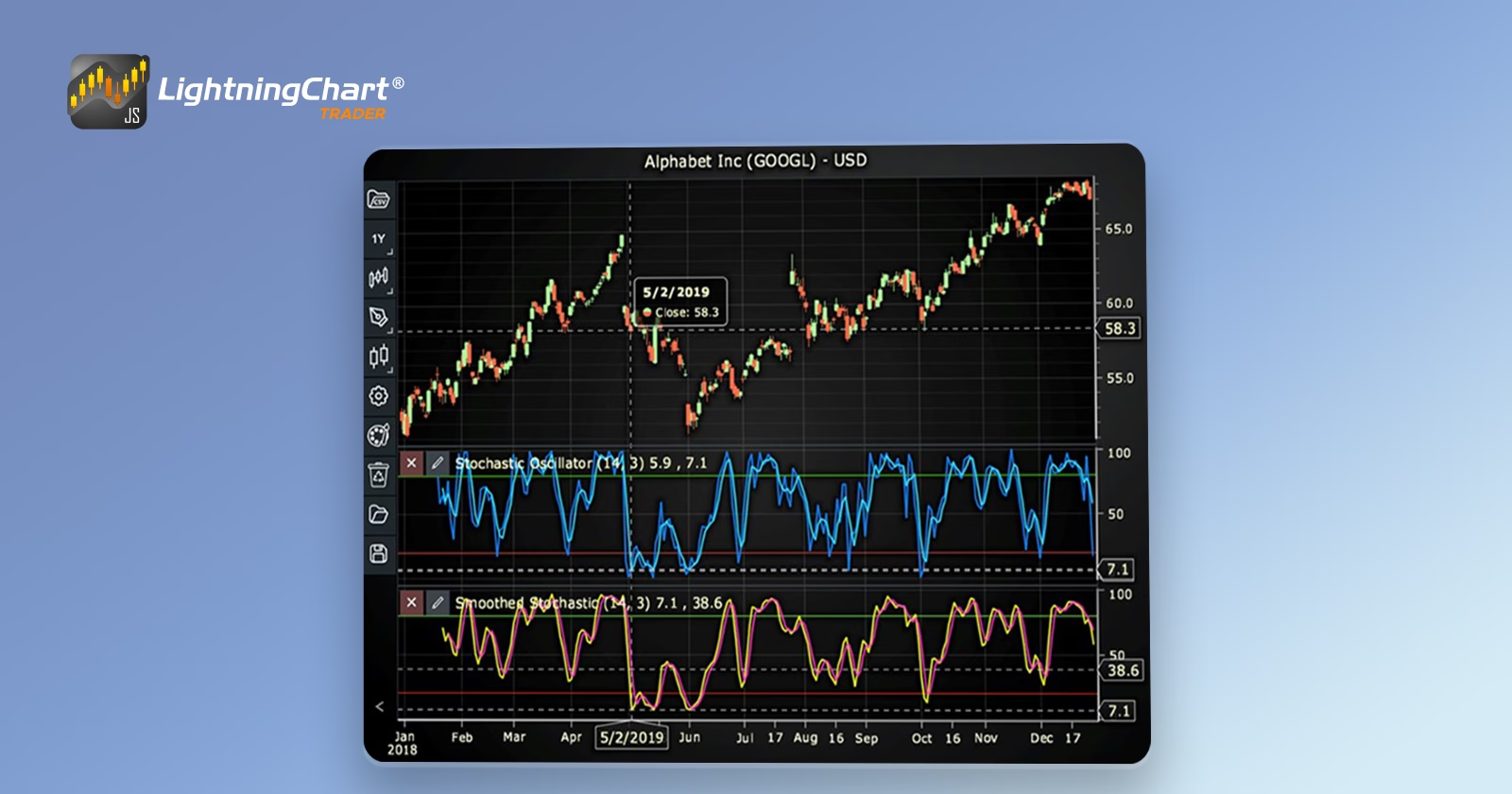
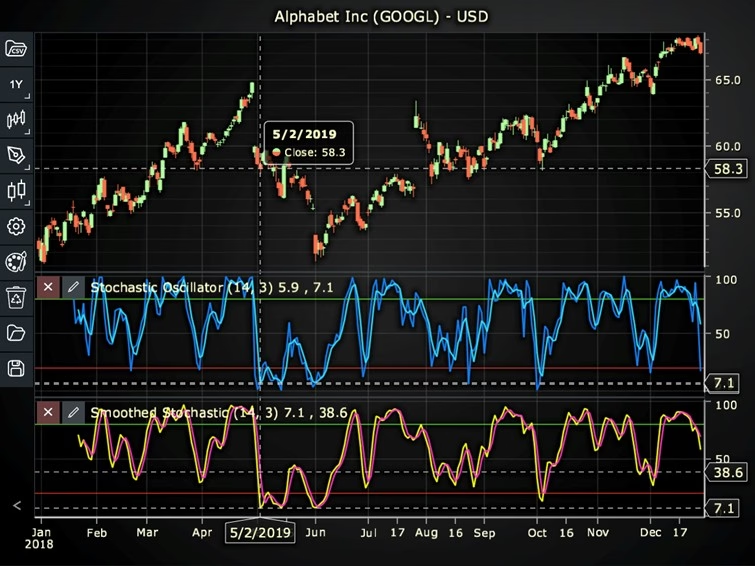
In this step, we will break down the code that creates the chart with the Stochastic Oscillator/ Smoothed Indicator, as shown in the image, using LightningChart JS Trader. The code demonstrates how to initialize a trading chart, apply the Stochastic Oscillator/Smoothed Indicator, and customize its appearance.
Here’s a detailed breakdown of each section:
A. Importing the Required Libraries:
   const lcjsTrader = require('@arction/lcjs-trader')
   const lcjs = require('@arction/lcjs')
const { Themes } = lcjs- lcjsTrader: This library provides access to the LightningChart JS Trader functionalities, allowing you to create advanced financial charts.
- lcjs: The main LightningChart JS library, used for general charting functionality.
- Themes: A property within lcjs that provides access to pre-built themes. In this case, we are using the darkGold theme to style the chart.
B. Initializing the Trading Chart:
   lcjsTrader.trader(TRADER_LICENSE).then(async (trader) => {
    // Create a trading chart.
const tradingChart = trader.tradingChart({ loadFromStorage: false, colorTheme: Themes.darkGold })trader(TRADER_LICENSE): Initializes the LightningChart JS Trader with the provided license key (TRADER_LICENSE). This is required to access the charting functionalities for financial data.
Note you can request a LightningChart JS Trader trial license, which is free.
tradingChart(): This function creates a trading chart with certain options.loadFromStorage: false: This disables the loading of previously stored chart data from local storage, ensuring a fresh chart setup.colorTheme: Themes.darkGold: This applies the darkGold theme to the chart, which influences the background color, gridlines, and other visual elements.
C. Adding and Customizing the Indicator
1. Using the Stochastic Oscillator
    // Add a Stochastic Oscillator indicator
    const so = tradingChart.indicators().addStochasticOscillator()
    so.setPeriodCounts(14, 3)
    so.setOversoldAndOverboughtRanges(20, 80)
    so.setStochasticLineColor('#1482FF')
    so.setMovingAverageLineColor('#32DCFF')
so.setLineWidth(2)addStochasticOscillator(): SO compares a closing price to a range of prices over a time period. It used to identify overbought and oversold levels.
so.setPeriodCounts(14, 3): Sets the time period counts used to calculate the indicator (soPeriodCount, maPeriodCount).
so.setOversoldAndOverboughtRanges(20, 80): Sets the values for oversold and overbought ranges (oversoldRange, overboughtRange).
so.setStochasticLineColor('#1482FF): Sets the color of the oscillator line to blue.
so.setMovingAverageLineColor('#32DCFF'): Sets the color of the moving average line to a shade of blue.
so.setLineWidth(2): Sets the width of the oscillator and moving average lines to 2 pixels.
2. Using the Stochastic Smoothed Oscillator
    // Add a Stochastic Smoothed indicator
    const sos = tradingChart.indicators().addStochasticOscillatorSmoothed()
    sos.setPeriodCounts(14, 3, 3)
    sos.setMovingAverageTypes(2, 2)
    sos.setOversoldAndOverboughtRanges(20, 80)
    sos.setStochasticLineColor('#FBFF14')
    sos.setMovingAverageLineColor('#FF33C9')
sos.setLineWidth(2)addStochasticOscillatorSmoothed(): It compares a closing price to a range of prices over a time period. It used to identify overbought and oversold levels. The difference between Smoothed SO and regular SO is that smoothed study smoothens also the stochastic (%K) line. Different moving averages and time period counts can be used for %K and %D lines.
sos.setPeriodCounts(14, 3, 3): Sets the time period counts used to calculate the indicator (oscillatorPeriodCount, oscillatorSmoothingPeriods, movingAveragePeriodCount).
**sos.setMovingAverageTypes(2, 2): Sets the types of the moving averages used in the indicator’s calculations (oscillatorSmoothingAverage, maMovingAverage). In this case, 2 represents the Simple Moving Average (SMA).
sos.setOversoldAndOverboughtRanges(20, 80): Sets the values for oversold and overbought ranges (oversoldRange, overboughtRange).
sos.setStochasticLineColor('#FBFF14'): Sets the color of the oscillator line to yellow.
sos.setMovingAverageLineColor('#FF33C9'): Sets the color of the moving average line to pink.
sos.setLineWidth(2): Sets the width of the oscillator and moving average lines to 2 pixels.
D. Loading Data from a CSV File
    // Reading data from a file.
    await fetch(`${document.head.baseURI}examples/assets/0000/Alphabet Inc (GOOGL).csv`).then((res) => res.text()).then((text) => {
        tradingChart.readCsvString(text, 'Alphabet Inc (GOOGL)')
})fetch(): This function retrieves a CSV file containing historical data for Alphabet Inc. (GOOGL). The CSV file includes pricing information for the company’s stock, which is plotted on the chart.readCsvString(): This function reads the CSV data and interprets it as pricing data for Alphabet Inc. The second argument (‘Alphabet Inc (GOOGL)’) sets the label for the chart, as seen at the top of the chart image.
E. Setting the Currency for the Chart
    tradingChart.setCurrency('USD')
})setCurrency('USD'): This sets the currency of the chart to USD, ensuring that the pricing data is interpreted and displayed in US dollars.
** Enumeration of Moving Average Types in LC JS Trader:
- Exponential Moving Average (EMA): 0
- None: 1 (No moving average applied)
- Simple Moving Average (SMA): 2
- Time Series Moving Average (TSMA): 3
- Triangular Moving Average (TMA): 4
- Variable Moving Average (VMA): 5
- Variable Index Dynamic Average (VIDYA): 6
- Volume Weighted Moving Average (VWMA): 7
- Weighted Moving Average (WMA): 8
- Welles Wilder’s Smoothing (WWS): 9
Advantages and Limitations of the Indicator
The Stochastic Oscillator is easy to use and widely applied in different trading strategies. One of its key benefits is its ability to identify overbought and oversold levels, allowing traders to anticipate potential market reversals.
It is particularly useful in range-bound markets, where it effectively highlights buy and sell opportunities. Moreover, the indicator is highly customizable, enabling traders to tweak settings based on their individual trading styles and preferences.
The LightningChart version, known as Stochastic Smoothed, further refines the traditional Stochastic Oscillator by incorporating smoothing techniques to the %K line.
This reduces market noise and provides more reliable signals. By using setPeriodCounts() and setMovingAverageTypes(), traders can control the smoothing parameters and adapt the indicator to different market conditions. This makes it particularly useful in reducing false signals in volatile markets.
However, both the Stochastic Oscillator and its Smoothed variant have some limitations. They can generate false signals, especially in strongly trending markets, leading to misleading buy or sell signals. As a lagging indicator, they rely on past prices, which means they might not always predict trend reversals accurately.
Additionally, in strong uptrends or downtrends, the oscillator may remain in the overbought or oversold regions for extended periods, making it less useful in such market conditions.
Stochastic Oscillator vs. Relative Strength Index (RSI)
When compared to the Relative Strength Index (RSI), both indicators, the Stochastic Oscillator and the smoothed version, serve as momentum indicators but their approaches differ.
The Stochastic Oscillator focuses on price relative to a range over a specific period, whereas the RSI measures the speed and magnitude of recent price changes.
The LightningChart Smoothed Stochastic version provides an advantage by reducing fluctuations, making it more reliable than the traditional Stochastic Oscillator in certain scenarios. As a result, the RSI is generally more effective in trending markets, while the Stochastic Oscillator, especially in its Smoothed form, works better in ranging markets.
Conclusion
The Stochastic Oscillator is a powerful momentum indicator used to identify overbought and oversold levels in various financial markets, particularly in Forex trading. By tracking price movements within a range, it helps traders spot potential trend reversals and momentum shifts.
Additionally, the Stochastic Smoothed version, available in LightningChart, provides a smoother interpretation by applying custom moving averages, reducing noise, and refining signals. Traders can optimize their strategies by configuring setPeriodCounts() and setMovingAverageTypes() within the LC JS Trader environment.
While the Stochastic Oscillator is a valuable tool, it is best used in combination with other indicators, such as the RSI or moving averages, to enhance accuracy and trading decisions. By understanding its formula, interpretation, and differences from other indicators, traders can leverage its full potential for effective market analysis.
Continue learning with LightningChart
The LightningChart JS Agent Skill: Give Any AI Coding Agent Accurate Charting Knowledge in 60 Seconds
An agent skill is a folder of instructions your AI coding tool picks up automatically. This one teaches any compatible agent how to use LightningChart JS correctly, before it writes a single line of chart code. Agent skills are a relatively new concept and the...
Why AI Coding Agents Get Data Visualization Wrong, and What to Do About It
AI coding assistants are getting good at most parts of application development. Data visualization is one of the areas where they still have a consistent, predictable failure mode. This article explains the mechanics of why it happens and the practical fix. I spent a...
Andrews’ Pitchfork in Technical Analysis
Andrews' Pitchfork is one of the most respected technical analysis tools used by traders to identify potential support and resistance levels, trend direction, and future price paths. Developed by Dr. Alan H. Andrews, the indicator is based on the principle that prices...



If you have any questions, feel free to contact us!



©LightningChart Ltd 2026. All rights reserved.