








On-Balance Volume Technical Indicator for Stock Trading
Article
Learn how to integrate the On-Balance Volume Indicator into your fintech software using LightningChart JS Trader for data visualization and analysis.
Ahmad Omid
Data Science Developer


What is the On-Balance Volume Indicator?
On-Balance Volume (OBV) is a powerful technical analysis tool developed by financial analyst Joe Granville. It is designed to predict stock price changes by leveraging the relationship between price movement and trading volume.
The concept behind the On-Balance Volume indicator is simple yet insightful: volume precedes price movement. This means that changes in trading volume often signal future price trends, making OBV a valuable asset in any trader’s toolkit.
Traders use the OBV indicator to identify market trends, confirm price movements, and detect potential reversals. By observing the cumulative volume changes associated with price fluctuations, OBV provides an easy-to-read visual representation that helps traders decide whether to enter or exit a trade.
On-Balance Volume Indicator in Trading
The On-Balance Volume indicator plays a crucial role in technical analysis as it directly correlates trading volume with price action. When the volume increases without a corresponding rise in price, it often indicates that institutional investors are accumulating or distributing shares. This can lead to significant price movements, making OBV a leading indicator in stock and forex trading.
How OBV Affects Stock Prices
- Trend Confirmation: When OBV rises alongside an uptrend, it confirms the strength of the price movement. Conversely, if OBV declines during a downtrend, it signals strong selling pressure.
- Divergence Signals: Divergences between OBV and price can highlight potential reversals. For example, if the price rises while OBV declines, it may indicate weakening momentum.
- Breakout Signals: Sudden changes in OBV can signal the start of a breakout, especially when the indicator aligns with support or resistance levels.
Formula
To understand the OBV indicator, it is essential to explore its formula, interpretation, and components. The formula for On-Balance Volume calculation is straightforward:
- If today’s closing price is higher than yesterday’s closing price:
OBV = Previous OBV + Today’s Volume
- If today’s closing price is lower than yesterday’s closing price:
OBV = Previous OBV – Today’s Volume
- If today’s closing price equals yesterday’s closing price:
OBV = Previous OBV
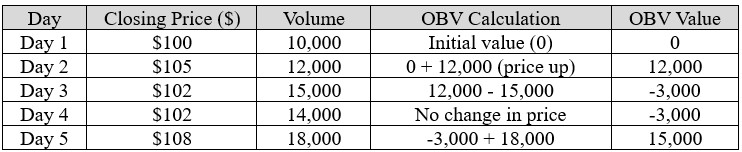
This cumulative calculation continues over time, creating a running total that reflects the flow of volume in the market. Let’s calculate OBV for three consecutive days based on sample data:
Interpretation
- Rising OBV: Indicates strong buying pressure and the likelihood of higher prices.
- Falling OBV: Suggests strong selling pressure and potential price declines.
- Flat OBV: Often corresponds to sideways price movement or consolidation phases.
Key Components
- Volume Trends: OBV focuses on the flow of volume into or out of a stock, giving insight into the behavior of traders and investors.
- Divergence Analysis: Traders look for divergences between OBV and price to identify early signs of trend reversals.
- Support and Resistance Levels: OBV can confirm the validity of breakouts or breakdowns.
How to Create the Technical Indicator Using LC JS Trader
Step 1: Get LightningChart JS Trader
To begin, you’ll need access to LightningChart JS Trader. This library provides the tools necessary to create advanced technical indicators, including the On-Balance Volume Indicator. Visit the LightningChart JS Trader page to download the required components and review the documentation.
Step 2: Review the Interactive Example
LightningChart JS Trader includes interactive examples that demonstrate how to create custom technical indicators. Start by reviewing the documentation, focusing on how to integrate the On-Balance Volume Indicator into your chart setup. The interactive examples will guide you through the process of setting up the OBV Indicator, from importing the necessary modules to modify the chart settings.
Step 3: Code Explanation
In this step, we will break down the code that creates the chart with the On-Balance Volume Indicator, as shown in the image, using LightningChart JS Trader. The code demonstrates how to initialize a trading chart, apply the OBV Indicator, and customize its appearance.

Here’s a detailed breakdown of each section:
A. Importing the Required Libraries:
   const lcjsTrader = require('@arction/lcjs-trader')
   const lcjs = require('@arction/lcjs')
const { Themes } = lcjs- lcjsTrader: This library provides access to the LightningChart JS Trader functionalities, allowing you to create advanced financial charts.
- lcjs: The main LightningChart JS library, used for general charting functionality.
- Themes: A property within lcjs that provides access to pre-built themes. In this case, we are using the darkGold theme to style the chart.
B. Initializing the Trading Chart:
   lcjsTrader.trader(TRADER_LICENSE).then(async (trader) => {
    // Create a trading chart.
const tradingChart = trader.tradingChart({ loadFromStorage: false, colorTheme: Themes.darkGold })trader(TRADER_LICENSE): Initializes the LightningChart JS Trader with the provided license key (TRADER_LICENSE). This is required to access the charting functionalities for financial data.
Note you can request a LightningChart JS Trader trial license, which is free.
tradingChart(): This function creates a trading chart with certain options.loadFromStorage: false: This disables the loading of previously stored chart data from local storage, ensuring a fresh chart setup.colorTheme: Themes.darkGold: This applies the darkGold theme to the chart, which influences the background color, gridlines, and other visual elements.
C. Adding and Customizing the Indicator
    // Add an On-Balance Volume Indicator
    const obv = tradingChart.indicators().addOnBalanceVolume()
    obv.setSource(3)
    obv.setLineColor('#FF5233')
obv.setLineWidth(3)addOnBalanceVolume(): It is developed to predict stock price changes by using volume changes.**obv.setSource(3): Values to base the calculations on. In this case, 3 represents the close price.obv.setLineColor('#FF5233'): Changes the color of the OBV line to an orange. This enhances the visual distinction of the indicator on the chart.obv.setLineWidth(3): Sets the line thickness of the OBV to 3 pixels. This makes the line more prominent and easier to observe during analysis.
D. Loading Data from a CSV File
    // Reading data from a file.
    await fetch(`${document.head.baseURI}examples/assets/0000/Alphabet Inc (GOOGL).csv`).then((res) => res.text()).then((text) => {
        tradingChart.readCsvString(text, 'Alphabet Inc (GOOGL)')
})fetch(): This function retrieves a CSV file containing historical data for Alphabet Inc. (GOOGL). The CSV file includes pricing information for the company’s stock, which is plotted on the chart.readCsvString(): This function reads the CSV data and interprets it as pricing data for Alphabet Inc. The second argument (‘Alphabet Inc (GOOGL)’) sets the label for the chart, as seen at the top of the chart image.
E. Setting the Currency for the Chart
    tradingChart.setCurrency('USD')
   })
tradingChart.setCurrency('USD')
})setCurrency('USD'): This sets the currency of the chart to USD, ensuring that the pricing data is interpreted and displayed in US dollars.
** Enumeration Source in LC JS Trader: To select which values the indicator calculations are based on.
Advantages and Limitations of the Indicator
The On-Balance Volume (OBV) indicator offers several advantages that make it a valuable tool for traders. First and foremost, its simplicity is a major benefit. The OBV formula is easy to understand and apply, even for beginners, making it accessible to a wide range of traders.
By focusing on volume as a leading indicator, OBV often provides early signals of potential price movements, giving traders a competitive edge. This is particularly helpful for identifying trends and reversals before they become obvious through price action alone. Moreover, OBV is highly versatile and can be used across different markets, including stocks, forex, and cryptocurrencies, making it a go-to choice for diverse trading strategies.
However, the OBV indicator is not without limitations. One significant drawback is the potential for false signals, especially in low-volume markets or during periods of high volatility. These conditions can lead to misleading trends in the OBV line, resulting in poor trading decisions.
Additionally, while OBV is considered a leading indicator, it may still lag in certain situations, particularly when confirming trend reversals. This means traders might need to rely on additional technical indicators for corroboration. Finally, OBV’s effectiveness depends on the accuracy of volume data, which might not always be reliable for certain instruments, such as cryptocurrencies or over-the-counter stocks where volume reporting is inconsistent.
In summary, while the On-Balance Volume indicator is a powerful tool for identifying trends and predicting price changes, traders should use it in conjunction with other indicators and market analysis techniques to minimize the risk of false signals and improve decision-making accuracy.
Conclusion
The On-Balance Volume (OBV) technical indicator is an indispensable tool for traders aiming to anticipate price movements by analyzing trading volume.
By leveraging the relationship between volume and price, OBV provides early signals for trends, potential reversals, and market momentum. Its straightforward calculation and adaptability across various markets, including stocks, forex, and cryptocurrencies, make it a valuable asset in any trading strategy.
One of the most effective ways to implement OBV in a trading environment is through LightningChart JS Trader. It provides an interactive and efficient means to visualize OBV and other technical indicators, making the analysis process seamless.
With its high-performance charting capabilities, LightningChart JS Trader allows traders to process large datasets, detect patterns, and make data-driven decisions with confidence. Incorporating such advanced tools ensures accuracy and enhances the overall trading experience.
Continue learning with LightningChart
Nbody Simulation Data Visualization
Written by a human | Updated on April 9th, 2025N-body Simulation Nbody simulation is maybe one of the most advanced data visualization types out there. The truth is that we’re not talking anymore about visualizing traditional data with a business focus and it...
Data Visualization Components for React Applications
Written by a human | Updated on April 9th, 2025React Data Visualization Components React is one of the most popular front-end development frameworks on the web in the year 2022. It is a free and open-source front-end JS library that is used to build interactive...
What Is LiDAR Data Visualization?
LiDAR Data Visualization The LiDAR method conveys another yet complex level of data visualization as it is widely used in demanding industries that require plotting, e.g., topographic or cartography 3D data. But the use of LiDAR goes further as it is also used...



If you have any questions, feel free to contact us!



©LightningChart Ltd 2026. All rights reserved.