








Creating the Elder-Ray Index Indicator with LightningChart JS Trader
Article
Learn how to develop the Elder-Ray Index indicator using LightningChart to enhance charting capabilities in your software applications.
Ahmad Omid
Data Science Developer

What is the Elder-Ray Index Indicator?
The Elder-Ray Index is a popular technical indicator used by traders to evaluate market trends by analyzing the balance between buying and selling pressure. Developed by Dr. Alexander Elder, this indicator is a powerful tool for identifying market sentiment and potential price reversals.
In this article, we’ll dive deep into the theory behind the Elder-Ray Index, understand its calculation, and demonstrate how to create it using the LightningChart JS Trader Interactive Examples.
What does Elder-Ray Index Mean?
The Elder-Ray Index, also known as the Elder-Ray Power Indicator, is a technical analysis tool that combines price action with market strength. It uses two key components: Bull Power and Bear Power, which represent the buying and selling pressures in the market, respectively. By analyzing these pressures, traders can gauge the consensus of market participants and predict potential trends or reversals.
Brief History
Dr. Alexander Elder introduced the Elder-Ray Index in his book Trading for a Living in the early 1990s. The indicator was designed to give traders a deeper understanding of market dynamics by combining the principles of trend-following and oscillators. Its simplicity and effectiveness have made it a staple among technical analysts.
How to Use the Elder-Ray Index Indicator?
The Elder-Ray Index can be used in various ways:
- Trend Confirmation: Combine it with a moving average to determine the trend direction. A positive Bull Power above the moving average suggests a strong uptrend, while a negative Bear Power below the moving average indicates a downtrend.
- Divergence Detection: Look for divergences between Bull Power or Bear Power and price action to identify potential reversals.
- Entry and Exit Signals: Use changes in Bull Power and Bear Power values to time entries and exits in trades.
Formula
The Elder-Ray Index relies on two primary calculations:
Bull Power = High of the current period – Exponential Moving Average (EMA)
Bear Power = Low of the current period – Exponential Moving Average (EMA)
Interpretation
- Bull Power: Reflects the strength of buyers. A positive value indicates that buyers are driving prices above the EMA, signaling bullish momentum.
- Bear Power: Represents the strength of sellers. A negative value means sellers are pushing prices below the EMA, suggesting bearish momentum.
Key Components
- Exponential Moving Average (EMA): Serves as a baseline to smooth price fluctuations and determine the prevailing trend.
- High and Low Prices: Used to assess the extent of buying and selling pressures relative to the trend.
By plotting Bull Power and Bear Power as separate lines, traders can visualize the market sentiment and make informed decisions.
How to Create the Technical Indicator Using LC JS Trader
Step 1: Get LightningChart JS Trader
To begin, you’ll need access to LightningChart JS Trader. This library provides the tools necessary to create advanced technical indicators, including the Elder-Ray Index oscillator Indicator. Visit the LightningChart JS Trader page to download the required components and review the documentation.
Step 2: Review the Interactive Example
LightningChart JS Trader includes interactive examples that demonstrate how to create custom technical indicators. Start by reviewing the documentation, focusing on how to integrate the Elder-Ray Index Indicator into your chart setup. The interactive examples will guide you through the process of setting up the Elder-Ray Index Indicator, from importing the necessary modules to modify the chart settings.
Step 3: Code Explanation
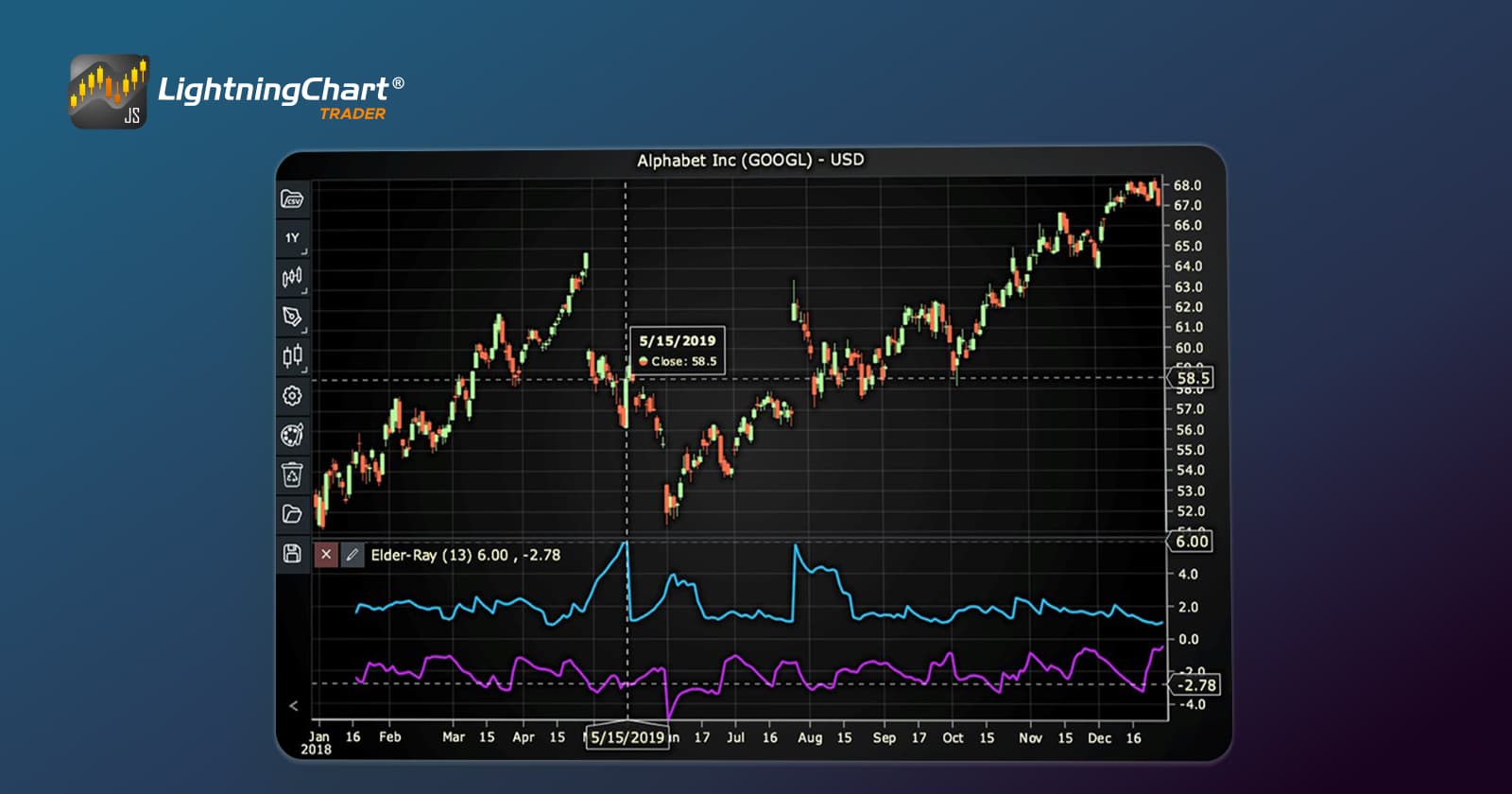
In this step, we will break down the code that creates the chart with the Elder-Ray Index Indicator, as shown in the image, using LightningChart JS Trader. The code demonstrates how to initialize a trading chart, apply the Elder-Ray Index Indicator, and customize its appearance.

Here’s a detailed breakdown of each section:
A. Importing the Required Libraries:
   const lcjsTrader = require('@arction/lcjs-trader')
   const lcjs = require('@arction/lcjs')
const { Themes } = lcjs- lcjsTrader: This library provides access to the LightningChart JS Trader functionalities, allowing you to create advanced financial charts.
- lcjs: The main LightningChart JS library, used for general charting functionality.
- Themes: A property within lcjs that provides access to pre-built themes. In this case, we are using the darkGold theme to style the chart.
B. Initializing the Trading Chart:
   lcjsTrader.trader(TRADER_LICENSE).then(async (trader) => {
    // Create a trading chart.
const tradingChart = trader.tradingChart({ loadFromStorage: false, colorTheme: Themes.darkGold })trader(TRADER_LICENSE): Initializes the LightningChart JS Trader with the provided license key (TRADER_LICENSE). This is required to access the charting functionalities for financial data.
Note you can request a LightningChart JS Trader trial license, which is free.
tradingChart(): This function creates a trading chart with certain options.loadFromStorage: false: This disables the loading of previously stored chart data from local storage, ensuring a fresh chart setup.colorTheme: Themes.darkGold: This applies the darkGold theme to the chart, which influences the background color, gridlines, and other visual elements.
C. Adding and Customizing the Indicator
    // Add an Elder-Ray Index Indicator
    const eri = tradingChart.indicators().addElderRayIndex()
    eri.setPeriodCount(13)
    eri.setMovingAverageType(0)
    eri.setSource(3)
    eri.setBullPowerColor('#29C5FA')
    eri.setBearPowerColor('#C528F0')
eri.setLineWidth(3)addElderRayIndex(): It measures the market consensus over a period of time. It consists of two indicators: Bull Power measuring the buying pressure and Bear Power measuring the selling pressure.
eri.setPeriodCount(13): Sets the number of time periods (n) used to calculate the indicator.
**eri.setMovingAverageType(0): Sets the type of Moving Average used to smooth the indicator. In this case, 2 represents the Exponential Moving Average (EMA).
***eri.setSource(3): Sets which values the indicator calculations are based on. In this case, calculations based on Close values.
eri.setBullPowerColor('#29C5FA'): Sets the color of the Bull Power line to blue.
eri.setBearPowerColor('#C528F0'): Sets the color of the Bear Power line to purple.
eri.setLineWidth(3): Sets the line thickness of the indicator to 3 pixels. This makes the line more prominent and easier to observe during analysis.
D. Loading Data from a CSV File
    // Reading data from a file.
    await fetch(`${document.head.baseURI}examples/assets/0000/Alphabet Inc (GOOGL).csv`).then((res) => res.text()).then((text) => {
        tradingChart.readCsvString(text, 'Alphabet Inc (GOOGL)')
})fetch(): This function retrieves a CSV file containing historical data for Alphabet Inc. (GOOGL). The CSV file includes pricing information for the company’s stock, which is plotted on the chart.readCsvString(): This function reads the CSV data and interprets it as pricing data for Alphabet Inc. The second argument (‘Alphabet Inc (GOOGL)’) sets the label for the chart, as seen at the top of the chart image.
E. Setting the Currency for the Chart
    tradingChart.setCurrency('USD')
})setCurrency('USD'): This sets the currency of the chart to USD, ensuring that the pricing data is interpreted and displayed in US dollars.
** Enumeration of Moving Average Types in LC JS Trader:
- Exponential Moving Average (EMA): 0
- None: 1 (No moving average applied)
- Simple Moving Average (SMA): 2
- Time Series Moving Average (TSMA): 3
- Triangular Moving Average (TMA): 4
- Variable Moving Average (VMA): 5
- Variable Index Dynamic Average (VIDYA): 6
- Volume Weighted Moving Average (VWMA): 7
- Weighted Moving Average (WMA): 8
- Welles Wilder’s Smoothing (WWS): 9
*** Enumeration Source in LC JS Trader:
To select which values the indicator calculations are based on.

Advantages and Limitations of the Indicator
The Elder-Ray Index offers several advantages that make it a popular choice among traders. One of its key strengths is its ability to effectively identify trends by combining price action with market sentiment. By analyzing Bull Power and Bear Power in relation to the EMA, traders can gain valuable insights into the underlying market dynamics.
The indicator is also highly versatile, as it can be applied across various asset classes and timeframes, making it suitable for different trading styles. Additionally, its ability to highlight divergences between price and market sentiment provides a reliable method for spotting potential trend reversals, enabling traders to capitalize on market opportunities.
However, the Elder-Ray Index is not without its limitations. Since it relies on the Exponential Moving Average (EMA), it inherits a lagging nature, which can delay the reflection of rapid market changes. This may result in traders reacting to signals after significant price movements have already occurred.
Another drawback is the subjectivity involved in interpreting Bull Power and Bear Power levels, which can lead to inconsistent results among traders. Moreover, the Elder-Ray Index is not designed to be a standalone tool for generating buy or sell signals. To maximize its effectiveness, it should be used in conjunction with other technical indicators and market analysis techniques.
Understanding these strengths and weaknesses can help traders use the Elder-Ray Index more effectively as part of their trading strategies.
Conclusion
The Elder-Ray Index is a valuable addition to any trader’s toolkit, offering insights into the balance of power between buyers and sellers. By understanding its calculation and interpretation, traders can use it to confirm trends, identify divergences, and time their trades effectively.
With the powerful visualization capabilities of LightningChart JS Trader, creating and analyzing the Elder-Ray Index becomes an intuitive process. Explore the LightningChart JS Trader to implement this indicator and enhance your trading strategy.
Continue learning with LightningChart

Javascript Charting Library comparison 2026
Every year someone publishes a listicle of JavaScript charting libraries. They screenshot a demo, note the GitHub stars, paste in the npm install command, and call it a day. Then you follow their recommendation, get six months into your project, and discover that your...

Visualizing 10 Million Data Points in the Browser (2026): The Technical Deep-Dive
Ten Million Data Points in the Browser: How WebGL Makes Mass Datasets Interactive Ten million data points. That number used to mean a database problem, not a front-end problem. Now research teams want to explore it interactively in a browser. Trading desks want...
Elliott Wave Theory in Trading
Financial markets often appear chaotic, but many traders believe that price movements follow recurring patterns driven by human psychology. One of the most influential approaches based on this idea is the Elliott Wave Theory. Developed nearly a century ago, it remains one of the most widely studied methods of technical analysis.



If you have any questions, feel free to contact us!



©LightningChart Ltd 2026. All rights reserved.