








3D Medical Imaging: Visualization of Multimodal Medical Data
Article
An insight into the world of 3D medical imaging using LightningChart .NET
Kestutis Gurevicius
CTO, Scientific Software Analyst, Support, Team Lead (.NET)


Introduction
Nowadays, the concept of 3D medical imaging transverse not only the word of medicine, but pop- culture as well. While we may have seen them during visit in local hospital, ordinary people would be familiar with 3D body/organs representation spinning on computer monitor from movies and TV shows.
Medical 3D imaging is almost universally understood as a detailed 3D representation of an object, typically derived from a series of 2D images or data points. In medical imaging, 3D images are often reconstructed from multiple 2D slices or projections. However, there is much more data than that.
Advancements in medical imaging technology and 3D (computer) graphics allow to record and visualize far more data than static 3D model. More dynamic could be added to 3D models by combining with other types of recording and adding time dimension into the model. This article will discuss how such multimodal medical data could be combined into a single application with the help of LightningChart® .NET library.
History of 3D Medical Imaging
Modern radiology has its origins at the boundary of the 19th and 20th centuries. Traditional X-ray technology, first discovered in 1895 by Wilhelm Conrad Roentgen, provided a 2D representation of the human body’s internal structures. The importance and usefulness of a new type of electromagnetic energy was immediately understood (Roentgen received a Nobel Prize in Physics in 1901, and multiple innovations followed its discovery).
In the 1930s radiologist Dr. Alessandro Vallebona presented a method for anatomically representing a single body slice on radiographic film. That marked the birth of Tomography, a technique to represent object by creating multiple slices (data set images). This laid the foundation for more advanced imaging modalities, such as Computed Tomography (CT), Magnetic Resonance Imaging (MRI), and Ultrasound. Learn more about the history of radiology.
The sources of Medical Imaging
3D imaging technologies went a long way from X-ray technology in the early 1900s. Today there are multiple 3D slicing technologies which capture anatomical structures in detail.
- Computed Tomography (CT) uses a rotating X-ray tube and a row of detectors placed in a gantry to measure X-ray attenuations by different tissues inside the body.
- Digital radiography has replaced traditional film-based X-rays, offering improved image quality and faster processing times.
- 3D ultrasound creates three-dimensional images of internal structures.
- Functional Magnetic Resonance Imaging (MRI) measures changes in blood flow related to neural activity.
- Positron Emission Tomography (PET) scans utilize radioactive tracers to create three-dimensional images of the body’s internal processes, including metabolism and blood flow.
- Optical Coherence Tomography (OCT) is a non-invasive imaging technique that uses light to create high-resolution, cross-sectional images of biological tissues.
- Cone-beam computed tomography (CBCT), a specialized form of X-ray imaging, provides comprehensive information about the teeth, jaws, and surrounding structures
For more details about those techniques and their application in modern medicine see article A Dive into the World of 3D Medical Imaging.
3D modelling technologies
Any of the above-described methods can create a detailed 3D representation of an object, typically derived from a series of 2D images. In medical imaging, 3D images are often reconstructed from multiple 2D slices or projections, providing clinicians, scientists and other users with a comprehensive view of the body’s internal structures.
However, this is still one step away from 3D visualization. The images/slices alone are just 2D representations, which may fall short in conveying the complete picture. 3D graphics provide clinicians and researchers with the tools needed to visualize complex datasets in ways that are both intuitive and enlightening.
Three-dimensional models can be used for diagnosis and treatment, teaching students, creating prosthetics, and increasing the efficiency of communication between doctors and patients. 3D graphics serve as a universal language that bridges the gap between professionals, clinicians, researchers, and the broader public (consider how medical 3D models entered pop-culture through TV shows).
Therefore, it should be no surprise that manufactures of medical equipment are interested in 3D modelling technologies, as it facilitates the conveyance of complicated device details and capabilities with unprecedented clarity. There are several techniques used to create 3D model, and these include:
- Volume Rendering is a technique that involves the conversion of 2D data (images) into a 3D volume, with each voxel (3D pixel) assigned a specific color and opacity based on its density or other properties.
- Segmentation or surface rendering involves extracting the surfaces of structures of interest from 2D data, creating a 3D mesh of the surface. Typical segmentation or surface rendering software (for example, 3D Slicer, Nii2mesh tool or Materialise Mimics) allow to export 3D mesh model as OBJ, STL or other format.
- Multiplanar Reconstruction (MPR) involves the reformatting of 2D image data into different planes, allowing for the creation of 3D images that can be viewed from various angles.
Multimodal Visualization of Medical Data
Modern medical imaging techniques, such as computed tomography (CT) and magnetic resonance imaging (MRI), generate volumetric data. However, this is only part of the data available for 3D visualization. Additional data may come from longitudinal studies (times aspect in 3D model), from combination several imaging techniques, from measuring other special parameters in the body (e.g. Electroencephalography).
- Several type of medical imaging could be combined. For example, the fusion of multiple imaging modalities, such as PET/CT or PET/MRI, into a single 3D representation provides more comprehensive and accurate diagnostic information.
- Brain electrical activity (as recorded by Electroencephalography (EEG) or Local Field Potentials (LFP)) could be dynamically reconstructed and visualized in three dimensions overlayed on top of 3D model of brain. For example, see articles about Brain Visualizer, PMCID: PMC4119601.
- 4D imaging introduces the dimension of time to 3D images, allowing for the observation of anatomical changes over time. Medical techniques grouped under 4D imaging includes 4D Renal Function, 4D Venogram, 4D Valve Imaging and 4D Cardiac Multiview.
The role of LightningChart .NET library in Medical Data visualization

LightningChart .NET SDK is an add-on to Microsoft Visual Studio, consisting of data visualization-related software components and tool classes for WPF (Windows Presentation Foundation), UWP (Universal Windows Platform), and Windows Forms .NET platforms. LightningChart components use low-level DirectX11 and DirectX9 GPU acceleration instead of slower GDI/GDI+ or WPF Graphics APIs.
LightningChart components are delivered for serious scientific, engineering, measurement, and trading solutions. The rendering performance and very advanced features are its special focus.
One of the library features is the ability to visualize multimodal medical data. Initially, the LightningChart .NET component is capable of generating a 3D model from a set of images (see VolumeModels). In addition, following the discussion on 3D modeling technologies, the LightningChart .NET component can import 3D mesh after segmentation or surface rendering. That is, a 3D model can be imported in OBJ format (see MeshModels), or MeshModel geometry can be constructed programmatically. Furthermore, LightningChart allows visualizing of multimodal data in a single 3D World view.
This includes not only VolumeModel, and MeshModel, but other types of data, which suitable to be visualized with other 3D series (see View3D). LightningChart has unmatched performance. Therefore, dynamic changes in data (like changes in 3D mesh geometry or coloring) will be rendered in real time.
Volumetric Rendering
The details of the LightningChart .NET volumetric rendering feature are described in the online documentation. For this article, we just list several main properties of VolumeModel:
- RayFunction property allows choosing one of the three ways of voxel sampling and composition: Accumulation, MaximalIntensity and Isosurface.
- The Volume Rendering Engine can apply a threshold range (Threshold property) – a separate boundary for every colour channel. Threshold removes colours outside the range.
- ColorRangeToClip allows setting the actual colour ranges that should be removed.
- SliceRange property allows cutting away a part of the VolumeModel along the X-, Y- or Z-axis.
- Quality and performance of sampling rate is controlled by SamplingRateOptions
- Smoothness property prevents too high detalization of the surface.
- EmptySpaceSkipping property defines a resolution of empty space, skipping sampling.
- Opacity specifies the behaviour of Accumulation option of RayFunction.
- Brightness and Darkness properties define the image’s transfer function.

Figure 1. Example of two different threshold settings. Threshold.Max is same for both images, and equal 1.0. On the left Threshold.Min = (0.5f, 0.5f, 0.5f), which cut away skin and soft tissues. On the right Threshold.Min = (0.2f, 0.2f, 0.2f). RayFunction = Isosurface.
The Interactive Examples App (which is copied to local computer with SDK installation) has multiple Volumetric Rendering examples. One can find them with the keyword ‘VolumeModel’, extract code and learn settings/usage of library (see learning from Demo). To date, there are 7 examples, which use VolumeModel.

3D model importing to LightningChart .NET
LightningChart .NET control can import and render a 3D model (created during segmentation) as MeshModel. The default import format is OBJ files (Wavefront .obj file). If the 3D model is in other formats, it either needs to be converted to an OBJ file or MeshModel geometry can be constructed programmatically (supplying position and color for each vertex in the model). More details about MeshModel features can be found in the online documentation. For this article, we just list several of its main properties:
- Load a 3D Model from a file, stream or resource.
- Constructing MeshModel programmatically from vertices (several Create methods are available).
- Position, Rotation and Size properties can change corresponding properties from model space into LightningChart space (for better compatibility with multimodal data).
- The 3D model could be rendered as solid Fill, as WireFrame or both.
- Real-time modification vertices’ colors can be done (for fill and wireframe).
- Bitmap can be used as Fill for 3D Model.
- 3D Light effect on the model and vertices winding order can be controlled.
- RenderingOrder property can improve rendering with other series (data types).
- MeshModel has triangle-based tracing for mouse position.
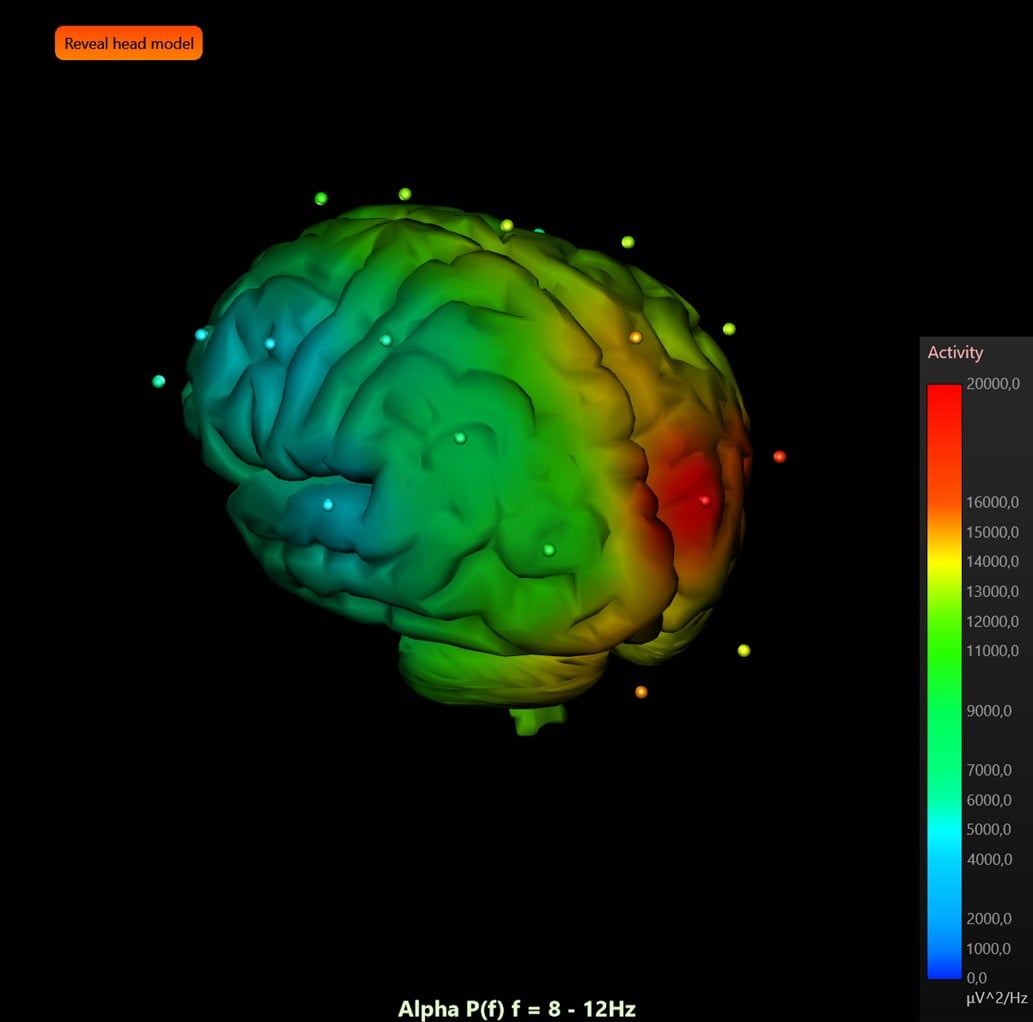
Figure 2. Example same brain MeshModel with real-time coloring based on EEG data.
The Interactive Examples App (which is copied to a local computer with SDK installation) has multiple MeshModel examples. One can find them with the keyword ‘MeshModel’, extract code, and learn settings/usage of the library (see learning from Demo). To date, there are 6 examples, which use MeshModel.

Multimodal Visualization with LightningChart® .NET
The Interactive Examples App has showcase examples (ExampleEEGDataVisualizationShowcase), which demonstrate real-time EEG data streaming, and mapping of brain activity on 3D brain model. See more in this EEG tutorial.

Another example (ExampleTranslucentChart3D) does not demonstrate any multi-model data per se but shows how different Series/data could be combined. In this example following classes of View3D are included: MeshModel, VolumeModel, PointLineSeries3D, Rectangle3D, SurfaceMeshSeries3D, Polygon3D, BarSeries3D and Annotation3D.

Conclusion
LightningChart .NET components are delivered for serious scientific, engineering, and measurement solutions. One of the library features is the ability to visualize multimodal medical data. This includes not only 3D models, but other type of 3D data. LightningChart has unmatched performance. Therefore, dynamic changes of data (like changes in 3D mesh geometry or coloring) will be rendered in real time.
Continue learning with LightningChart

Creating a Smith Chart Application in .NET
Written by a human | Updated on April 9th, 2025Smith Charts The Smith chart is a diagram designed for the study and resolution of problems with transmission lines. This diagram is aimed at electrical and electronic engineers specializing in radio frequency....

Nbody Simulation Data Visualization
Written by a human | Updated on April 9th, 2025N-body Simulation Nbody simulation is maybe one of the most advanced data visualization types out there. The truth is that we’re not talking anymore about visualizing traditional data with a business focus and it...

Data Visualization Components for React Applications
Written by a human | Updated on April 9th, 2025React Data Visualization Components React is one of the most popular front-end development frameworks on the web in the year 2022. It is a free and open-source front-end JS library that is used to build interactive...



If you have any questions, feel free to contact us!



©LightningChart Ltd 2026. All rights reserved.