








Vertical Horizontal Filter Indicator for Trading App Development with LightningChart JS Trader
Article
Assisted by AI
Learn how to integrate the vertical-horizontal filter indicator in your financial and trading applications using LightningChart JS Trader.
Ahmad Omid
Data Science Developer

Introduction
The Vertical Horizontal Filter (VHF) is a technical analysis indicator used to measure the trendiness of a market, essentially identifying whether prices are moving strongly in one direction (trending) or just oscillating sideways (ranging). Unlike traditional trend-following tools, the Vertical Horizontal Filter doesn’t attempt to predict the direction of the next move. Instead, it determines how strongly a market is trending, helping traders decide whether to apply trend-following strategies or range-bound tactics.
Originally introduced by Adam White in the early 1990s, the VHF was designed as an objective way to filter out market noise and assess when a market is trending enough to justify certain trading strategies. It filled a critical gap: many indicators told traders where to trade, but few provided confidence on whether the market conditions actually favored such trades. The Vertical Horizontal Filter became popular among traders who wanted a simple but effective tool to gauge the strength of market phases.
Key features of the Vertical Horizontal Filter include:
- Measuring the strength of price movement over a given period.
- Providing a normalized ratio that is easy to compare across timeframes.
- Helping traders adapt their strategies based on whether a market is trending or ranging.
Formula
The Vertical Horizontal Filter is calculated using a straightforward ratio that compares vertical movement (net directional change) to horizontal movement (total price range).
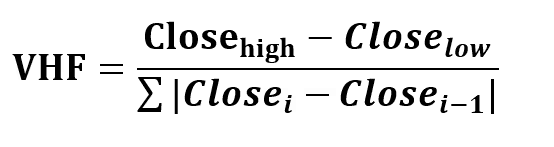
Where:
- Closehigh=highest closing price over the period.
- Loselow=lowest closing price over the period.
- ∑|Closei – Closei-1| = sum of absolute daily changes in close over the same period.
Interpretation:
- A high VHF value suggests a strong trend. Prices are moving consistently in one direction with minimal choppiness.
- A low VHF value indicates sideways or ranging behavior. The market is experiencing indecision or consolidation.
But, how much high or low VHF? There’s no universal threshold (like “above 0.7 = trending”), because different assets and timeframes produce different value ranges. Traders typically compare the VHF against its own historical levels on the same chart.
For example, if the VHF has been oscillating between 0.2 and 0.8, then readings near 0.7–0.8 would indicate strong trend conditions, while 0.2–0.3 would signal consolidation. In practice, many traders look for relative highs and lows in VHF to decide if the market is trending strongly enough to justify a trend-following strategy.
So, in short: “high” and “low” in VHF indicator aren’t fixed values across markets, they’re relative to the asset and period you’re analyzing. And an important hint to say, the VHF does not reveal the direction of the trend, only its intensity. That’s why it’s commonly paired with directional indicators like moving averages or MACD for comprehensive analysis.
Calculation Example
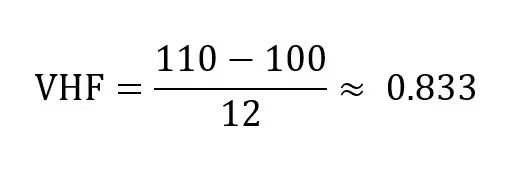
Let’s say you want to calculate the VHF over a 10-day period. Here’s a simplified version:
- Close_high = 110
- Close_low = 100
- Daily closes: [100, 101, 102, 101, 103, 104, 105, 106, 108, 110]
Apply the VHF formula:
How to Create the Technical Indicator Using LC JS Trader
Step 1: Get LightningChart JS Trader
To begin, you’ll need access to LightningChart JS Trader. This specialized library contains all the necessary components for developing advanced technical indicators, including the Vertical Horizontal Filter (VHF) indicator. Visit the LightningChart JS Trader page to download the required components and review the documentation.
Step 2: Review the Interactive Example
LightningChart JS Trader includes interactive examples that demonstrate how to create custom technical indicators. These examples do more than just explain; they show you what works in practice. Start with the documentation, focusing on how to add the VHF indicator to your chart. The interactive examples take you through each step of the process, from importing the right modules to adjusting your chart settings for the best display.
Step 3: Code Explanation
In this step, we’ll examine the code that creates the chart with the VHF indicator, as shown in the image, using LightningChart JS Trader. The code reveals how to properly initialize a trading chart, apply the indicator, and customize its visual properties to enhance your technical analysis. Understanding these code components helps you see how the different parts work together to produce an effective analysis tool. This knowledge allows you to adapt the implementation for your specific trading requirements.
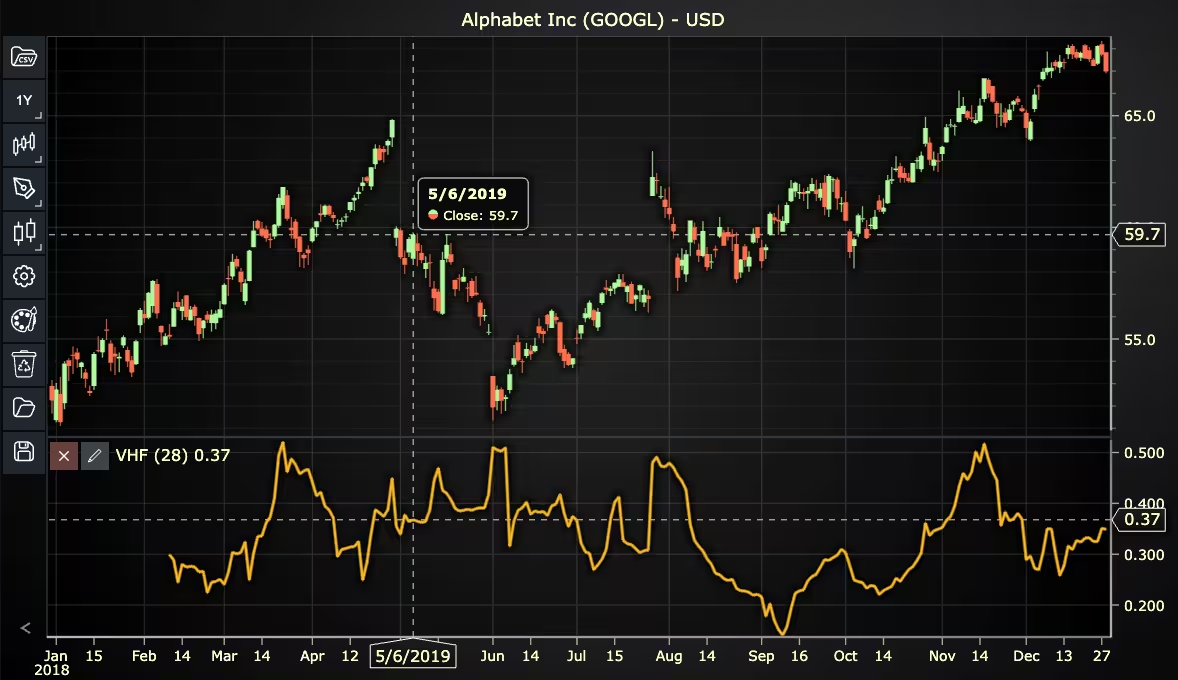
Here’s a detailed breakdown of each section:
A. Importing the Required Libraries:
const lcjsTrader = require('@lightningchart/lcjs-trader')
const lcjs = require('@lightningchart/lcjs')- lcjsTrader: This library provides access to the LightningChart JS Trader functionalities, allowing you to create advanced financial charts.
- lcjs: The main LightningChart JS library, used for general charting functionality.
B. Initializing the Trading Chart:
   lcjsTrader.trader(TRADER_LICENSE).then(async (trader) => {
     // Create a trading chart. Optionally, various chart settings can be provided.
const tradingChart = trader.tradingChart({ loadFromStorage: false })trader(TRADER_LICENSE): Initializes the LightningChart JS Trader with the provided license key (TRADER_LICENSE). This is required to access the charting functionalities for financial data.
Note you can request a LightningChart JS Trader trial license, which is free.
tradingChart(): This function creates a trading chart with certain options.loadFromStorage: false: This disables the loading of previously stored chart data from local storage, ensuring a fresh chart setup.
C. Adding and Customizing the Indicator
    // Add a Vertical Horizontal Filter indicator
    const vhf = tradingChart.indicators().addVerticalHorizontalFilter()
    vhf.setPeriodCount(28)
    vhf.setSource(3)
    vhf.setLineColor('#FAB829')
vhf.setLineWidth(3)addVerticalHorizontalFilter(): VHF determines the trendiness (level of trend activity) of prices to identify trending phases and trading ranges.
setPeriodCount(28): Sets the number of time periods (n) used to calculate the indicator.
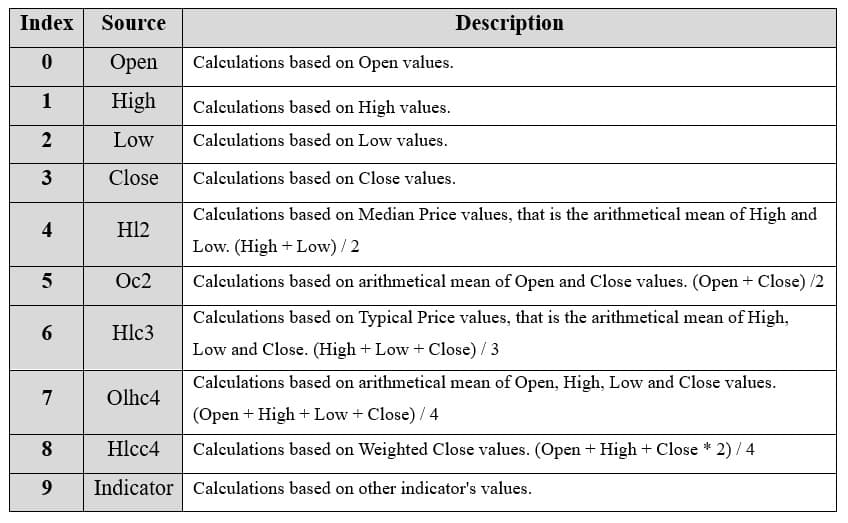
**vhf.setSource(3): Sets which values the indicator calculations are based on. In this case, calculations based on Close values.
setLineColor('#FAB829'): Sets the color of the VHF line to orange.
setLineWidth(3): Sets the lines width of the indicator to 3 pixels.
D. Loading Data from a CSV File
    // Reading data from a file.
    await fetch(`${document.head.baseURI}examples/assets/0000/Alphabet Inc (GOOGL).csv`).then((res) => res.text()).then((text) => {
        tradingChart.readCsvString(text, 'Alphabet Inc (GOOGL)')
})fetch(): This function retrieves a CSV file containing historical data for Alphabet Inc. (GOOGL). The CSV file includes pricing information for the company’s stock, which is plotted on the chart.readCsvString(): This function reads the CSV data and interprets it as pricing data for Alphabet Inc. The second argument (‘Alphabet Inc (GOOGL)’) sets the label for the chart, as seen at the top of the chart image.
E. Setting the Currency for the Chart
    tradingChart.setCurrency('USD')
})setCurrency('USD'): This sets the currency of the chart to USD, ensuring that the pricing data is interpreted and displayed in US dollars.
** Enumeration Source in LC JS Trader:
To select which values the indicator calculations are based on.
Advantages and Limitations of the Indicator
The Vertical Horizontal Filter (VHF) offers several advantages for traders who want a clear understanding of market conditions. One of its biggest strengths is its ability to distinguish between trending and ranging phases, which helps traders decide whether to use trend-following strategies or range-based techniques.
By filtering out noise from erratic price movements, it reduces the likelihood of reacting to false signals. The VHF is also flexible enough to be applied across different timeframes, making it useful for day traders, swing traders, and long-term investors alike. In addition, because it focuses on trend strength rather than direction, it works well when paired with directional indicators such as moving averages or MACD, providing a more complete market analysis.
However, the indicator also comes with limitations. Like many technical tools, the VHF is based on historical data, which makes it inherently lagging and sometimes slow to reflect sudden market shifts. Another drawback is that it does not provide any insight into the direction of a trend, meaning traders must rely on other indicators to confirm whether the market is moving up or down.
Finally, the effectiveness of the VHF can depend heavily on the chosen period length, shorter periods make it more responsive but can introduce noise, while longer periods may smooth the data but delay signals. These limitations mean the Vertical Horizontal Filter works best as a complementary tool rather than a standalone trading signal.
Conclusion
The Vertical Horizontal Filter (VHF) is a no-nonsense tool for assessing the presence and strength of a market trend. It doesn’t try to be everything at once; it focuses on one job and does it well: identifying trend conditions. For traders and developers building chart trading applications with LightningChart JS Trader, incorporating the Vertical Horizontal Filter can bring a new layer of strategy filtering and risk control.
By knowing whether the market is trending or consolidating, you can deploy the right tools at the right time, whether that means riding a breakout or fading a range. The Vertical Horizontal Filter doesn’t just measure movement; it tells you when that movement matters.
Continue learning with LightningChart
Real-time data visualization with WebSockets
Written by a human | Updated on April 10th, 2025WebSockets Data Visualization in Real-Time These days it is ever increasingly common that people require web solutions for their applications and services. Data visualization is not an exception to this, as...
Why Performance Matters in Data Visualization?
Written by a human | Updated on April 10th, 2025Performance in Data VisualizationI was doing a Google search a couple of days ago and particularly, I wanted to know what are the options for developers who need to visualize large amounts of data points within...

Geospatial data visualization with Google Maps & LightningChart
Written by a human | Updated on April 10th, 2025Geospatial Data Visualization This article showcases and describes a particular use case of LightningChart JS for geospatial data visualization. LightningChart JS is a JavaScript charting tool designed for...



If you have any questions, feel free to contact us!



©LightningChart Ltd 2026. All rights reserved.