








Ultimate Oscillator Guide with LightningChart JS Trader
Article
Assisted by AI
Learn how to implement the ultimate oscillator technical indicator into your software applications using LightningChart JS Trader.
Ahmad Omid
Data Science Developer

Introduction to the Ultimate Oscillator Indicator
The Ultimate Oscillator (UO) is a technical momentum indicator designed to capture momentum across three different timeframes. Unlike traditional oscillators, which may focus on a single period, the UO reduces volatility and generates fewer false signals by combining multiple timeframes into one measurement. This multi-timeframe approach makes the Ultimate Oscillator a powerful tool for identifying overbought and oversold conditions in the market.
What is the Smoothed Ultimate Oscillator?
The Smoothed Ultimate Oscillator is a variant of the standard Ultimate Oscillator that employs a moving average for smoothing rather than a summation method in its calculations. This modification, specific to LightningChart JS Trader, helps further reduce noise and improve signal clarity by refining the momentum readings over time.
Differences Between the Ultimate Oscillator and the Smoothed Version
While both indicators serve the same fundamental purpose of measuring momentum and identifying buy and sell signals, their key difference lies in how they process data:
- The Ultimate Oscillator uses a weighted sum of three different periods to calculate its value.
- The Smoothed Ultimate Oscillator (LightningChart version) applies a moving average to refine the data, thereby reducing short-term fluctuations and providing a clearer trend indication.
How to Trade Using the Ultimate Oscillator Indicator
Traders commonly use the Ultimate Oscillator to generate buy and sell signals based on overbought and oversold conditions. Some common trading strategies include:
- Overbought/Oversold Levels: A UO reading above 70 suggests an overbought market, signaling a potential sell opportunity, while a reading below 30 indicates an oversold market, suggesting a potential buy opportunity.
- Bullish and Bearish Divergences: If the price makes a new low while the Ultimate Oscillator makes a higher low, it signals a potential bullish reversal. Conversely, a new price high with a lower high in UO suggests a bearish reversal.
- Crossing the 50 Level: A move above 50 indicates bullish momentum, while a drop below 50 suggests bearish momentum.
Best Settings and Strategies for the Ultimate Oscillator
- The standard periods used in Ultimate Oscillator calculations are 7, 14, and 28.
- Shorter-term traders may opt for lower values like 3, 7, and 14 for faster signals.
- Longer-term traders can use 14, 28, and 56 to reduce noise and enhance trend reliability.
- Combining the UO with other indicators, such as Moving Averages or MACD, can improve trade confirmation and accuracy.
Formula
The Ultimate Oscillator is calculated using the following formula:
- Calculate the Buying Pressure (BP): BP = Close – Min (Low,PreviousClose)
- Calculate the True Range (TR): TR = Max (High, PreviousClose) – Min (Low, PreviousClose)
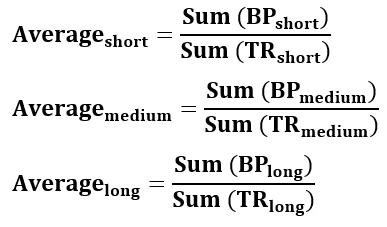
- Compute the Averages over three periods (short, medium, long):
- Calculate the final Ultimate Oscillator value:

Interpretation
- Above 70: Overbought, potential price decline.
- Below 30: Oversold, potential price increase.
- Between 30 and 70: Neutral range, less clear trade signals.
Calculation Example
We assume a short dataset for demonstration:
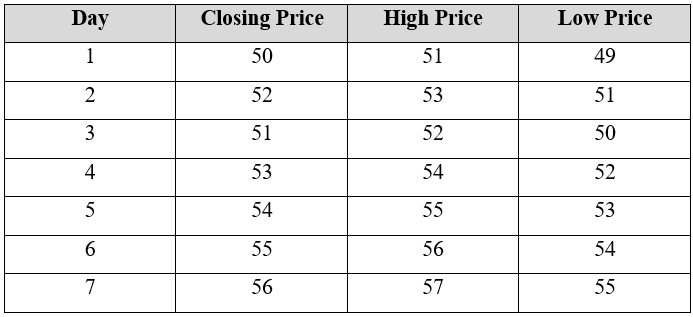
We will use three periods for the UO calculation:
- Short-term: 7 periods
- Medium-term: 14 periods (not covered in this short example)
- Long-term: 28 periods (not covered in this short example)
For simplification, we will focus on the 7-period calculation only.
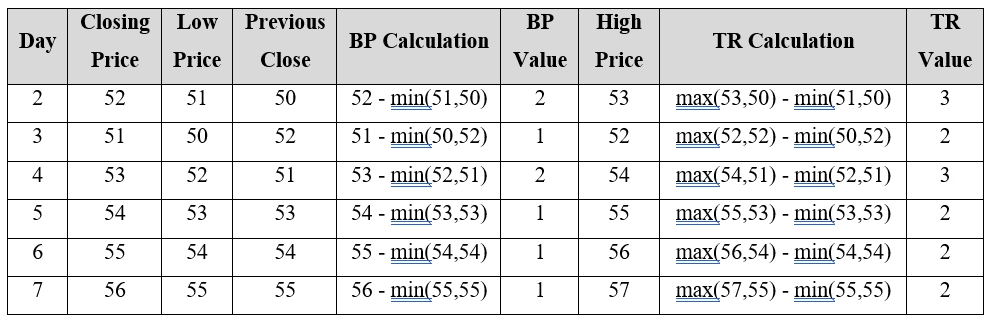
Step 1: Compute Buying Pressure (BP) and True Range (TR)
Calculate BP and TR for each day:
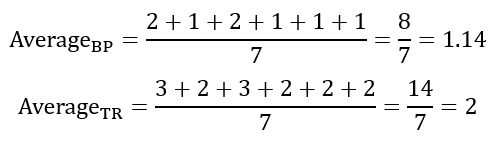
Step 2: Calculate Average BP and TR Over the Periods
For 7-period:
Step 3: Compute the Ultimate Oscillator Value

Calculations’ Interpretation:
- 65.1 is close to the overbought level but still neutral.
- If the UO > 70, the asset is considered overbought (potential sell signal).
- If the UO < 30, the asset is considered oversold (potential buy signal).
- Since 65.1 is between 30 and 70, it indicates a neutral trend.
How to Create the Technical Indicator Using LC JS Trader
Step 1: Get LightningChart JS Trader
To begin, you’ll need access to LightningChart JS Trader. This library provides the tools necessary to create advanced technical indicators, including the Ultimate Oscillator/ Smoothed Indicator. Visit the LightningChart JS Trader page to download the required components and review the documentation.
Step 2: Review the Interactive Example
LightningChart JS Trader includes interactive examples that demonstrate how to create custom technical indicators. Start by reviewing the documentation, focusing on how to integrate the Ultimate Oscillator/Smoothed Indicator into your chart setup. The interactive examples will guide you through the process of setting up the Ultimate Oscillator/ Smoothed Indicator, from importing the necessary modules to modify the chart settings.
Step 3: Code Explanation
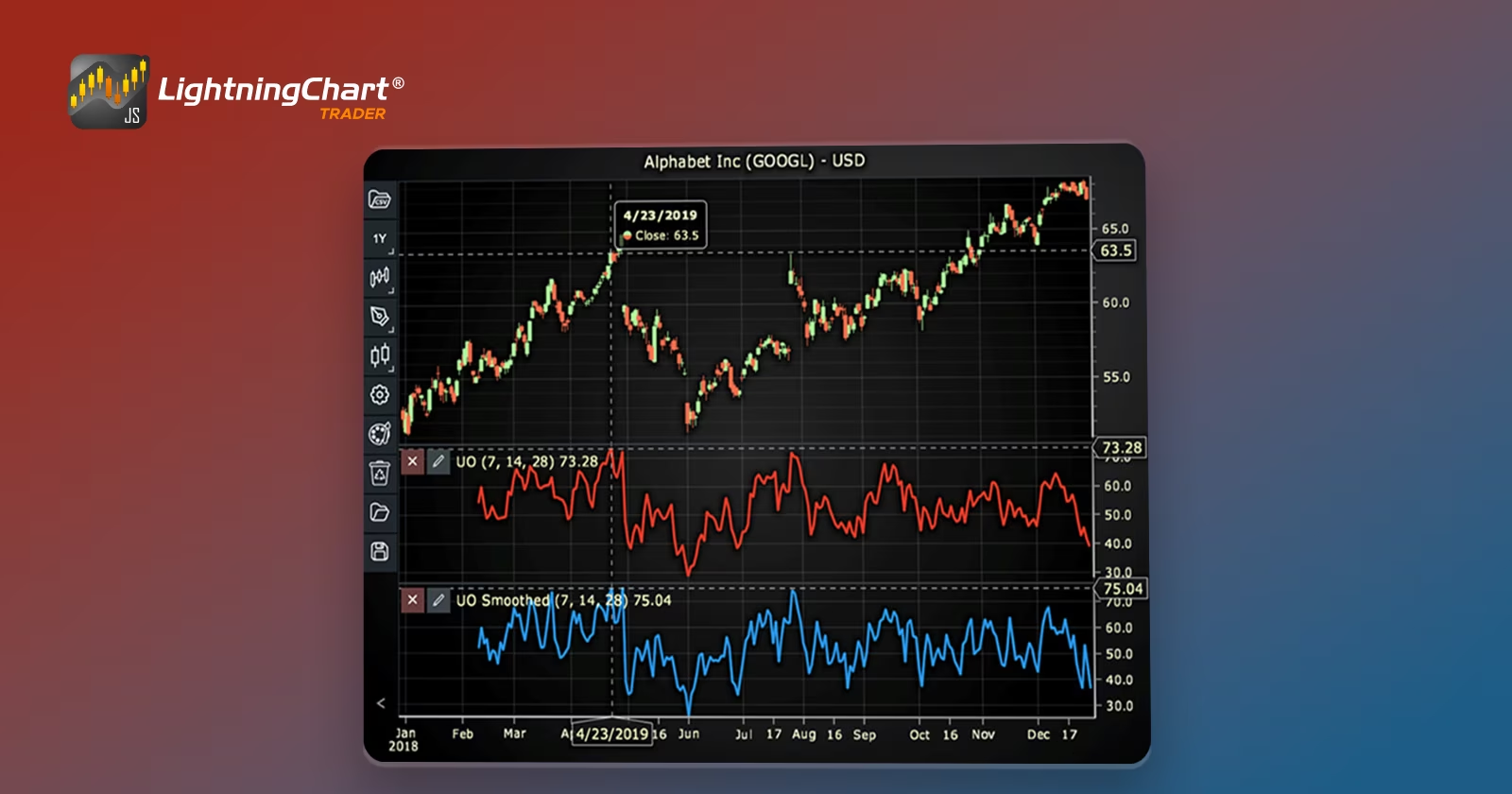
In this step, we will break down the code that creates the chart with the Ultimate Oscillator/ Smoothed Indicator, as shown in the image, using LightningChart JS Trader. The code demonstrates how to initialize a trading chart, apply the Ultimate Oscillator/Smoothed Indicator, and customize its appearance.
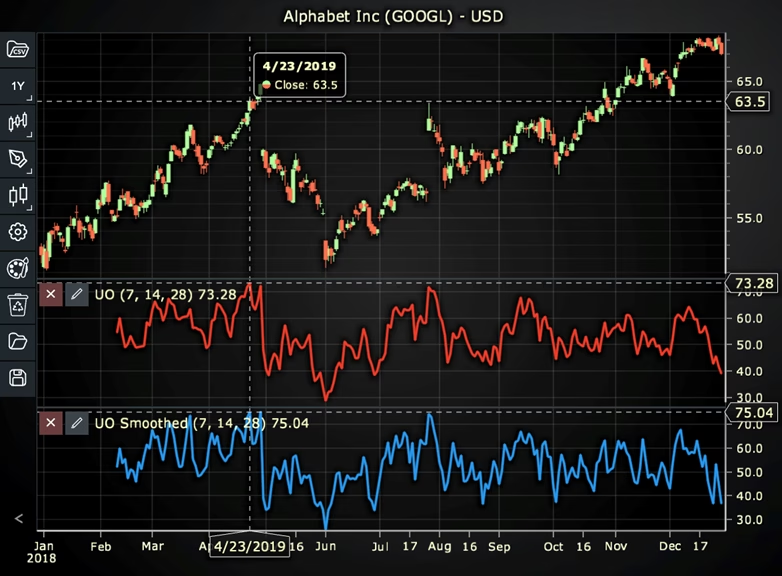
Here’s a detailed breakdown of each section:
A. Importing the Required Libraries:
   const lcjsTrader = require('@arction/lcjs-trader')
   const lcjs = require('@arction/lcjs')
const { Themes } = lcjs- lcjsTrader: This library provides access to the LightningChart JS Trader functionalities, allowing you to create advanced financial charts.
- lcjs: The main LightningChart JS library, used for general charting functionality.
- Themes: A property within lcjs that provides access to pre-built themes. In this case, we are using the darkGold theme to style the chart.
B. Initializing the Trading Chart:
   lcjsTrader.trader(TRADER_LICENSE).then(async (trader) => {
    // Create a trading chart.
const tradingChart = trader.tradingChart({ loadFromStorage: false, colorTheme: Themes.darkGold })trader(TRADER_LICENSE): Initializes the LightningChart JS Trader with the provided license key (TRADER_LICENSE). This is required to access the charting functionalities for financial data.
Note you can request a LightningChart JS Trader trial license, which is free.
tradingChart(): This function creates a trading chart with certain options.loadFromStorage: false: This disables the loading of previously stored chart data from local storage, ensuring a fresh chart setup.colorTheme: Themes.darkGold: This applies the darkGold theme to the chart, which influences the background color, gridlines, and other visual elements.
C. Adding and Customizing the Indicator
1. Using the Ultimate Oscillator
    // Add an Ultimate Oscillator indicator
    const uo = tradingChart.indicators().addUltimateOscillator()
    uo.setPeriodCounts(7, 14, 28)
    uo.setLineColor('#F03C28')
uo.setLineWidth(3)addUltimateOscillator(): UO captures momentum across three different timeframes, which reduces the volatility and generates fewer trade signals. Therefore, it is often used to identify buy and sell signals.
uo.setPeriodCounts(7, 14, 28): Sets the time period counts used to calculate the indicator (periodCountShort, periodCountMid, periodCountLong).
uo.setLineColor('#F03C28’): Sets the color of the oscillator line to red.
uo.setLineWidth(3): Sets the width of the oscillator line to 3 pixels.
2. Using the Ultimate Oscillator Smoothed
    // Add an Ultimate Oscillator Smoothed indicator
    const uos = tradingChart.indicators().addUltimateOscillatorSmoothed()
    uos.setPeriodCounts(7, 14, 28)
    uos.setMovingAverageType(0)
    uos.setLineColor('#289AF0')
uos.setLineWidth(3)addUltimateOscillatorSmoothed(): UO Smoothed differs from the regular UO by using smoothing with a moving average instead of summation during the calculations.
uos.setPeriodCounts(7, 14, 28): Sets the time period counts used to calculate the indicator (periodCountShort, periodCountMid, periodCountLong).
**uos.setMovingAverageType(0): Sets the types of the moving averages used for smoothing. In this case, 0 represents the Exponential Moving Average (EMA).
uos.setLineColor('#289AF0’): Sets the color of the oscillator line to blue.
uos.setLineWidth(3): Sets the width of the oscillator line to 3 pixels.
D. Loading Data from a CSV File
    // Reading data from a file.
    await fetch(`${document.head.baseURI}examples/assets/0000/Alphabet Inc (GOOGL).csv`).then((res) => res.text()).then((text) => {
        tradingChart.readCsvString(text, 'Alphabet Inc (GOOGL)')
})fetch(): This function retrieves a CSV file containing historical data for Alphabet Inc. (GOOGL). The CSV file includes pricing information for the company’s stock, which is plotted on the chart.readCsvString(): This function reads the CSV data and interprets it as pricing data for Alphabet Inc. The second argument (‘Alphabet Inc (GOOGL)’) sets the label for the chart, as seen at the top of the chart image.
E. Setting the Currency for the Chart
    tradingChart.setCurrency('USD')
})setCurrency('USD'): This sets the currency of the chart to USD, ensuring that the pricing data is interpreted and displayed in US dollars.
** Enumeration of Moving Average Types in LC JS Trader:
- Exponential Moving Average (EMA): 0
- None: 1 (No moving average applied)
- Simple Moving Average (SMA): 2
- Time Series Moving Average (TSMA): 3
- Triangular Moving Average (TMA): 4
- Variable Moving Average (VMA): 5
- Variable Index Dynamic Average (VIDYA): 6
- Volume Weighted Moving Average (VWMA): 7
- Weighted Moving Average (WMA): 8
- Welles Wilder’s Smoothing (WWS): 9
Advantages and Limitations of the Indicator
Advantages
- Multi-timeframe approach: Reduces false signals by capturing broader market momentum.
- Fewer whipsaws: More stable than other oscillators.
- Works well with divergences: Helps spot potential reversals earlier than traditional indicators.
Limitations
- Lagging nature: As with all oscillators, the UO is reactive rather than predictive.
- Not standalone: Works best when combined with other indicators for confirmation.
- Settings require tuning: May need adjustments based on market conditions and asset volatility.
Conclusion
The Ultimate Oscillator is a powerful tool for traders looking to capture momentum across multiple timeframes while minimizing false signals. By utilizing this indicator correctly, traders can improve their ability to identify overbought and oversold conditions, as well as potential reversals.
The Smoothed Ultimate Oscillator, available in LightningChart JS Trader, enhances the original by applying moving average smoothing, further refining signal accuracy.
For those interested in implementing the Ultimate Oscillator in their trading strategies, LightningChart JS Trader provides interactive environment to help visualize and utilize the indicator effectively.
By mastering the Ultimate Oscillator and its smoothed version, traders can make more informed decisions and refine their market entries and exits for improved trading performance.
Continue learning with LightningChart
How to Set Up LightningChart JS in Cursor and Claude Code Using MCP, in Under 5 Minutes
A step-by-step guide to installing the LightningChart JS MCP server so your AI coding agent stops hallucinating chart APIs and starts writing production-ready code from the first prompt. AI coding agents are good at writing chart code. They are less good at writing...

The LightningChart JS Agent Skill: Give Any AI Coding Agent Accurate Charting Knowledge in 60 Seconds
An agent skill is a folder of instructions your AI coding tool picks up automatically. This one teaches any compatible agent how to use LightningChart JS correctly, before it writes a single line of chart code. Agent skills are a relatively new concept and the...
Why AI Coding Agents Get Data Visualization Wrong, and What to Do About It
AI coding assistants are getting good at most parts of application development. Data visualization is one of the areas where they still have a consistent, predictable failure mode. This article explains the mechanics of why it happens and the practical fix. I spent a...



If you have any questions, feel free to contact us!



©LightningChart Ltd 2026. All rights reserved.