








System Quality Number Indicator for Developing Trading Applications
Article
Assisted by AI
Create a System Quality Number indicator in LightningChart JS Trader and add SQN analysis to your trading app projects.
Ahmad Omid
Data Science Developer

Introduction
The System Quality Number (SQN) is a technical indicator designed to evaluate the performance and consistency of a trading system. Unlike traditional indicators that rely solely on price patterns or momentum, the system quality number focuses on statistical robustness.
It does this by analyzing the average return per trade (expressed as an R-multiple) and its variability. Originally developed by Dr. Van K. Tharp, the SQN provides a clear, quantitative measure of a system’s effectiveness by combining risk-adjusted return and volatility into a single score.
Over time, traders have found that SQN can also be applied directly to the daily price changes of financial instruments, offering insight into market behavior itself, specifically its trendiness or randomness. In this context, it becomes a trend strength indicator, gauging how clean or erratic a stock’s directional movement is over time.
This blog explores the theory behind the System Quality Number, explains how it works, and demonstrates how to implement the indicator visually using LightningChart JS Trader.
Formula
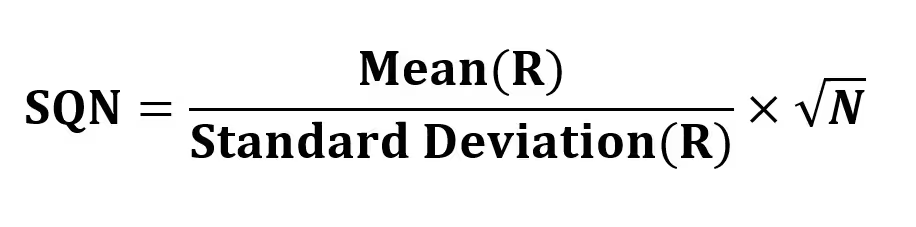
The formula for the System Quality Number is:
Where:
- Mean(R) is the average of R-multiples (returns per trade).
- Standard Deviation(R) measures the variability of those returns.
- N is the number of trades.
Interpretation:
- An SQN above 3.0 typically signals a very robust and high-quality system.
- Between 2.0 to 3.0 indicates a solid system, though possibly inconsistent in certain market conditions.
- Between 1.5 to 2.0 reflects a marginal system that might work only under favorable conditions.
- Below 1.5 suggests the strategy is unreliable or random.
When applied to daily stock returns, the same logic holds:
- A high SQN suggests the stock is trending smoothly.
- A low SQN means choppy, unpredictable price action with no clear direction.
Calculation Example
Imagine a trading strategy with the following 10 trade results (expressed as R-multiples):
[1.2, 0.5, -0.3, 2.0, -0.5, 1.8, 0.9, -1.0, 1.1, 0.7]
- Mean(R) = 0.74
- Standard Deviation(R) ≈ 0.91
- N = 10
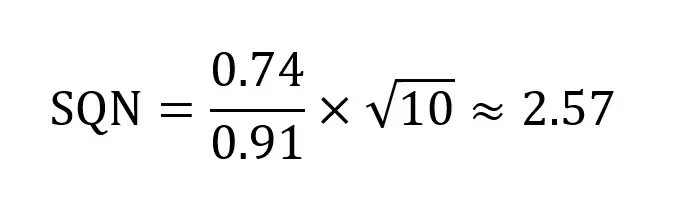
This indicates a good quality trading system, but still with some inconsistency due to the relatively high standard deviation.
How to Create the Technical Indicator Using LC JS Trader
Step 1: Get LightningChart JS Trader
To begin, you’ll need access to LightningChart JS Trader. This library provides the tools necessary to create advanced technical indicators, including the System Quality Number (SQN) indicator. Visit the LightningChart JS Trader page to download the required components and review the documentation.
Step 2: Review the Interactive Example
LightningChart JS Trader includes interactive examples that demonstrate how to create custom technical indicators. These examples do more than just explain; they show you what works in practice. Start with the documentation, focusing on how to add the SQN indicator to your chart. The interactive examples take you through each step of the process, from importing the right modules to adjusting your chart settings for the best display.
Step 3: Code Explanation
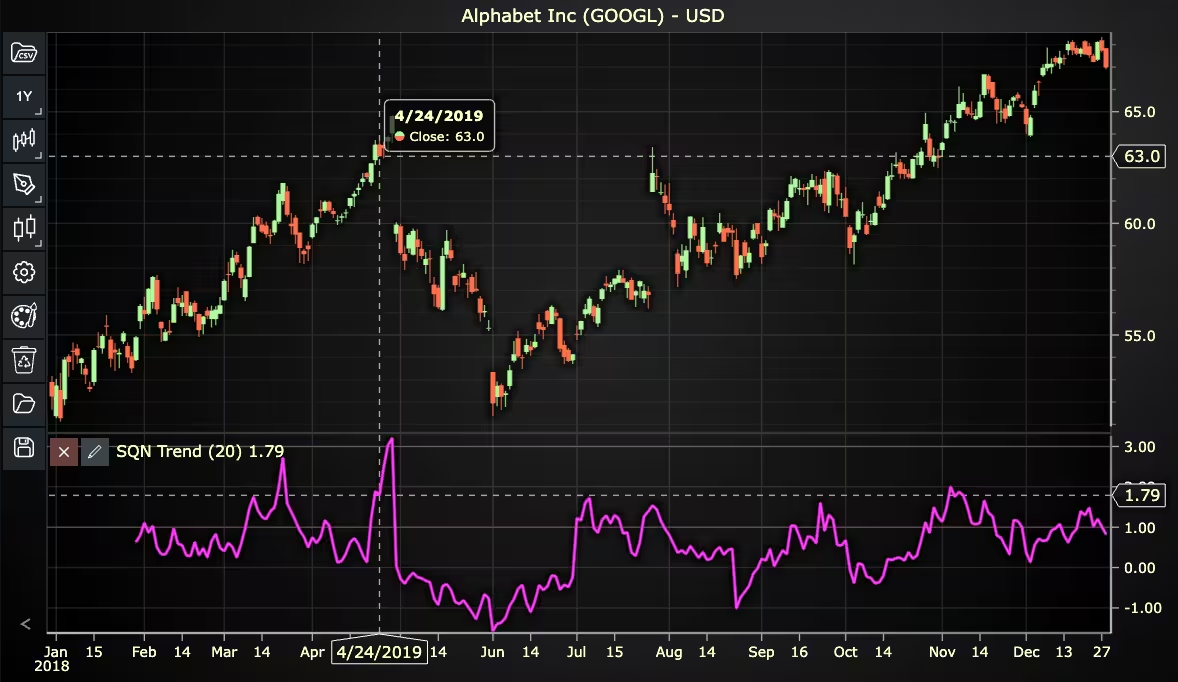
In this step, we’ll examine the code that creates the chart with the SQN indicator, as shown in the image, using LightningChart JS Trader. The code reveals how to properly initialize a trading chart, apply the indicator, and customize its visual properties to enhance your technical analysis. Understanding these code components helps you see how the different parts work together to produce an effective analysis tool. This knowledge allows you to adapt the implementation for your specific trading requirements.
Here’s a detailed breakdown of each section:
A. Importing the Required Libraries:
const lcjsTrader = require('@lightningchart/lcjs-trader')
const lcjs = require('@lightningchart/lcjs')- lcjsTrader: This library provides access to the LightningChart JS Trader functionalities, allowing you to create advanced financial charts.
- lcjs: The main LightningChart JS library, used for general charting functionality.
B. Initializing the Trading Chart:
   lcjsTrader.trader(TRADER_LICENSE).then(async (trader) => {
     // Create a trading chart. Optionally, various chart settings can be provided.
const tradingChart = trader.tradingChart({ loadFromStorage: false })trader(TRADER_LICENSE): Initializes the LightningChart JS Trader with the provided license key (TRADER_LICENSE). This is required to access the charting functionalities for financial data.
Note you can request a LightningChart JS Trader trial license, which is free.
tradingChart(): This function creates a trading chart with certain options.loadFromStorage: false: This disables the loading of previously stored chart data from local storage, ensuring a fresh chart setup.
C. Adding and Customizing the Indicator
    // Add a System Quality Number Trend indicator
    const sqn = tradingChart.indicators().addSQNTrend()
    sqn.setPeriodCount(20)
    sqn.setSource(3)
    sqn.setMovingAverageType(2)
    sqn.setLineColor('#FF14F7')
sqn.setLineWidth(3)addSQNTrend(): It measures the quality of a trading system by comparing the mean and the standard deviation of the trading systems R-multiple distribution. When this SQN formula is applied to the daily price change of a stock, it measures the trendiness of the market.
setPeriodCount(20): Sets the number of time periods (n) used to calculate the indicator.
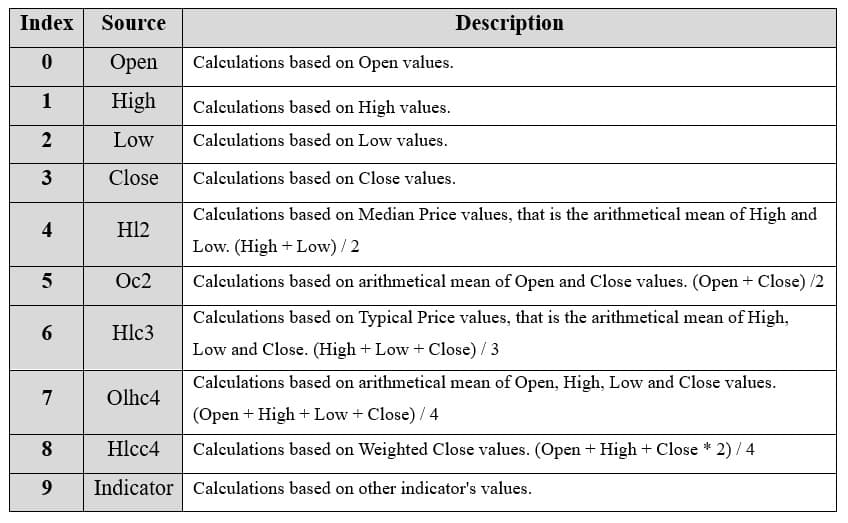
**sqn.setSource(3): Sets which values the indicator calculations are based on. In this case, calculations based on Close values.
***sqn.setMovingAverageType(2): Sets the type of Moving Average used during the indicator calculations. In this case, 2 represents the Simple Moving Average (SMA).
setLineColor('#FF14F7'): Sets the color of the SQN line to pink.
setLineWidth(3): Sets the lines width of the indicator to 3 pixels.
D. Loading Data from a CSV File
    // Reading data from a file.
    await fetch(`${document.head.baseURI}examples/assets/0000/Alphabet Inc (GOOGL).csv`).then((res) => res.text()).then((text) => {
        tradingChart.readCsvString(text, 'Alphabet Inc (GOOGL)')
})fetch(): This function retrieves a CSV file containing historical data for Alphabet Inc. (GOOGL). The CSV file includes pricing information for the company’s stock, which is plotted on the chart.readCsvString(): This function reads the CSV data and interprets it as pricing data for Alphabet Inc. The second argument (‘Alphabet Inc (GOOGL)’) sets the label for the chart, as seen at the top of the chart image.
E. Setting the Currency for the Chart
    tradingChart.setCurrency('USD')
})setCurrency('USD'): This sets the currency of the chart to USD, ensuring that the pricing data is interpreted and displayed in US dollars.
** Enumeration Source in LC JS Trader:
To select which values the indicator calculations are based on.
*** Enumeration of Moving Average Types in LC JS Trader:
- Exponential Moving Average (EMA): 0
- None: 1 (No moving average applied)
- Simple Moving Average (SMA): 2
- Time Series Moving Average (TSMA): 3
- Triangular Moving Average (TMA): 4
- Variable Moving Average (VMA): 5
- Variable Index Dynamic Average (VIDYA): 6
- Volume Weighted Moving Average (VWMA): 7
- Weighted Moving Average (WMA): 8
- Welles Wilder’s Smoothing (WWS): 9
Advantages and Limitations of the Indicator
The System Quality Number offers several practical advantages for traders and system developers. One of its strongest features is its objectivity; it quantifies system performance using statistical measures rather than subjective analysis. By combining the average return with the consistency of those returns (through standard deviation), SQN delivers a more balanced and realistic assessment of a system’s effectiveness.
This makes it especially valuable in back-testing environments where you need a clean, data-driven performance metric. It also adapts well across asset classes and timeframes, allowing you to evaluate trend strength when applied to daily price changes. In this way, the system quality number becomes a tool not just for strategy development, but for assessing current market conditions.
However, the indicator isn’t without its drawbacks. SQN is sensitive to sample size, meaning results based on too few trades or short data windows can be misleading. For example, a single outlier trade in a small sample can distort both the mean and standard deviation, inflating or deflating the score unnaturally.
Another limitation is that SQN doesn’t capture the context of trades, such as market regime shifts, news events, or strategy logic, so two systems with identical SQNs could behave very differently in real-time conditions. There’s also the risk of over-optimizing a system just to boost the SQN, leading to curve-fitting that fails in live markets.
Despite these limitations, when used thoughtfully, the system quality number remains a powerful tool for evaluating the reliability and robustness of trading strategies.
Conclusion
The System Quality Number is more than a performance statistic; it’s a technical indicator that captures both return and consistency in a single number. By integrating the system quality number into your workflow using LightningChart JS Trader, you can visually track how robust your strategies or market moves are in real time.
It offers a powerful playground for this, enabling developers and traders to visualize SQN dynamically, tune their systems, and make smarter, data-driven decisions.
Continue learning with LightningChart
Real-time data visualization with WebSockets
Written by a human | Updated on April 10th, 2025WebSockets Data Visualization in Real-Time These days it is ever increasingly common that people require web solutions for their applications and services. Data visualization is not an exception to this, as...
Why Performance Matters in Data Visualization?
Written by a human | Updated on April 10th, 2025Performance in Data VisualizationI was doing a Google search a couple of days ago and particularly, I wanted to know what are the options for developers who need to visualize large amounts of data points within...

Geospatial data visualization with Google Maps & LightningChart
Written by a human | Updated on April 10th, 2025Geospatial Data Visualization This article showcases and describes a particular use case of LightningChart JS for geospatial data visualization. LightningChart JS is a JavaScript charting tool designed for...



If you have any questions, feel free to contact us!



©LightningChart Ltd 2026. All rights reserved.