








Introduction to Stochastic Momentum Index (SMI) Indicator
Article
Assisted by AI
Explore how to implement the Stochastic Momentum Index (SMI) in your trading applications for enhanced decision-making and market analysis capabilities.
Ahmad Omid
Data Science Developer


Overview and History of Stochastic Momentum Index
The Stochastic Momentum Index (SMI) is an advanced variation of the traditional Stochastic Oscillator, designed to provide traders with a more refined measurement of price momentum. Unlike the Stochastic Oscillator, which compares closing prices to the lowest and highest points over a set period, the SMI calculates the distance between the current closing price and the midpoint of the high/low range. This makes it a smoother, less erratic indicator, reducing false signals often seen in the standard stochastic calculations.
Developed to enhance momentum trading strategies, the Stochastic Momentum Index aims to filter out market noise and provide more reliable signals. By refining the calculation methodology, traders can better identify overbought and oversold conditions and make more informed trading decisions.
How is the Stochastic Momentum Index Indicator Used in Trading?
The SMI indicator is widely used in technical analysis to identify potential trend reversals and confirm existing trends. Traders typically apply the SMI to:
- Identify Overbought and Oversold Conditions: Like Stochastic Oscillator, values above +40 indicate overbought conditions, while values below -40 indicate oversold conditions.
- Spot Trend Reversals: A crossover of the SMI line with its signal line can signal an upcoming price reversal.
- Confirm Existing Trends: When the SMI remains in positive or negative territory for an extended period, it confirms the strength of a prevailing trend.
- Divergence Analysis: If the price moves in the opposite direction of the SMI, it may indicate a weakening trend and a possible reversal.
Formula
The Stochastic Momentum Index is calculated using the following formula:
1. Calculate the Midpoint of the High/Low Range:
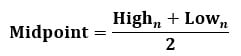
2. Compute the Close Relative to the Midpoint:
Dn = Closen – Midpoint
3. Apply a Moving Average (SMoothed D):
DSM = EMA(Dn, P)
4. Calculate the Range of High/Low Differences:
HLDn = Highn – Lown
5. Smooth the Range:
HLDsm = EMA (HLDn, P)
6. Compute the SMI value:
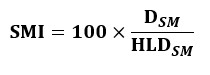
Where:
- n is the number of periods used for the calculation.
- EMA represents the Exponential Moving Average.
- P is the smoothing period.
Interpretation
- SMI Above Zero: Indicates bullish momentum, meaning prices are closing closer to the high of the range.
- SMI Below Zero: Indicates bearish momentum, meaning prices are closing closer to the low of the range.
- Crossovers: When the SMI crosses above its signal line, it suggests a buying opportunity, while a crossover below the signal line signals a potential sell.
- Extreme Values: Readings above +40 or below -40 can suggest overbought or oversold conditions, respectively.
Calculation Example
Let’s compute the Stochastic Momentum Index using a 5-day stock price dataset. Given Data:

The computed values according to the given formula for each part as below:

Interpretation of Results:
- The SMI values gradually increase, indicating an upward momentum shift.
- As SMI moves above zero, it suggests a transition towards bullish conditions.
- The steady increase in SMI confirms the strengthening of an uptrend.
- Lower values of SMI (closer to zero) in early days indicate indecision before momentum gains.
How to Create the Technical Indicator Using LC JS Trader
Step 1: Get LightningChart JS Trader
To begin, you’ll need access to LightningChart JS Trader. This library provides the tools necessary to create advanced technical indicators, including the Stochastic Momentum Index Indicator. Visit the LightningChart JS Trader page to download the required components and review the documentation.
Step 2: Review the Interactive Example
LightningChart JS Trader includes interactive examples that demonstrate how to create custom technical indicators. Start by reviewing the documentation, focusing on how to integrate the Stochastic Momentum Index Indicator into your chart setup. The interactive examples will guide you through the process of setting up the SMI Indicator, from importing the necessary modules to modify the chart settings.
Step 3: Code Explanation
In this step, we will break down the code that creates the chart with the Stochastic Momentum Index Indicator, as shown in the image, using LightningChart JS Trader. The code demonstrates how to initialize a trading chart, apply the SMI Indicator, and customize its appearance.
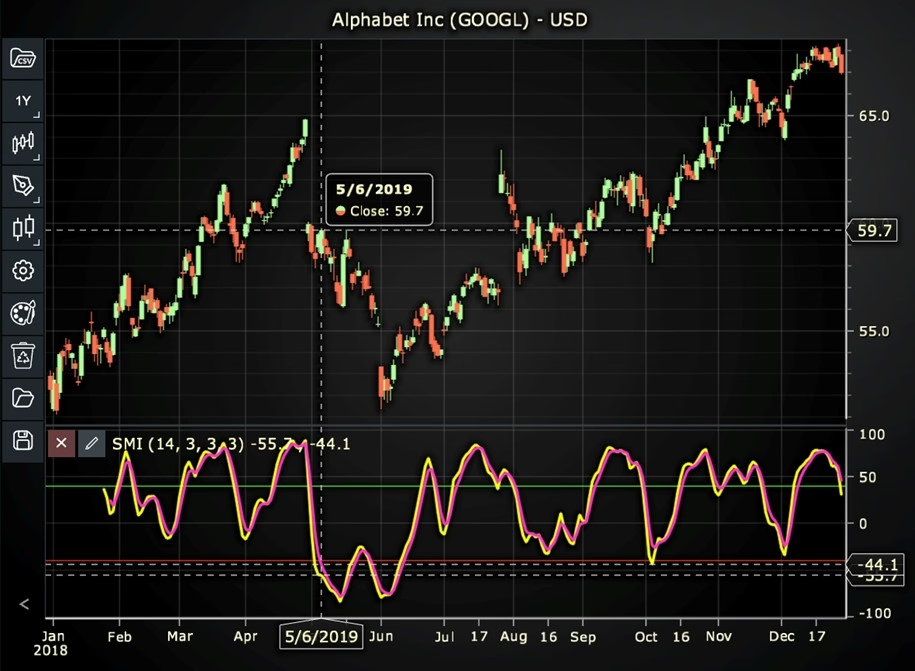
Here’s a detailed breakdown of each section:
A. Importing the Required Libraries:
   const lcjsTrader = require('@arction/lcjs-trader')
   const lcjs = require('@arction/lcjs')
const { Themes } = lcjs- lcjsTrader: This library provides access to the LightningChart JS Trader functionalities, allowing you to create advanced financial charts.
- lcjs: The main LightningChart JS library, used for general charting functionality.
- Themes: A property within lcjs that provides access to pre-built themes. In this case, we are using the darkGold theme to style the chart.
B. Initializing the Trading Chart:
   lcjsTrader.trader(TRADER_LICENSE).then(async (trader) => {
    // Create a trading chart.
const tradingChart = trader.tradingChart({ loadFromStorage: false, colorTheme: Themes.darkGold })trader(TRADER_LICENSE): Initializes the LightningChart JS Trader with the provided license key (TRADER_LICENSE). This is required to access the charting functionalities for financial data.
Note you can request a LightningChart JS Trader trial license, which is free.
tradingChart(): This function creates a trading chart with certain options.loadFromStorage: false: This disables the loading of previously stored chart data from local storage, ensuring a fresh chart setup.colorTheme: Themes.darkGold: This applies the darkGold theme to the chart, which influences the background color, gridlines, and other visual elements.
C. Adding and Customizing the Indicator
    // Add a Stochastic Momentum Index indicator
    const smi = tradingChart.indicators().addStochasticMomentumIndex()
    smi.setPeriodCounts(14, 3, 3, 3)
    smi.setMovingAverageTypes(0, 0)
    smi.setOversoldAndOverboughtRanges(-40, 40)
    smi.setStochasticLineColor('#FBFF14')
    smi.setMovingAverageLineColor('#FF33C9')
smi.setLineWidth(3)addStochasticMomentumIndex(): SMI is a variation of Stochastic Oscillator, showing the distance between the current price and the midpoint of High/Low range.
smi.setPeriodCounts(14, 3, 3, 3): Sets the time period counts used to calculate the indicator (oscillatorPeriodCount, firstSmoothPeriods, doubleSmoothPeriods, movingAveragePeriodCount).
**smi.setMovingAverageTypes(0, 0): Sets the types of the moving averages used in the indicator’s calculations (oscillatorSmoothingAverage, maMovingAverage). In this case, 0 represents the Exponential Moving Average (EMA).
smi.setOversoldAndOverboughtRanges(-40, 40): Sets the values for oversold and overbought ranges (oversoldRange, overboughtRange).
smi.setStochasticLineColor('#FBFF14'): Sets the color of the oscillator line to yellow.
smi.setMovingAverageLineColor('#FF33C9'): Sets the color of the moving average line to pink.
smi.setLineWidth(3): Sets the width of the oscillator and moving average lines to 3 pixels.
D. Loading Data from a CSV File
    // Reading data from a file.
    await fetch(`${document.head.baseURI}examples/assets/0000/Alphabet Inc (GOOGL).csv`).then((res) => res.text()).then((text) => {
        tradingChart.readCsvString(text, 'Alphabet Inc (GOOGL)')
})fetch(): This function retrieves a CSV file containing historical data for Alphabet Inc. (GOOGL). The CSV file includes pricing information for the company’s stock, which is plotted on the chart.readCsvString(): This function reads the CSV data and interprets it as pricing data for Alphabet Inc. The second argument (‘Alphabet Inc (GOOGL)’) sets the label for the chart, as seen at the top of the chart image.
E. Setting the Currency for the Chart
    tradingChart.setCurrency('USD')
})setCurrency('USD'): This sets the currency of the chart to USD, ensuring that the pricing data is interpreted and displayed in US dollars.
** Enumeration of Moving Average Types in LC JS Trader:
- Exponential Moving Average (EMA): 0
- None: 1 (No moving average applied)
- Simple Moving Average (SMA): 2
- Time Series Moving Average (TSMA): 3
- Triangular Moving Average (TMA): 4
- Variable Moving Average (VMA): 5
- Variable Index Dynamic Average (VIDYA): 6
- Volume Weighted Moving Average (VWMA): 7
- Weighted Moving Average (WMA): 8
- Welles Wilder’s Smoothing (WWS): 9
Advantages and Limitations of the Indicator
The Stochastic Momentum Index reduces market noise by calculating price movements relative to the midpoint, producing smoother signals compared to the standard Stochastic Oscillator.
It provides improved accuracy in identifying overbought and oversold conditions and enhances trend analysis by confirming trend strength and direction with minimal false signals. Furthermore, it is highly versatile, applicable to various asset classes such as stocks, forex, and commodities.
However, the SMI is a lagging indicator, relying on past price data, which may cause delayed signals. In sideways markets, the SMI can produce misleading buy or sell signals, requiring additional confirmation from other technical indicators like Moving Averages or RSI.
Conclusion
The Stochastic Momentum Index is a powerful technical indicator that enhances momentum trading by providing a more refined and reliable version of the traditional Stochastic Oscillator.
By measuring price momentum in relation to the midpoint of the high/low range, it offers traders a clearer picture of market trends and potential reversals. To fully utilize the SMI and gain a comprehensive understanding of its application, LightningChart JS Trader provides interactive environment and real-time visualizations.
It allows traders to analyze SMI signals effectively and make informed trading decisions with high precision and accuracy.
Continue learning with LightningChart
Why Performance Matters in Data Visualization?
Written by a human | Updated on April 10th, 2025Performance in Data VisualizationI was doing a Google search a couple of days ago and particularly, I wanted to know what are the options for developers who need to visualize large amounts of data points within...

Geospatial data visualization with Google Maps & LightningChart
Written by a human | Updated on April 10th, 2025Geospatial Data Visualization This article showcases and describes a particular use case of LightningChart JS for geospatial data visualization. LightningChart JS is a JavaScript charting tool designed for...
![[Tutorial] How to embed interactive charts in PowerPoint presentations](https://lightningchart.com/wp-content/uploads/2022/12/Interactive-Charts-in-PowerPoint-feature-image.jpg)
[Tutorial] How to embed interactive charts in PowerPoint presentations
Written by a human | Updated on April 9th, 2025Embed interactive charts in PowerPoint presentations Embedding charts within PowerPoint presentations has always been possible but perhaps one of the most ignored possibilities is actually embedding web applications...



If you have any questions, feel free to contact us!



©LightningChart Ltd 2026. All rights reserved.