








Creating a Relative Strength Index (RSI) Technical Chart
Article
Assisted by AI
Learn how to build and integrate a Relative Strength Index (RSI) technical chart in your trading applications to analyze market trends and enhance your strategy.
Ahmad Omid
Data Science Developer

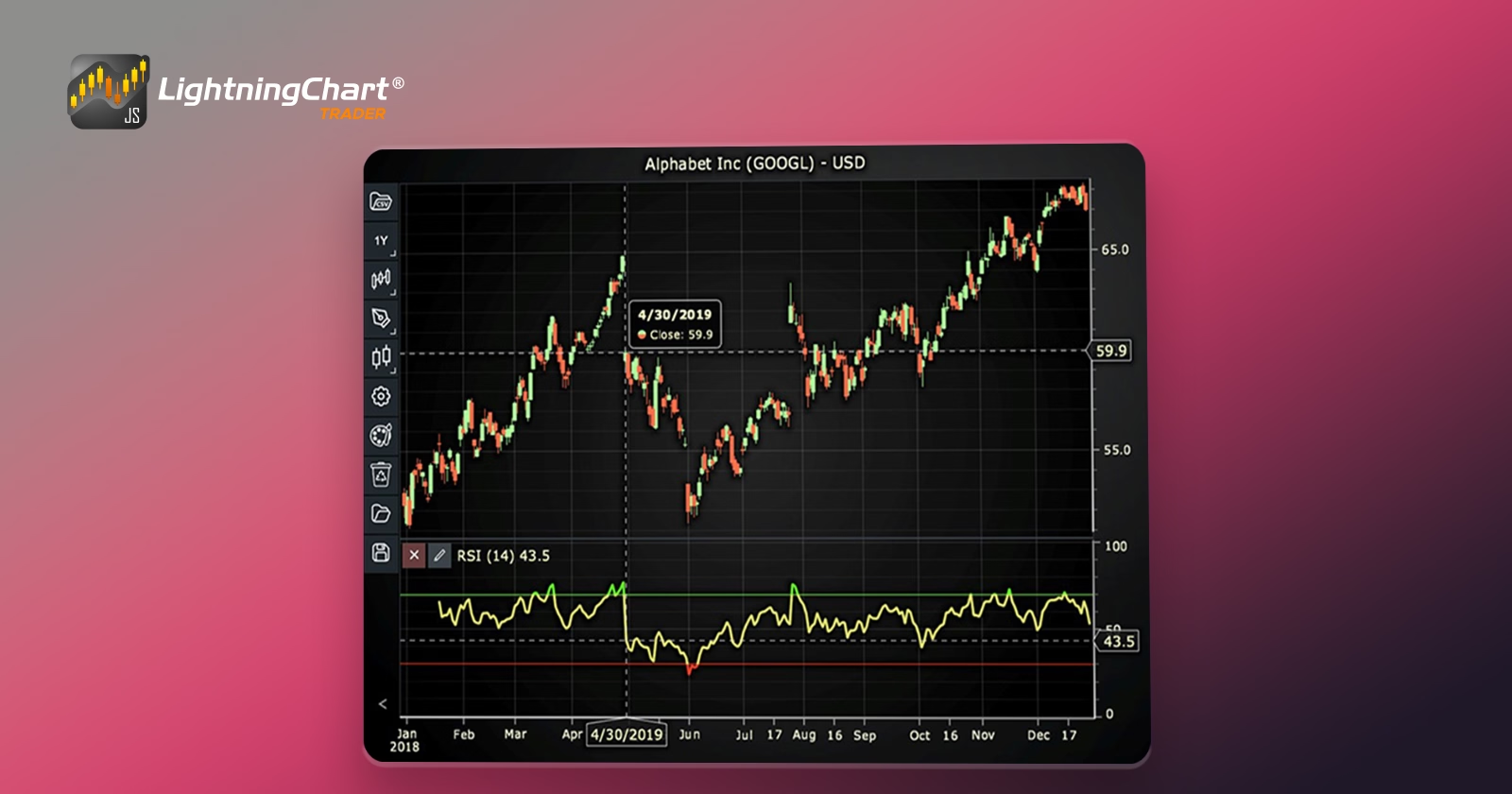
Relative Strength Index (RSI) Technical Indicator
The Relative Strength Index (RSI) is a momentum oscillator that measures the speed and change of price movements. Developed by J. Welles Wilder Jr., the RSI helps identify when a security is potentially overbought or oversold, making it a valuable tool for traders. It operates within a range of 0 to 100, providing signals that can help predict future market behavior.
RSI is categorized as a momentum oscillator because it reflects the velocity of price movements. Unlike trend-following indicators, which only align with the price’s direction, oscillators like RSI often diverge, signaling potential reversals. This characteristic makes RSI particularly useful in choppy, non-trending markets to identify possible entry and exit points.
Formula
The RSI is calculated using the following formula:

Where:
- RS (Relative Strength) is the average of n days’ up closes divided by the average of n days’ down closes.
Interpretation
The RSI provides a relative evaluation of the strength of a security’s recent price performance, thus constructing a metric of the stock’s upward and downward movements and its speed of movements. Typically, an RSI value over 70 indicates that a stock might be overbought, while an RSI below 30 could suggest an oversold condition.
Calculation Example
For a 14-day RSI, one would sum up all the gains over the past 14 days and divide by 14 to get the average gain. Similarly, sum all the losses and divide by 14 to get the average loss. These averages are then used in the RSI formula to find the RSI value, providing a snapshot of momentum and potential price reversals as below:
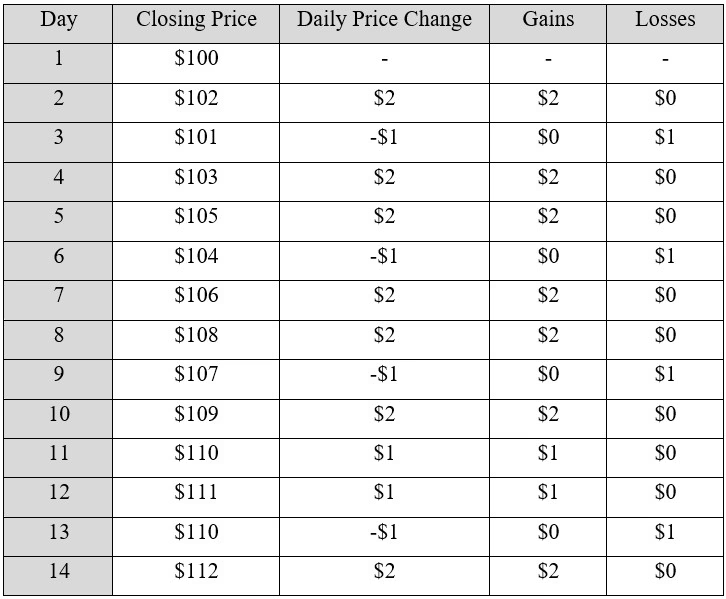
Step 1: Collect Price Data: First, you need 14 days of closing prices of the stock.
Step 2: Calculate Daily Price Changes: Next, calculate the daily price changes. For example, change from Day 1 to Day 2: 102 – 100 = $2.
Step 3: Divide Changes into Gains and Losses: Now, split these changes into gains and losses.
- Gains (positive changes): $2, $1, $4, …
- Losses (negative changes, as positive values): $1, $2, …
The results of the first 3 steps are presented as below:
Step 4: Calculate Average Gains and Losses: Sum all the gains and divide by 14 to find the average gain. Do the same for the losses:
- Average gain = Total gains over 14 days / 14
- Average loss = Total losses over 14 days / 14
Assuming the sum of gains is $35 and the sum of losses is $15:
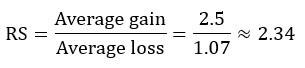
- Average gain = 35 / 14 = 2.5
- Average loss = 15 / 14 = 1.07
Step 5: Calculate the Relative Strength (RS): Relative Strength is the ratio of average gain to average loss:
Step 6: Calculate the RSI: Finally, plug the RS into the RSI formula:

This RSI value of 70.1 suggests that the stock is potentially becoming overbought, as it is above the typical threshold of 70, indicating that it may be time to consider selling to capitalize on recent price increases. This method provides a clear picture of how traders might use RSI to gauge market conditions and make trading decisions.
How to Create the Technical Indicator Using LC JS Trader
Step 1: Get LightningChart JS Trader
To begin, you’ll need access to LightningChart JS Trader. This library provides the tools necessary to create advanced technical indicators, including the Relative Strength Index Indicator. Visit the LightningChart JS Trader page to download the required components and review the documentation.
Step 2: Review the Interactive Example
LightningChart JS Trader includes interactive examples that demonstrate how to create custom technical indicators. Start by reviewing the documentation, focusing on how to integrate the Relative Strength Index Indicator into your chart setup. The interactive examples will guide you through the process of setting up the RSI Indicator, from importing the necessary modules to modify the chart settings.
Step 3: Code Explanation
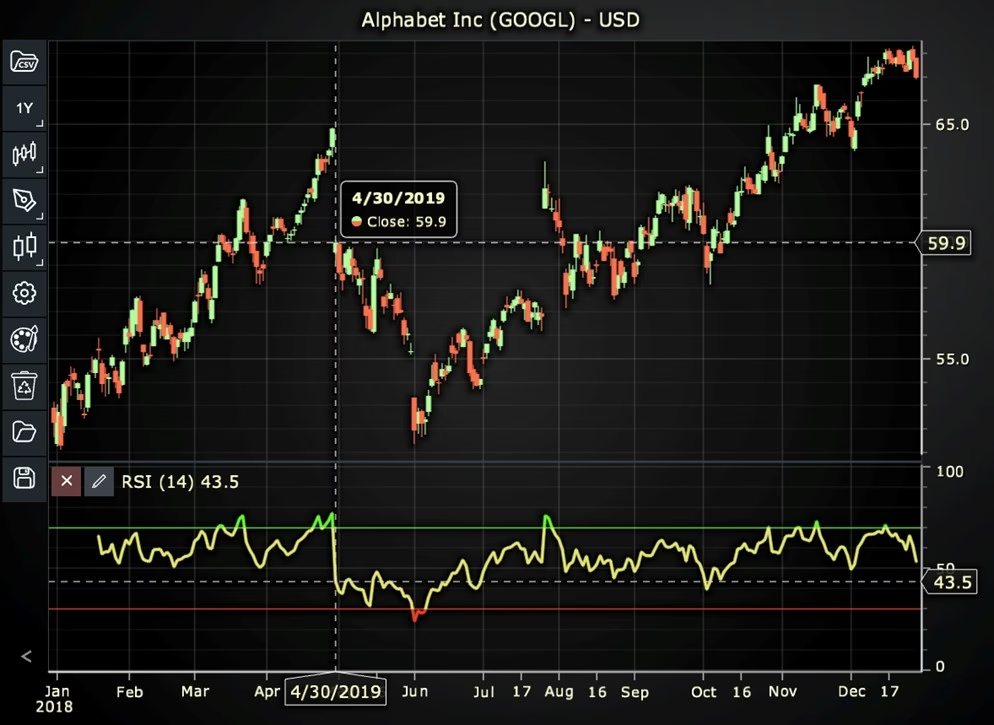
In this step, we will break down the code that creates the chart with the Relative Strength Index Indicator, as shown in the image, using LightningChart JS Trader. The code demonstrates how to initialize a trading chart, apply the RSI Indicator, and customize its appearance.
Here’s a detailed breakdown of each section:
A. Importing the Required Libraries:
   const lcjsTrader = require('@arction/lcjs-trader')
   const lcjs = require('@arction/lcjs')
const { Themes } = lcjs- lcjsTrader: This library provides access to the LightningChart JS Trader functionalities, allowing you to create advanced financial charts.
- lcjs: The main LightningChart JS library, used for general charting functionality.
- Themes: A property within lcjs that provides access to pre-built themes. In this case, we are using the darkGold theme to style the chart.
B. Initializing the Trading Chart:
   lcjsTrader.trader(TRADER_LICENSE).then(async (trader) => {
    // Create a trading chart.
const tradingChart = trader.tradingChart({ loadFromStorage: false, colorTheme: Themes.darkGold })trader(TRADER_LICENSE): Initializes the LightningChart JS Trader with the provided license key (TRADER_LICENSE). This is required to access the charting functionalities for financial data.
Note you can request a LightningChart JS Trader trial license, which is free.
tradingChart(): This function creates a trading chart with certain options.loadFromStorage: false: This disables the loading of previously stored chart data from local storage, ensuring a fresh chart setup.colorTheme: Themes.darkGold: This applies the darkGold theme to the chart, which influences the background color, gridlines, and other visual elements.
C. Adding and Customizing the Indicator
    // Add a Relative Strength Index indicator
    const rsi = tradingChart.indicators().addRelativeStrengthIndex()
    rsi.setPeriodCount(14)
    rsi.setSource(3)
    rsi.setThresholds(30, 70)
    rsi.setLineColor('#E3E571')
rsi.setLineWidth(3)addRelativeStrengthIndex(): RSI compares the internal strength of a single security by calculating the average momentum over a set number of days.
rsi.setPeriodCount(14): Sets the number of time periods (n) used to calculate the indicator.
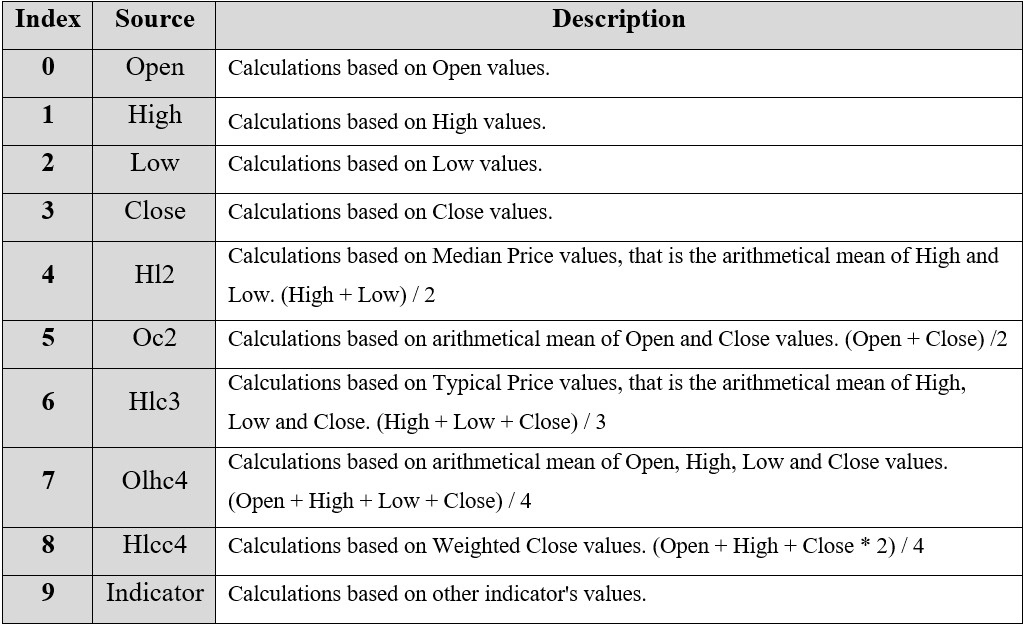
**rsi.setSource(3): Sets which values the indicator calculations are based on. In this case, calculations based on Close values.
rsi.setThresholds(30, 70): Sets the values for Low and High threshold levels to 30 and 70 (lowThreshold, highThreshold).
rsi.setLineColor('#E3E571'): Changes the color of the RSI line to a shade of yellow.
rsi.setLineWidth(3): Sets the line thickness of the indicator to 3 pixels.
D. Loading Data from a CSV File
    // Reading data from a file.
    await fetch(`${document.head.baseURI}examples/assets/0000/Alphabet Inc (GOOGL).csv`).then((res) => res.text()).then((text) => {
        tradingChart.readCsvString(text, 'Alphabet Inc (GOOGL)')
})fetch(): This function retrieves a CSV file containing historical data for Alphabet Inc. (GOOGL). The CSV file includes pricing information for the company’s stock, which is plotted on the chart.readCsvString(): This function reads the CSV data and interprets it as pricing data for Alphabet Inc. The second argument (‘Alphabet Inc (GOOGL)’) sets the label for the chart, as seen at the top of the chart image.
E. Setting the Currency for the Chart
    tradingChart.setCurrency('USD')
})setCurrency('USD'): This sets the currency of the chart to USD, ensuring that the pricing data is interpreted and displayed in US dollars.
** Enumeration Source in LC JS Trader:
To select which values the indicator calculations are based on.
Advantages and Limitations of the Indicator
Advantages
- The RSI can help identify trend reversals, corrections, and bearish or bullish conditions.
- It is easy to understand and apply, making it popular among new and experienced traders alike.
- RSI can be combined with other indicators to create robust trading strategies.
Limitations
- RSI may not provide accurate signals in a strong trending market where prices continue to reach new highs or lows.
- As with all technical indicators, RSI signals are occasionally false, potentially leading to misleading interpretations without additional analysis.
- The default period setting of 14 days can be too arbitrary and may not work best under all market conditions. Traders often adjust this setting to better fit the instrument’s volatility.
Conclusion
The Relative Strength Index (RSI) is a powerful tool that can help traders analyze market conditions and forecast price movements by comparing the magnitude of recent gains to recent losses.
However, it is essential to use it in conjunction with other analysis techniques and market information to enhance its effectiveness. By understanding and applying RSI effectively within the LightningChart JS Trader, traders can refine their trading strategies and potentially increase their market success.
LightningChart JS Trader is renowned for its exceptional performance and efficiency, capable of rendering vast volumes of data in real-time without lag.
This is particularly important when tracking market changes using indicators like RSI, where timely and accurate data representation can greatly influence trading decisions.
The environment’s advanced graphical capabilities allow for detailed and customizable visualizations, making it easier to identify RSI trends and potential buy or sell signals.
Moreover, LightningChart JS Trader supports interactive features, such as zooming and scrolling, which provide traders with the ability to delve deeper into the specifics of price movements and RSI calculations.
Continue learning with LightningChart

What Is LiDAR Data Visualization?
LiDAR Data Visualization The LiDAR method conveys another yet complex level of data visualization as it is widely used in demanding industries that require plotting, e.g., topographic or cartography 3D data. But the use of LiDAR goes further as it is also used...
Android
Written by a human | Updated on April 9th, 2025Android Charts Here's a new article I'm really excited about...this time, we will create an android charts data visualization application. For this application, we will work with Android Studio and LightningChart JS...

Create a JavaScript Scatter Plot
Written by a human | Updated on April 9th, 2025LightningChart JS This is a quick technical look into some interesting features of LightningChart JS XY charts and how to create an embedded scatter chat and add custom interactions to it using LightningChart JS....



If you have any questions, feel free to contact us!



©LightningChart Ltd 2026. All rights reserved.