



Using the Range Action Verification Index (RAVI) indicator for Fintech with LightningChart JS Trader
Article
Assisted by AI
Discover how the Range Action Verification Index (RAVI) helps fintech apps detect trending vs range-bound markets using moving average divergence.
Ahmad Omid
Data Science Developer

Introduction
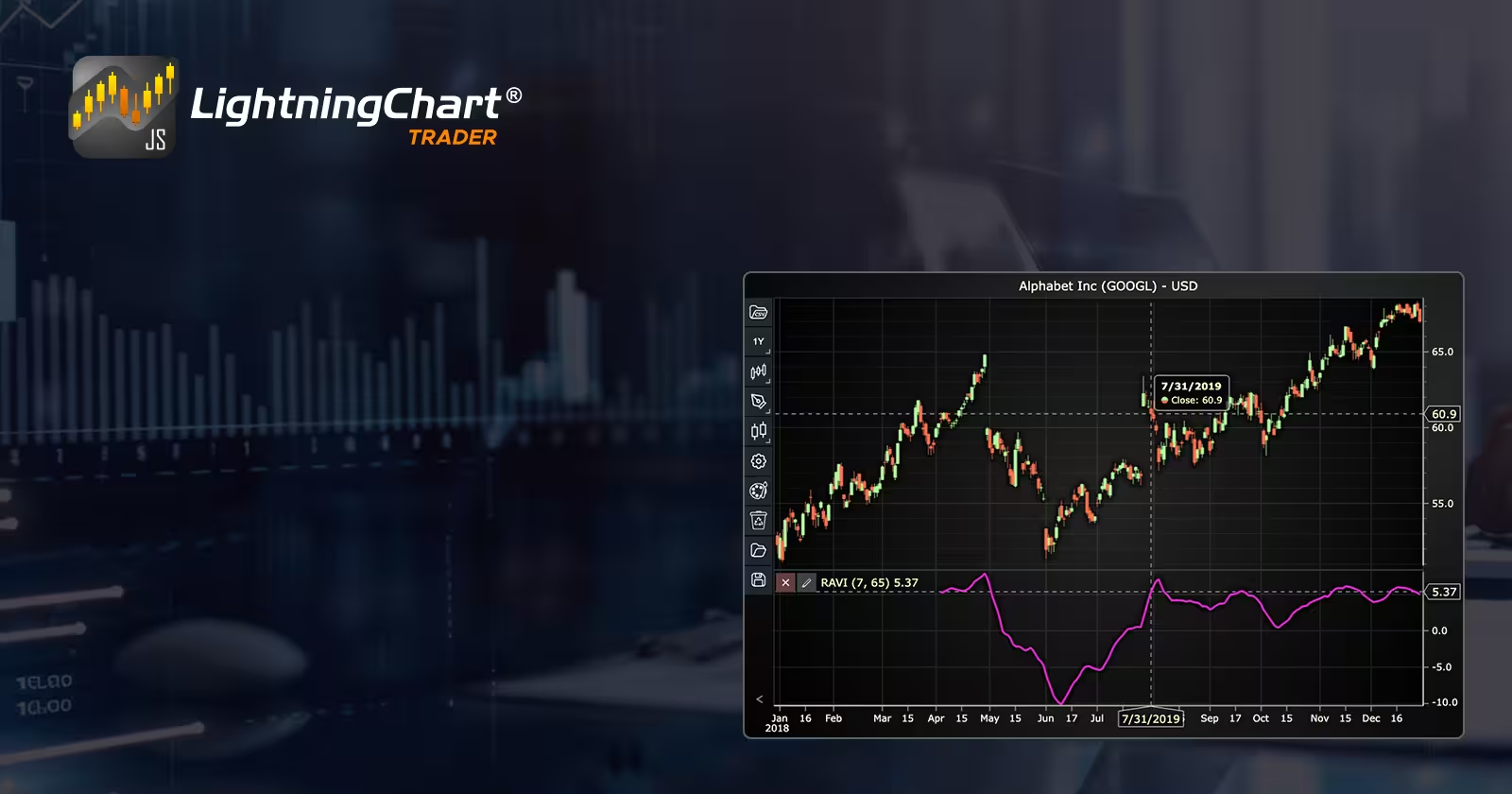
The Range Action Verification Index (RAVI) is a lesser-known yet practical technical analysis indicator used to detect whether a financial market is trending or range-bound. Built on the principles of moving averages, the RAVI indicator helps traders identify shifts in momentum by quantifying the divergence between short-term and long-term average prices. In a world of increasingly automated and data-driven fintech solutions, integrating RAVI into applications and trading tools can offer users a clearer view of market behavior.
Originally developed by Tushar Chande, the Range Action Verification Index was created to offer a simple, rules-based method to confirm the presence of a trend. Unlike more volatile or reactive trend indicators, RAVI focuses on reducing noise by working with smoothed price averages, allowing developers and traders to make better-informed decisions in both high-frequency and swing trading environments.
The RAVI indicator’s key features include its ability to:
- Clearly distinguish between trending and sideways markets.
- Be customized using different moving average periods depending on asset class or time frame.
- Provide visual clarity when plotted, which is especially useful for interactive charting tools in fintech applications.
With the rise of algorithmic trading and interactive trading apps, embedding indicators like RAVI using environments such as the LC JS Trader opens up powerful opportunities to empower retail traders and enhance fintech app functionality.
Formula
The Range Action Verification Index relies on two simple moving averages (SMA) of different lengths. Typically, a 7-period SMA and a 65-period SMA are used.
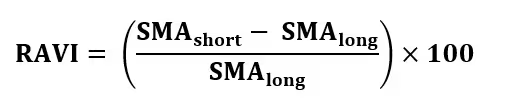
Where:
- SMAshort is the short-term moving average (e.g., 7-day)
- SMAlong is the long-term moving average (e.g., 65-day)
Interpretation:
The output of the Range Action Verification Index is a percentage that reflects the strength of a potential trend. Here’s how to read it:
- RAVI > 0.3% to 0.5%: The market may be entering or is already in a trending phase.
- RAVI < 0.3%: The market is likely range-bound or consolidating.
- Negative values are possible and may indicate downward trends or reversals.
Traders can adjust the threshold depending on market volatility or asset class. For fintech developers, these thresholds can be turned into configurable alerts or visual cues within an app.
Calculation Example
Let’s walk through a basic example using closing prices:
- Assume the 7-period SMA is 105.
- Assume the 65-period SMA is 100.
Then:

A 5% RAVI reading suggests a clear upward trend. If this data were plotted using the LC JS Trader, it would visually confirm the presence of momentum, allowing users to time entries or avoid sideways noise.
How to Create the Technical Indicator Using LC JS Trader
Step 1: Get LightningChart JS Trader
To begin, you’ll need access to LightningChart JS Trader. This specialized library contains all the necessary components for developing advanced technical indicators, including the Range Action Verification Index (RAVI) indicator. Visit the LightningChart JS Trader page to download the required components and review the documentation.
Step 2: Review the Interactive Example
LightningChart JS Trader includes interactive examples that demonstrate how to create custom technical indicators. These examples do more than just explain; they show you what works in practice.
Start with the documentation and focus on how to add the Range Action Verification Index (RAVI) indicator to your chart. The interactive examples take you through each step of the process, from importing the right modules to adjusting your chart settings for the best display.
Step 3: Code Explanation
In this step, we’ll examine the code that creates the chart with the Range Action Verification Index (RAVI) indicator, as shown in the image, using LightningChart JS Trader. The code reveals how to properly initialize a trading chart, apply the indicator, and customize its visual properties to enhance your technical analysis. Understanding these code components helps you see how the different parts work together to produce an effective analysis tool. This knowledge allows you to adapt the implementation for your specific trading requirements.
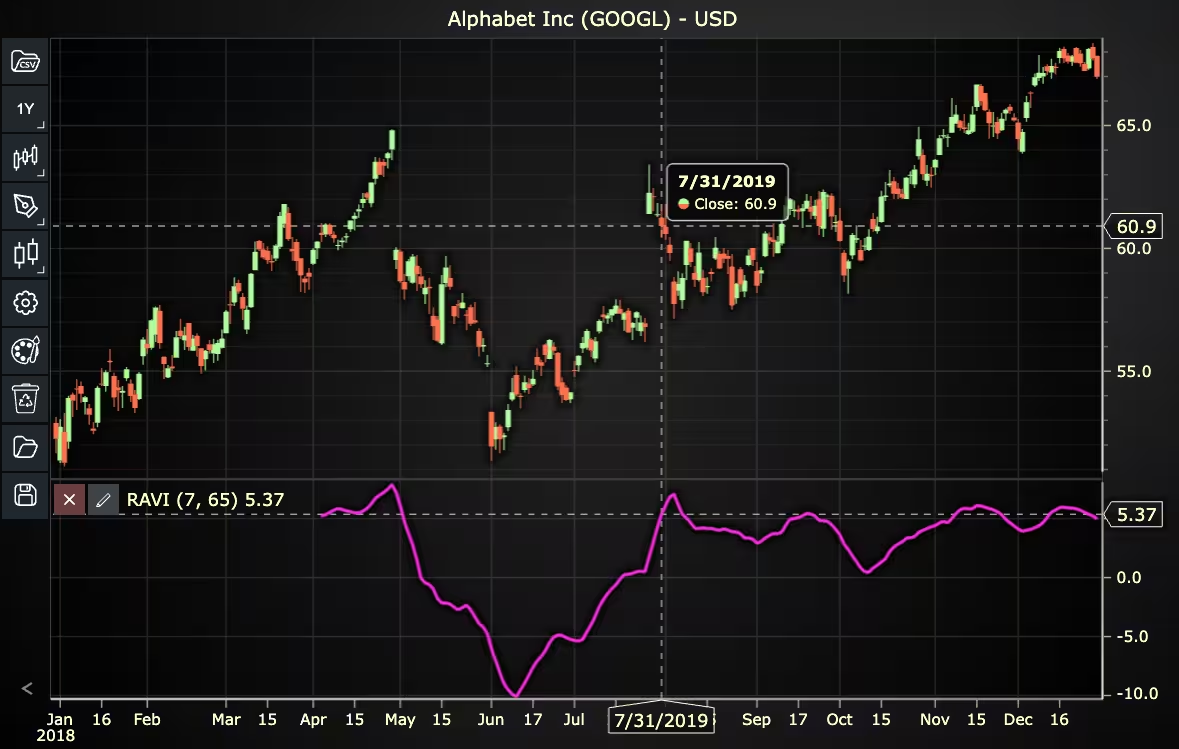
Here’s a detailed breakdown of each section:
A. Importing the Required Libraries:
const lcjsTrader = require('@lightningchart/lcjs-trader')
const lcjs = require('@lightningchart/lcjs')- lcjsTrader: This library provides access to the LightningChart JS Trader functionalities, allowing you to create advanced financial charts.
- lcjs: The main LightningChart JS library, used for general charting functionality.
B. Initializing the Trading Chart:
lcjsTrader.trader(TRADER_LICENSE).then(async (trader) => {
  // Create a trading chart.
  const tradingChart = trader.tradingChart({ loadFromStorage: false, colorTheme: Themes.darkGold })
trader(TRADER_LICENSE): Initializes the LightningChart JS Trader with the provided license key (TRADER_LICENSE). This is required to access the charting functionalities for financial data.
Note you can request a LightningChart JS Trader trial license, which is free.
tradingChart(): This function creates a trading chart with certain options.loadFromStorage: false: This disables the loading of previously stored chart data from local storage, ensuring a fresh chart setup.
C. Adding and Customizing the Indicator
// Add a Range Action Verification Index indicator
const ravi = tradingChart.indicators().addRangeActionVerificationIndex()
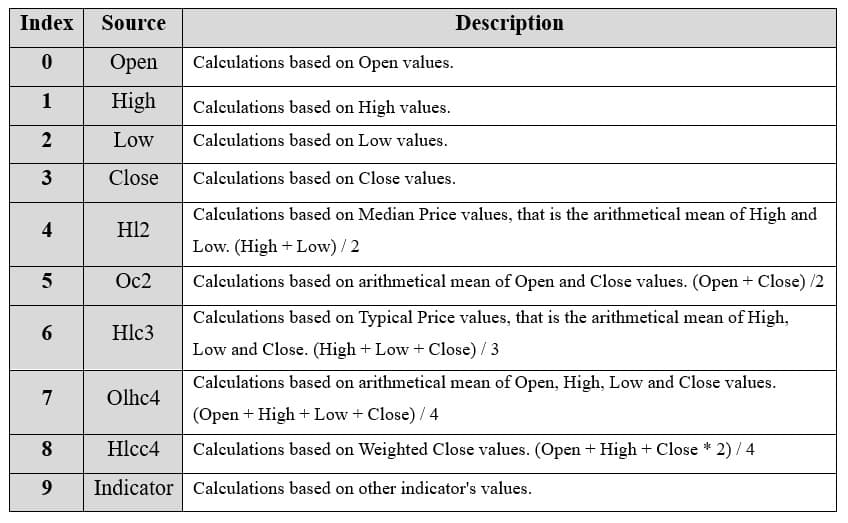
ravi.setSource(3)
ravi.setMovingAverageTypes(2, 2)
ravi.setPeriodCounts(7, 65)
ravi.setLineColor('#FA29DE')
ravi.setLineWidth(3)addRangeActionVerificationIndex(): It uses moving averages of different lengths to determine whether a market is trending.ravi.setSource(3): Sets the values that the indicator calculations are based on. In this case, calculations are based on Close values.ravi.setMovingAverageTypes(2, 2): Sets the types of short and long moving averages. In this case, 2 represents the Simple Moving Average (SMA).setPeriodCounts(7, 65): Sets the number of short and long time periods used to calculate the indicator (shortPeriodCount, longPeriodCount).setLineColor('#FA29DE'): Sets the color of the RAVI line to pink.setLineWidth(3): Sets the line width of the indicator to 3 pixels.
D. Loading Data from a CSV File
    // Reading data from a file.
    await fetch(`${document.head.baseURI}examples/assets/0000/Alphabet Inc (GOOGL).csv`).then((res) => res.text()).then((text) => {
        tradingChart.readCsvString(text, 'Alphabet Inc (GOOGL)')
})fetch(): This function retrieves a CSV file containing historical data for Alphabet Inc. (GOOGL). The CSV file includes pricing information for the company’s stock, which is plotted on the chart.readCsvString(): This function reads the CSV data and interprets it as pricing data for Alphabet Inc. The second argument (‘Alphabet Inc (GOOGL)’) sets the label for the chart, as seen at the top of the chart image.
E. Setting the Currency for the Chart
    tradingChart.setCurrency('USD')
})setCurrency('USD'): This sets the currency of the chart to USD, ensuring that the pricing data is interpreted and displayed in US dollars.
Enumeration Source in LC JS Trader:
To select which values the indicator calculations are based on.
Enumeration of Moving Average Types in LC JS Trader:
- Exponential Moving Average (EMA): 0
- None: 1 (No moving average applied)
- Simple Moving Average (SMA): 2
- Time Series Moving Average (TSMA): 3
- Triangular Moving Average (TMA): 4
- Variable Moving Average (VMA): 5
- Variable Index Dynamic Average (VIDYA): 6
- Volume Weighted Moving Average (VWMA): 7
- Weighted Moving Average (WMA): 8
- Welles Wilder’s Smoothing (WWS): 9
Advantages and Limitations of the Indicator
The Range Action Verification Index has several advantages, especially when used in fintech environments that demand speed, clarity, and adaptability. On the positive side, RAVI is easy to implement and interpret. It doesn’t require complex mathematical models, making it ideal for interactive charting libraries like LC JS Trader. The indicator is also versatile across assets and timeframes, making it useful for everything from equities to forex and crypto.
However, there are limitations. Since RAVI is based on moving averages, it inherits the lagging nature of those averages. It may not react quickly enough in fast-moving or highly volatile markets. Additionally, its thresholds may need fine-tuning across different asset classes; what signals a trend in one market might be noise in another.
Moreover, the RAVI indicator doesn’t provide directional insight on its own; it must be combined with price action analysis or other indicators for confirmation. For developers, this means RAVI is best used as part of a broader technical indicator toolkit.
Conclusion
The Range Action Verification Index (RAVI) is a straightforward but effective tool for identifying whether a market is trending or not. Its simplicity, reliability, and compatibility with moving averages make it an excellent candidate for integration into fintech applications and trading environments. By leveraging RAVI through LightningChart JS Trader, developers can enhance the analytical capabilities of their trading and help users navigate complex markets with greater clarity.
Continue learning with LightningChart

Trend Lines in Trading
Trend lines are among the simplest yet most powerful tools in technical analysis. They help traders visualize market direction, identify potential support and resistance levels, and make more informed trading decisions. Despite their simplicity, trend lines remain a...

Best Python Charting Library in 2026
Python's charting ecosystem is large, overlapping, and regularly misunderstood. Most comparison guides stop at Matplotlib, Plotly, and Seaborn. This one goes further: it covers what happens when your datasets grow large, your update rates increase, or your chart types...

Best TradingView Charting Library Alternative
TradingView's charting libraries are the most visible option for fintech developers. Visibility is not the same as capability. This guide is for developers who have hit the wall on candle count limits, watermark restrictions, branding requirements, real-time...



If you have any questions, feel free to contact us!



©LightningChart Ltd 2026. All rights reserved.





