





Price Volume Trend Indicator for Stock Trading
Article
Learn how to integrate the Price Volume Trend Indicator in your fintech software projects using LightningChart JS Trader.
Ahmad Omid
Data Science Developer


Introduction to Price Volume Trend Indicator
The Price Volume Trend Indicator (PVT) is a technical analysis tool used in stock trading to combine price and volume data. It evaluates the relationship between the percentage change in a stock’s price and the associated trading volume.
By incorporating both elements, the price and volume trend indicator offers a more nuanced view of market movements, helping traders confirm the strength of price trends or detect potential reversals.
What is the Price Volume Trend Indicator About?
The price volume trend indicator calculates a cumulative total of trading volumes adjusted for the percentage change in stock prices. It serves as a barometer for market sentiment, with increases in PVT indicating buying pressure and decreases signaling selling pressure. The indicator is dynamic and updates with every price movement, making it ideal for analyzing trends in real time.
How is It Used in Trading?
The price volume trend indicator strategy involves interpreting PVT trends alongside price charts. Traders look for confirmations or divergences:
- Confirmation: When the PVT moves in the same direction as the stock price, it validates the trend.
- Divergence: If the PVT diverges from the price trend, it may signal a potential reversal. For instance, a rising price with a falling PVT could indicate weakening buying pressure.
How the Price Volume Trend Indicator Affects Stock Prices
The volume price trend indicator provides insight into the strength or weakness of price movements:
- Bullish Trends: A rising PVT coupled with increasing stock prices suggests strong buying interest, reinforcing the bullish momentum.
- Bearish Trends: A falling PVT alongside declining prices indicates strong selling pressure, supporting the bearish trend.
The indicator is also instrumental in identifying volume price trend divergence, which can highlight discrepancies between volume and price dynamics. Such divergences often precede significant market movements.
Formula
The formula for the price volume trend indicator is:

Where:
- Closecurrent: The stock’s current closing price.
- Closeprevious: The previous closing price.
- Volume: The trading volume for the period.
The result is a cumulative value that reflects the weighted contribution of price changes and trading volumes over time.
Interpretation
- Rising PVT: signals that price increases are supported by higher volumes, indicating strong market sentiment.
- Falling PVT: suggests declining prices accompanied by heavy trading volumes, often a bearish signal.
- Flat PVT: If PVT remains stagnant despite price fluctuations, it may indicate low conviction in the market.
Key Components
- Volume-Adjusted Price Movement: The percentage change in price determines the volume’s contribution to the PVT.
- Cumulative Nature: The indicator aggregates changes over time, offering a long-term view of price-volume dynamics.
- Real-Time Updates: As new data arrives, the PVT value changes, allowing traders to monitor shifts instantly.
How to Create the Technical Indicator Using LC JS Trader
Step 1: Get LightningChart JS Trader
To begin, you’ll need access to LightningChart JS Trader. This library provides the tools necessary to create advanced technical indicators, including the Price Volume Trend Indicator. Visit the LightningChart JS Trader page to download the required components and review the documentation.
Step 2: Review the Interactive Example
LightningChart JS Trader includes interactive examples that demonstrate how to create custom technical indicators. Start by reviewing the documentation, focusing on how to integrate the Price Volume Trend Indicator into your chart setup. The interactive examples will guide you through the process of setting up the PVT Indicator, from importing the necessary modules to modify the chart settings.
Step 3: Code Explanation
In this step, we will break down the code that creates the chart with the Price Volume Trend Indicator, as shown in the image, using LightningChart JS Trader. The code demonstrates how to initialize a trading chart, apply the PVT Indicator, and customize its appearance.

Here’s a detailed breakdown of each section:
A. Importing the Required Libraries:
   const lcjsTrader = require('@arction/lcjs-trader')
   const lcjs = require('@arction/lcjs')
const { Themes } = lcjs- lcjsTrader: This library provides access to the LightningChart JS Trader functionalities, allowing you to create advanced financial charts.
- lcjs: The main LightningChart JS library, used for general charting functionality.
- Themes: A property within lcjs that provides access to pre-built themes. In this case, we are using the darkGold theme to style the chart.
B. Initializing the Trading Chart:
   lcjsTrader.trader(TRADER_LICENSE).then(async (trader) => {
    // Create a trading chart.
const tradingChart = trader.tradingChart({ loadFromStorage: false, colorTheme: Themes.darkGold })trader(TRADER_LICENSE): Initializes the LightningChart JS Trader with the provided license key (TRADER_LICENSE). This is required to access the charting functionalities for financial data.
Note you can request a LightningChart JS Trader trial license, which is free.
tradingChart(): This function creates a trading chart with certain options.loadFromStorage: false: This disables the loading of previously stored chart data from local storage, ensuring a fresh chart setup.colorTheme: Themes.darkGold: This applies the darkGold theme to the chart, which influences the background color, gridlines, and other visual elements.
C. Adding and Customizing the Indicator
    // Add a Price Volume Trend  Indicator
    const pvt = tradingChart.indicators().addPriceVolumeTrend()
    pvt.setSource(3)
    pvt.setLineColor('#33FF55')
pvt.setLineWidth(3)addPriceVolumeTrend(): It uses actual trading volumes to confirm or invalidate the strength of a price trend. PVT takes the percentual change in price into account when calculating its value.
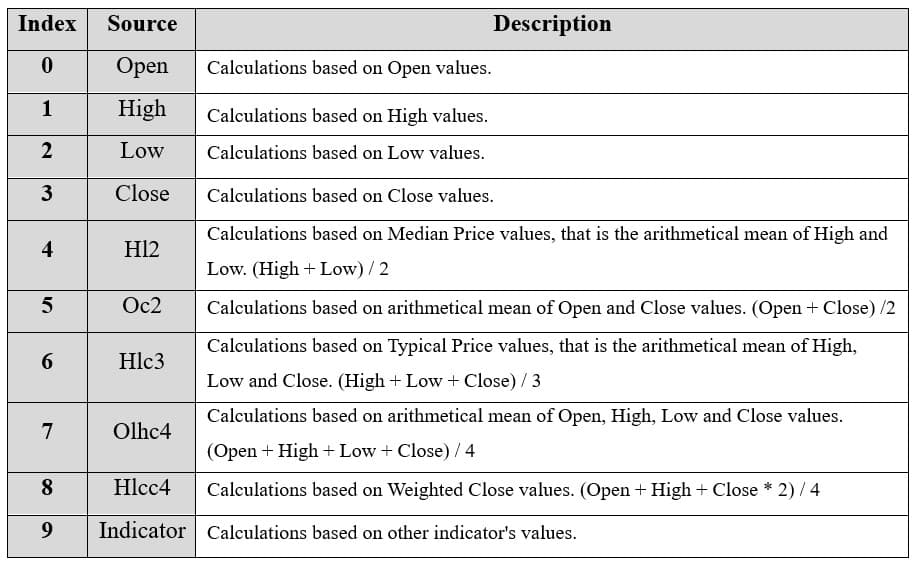
**pvt.setSource(3): Values to base the calculations on. In this case, 3 represents the close price.
pvt.setLineColor('#33FF55'): Changes the color of the PVT line to a green. This enhances the visual distinction of the indicator on the chart.
pvt.setLineWidth(3): Sets the line thickness of the PVT to 3 pixels. This makes the line more prominent and easier to observe during analysis.
D. Loading Data from a CSV File
    // Reading data from a file.
    await fetch(`${document.head.baseURI}examples/assets/0000/Alphabet Inc (GOOGL).csv`).then((res) => res.text()).then((text) => {
        tradingChart.readCsvString(text, 'Alphabet Inc (GOOGL)')
})fetch(): This function retrieves a CSV file containing historical data for Alphabet Inc. (GOOGL). The CSV file includes pricing information for the company’s stock, which is plotted on the chart.readCsvString(): This function reads the CSV data and interprets it as pricing data for Alphabet Inc. The second argument (‘Alphabet Inc (GOOGL)’) sets the label for the chart, as seen at the top of the chart image.
E. Setting the Currency for the Chart
    tradingChart.setCurrency('USD')
})setCurrency('USD'): This sets the currency of the chart to USD, ensuring that the pricing data is interpreted and displayed in US dollars.
** Enumeration Source in LC JS Trader:
To select which values the indicator calculations are based on.
Advantages and Limitations of the Indicator
The Price Volume Trend Indicator (PVT) offers several advantages that make it a valuable tool for traders. One of its primary benefits is its ability to confirm price trends by incorporating volume data.
When price movements align with corresponding changes in the PVT, it validates the trend’s strength, giving traders confidence in their decisions. Additionally, the indicator is effective in identifying volume price trend divergences, which can signal potential reversals before they appear in the price chart.
This predictive quality allows traders to act proactively, improving their timing in both entering and exiting trades. The PVT’s versatility also extends to various asset classes, including stocks, commodities, and currencies, as long as volume data is available.
Despite its strengths, the volume price trend indicator has some limitations. One notable drawback is its lagging nature, which stems from its cumulative calculation method.
This delay may cause the PVT to respond slowly to abrupt market changes, potentially missing short-term trading opportunities. Additionally, the indicator is highly sensitive to volume spikes, which can distort its readings. For instance, an unusually high volume on a single day might cause a sharp jump or drop in the PVT, creating a false signal that doesn’t accurately reflect the market’s broader trend.
Lastly, the accuracy of the PVT depends on the quality and reliability of the volume data. Inaccurate or incomplete data can compromise the indicator’s effectiveness, leading to poor trading decisions.
Conclusion
The Price Volume Trend Indicator (PVT) is a powerful tool for traders, offering insights into the relationship between price movements and trading volumes. By combining these two critical aspects of market behavior, the indicator helps validate trends and identify potential reversals.
Its ability to detect volume price trend divergence can give traders an edge by highlighting shifts in market sentiment that may not yet be visible on price charts. However, like any technical analysis tool, the PVT has its limitations, such as sensitivity to volume spikes and a lagging response to sudden market changes. Therefore, it is most effective when used alongside other indicators and strategies.
Incorporating LightningChart JS Trader Interactive Examples elevates the analysis by providing intuitive, interactive visualizations for implementing and experimenting with the PVT. LightningChart’s advanced charting capabilities allow traders to create custom visual setups, making it easier to test strategies and gain deeper insights into the market.
The ability to seamlessly integrate real-time data with dynamic charting ensures that traders can effectively monitor and respond to PVT trends as they unfold, enhancing their decision-making processes.
Continue learning with LightningChart
The Head and Shoulders Pattern in Technical Analysis
The Head and Shoulders Pattern in Technical Analysis The Head and Shoulders Pattern in Technical Analysis The Head and Shoulders pattern is one of the most recognized and widely used chart patterns in technical analysis. It is considered a reliable reversal pattern...
Best Telerik Charts Alternative in 2026: GPU Performance for WPF, WinForms, and Web
Telerik from Progress is a comprehensive UI component suite covering WPF, WinForms, ASP.NET, Blazor, and JavaScript. The charting components: RadChartView for WPF and WinForms, and Kendo UI Charts for web and Blazor, arrive bundled with the suite purchase. For teams...
Streaming Data Visualization with WebSockets (2026): The Complete Tutorial
Every WebSocket tutorial on the internet shows the same thing: a server sends a random number every second, a chart updates. It works. The demo looks great. Then you deploy to production, your IoT sensors push 800 updates per second across twelve channels, and the...





If you have any questions, feel free to contact us!
©LightningChart Ltd 2026. All rights reserved.