








A Complete Guide to Negative Volume Index Indicator for Stock Trading
Article
Learn how to implement the Negative Volume Index Indicator in your fintech software using LightningChart JS Trader.
Ahmad Omid
Data Science Developer


Introduction to Negative Volume Index Indicator
The Negative Volume Index (NVI) is a technical indicator that provides insights into market trends by focusing on days when trading volume decreases compared to the previous day. It is rooted in the idea that “smart money” (institutional investors) tends to be active during quieter trading sessions, whereas “not-so-smart money” (retail investors) dominates during high-volume days.
What is the Negative Volume Index Indicator About?
The NVI emphasizes the changes in stock price during periods of reduced market activity, effectively filtering out the noise generated by high-volume trading days. By tracking price movements when trading volume is lower, the NVI attempts to highlight the activities of informed investors who quietly accumulate or distribute stocks.
How is the Negative Volume Index Indicator Used in Trading?
The NVI is often employed as a contrarian indicator, enabling traders to gauge the potential direction of a stock’s price by understanding the behavior of institutional investors. Many traders use the NVI in conjunction with other indicators, such as the Positive Volume Index (PVI) or moving averages, to confirm trends or identify potential reversals.
Negative Volume Index Indicator in Trading
The Negative Volume Index indicator is pivotal in understanding market psychology and anticipating stock price movements.
How Negative Volume Index Indicator Affects Stock Prices
The NVI does not directly influence stock prices but rather provides a lens through which price movements during low-volume periods can be interpreted. Institutional investors tend to operate strategically, accumulating or distributing positions during less active trading sessions. By analyzing the NVI:
- Rising NVI: Indicates institutional accumulation, suggesting a bullish trend.
- Falling NVI: May signal institutional distribution, hinting at a bearish trend.
Formula
The NVI is calculated as follows:
- Determine whether the current day’s trading volume is less than the previous day’s.
- If yes, calculate the NVI:

- If no, the NVI remains unchanged.
Interpretation
The NVI serves as a cumulative index that adjusts based on price changes during low-volume days.
- A rising NVI typically reflects positive price changes driven by institutional investors.
- A declining NVI may indicate institutional selling or bearish sentiment.
Key Components
- Volume: The primary factor determining whether the NVI will change.
- Price: Used to measure the rate of change during low-volume days.
- Cumulative Nature: The NVI builds over time, providing a historical perspective of trends.
Calculations Example
Here’s a step-by-step example to calculate the Negative Volume Index (NVI):
Assumptions:
- Previous NVI: 1,000
- Price Today: $105
- Price Yesterday: $100
- Volume Today: 800,000 shares
- Volume Yesterday: 1,000,000 shares
Step 1: Determine if Volume Today < Volume Yesterday
Compare the volume for today and yesterday:
- Volume Today (800,000) < Volume Yesterday (1,000,000)
Since the trading volume has decreased, the NVI will be recalculated.
Step 2: Calculate the Percentage Price Change
The formula for price change is:

Substitute the values:
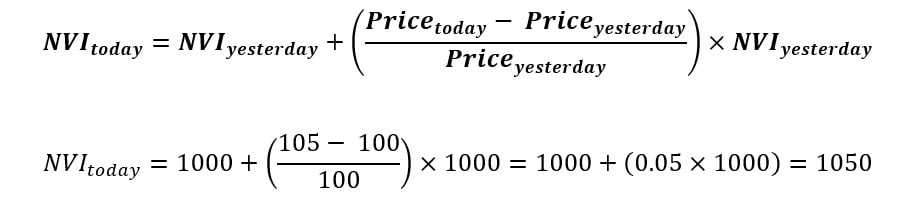
Step 4: Interpretation
- The new NVI is 1,050, reflecting a 5% increase due to the price change on a low-volume day.
- This increase suggests that “smart money” (institutional investors) may be accumulating the stock during quieter trading activity.
If Volume Today ≥ Volume Yesterday
Had the trading volume today been greater than or equal to the volume yesterday, the NVI would have remained unchanged at 1,000.
How to Create the Technical Indicator Using LC JS Trader
Step 1: Get LightningChart JS Trader
To begin, you’ll need access to LightningChart JS Trader. This library provides the tools necessary to create advanced technical indicators, including the Negative Volume Index Indicator. Visit the LightningChart JS Trader page to download the required components and review the documentation.
Step 2: Review the Interactive Example
LightningChart JS Trader includes interactive examples that demonstrate how to create custom technical indicators. Start by reviewing the documentation, focusing on how to integrate the Negative Volume Index Indicator into your chart setup. The interactive examples will guide you through the process of setting up the NVI Indicator, from importing the necessary modules to modify the chart settings.
Step 3: Code Explanation
In this step, we will break down the code that creates the chart with the Negative Volume Index Indicator, as shown in the image, using LightningChart JS Trader. The code demonstrates how to initialize a trading chart, apply the NVI Indicator, and customize its appearance.

Here’s a detailed breakdown of each section:
A. Importing the Required Libraries:
   const lcjsTrader = require('@arction/lcjs-trader')
   const lcjs = require('@arction/lcjs')
const { Themes } = lcjs- lcjsTrader: This library provides access to the LightningChart JS Trader functionalities, allowing you to create advanced financial charts.
- lcjs: The main LightningChart JS library, used for general charting functionality.
- Themes: A property within lcjs that provides access to pre-built themes. In this case, we are using the darkGold theme to style the chart.
B. Initializing the Trading Chart:
   lcjsTrader.trader(TRADER_LICENSE).then(async (trader) => {
    // Create a trading chart.
const tradingChart = trader.tradingChart({ loadFromStorage: false, colorTheme: Themes.darkGold })trader(TRADER_LICENSE): Initializes the LightningChart JS Trader with the provided license key (TRADER_LICENSE). This is required to access the charting functionalities for financial data.
Note you can request a LightningChart JS Trader trial license, which is free.
tradingChart(): This function creates a trading chart with certain options.loadFromStorage: false: This disables the loading of previously stored chart data from local storage, ensuring a fresh chart setup.colorTheme: Themes.darkGold: This applies the darkGold theme to the chart, which influences the background color, gridlines, and other visual elements.
C. Adding and Customizing the Indicator
    // Add a Negative Volume Index indicator
    const nvi = tradingChart.indicators().addNegativeVolumeIndex()
    nvi.setSource(3)
    nvi.setLineColor('#F0D528')
nvi.setLineWidth(3)addNegativeVolumeIndex(): NVI tracks volume as it decreases from the previous day. Since NVI shows the actions of the majority of the traders, it is usually used as a contrarian indicator; smart money is active on quiet days and not-so-smart money on busy days.**nvi.setSource(3): Values to base the calculations on. In this case, 3 represents the close price.nvi.setLineColor('#F0D528'): Changes the color of the NVI line to yellow. This enhances the visual distinction of the indicator on the chart.nvi.setLineWidth(3): Sets the line thickness of the NVI to 3 pixels. This makes the line more prominent and easier to observe during analysis.
D. Loading Data from a CSV File
    // Reading data from a file.
    await fetch(`${document.head.baseURI}examples/assets/0000/Alphabet Inc (GOOGL).csv`).then((res) => res.text()).then((text) => {
        tradingChart.readCsvString(text, 'Alphabet Inc (GOOGL)')
})fetch(): This function retrieves a CSV file containing historical data for Alphabet Inc. (GOOGL). The CSV file includes pricing information for the company’s stock, which is plotted on the chart.readCsvString(): This function reads the CSV data and interprets it as pricing data for Alphabet Inc. The second argument (‘Alphabet Inc (GOOGL)’) sets the label for the chart, as seen at the top of the chart image.
E. Setting the Currency for the Chart
    tradingChart.setCurrency('USD')
})setCurrency('USD'): This sets the currency of the chart to USD, ensuring that the pricing data is interpreted and displayed in US dollars.
** Enumeration Source in LC JS Trader: To select which values the indicator calculations are based on.

Advantages and Limitations of the Indicator
Advantages
The Negative Volume Index indicator stands out for its ability to focus on the activities of institutional investors, often referred to as “smart money.” By analyzing price movements during low-volume days, it offers insights that are typically overlooked by conventional indicators.
This makes it particularly useful for identifying hidden opportunities or confirming long-term trends. Additionally, the contrarian nature of the NVI provides a fresh perspective, allowing traders to anticipate potential market reversals when most participants might not be paying attention. Furthermore, the NVI works effectively in combination with other tools like moving averages or the Positive Volume Index, enabling a more robust trading strategy.
Limitations
Despite its advantages, the NVI is not without its challenges. One major limitation is its lagging nature; as a cumulative indicator, it may not react promptly to sudden price changes, reducing its effectiveness for short-term trading.
Another issue arises from its reliance on trading volume. External factors, such as market anomalies or news-driven spikes, can distort volume data, potentially leading to inaccurate readings.
Lastly, interpreting the NVI signals can be subjective and often requires a complementary analysis to validate trends or signals. For these reasons, the NVI should be used as part of a broader analytical framework rather than as a standalone tool.
Conclusion
The Negative Volume Index indicator is a powerful tool for understanding the behavior of institutional investors during low-volume periods. Its contrarian nature makes it particularly useful for identifying trends that are not immediately visible on high-volume trading days.
By combining the NVI with other indicators and analysis methods, traders can gain a comprehensive understanding of market trends and improve their decision-making processes. While the NVI has its limitations, its ability to track smart money movements provides valuable insights for stock trading.
When implemented using LightningChart JS Trader, the NVI can be visualized effectively, enabling traders to experiment with real-time data and refine their strategies. Integrating this indicator into your trading toolkit can offer a new perspective on market dynamics and enhance your trading outcomes.
Continue learning with LightningChart
The LightningChart JS Agent Skill: Give Any AI Coding Agent Accurate Charting Knowledge in 60 Seconds
An agent skill is a folder of instructions your AI coding tool picks up automatically. This one teaches any compatible agent how to use LightningChart JS correctly, before it writes a single line of chart code. Agent skills are a relatively new concept and the...
Why AI Coding Agents Get Data Visualization Wrong, and What to Do About It
AI coding assistants are getting good at most parts of application development. Data visualization is one of the areas where they still have a consistent, predictable failure mode. This article explains the mechanics of why it happens and the practical fix. I spent a...
Andrews’ Pitchfork in Technical Analysis
Andrews' Pitchfork is one of the most respected technical analysis tools used by traders to identify potential support and resistance levels, trend direction, and future price paths. Developed by Dr. Alan H. Andrews, the indicator is based on the principle that prices...



If you have any questions, feel free to contact us!



©LightningChart Ltd 2026. All rights reserved.