








Market Facilitation Index as a Trading Strategy
Article
Learn how to integrate the Market Facilitation Index into your fintech software using LightningChart JS Trader for technical analysis.
Ahmad Omid
Data Science Developer

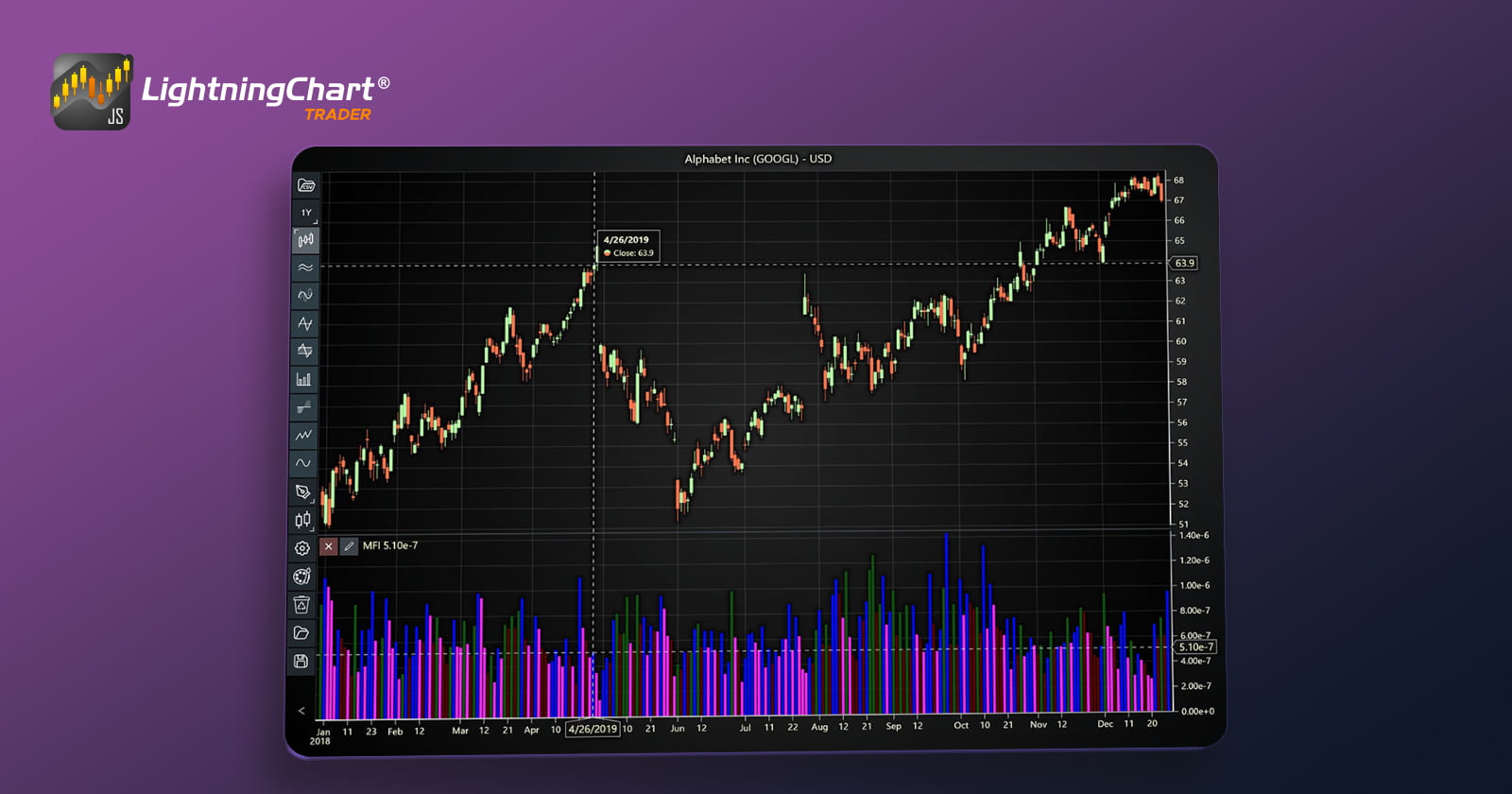
Introduction to Market Facilitation Index Indicator
The Market Facilitation Index (MFI), created by Bill Williams, is a technical indicator that measures the market’s willingness to move the price. It combines price range and volume to reveal the efficiency of market movements. Unlike other indicators that focus solely on price or volume, the MFI indicator emphasizes their interplay, making it particularly insightful for traders seeking to understand market behavior.
The indicator is displayed as a histogram with color-coded bars, each representing the relationship between the MFI value and trading volume during a specific period. These colors predefined and unmodifiable help traders quickly interpret market conditions, offering a visual summary of price dynamics and market sentiment.
How Is It Used in Trading?
The Market Facilitation Index indicator is most commonly applied in forex markets but is equally effective for other asset classes. It enables traders to:
- Assess whether market participants are driving price movements or if external factors are at play.
- Identify potential trend reversals or continuations.
- Recognize periods of consolidation or volatility, which can precede significant market moves.
By interpreting the color-coded histogram, traders can make informed decisions about entering or exiting trades based on the market’s current state.
Market Facilitation Index Indicator in Trading
The MFI indicator serves as a barometer for the ease of price movement relative to volume. Its histogram consists of four distinct colors, each reflecting a unique relationship between the Market Facilitation Index value and trading volume:
- Green Bar:
- MFI and volume both increase.
- Indicates strong market momentum, often signaling the beginning or continuation of a trend.
- Represents a high level of trader participation.
- Brown Bar:
- MFI decreases while volume increases.
- Suggests indecision or a potential trend reversal.
- Implies high market activity without significant price movement.
- Blue Bar:
- MFI and volume both decrease.
- Reflects low interest and liquidity in the market, indicating consolidation or inactivity.
- Pink Bar:
- MFI increases while volume decreases.
- Suggests price movements driven by thin trading, often signaling a lack of confidence or manipulation.
By analyzing these colors, traders gain deeper insights into whether price changes are supported by strong volume or if they occur under low market participation, which can be a red flag for volatility or instability.
Formula
The Market Facilitation Index is calculated using the formula:

Where:
- High Price: The highest price during the session.
- Low Price: The lowest price during the session.
- Volume: The total volume traded during the session.
The resulting MFI value quantifies how efficiently the market moves the price relative to trading volume.
Interpretation
The MFI’s histogram bars, coupled with their color-coding, allow traders to interpret market conditions quickly:
- High MFI with high volume (green): A sign of active markets with strong trends.
- High MFI with low volume (pink): Suggests price movement with weak market participation, warranting caution.
- Low MFI with high volume (brown): Indicates choppy or indecisive markets.
- Low MFI with low volume (blue): Reflects periods of consolidation or inactivity.
Key Components
- Price Range: The difference between the high and low prices, representing the extent of price movement.
- Volume: Acts as a validation metric, showing the level of market participation.
- Color Coding: Provides an intuitive way to interpret the relationship between MFI values and trading volume.
These components together give traders a snapshot of the market’s willingness to move the price and the strength behind such movements.
Example Scenario:
Let’s assume the following data for a specific trading session:
- High Price: $150
- Low Price: $145
- Volume: 10,000
Step-by-Step Calculation:
Determine the Price Range:

- Interpret the MFI Value:
The MFI value is 0.0005. This value on its own might not carry significant meaning, but when compared to previous MFI values and the corresponding volume, it can provide insight into market activity. For example:
- If the MFI and volume increase together, it suggests strong market momentum (green histogram bar).
- If the MFI increases but volume decreases, it may indicate thin trading activity driving price movement (pink histogram bar).
Using Histogram Bars:
If we compare this value with previous sessions, we might notice changes in the histogram:
- If today’s MFI value of 0.0005 is higher than yesterday’s and the volume also increased, we would expect a green histogram bar, signaling strong market momentum.
- If the volume decreased instead, we would expect a pink bar, indicating low market participation behind the price movement.
This step-by-step approach shows how the Market Facilitation Index can be calculated and interpreted, emphasizing its reliance on the relationship between price range and trading volume.
How to Create the Technical Indicator Using LC JS Trader
Step 1: Get LightningChart JS Trader
To begin, you’ll need access to LightningChart JS Trader. This library provides the tools necessary to create advanced technical indicators, including the Market Facilitation Index Indicator. Visit the LightningChart JS Trader page to download the required components and review the documentation.
Step 2: Review the Interactive Example
LightningChart JS Trader includes interactive examples that demonstrate how to create custom technical indicators. Start by reviewing the documentation, focusing on how to integrate the Market Facilitation Index Indicator into your chart setup. The interactive examples will guide you through the process of setting up the MFI Indicator, from importing the necessary modules to modify the chart settings.
Step 3: Code Explanation
In this step, we will break down the code that creates the chart with the Market Facilitation Index Indicator, as shown in the image, using LightningChart JS Trader. The code demonstrates how to initialize a trading chart, apply the MFI Indicator, and customize its appearance.
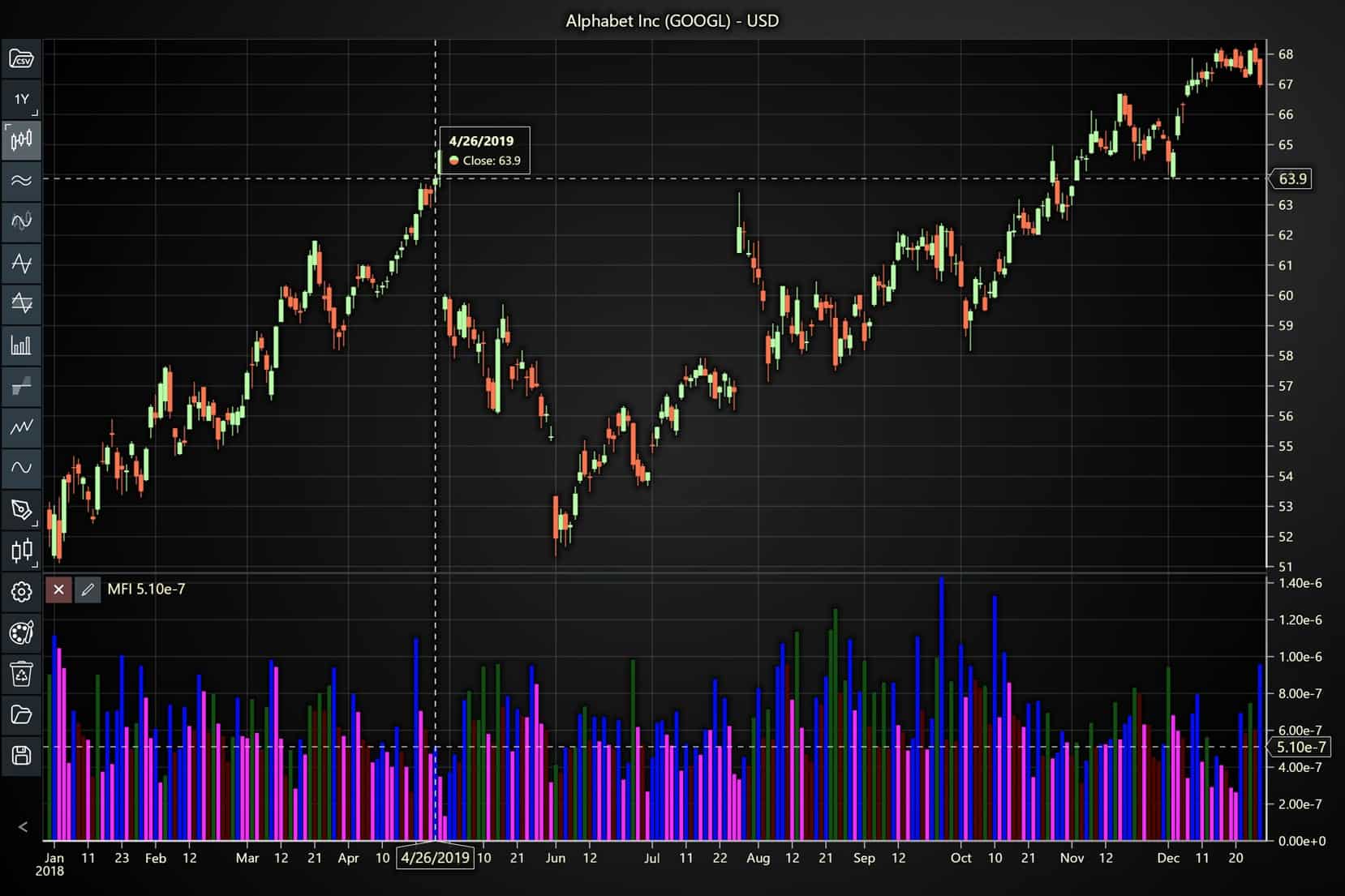
Here’s a detailed breakdown of each section:
A. Importing the Required Libraries:
   const lcjsTrader = require('@arction/lcjs-trader')
   const lcjs = require('@arction/lcjs')
const { Themes } = lcjs- lcjsTrader: This library provides access to the LightningChart JS Trader functionalities, allowing you to create advanced financial charts.
- lcjs: The main LightningChart JS library, used for general charting functionality.
- Themes: A property within lcjs that provides access to pre-built themes. In this case, we are using the darkGold theme to style the chart.
B. Initializing the Trading Chart:
   lcjsTrader.trader(TRADER_LICENSE).then(async (trader) => {
    // Create a trading chart.
const tradingChart = trader.tradingChart({ loadFromStorage: false, colorTheme: Themes.darkGold })trader(TRADER_LICENSE): Initializes the LightningChart JS Trader with the provided license key (TRADER_LICENSE). This is required to access the charting functionalities for financial data.
Note you can request a LightningChart JS Trader trial license, which is free.
tradingChart(): This function creates a trading chart with certain options.loadFromStorage: false: This disables the loading of previously stored chart data from local storage, ensuring a fresh chart setup.colorTheme: Themes.darkGold: This applies the darkGold theme to the chart, which influences the background color, gridlines, and other visual elements.
C. Adding and Customizing the Indicator
    // Add a Market Facilitation Index indicator
tradingChart.indicators().addMarketFacilitationIndex()addMarketFacilitationIndex(): It measures the willingness of the market to move the price. The index values are shown as histogram bars with various colors. These colors indicate the relation between the index and volume.
D. Loading Data from a CSV File
    // Reading data from a file.
    await fetch(`${document.head.baseURI}examples/assets/0000/Alphabet Inc (GOOGL).csv`).then((res) => res.text()).then((text) => {
        tradingChart.readCsvString(text, 'Alphabet Inc (GOOGL)')
})fetch(): This function retrieves a CSV file containing historical data for Alphabet Inc. (GOOGL). The CSV file includes pricing information for the company’s stock, which is plotted on the chart.readCsvString(): This function reads the CSV data and interprets it as pricing data for Alphabet Inc. The second argument (‘Alphabet Inc (GOOGL)’) sets the label for the chart, as seen at the top of the chart image.
E. Setting the Currency for the Chart
    tradingChart.setCurrency('USD')
})setCurrency('USD'): This sets the currency of the chart to USD, ensuring that the pricing data is interpreted and displayed in US dollars.
Advantages and Limitations of the Indicator
The Market Facilitation Index (MFI) offers several advantages that make it a valuable tool for traders across various markets. One of its most notable benefits is its visual simplicity. The color-coded histogram provides an intuitive way to interpret market dynamics, making it accessible even for traders who may not be deeply experienced with complex technical analysis. This feature allows users to quickly grasp whether the market is trending, consolidating, or displaying signs of indecision.
Another key advantage is the combination of price and volume data. Unlike many indicators that focus solely on price or volume, the MFI integrates both, offering a more nuanced understanding of market movements. This makes it particularly effective for identifying trends, pinpointing periods of market inactivity, and recognizing potential reversals.
Furthermore, its versatility ensures it can be applied to various asset classes, including forex, stocks, and commodities, allowing traders to adapt the indicator to their preferred markets. Lastly, the MFI provides valuable insights into market sentiment, highlighting the willingness of participants to move prices, which can be crucial for making informed trading decisions.
However, the MFI is not without its limitations. A significant drawback is its reliance on volume data, which can make it less effective in markets where volume information is either unreliable or unavailable, such as some cryptocurrency markets.
Additionally, while the color-coded histogram simplifies interpretation, there is still an element of subjectivity involved. Traders must evaluate the broader market context to make accurate judgments, and this can sometimes lead to inconsistent conclusions, especially for less experienced users.
Finally, the MFI is not intended to be a standalone tool. While it provides valuable insights, it requires confirmation from other technical indicators to avoid false signals. This dependency on additional tools can add complexity to a trader’s strategy, particularly if they are seeking a straightforward method for market analysis.
Despite these limitations, the Market Facilitation Index strategy remains a powerful addition to any trader’s toolkit when used in conjunction with other analytical methods.
Conclusion
The Market Facilitation Index (MFI) is a powerful technical indicator that measures the market’s willingness to move prices by integrating price range and volume. Its unique color-coded histogram provides traders with an intuitive way to understand market dynamics, making it especially effective for identifying trends, consolidations, and potential reversals in forex trading.
However, like any technical tool, the MFI is most effective when used alongside other indicators to confirm signals and provide a more comprehensive view of market behavior.
A crucial aspect of applying the Market Facilitation Index strategy is utilizing tools that allow for seamless and precise implementation. LightningChart JS Trader Interactive Examples are indispensable for traders.
These tools enable users to create and customize visual representations of the MFI, ensuring they can interpret the histogram with accuracy and speed. LightningChart JS Trader provides a highly efficient environment for developing and testing trading strategies, making it an essential resource for incorporating the MFI into a robust trading plan.
Key Takeaways
- The Market Facilitation Index combines price and volume to gauge the market’s efficiency in moving prices.
- The histogram’s predefined colors (green, brown, blue, pink) simplify the analysis of market conditions, highlighting trends, indecision, and periods of consolidation.
- While valuable, the MFI should be used alongside other indicators for enhanced accuracy and reduced risk of false signals.
- LightningChart JS Trader is vital for effective visualization and application of the MFI, enabling traders to make better-informed decisions.
Continue learning with LightningChart
High-Performance Charting Controls for Fintech App Development
Written by a human | Updated on April 10th, 2025Charting Controls for Fintech Apps Money makes the world go round and as such, tracking and controlling financial transactions and information are some of the most important activities to do for any...

Data Visualization in Medical & Healthcare Applications
Written by a human | Updated on April 10th, 2025Charting Controls for Medical Healthcare Data Visualization Applications The fact that data and data visualization are everywhere in today's world, makes me wonder how data visualization impacts medical...

Creating a Smith Chart Application in .NET
Written by a human | Updated on April 9th, 2025Smith Charts The Smith chart is a diagram designed for the study and resolution of problems with transmission lines. This diagram is aimed at electrical and electronic engineers specializing in radio frequency....



If you have any questions, feel free to contact us!



©LightningChart Ltd 2026. All rights reserved.