








Linear Regression in Finance Application Development
Article
Assisted by AI
Explore how linear regression in finance supports trend analysis, forecasting, and data modelling in application development with key metrics like slope and R².
Ahmad Omid
Data Science Developer

Introduction
Linear regression is a statistical method that fits a trendline to a dataset by minimizing the sum of squared errors, known as the least squares method. In finance, linear regression in finance is used to identify trends, estimate relationships between variables, and produce forecasts.
A typical linear regression indicator includes four elements:
- Slope: shows trend direction and strength
- Intercept: where the trendline crosses the y-axis
- Forecast: projected value beyond current data
- Rsquared (R²): determines the goodness of fit
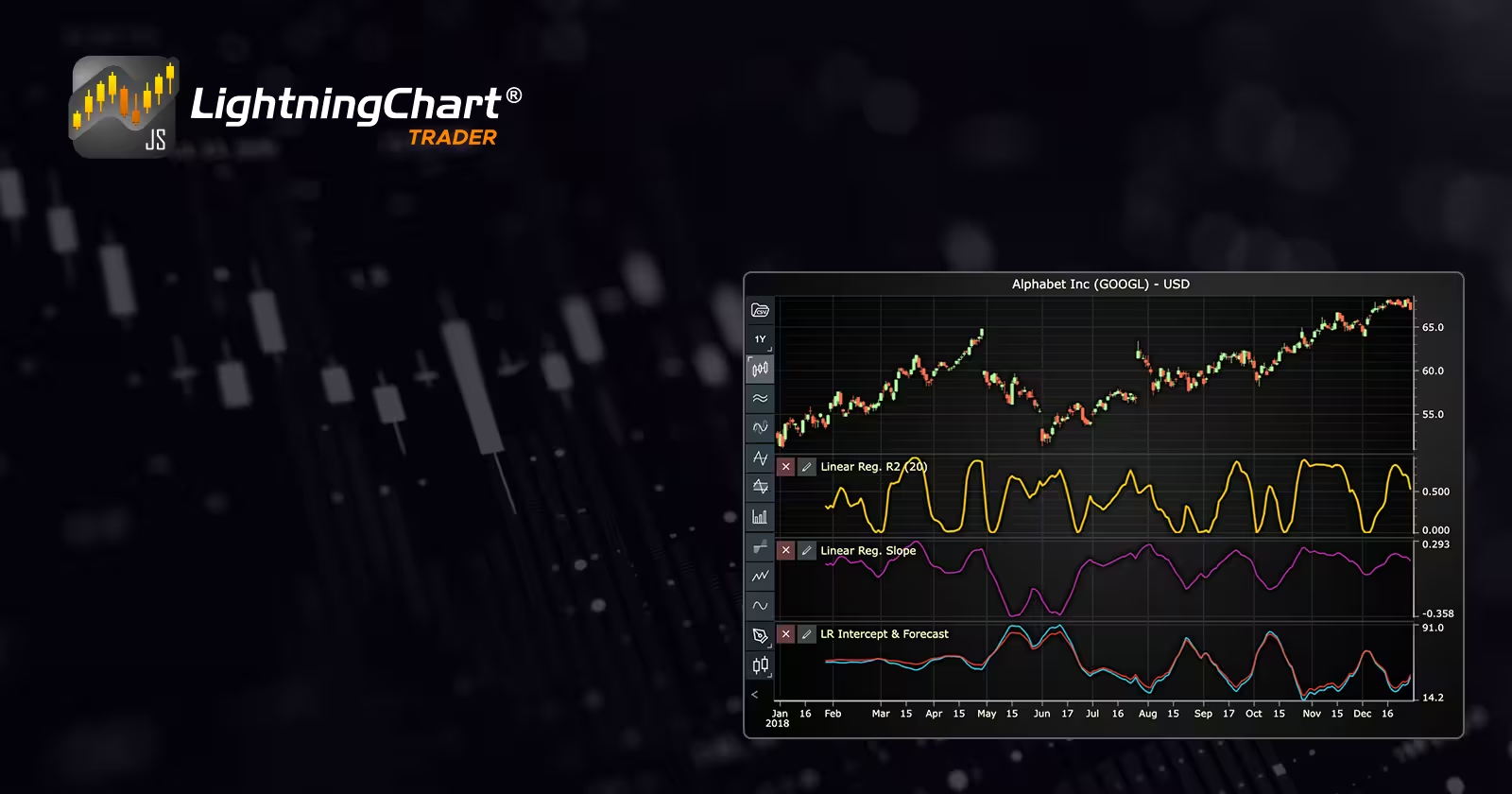
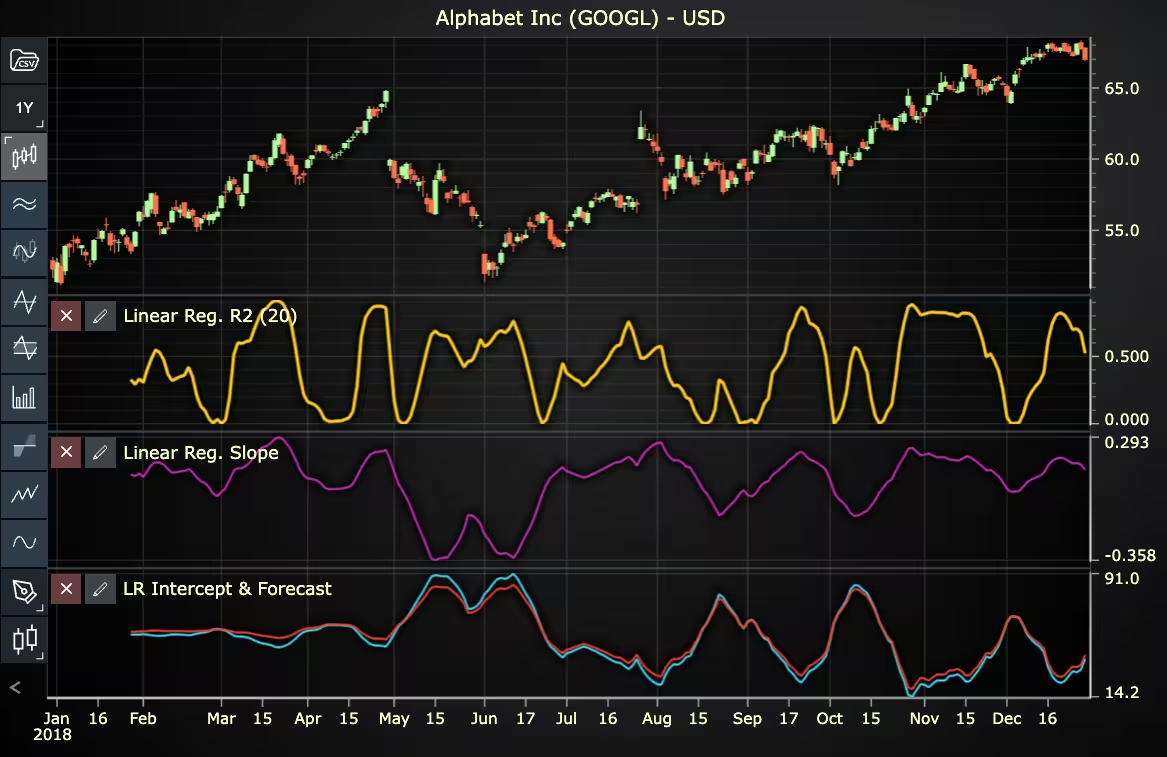
In LightningChart JS Trader, slope and R² are displayed in their own panels, while intercept and forecast share a common view. The entire indicator is anchored around R²: updating or removing the R² line automatically updates or removes all components. Only one linear regression indicator can be added per chart.
Model Assumptions
Linear regression relies on a set of critical assumptions that must be satisfied for accurate results:
- Linearity: The relationship between dependent and independent variables is linear.
- Independence: Observations must be independent of each other.
- Homoscedasticity: Variance of errors is constant across all levels of independent variables.
- Normality: Error terms are normally distributed.
Failure to meet these assumptions can lead to inaccuracies in forecasts derived from the linear regression in finance.
Simple Linear Regression
Simple linear regression involves a single independent variable. It plots a trendline through a dataset by minimizing the squared residuals, aiming to provide the best-fit line to explain price movements or asset returns. In finance, this technique can be used to forecast future stock prices based on historical price data.
Multiple Linear Regression
Multiple linear regression expands the model to include two or more independent variables. For instance, traders often use multiple regression models that consider various financial indicators, such as trading volumes, moving averages, or interest rates, to predict asset price movements more accurately. It enhances the predictive power of linear regression in finance by considering multiple factors simultaneously.
How to Use Linear Regression in Finance?
Linear regression in finance is primarily employed to forecast future asset prices, identify trends, and evaluate the strength of relationships between financial variables. Traders and analysts leverage linear regression to make more informed investment decisions. Here’s how it is typically used:
1. Identifying and Confirming Trends: Linear regression helps traders visualize and confirm existing trends by plotting a best-fit trendline through historical price data using the least squares method. A positively sloped line indicates an upward trend, signaling potential buying opportunities, while a negatively sloped line indicates a downward trend, signaling possible selling opportunities.
2. Measuring Trend Strength: The slope of the linear regression line quantifies the direction and magnitude of the trend. Traders observe changes in the slope to determine whether a trend is accelerating, decelerating, or reversing.
3. Evaluating Reliability of Trends (R²): The R-squared value measures how well the linear regression line fits the actual price data. An R² close to 1 means the regression line explains the data well, and forecasts based on this model are more reliable. Conversely, a low R² value indicates a weak trend, suggesting caution when relying on its forecasts.
4. Forecasting Future Prices: Linear regression generates forecasts by extending the regression line into the future. The forecast line estimates future price levels based on historical trends. Traders commonly use this to set target prices, identify potential breakout points, or predict support and resistance levels.
5. Trading Signals and Decision-Making: Traders incorporate linear regression indicators, such as those available in LC JS Trader, into their strategies by observing the interaction between price movements and the regression lines (slope, intercept, forecast, and R²). Because the LC JS Trader’s linear regression indicator consists of four synchronized elements controlled by the R² line, traders can quickly assess changing market conditions and respond promptly.
In practice, traders often combine linear regression with other technical indicators, such as moving averages, RSI, or Bollinger Bands, to enhance accuracy and reduce false signals.
Formula
A general multiple regression:

In simple regression:

Where:
- Y: Represents the dependent variable, typically the predicted price, asset returns, or another financial metric you’re forecasting.
- X: Denotes the independent variable, usually time, trading volume, or other relevant financial indicators influencing the dependent variable.
- a (Intercept): The value of the dependent variable (Y) when the independent variable (X) equals zero. It represents the starting point of the regression line.
- b (slope): Indicates the rate at which Y changes relative to a one-unit change in X. It determines both the direction (positive or negative) and steepness (strength) of the trendline.
- e (Error term): Represents the residual or the difference between the actual observed value and the predicted value from the regression line. This captures unexplained variations or deviations from the trend.
Interpretation
- Slope (b): Estimated change in Y per unit change in X; signals trend direction.
- Intercept (a): Estimated value of Y where X = 0.
- R²: Proportion of Y’s variance explained by X; values closer to 1 indicate a tighter fit.
- Forecast: Extrapolated Y based on future X.
- Segments Relationship: In LC JS Trader, R² is the anchor, modifying it automatically updates slope, intercept, and forecast.
Calculation Example
Assume a simple linear regression in a finance model:
- Intercept a =25
- Slope b = 2
- Current day index X = 10
Forecast: Y = 25 + (2 × 10) = 45
The value 45 represents the predicted or forecasted value of the dependent variable (for example, a close price) at the given independent variable value (e.g., day 10). So, if actual prices differ significantly from this prediction, it could indicate a change in trend, volatility, or other market dynamics worth investigating further.
How to Create the Technical Indicator Using LC JS Trader
Step 1: Get LightningChart JS Trader
To begin, you’ll need access to LightningChart JS Trader. This specialized library contains all the necessary components for developing advanced technical indicators, including Linear Regression. Visit the LightningChart JS Trader page to download the required components and review the documentation.
Step 2: Review the Interactive Example
LightningChart JS Trader includes interactive examples that demonstrate how to create custom technical indicators. These examples do more than just explain; they show you what works in practice.
Start with the documentation and focus on how to add Linear Regression to your chart. The interactive examples take you through each step of the process, from importing the right modules to adjusting your chart settings for the best display.
Step 3: Code Explanation
In this step, we’ll examine the code that creates the chart with the Linear Regression, as shown in the image, using LightningChart JS Trader. The code reveals how to initialize a trading chart properly, apply the indicator, and customize its visual properties to enhance your technical analysis. Understanding these code components helps you see how the different parts work together to produce an effective analysis tool. This knowledge allows you to adapt the implementation for your specific trading requirements.
Here’s a detailed breakdown of each section:
A. Importing the Required Libraries:
const lcjsTrader = require('@lightningchart/lcjs-trader')
const lcjs = require('@lightningchart/lcjs')- lcjsTrader: This library provides access to the LightningChart JS Trader functionalities, allowing you to create advanced financial charts.
- lcjs: The main LightningChart JS library, used for general charting functionality.
B. Initializing the Trading Chart:
lcjsTrader.trader(TRADER_LICENSE).then(async (trader) => {
  // Create a trading chart.
  const tradingChart = trader.tradingChart({ loadFromStorage: false, colorTheme: Themes.darkGold })
trader(TRADER_LICENSE): Initializes the LightningChart JS Trader with the provided license key (TRADER_LICENSE). This is required to access the charting functionalities for financial data.
Note you can request a LightningChart JS Trader trial license, which is free.
tradingChart(): This function creates a trading chart with certain options.loadFromStorage: false: This disables the loading of previously stored chart data from local storage, ensuring a fresh chart setup.
C. Adding and Customizing the Indicator
// Add a Linear Regression
const lr20 = tradingChart.indicators().addLinearRegression()
lr20.setPeriodCount(20)
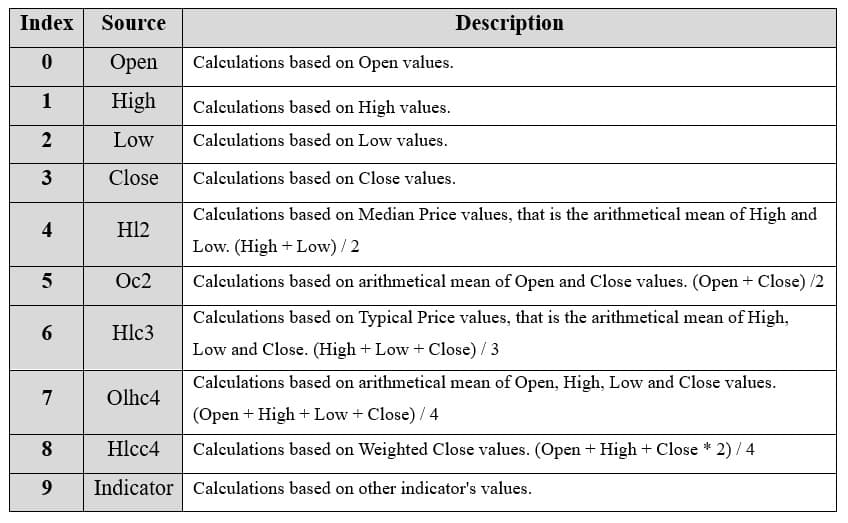
lr20.setSource(3)
lr20.setLineColor('#E2B928')
lr20.setLineWidth(3)addLinearRegression():: It plots a trendline value for each data point using the least squares method. The indicator consists of four lines: slope, intercept, forecast, and R-squared. Of these, slope and R-squared are displayed in their own segments, while intercept and forecast share one segment.lr20.setPeriodCount(20):: Sets the number of time periods (n) used to calculate the indicator.lr20.setSource(3): Sets which values the indicator calculations are based on. In this case, calculations are based on Close values.lr20.setLineColor('#E2B928'): Sets the line color of the linear regression line to a shade of yellow.lr20.setLineWidth(3): Sets the line width of the indicator to 3 pixels.
D. Loading Data from a CSV File
    // Reading data from a file.
    await fetch(`${document.head.baseURI}examples/assets/0000/Alphabet Inc (GOOGL).csv`).then((res) => res.text()).then((text) => {
        tradingChart.readCsvString(text, 'Alphabet Inc (GOOGL)')
})fetch(): This function retrieves a CSV file containing historical data for Alphabet Inc. (GOOGL). The CSV file includes pricing information for the company’s stock, which is plotted on the chart.readCsvString(): This function reads the CSV data and interprets it as pricing data for Alphabet Inc. The second argument (‘Alphabet Inc (GOOGL)’) sets the label for the chart, as seen at the top of the chart image.
E. Setting the Currency for the Chart
    tradingChart.setCurrency('USD')
})setCurrency('USD'): This sets the currency of the chart to USD, ensuring that the pricing data is interpreted and displayed in US dollars.
Enumeration Source in LC JS Trader:
To select which values the indicator calculations are based on.
Advantages and Limitations of the Indicator
Linear regression in finance provides several significant advantages. Primarily, it offers traders and analysts a clear, straightforward method for identifying and measuring market trends. Its simplicity makes it intuitive even for individuals without extensive statistical backgrounds, and the output, slope, intercept, forecast, and R-squared can be easily interpreted to facilitate quick trading decisions.
The indicator’s integration with LC JS Trader further enhances its usefulness by automatically synchronizing updates across all four lines. The primary R² line controls the indicator, simplifying interactions and streamlining the user experience. Limiting each chart to only one linear regression indicator also helps maintain visual clarity, preventing over-analysis or confusion caused by too many overlapping indicators.
However, linear regression indicators also have inherent limitations. They assume relationships between variables are linear, potentially overlooking nonlinear market behaviors or complex interactions between different financial variables. Another limitation arises from sensitivity to data quality; the reliability of predictions strongly depends on accurate and stable historical data. Markets subject to sudden shocks, structural breaks, or extreme volatility can render linear regression predictions unreliable.
Additionally, linear regression indicators are prone to biases if assumptions such as homoscedasticity, independence of observations, and absence of multicollinearity are violated. Therefore, traders typically combine linear regression with other technical indicators or fundamental analysis to mitigate these weaknesses and improve decision-making accuracy.
Conclusion
Linear regression in finance is a foundational tool for trend detection, forecasting, and quantifying market relations. In development with LC JS Trader, its four components, slope, intercept, forecast, and R² are controlled via the R² line, ensuring synchronized updates and coherent chart behavior.
While offering transparency and simplicity, the technique hinges on OLS assumptions and linear relationships. For robust application, pair it with other indicators, monitor assumption validity, and treat forecasts as probabilistic, not absolute.
Continue learning with LightningChart
Create a JavaScript Pie Chart with NodeJS, TypeScript & LightningChart
Written by a human | Updated on April 10th, 2025JavaScript Pie Chart with NodeJS & TypeScript Today, we are going to do a short tutorial on how to generate a pie chart using Node JS, TypeScript, and LigningCharts JS. To see how to get LightningChart JS for...
Real-time data visualization with WebSockets
Written by a human | Updated on April 10th, 2025WebSockets Data Visualization in Real-Time These days it is ever increasingly common that people require web solutions for their applications and services. Data visualization is not an exception to this, as...
Why Performance Matters in Data Visualization?
Written by a human | Updated on April 10th, 2025Performance in Data VisualizationI was doing a Google search a couple of days ago and particularly, I wanted to know what are the options for developers who need to visualize large amounts of data points within...



If you have any questions, feel free to contact us!



©LightningChart Ltd 2026. All rights reserved.