





Detrended Price Oscillator Theory & Chart Implementation
Article
Learn how to implement the Detrended Price Oscillator in your software applications to analyze recurring patterns, estimate price cycle lengths, and measure short-term volatility.
Ahmad Omid
Data Science Developer

What Is the Detrended Price Oscillator?
The Detrended Price Oscillator (DPO) is a technical analysis tool used to remove long-term trends from price movements, allowing traders to focus on short-term cycles and price volatility. Unlike other trend-following indicators, the DPO is not aligned with current prices. Instead, it shifts data backward to highlight cyclical patterns and fluctuations.
The Detrended Price Oscillator emerged as part of a broader effort to refine the analysis of cyclical price movements in financial markets. By removing the impact of long-term trends, the DPO enables traders to identify recurring patterns, estimate the length of price cycles, and measure short-term volatility more effectively.
Initially popular among technical analysts exploring oscillatory behaviors in prices, the DPO gained traction due to its simplicity and usefulness in spotting overbought or oversold conditions. Today, the detrended price oscillator indicator is widely used in conjunction with other tools to enhance trading strategies.
How is the Detrended Price Oscillator used in trading?
The detrended price oscillator strategy revolves around identifying price extremes and cyclical turning points. Traders utilize the indicator to:
- Detect potential reversal points in price movements.
- Estimate the duration and amplitude of price cycles.
- Identify periods of low or high volatility for strategic entries or exits.
When combined with other indicators or chart patterns, the DPO helps traders fine-tune their decisions and gain insights into market dynamics.
Formula
The detrended price oscillator formula can be expressed as:
DPO = Close – SMA(N)
Where:
- Close is the closing price of the asset.
- SMA(N) is the simple moving average of the closing price over N periods, shifted back by ((n/2) + 1)
This backward shift is the distinguishing feature of the DPO, as it decouples the indicator from current price trends.
Interpretation
The detrended price oscillator indicator oscillates around a zero line, representing the mean deviation from the shifted moving average. Here’s how it is typically interpreted:
- Positive values: Prices are trading above the SMA, indicating upward momentum.
- Negative values: Prices are trading below the SMA, suggesting downward momentum.
- Zero line crossovers: These often signal potential turning points or the beginning of a new price cycle.
Calculation Example
Suppose an asset has the following closing prices over a 10-day period:
[50,51,52,53,54,55,56,57,58,59]
To calculate the DPO with a 5-day SMA:
- Calculate the 5-day SMA: SMA = Sum of prices over 5 days / 5
- For 5 days: SMA = (50 + 51 + 52 + 53 + 54) / 5 = 52
Shift the SMA back by ((N/2) + 1): shift by (5/2) + 1 = 3 days
Subtract the shifted SMA from the closing price: If the price on day 8 is 57, and the SMA for that day is 54 then DPO = 57 – 54 = 3
By repeating this calculation across the dataset, traders can plot the DPO for analysis.
How to Create the Technical Indicator Using LC JS Trader
Step 1: Get LightningChart JS Trader
To begin, you’ll need access to LightningChart JS Trader. This library provides the tools necessary to create advanced technical indicators, including the detrended price oscillator Indicator. Visit the LightningChart JS Trader page to download the required components and review the documentation.
Step 2: Review the Interactive Example
LightningChart JS Trader includes interactive examples that demonstrate how to create custom technical indicators. Start by reviewing the documentation, focusing on how to integrate the detrended price oscillator Indicator into your chart setup. The interactive examples will guide you through the process of setting up the DPO Indicator, from importing the necessary modules to modify the chart settings.
Step 3: Code Explanation
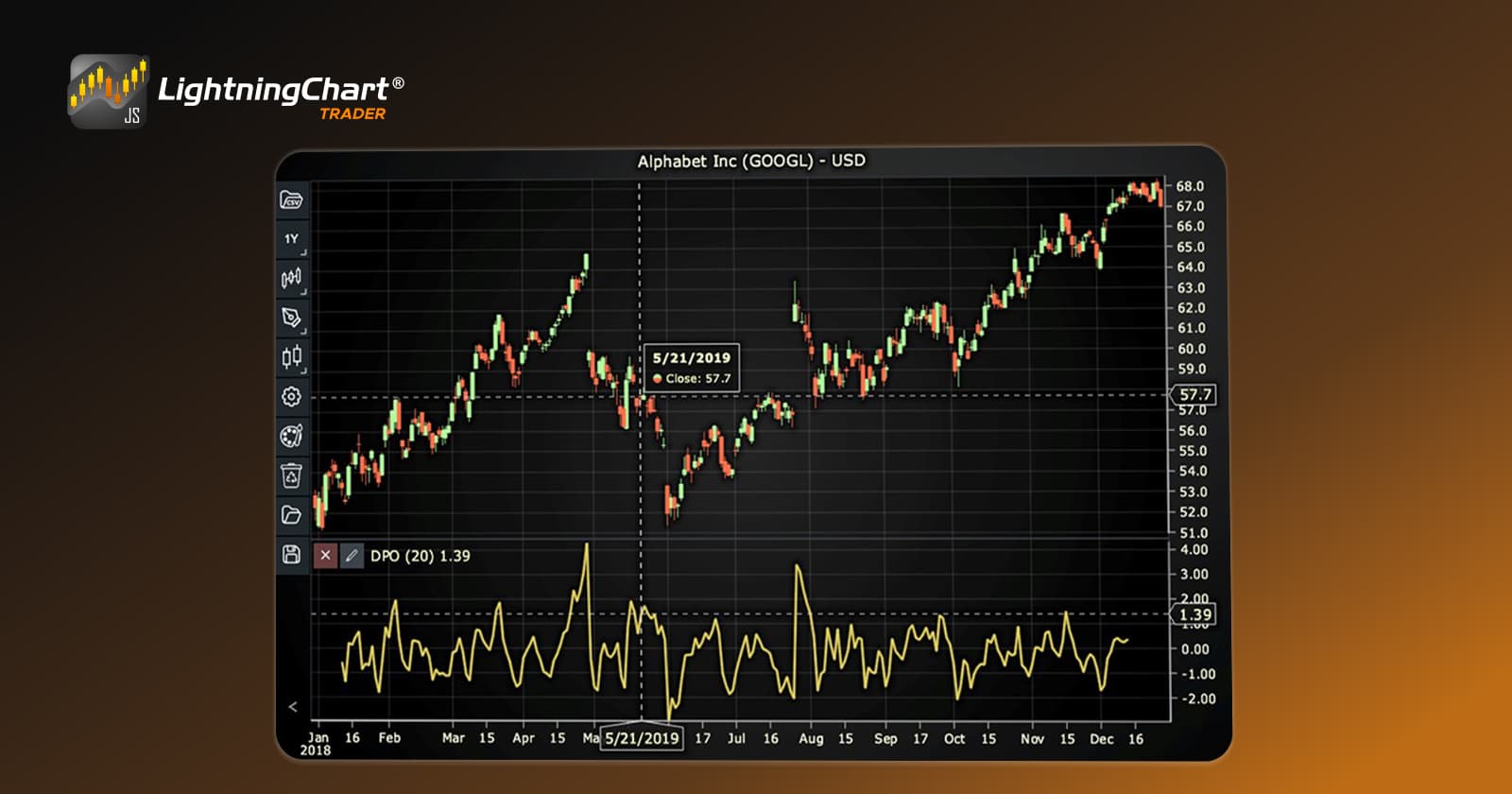
In this step, we will break down the code that creates the chart with the detrended price oscillator Indicator, as shown in the image, using LightningChart JS Trader. The code demonstrates how to initialize a trading chart, apply the DPO Indicator, and customize its appearance.

Here’s a detailed breakdown of each section:
A. Importing the Required Libraries:
   const lcjsTrader = require('@arction/lcjs-trader')
   const lcjs = require('@arction/lcjs')
const { Themes } = lcjs- lcjsTrader: This library provides access to the LightningChart JS Trader functionalities, allowing you to create advanced financial charts.
- lcjs: The main LightningChart JS library, used for general charting functionality.
- Themes: A property within lcjs that provides access to pre-built themes. In this case, we are using the darkGold theme to style the chart.
B. Initializing the Trading Chart:
   lcjsTrader.trader(TRADER_LICENSE).then(async (trader) => {
    // Create a trading chart.
const tradingChart = trader.tradingChart({ loadFromStorage: false, colorTheme: Themes.darkGold })trader(TRADER_LICENSE): Initializes the LightningChart JS Trader with the provided license key (TRADER_LICENSE). This is required to access the charting functionalities for financial data.
Note you can request a LightningChart JS Trader trial license, which is free.
tradingChart(): This function creates a trading chart with certain options.loadFromStorage: false: This disables the loading of previously stored chart data from local storage, ensuring a fresh chart setup.colorTheme: Themes.darkGold: This applies the darkGold theme to the chart, which influences the background color, gridlines, and other visual elements.
C. Adding and Customizing the Indicator
    // Add a Detrended Price Oscillator Indicator
    const dpo = tradingChart.indicators().addDetrendedPriceOscillator()
    dpo.setPeriodCount(20)
    dpo.setMovingAverageType(2)
    dpo.setSource(3)
    dpo.setLineColor('#E2D060')
dpo.setLineWidth(3)addDetrendedPriceOscillator(): DPO removes trend to estimate the length of price cycles.
dpo.setPeriodCount(20): Sets the number of time periods (n) used to calculate the indicator.
- **
dpo.setMovingAverageType(2): Sets the type of Moving Average used to smooth the indicator. In this case, 2 represents the Simple Moving Average (SMA).
- ***
dpo.setSource(3): Sets which values the indicator calculations are based on. In this case, calculations based on Close values.
dpo.setLineColor('#E2D060'): Changes the color of the indicator to a shade of yellow.
dpo.setLineWidth(3): Sets the line thickness of the indicator to 3 pixels. This makes the line more prominent and easier to observe during analysis.
D. Loading Data from a CSV File
    // Reading data from a file.
    await fetch(`${document.head.baseURI}examples/assets/0000/Alphabet Inc (GOOGL).csv`).then((res) => res.text()).then((text) => {
        tradingChart.readCsvString(text, 'Alphabet Inc (GOOGL)')
})fetch(): This function retrieves a CSV file containing historical data for Alphabet Inc. (GOOGL). The CSV file includes pricing information for the company’s stock, which is plotted on the chart.readCsvString(): This function reads the CSV data and interprets it as pricing data for Alphabet Inc. The second argument (‘Alphabet Inc (GOOGL)’) sets the label for the chart, as seen at the top of the chart image.
E. Setting the Currency for the Chart
    tradingChart.setCurrency('USD')
})setCurrency('USD'): This sets the currency of the chart to USD, ensuring that the pricing data is interpreted and displayed in US dollars.
** Enumeration of Moving Average Types in LC JS Trader:
- Exponential Moving Average (EMA): 0
- None: 1 (No moving average applied)
- Simple Moving Average (SMA): 2
- Time Series Moving Average (TSMA): 3
- Triangular Moving Average (TMA): 4
- Variable Moving Average (VMA): 5
- Variable Index Dynamic Average (VIDYA): 6
- Volume Weighted Moving Average (VWMA): 7
- Weighted Moving Average (WMA): 8
- Welles Wilder’s Smoothing (WWS): 9
*** Enumeration Source in LC JS Trader:
To select which values the indicator calculations are based on.

Advantages and Limitations of the Indicator
Advantages
- Cycle Analysis: The DPO excels at highlighting short-term cycles, aiding traders in timing their trades.
- Trend Removal: By excluding long-term trends, it provides a clear view of short-term price movements.
- Versatility: The detrended price oscillator strategy can be tailored to various timeframes, making it useful for day trading, swing trading, or longer-term analysis.
Limitations
- Lagging Nature: The backward shift of the SMA introduces a lag, which may delay signals in fast-moving markets.
- Limited Trend Insights: The DPO focuses solely on cyclical movements, making it less effective for identifying long-term trends.
- Dependence on Period Selection: The effectiveness of the indicator heavily depends on choosing an appropriate period length (N).
Conclusion
The Detrended Price Oscillator is a valuable tool for traders seeking to analyze and capitalize on price cycles. By removing the influence of long-term trends, it offers unique insights into short-term price volatility and momentum. However, like any technical indicator, it has its limitations and should be used in combination with other tools to form a comprehensive trading strategy.
To fully harness the power of the DPO, traders can leverage libraries like LightningChart JS Trader, which provide a dynamic environment for implementing and testing the detrended price oscillator indicator. By integrating this tool into your trading arsenal, you can unlock new perspectives and refine your approach to market analysis.
Continue learning with LightningChart
Real-time data visualization with WebSockets
Written by a human | Updated on April 10th, 2025WebSockets Data Visualization in Real-Time These days it is ever increasingly common that people require web solutions for their applications and services. Data visualization is not an exception to this, as...
Why Performance Matters in Data Visualization?
Written by a human | Updated on April 10th, 2025Performance in Data VisualizationI was doing a Google search a couple of days ago and particularly, I wanted to know what are the options for developers who need to visualize large amounts of data points within...

Geospatial data visualization with Google Maps & LightningChart
Written by a human | Updated on April 10th, 2025Geospatial Data Visualization This article showcases and describes a particular use case of LightningChart JS for geospatial data visualization. LightningChart JS is a JavaScript charting tool designed for...





If you have any questions, feel free to contact us!
©LightningChart Ltd 2026. All rights reserved.