








Chande Momentum Oscillator Theory & Chart Implementation
Article
Learn how to implement the Chande Momentum Oscillator in your trading software development to capture price movements.
Ahmad Omid
Data Science Developer

What is the Chande Momentum Oscillator?
The Chande Momentum Oscillator (CMO) is a technical indicator developed by Tushar Chande in the 1990s. It was designed to identify the relative strength or weakness of a market, offering traders a more refined approach compared to traditional momentum indicators. The CMO stands out due to its ability to capture both upward and downward price movements, providing a balanced measure of market momentum.
Unlike conventional momentum indicators, which often focus only on price gains, the CMO incorporates both gains and losses into its calculation. This results in a more accurate representation of market conditions and eliminates potential biases present in older methods.
How Is Chande Forecast Momentum Used in Trading?
The Chande Momentum Oscillator is used to identify overbought and oversold levels, trend strength, and possible reversal points. Traders typically interpret the indicator as follows:
- Overbought Levels: Values above +50 suggest the market is overbought and may be due for a reversal or consolidation.
- Oversold Levels: Values below -50 indicate the market is oversold, signaling a potential upward correction.
- Trend Strength: Values closer to +100 or -100 signify strong trends, while values near zero indicate a lack of momentum.
Chande Momentum Oscillator VS. Conventional Momentum Indicator
The main difference lies in the calculation and sensitivity:
- The conventional momentum indicator measures the price change over a fixed period, focusing only on gains or losses in isolation. This can result in misleading signals in volatile markets.
- The Chande Momentum Oscillator, however, accounts for both positive and negative price changes, providing a more holistic view of market behavior. This dual-focus makes the CMO more responsive and reliable in dynamic trading conditions.
Formula
The formula for the Chande Momentum Oscillator is as follows:

Where:
- Sum of Gains: Total price increases over the lookback period.
- Sum of Losses: Absolute value of total price decreases over the lookback period.
This calculation results in values ranging from -100 to +100.
Interpretation
- CMO Values > +50: Indicates overbought conditions; prices may reverse or stabilize.
- CMO Values < -50: Signals oversold conditions, suggesting potential price increases.
- CMO Near 0: Reflects equilibrium in market momentum, with no dominant trend.
Calculation Example
Let’s assume a 14-period lookback:
- Over 14 days, the sum of gains = 120 and the sum of losses = 80.
- Plugging into the formula:

- A CMO value of +20 indicates mild upward momentum, signaling a bullish bias without being overbought.
How to Create the Technical Indicator Using LC JS Trader
Step 1: Get LightningChart JS Trader
To begin, you’ll need access to LightningChart JS Trader. This library provides the tools necessary to create advanced technical indicators, including the Chande Momentum Oscillator Indicator. Visit the LightningChart JS Trader page to download the required components and review the documentation.
Step 2: Review the Interactive Example
LightningChart JS Trader includes interactive examples that demonstrate how to create custom technical indicators. Start by reviewing the documentation, focusing on how to integrate the Chande Momentum Oscillator Indicator into your chart setup. The interactive examples will guide you through the process of setting up the CMO Indicator, from importing the necessary modules to modify the chart settings.
Step 3: Code Explanation
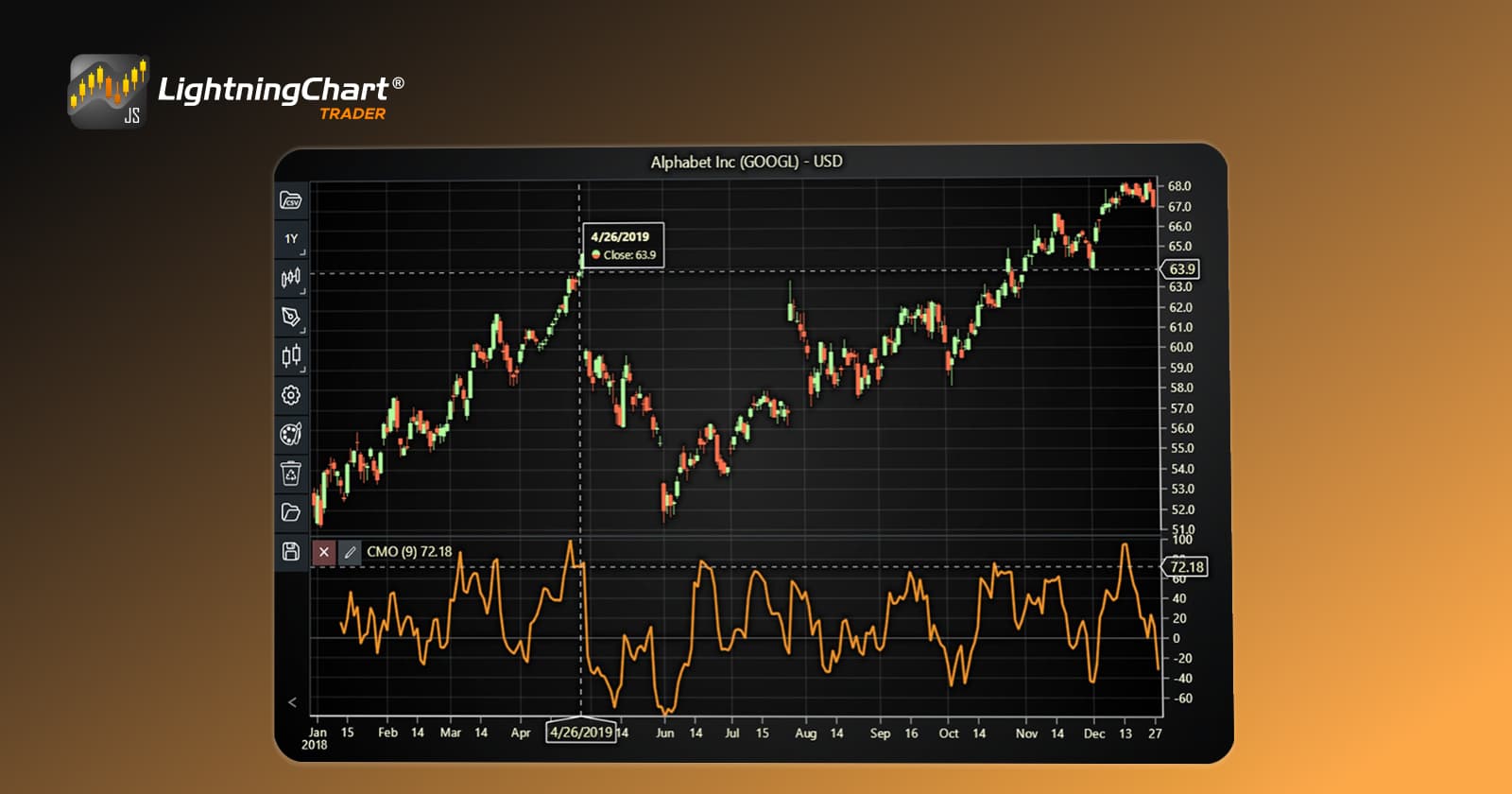
In this step, we will break down the code that creates the chart with the Chande Momentum Oscillator Indicator, as shown in the image, using LightningChart JS Trader. The code demonstrates how to initialize a trading chart, apply the CMO Indicator, and customize its appearance.

Here’s a detailed breakdown of each section:
A. Importing the Required Libraries:
   const lcjsTrader = require('@arction/lcjs-trader')
   const lcjs = require('@arction/lcjs')
const { Themes } = lcjs- lcjsTrader: This library provides access to the LightningChart JS Trader functionalities, allowing you to create advanced financial charts.
- lcjs: The main LightningChart JS library, used for general charting functionality.
- Themes: A property within lcjs that provides access to pre-built themes. In this case, we are using the darkGold theme to style the chart.
B. Initializing the Trading Chart:
   lcjsTrader.trader(TRADER_LICENSE).then(async (trader) => {
    // Create a trading chart.
const tradingChart = trader.tradingChart({ loadFromStorage: false, colorTheme: Themes.darkGold })trader(TRADER_LICENSE): Initializes the LightningChart JS Trader with the provided license key (TRADER_LICENSE). This is required to access the charting functionalities for financial data.
Note you can request a LightningChart JS Trader trial license, which is free.
tradingChart(): This function creates a trading chart with certain options.loadFromStorage: false: This disables the loading of previously stored chart data from local storage, ensuring a fresh chart setup.colorTheme: Themes.darkGold: This applies the darkGold theme to the chart, which influences the background color, gridlines, and other visual elements.
C. Adding and Customizing the Indicator
    // Add a Chande Momentum Oscillator indicator
    const cmo = tradingChart.indicators().addChandeMomentumOscillator()
    cmo.setPeriodCount(9)
    cmo.setSource(3)
    cmo.setLineColor('#FA9829')
cmo.setLineWidth(3)addChandeMomentumOscillator(): CMO is used to identify the relative strength or weakness of the market.
cmo.setPeriodCount(9): Sets the number of time periods (n) used to calculate the indicator.
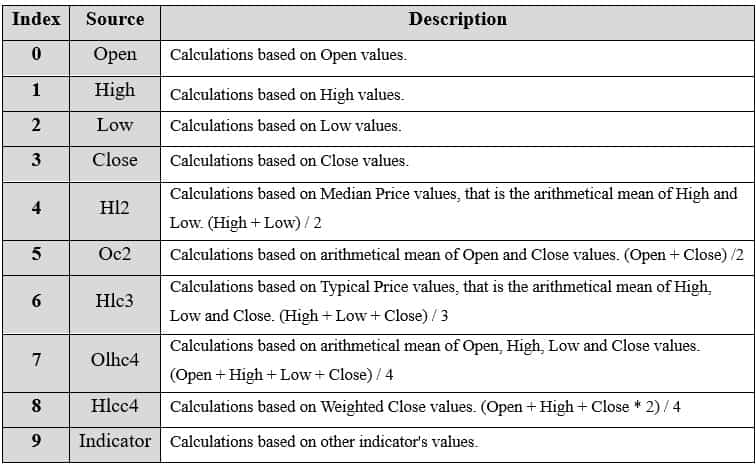
**cmo.setSource(3): Sets which values the indicator calculations are based on. In this case, calculations based on Close values.
cmo.setLineColor('#FA9829'): Changes the color of the CFO line to a shade of green.
cmo.setLineWidth(3): Sets the line thickness of the indicator to 3 pixels. This makes the line more prominent and easier to observe during analysis.
D. Loading Data from a CSV File
    // Reading data from a file.
    await fetch(`${document.head.baseURI}examples/assets/0000/Alphabet Inc (GOOGL).csv`).then((res) => res.text()).then((text) => {
        tradingChart.readCsvString(text, 'Alphabet Inc (GOOGL)')
})fetch(): This function retrieves a CSV file containing historical data for Alphabet Inc. (GOOGL). The CSV file includes pricing information for the company’s stock, which is plotted on the chart.readCsvString(): This function reads the CSV data and interprets it as pricing data for Alphabet Inc. The second argument (‘Alphabet Inc (GOOGL)’) sets the label for the chart, as seen at the top of the chart image.
E. Setting the Currency for the Chart
    tradingChart.setCurrency('USD')
})setCurrency('USD'): This sets the currency of the chart to USD, ensuring that the pricing data is interpreted and displayed in US dollars.
** Enumeration of Moving Average Types in LC JS Trader: To select which values the indicator calculations are based on.
Advantages and Limitations of the Indicator
The Chande Momentum Oscillator (CMO) offers several advantages that make it a valuable tool for traders. One of its key strengths lies in its comprehensive approach to analyzing market momentum. By considering both gains and losses in its calculation, the CMO provides a balanced view of price movements, avoiding the bias often found in conventional momentum indicators.
This dual-sided approach ensures that traders can accurately assess the strength or weakness of a market trend, regardless of its direction. Additionally, the CMO is highly flexible and can be applied across a wide range of asset classes, including stocks, forex, and commodities.
Its enhanced sensitivity to price changes makes it particularly effective in volatile markets, where quick responses to market shifts are crucial. Moreover, the simplicity of its interpretation—clear thresholds for overbought and oversold levels—makes it accessible even for novice traders.
Despite its strengths, the Chande Momentum Oscillator is not without limitations. In choppy or sideways markets, the indicator can produce false signals, potentially leading to inaccurate trading decisions. This limitation emphasizes the need to use the CMO in conjunction with other technical indicators or tools for confirmation.
Another challenge arises in strong trending markets, where the CMO can lag in identifying the early phases of a trend, making it less effective as a leading indicator in such scenarios.
Furthermore, the choice of the lookback period can significantly influence the CMO’s performance. A shorter period increases sensitivity but may lead to excessive noise, while a longer period smooths out fluctuations but risks missing critical market movements. This subjectivity in parameter selection highlights the importance of tailoring the CMO settings to specific market conditions and trading strategies.
Conclusion
The Chande Momentum Oscillator is a versatile tool for traders seeking to measure the relative strength or weakness of a market. Its unique calculation method, which accounts for both gains and losses, sets it apart from traditional momentum indicators. By providing insights into overbought and oversold conditions, the CMO helps traders make informed decisions.
Moreover, the LightningChart JS Trader offer an excellent library to visualize the CMO and integrate it into trading strategies. Whether you’re a novice or an experienced trader, mastering the Chande Momentum Oscillator can significantly enhance your market analysis toolkit.
Continue learning with LightningChart

Geospatial data visualization with Google Maps & LightningChart
Written by a human | Updated on April 10th, 2025Geospatial Data Visualization This article showcases and describes a particular use case of LightningChart JS for geospatial data visualization. LightningChart JS is a JavaScript charting tool designed for...
![[Tutorial] How to embed interactive charts in PowerPoint presentations](https://lightningchart.com/wp-content/uploads/2022/12/Interactive-Charts-in-PowerPoint-feature-image.jpg)
[Tutorial] How to embed interactive charts in PowerPoint presentations
Written by a human | Updated on April 9th, 2025Embed interactive charts in PowerPoint presentations Embedding charts within PowerPoint presentations has always been possible but perhaps one of the most ignored possibilities is actually embedding web applications...
Motorsports Analytics
Updated on April 10th, 2025 | Written by human Motorsports Analytics Large companies in the motorsports industry are collecting huge volumes of real-time data coming from different sources on and off the pitch during racing competitions. These data are both...



If you have any questions, feel free to contact us!



©LightningChart Ltd 2026. All rights reserved.