





Accumulative Swing Index for Fintech Applications with LightningChart JS Trader
Article
Assisted by AI
Learn how the Accumulative Swing Index Indicator tracks long-term market trends, measures momentum, and simplifies technical analysis in Fintech Applications.
Ahmad Omid
Data Science Developer

Introduction
The Accumulative Swing Index (ASI) helps people track price trends in the stock market over a long time. Welles Wilder created it to help see the big picture of where prices are going without getting distracted by daily ups and downs. Unlike other tools that react quickly to small changes, the ASI adds up values over time, making it great for spotting trends that last.
The ASI comes from the Swing Index, which looks at price changes each day. The Swing Index measures how strong each day’s price movement is and which way it’s going. When you add up these daily numbers, you get the ASI, which shows the bigger trend.
When building financial apps, using the Accumulative Swing Index gives traders a simple way to see market momentum as just one line on a chart. In LightningChart JS, the ASI makes charts easier to use and helps people understand trends without needing to look at lots of complex price data.
Formula
Swing Index Formula
The Swing Index formula, according to Wilder, is:

SWhere:
- Close = Current close price
- pClose = Previous close price
- Open = Current open price
- pOpen = Previous open price
- High = Current high
- Low = Current low
- R = max(High – pClose, Low – pClose, High – Low)
- K = max(High – pClose, Low – pClose)
- M = max(High – Low, abs(pClose – pOpen))
This version includes a volatility adjustment factor (K / M) to normalize the signal within a consistent scale, often between -100 and +100.
Accumulative Swing Index Formula

Each new SI value is added to the previous ASI value to form a running total. This cumulative approach makes it easier to observe long-term momentum and price direction.
Interpretation
The Accumulative Swing Index provides clear signals about market direction when properly understood. Here’s what to look for:
Rising ASI: Shows that buyers are in control of the market. This upward movement confirms bullish breakouts and suggests that upward price trends have real strength behind them.
Falling ASI: Reveals selling pressure in the market. When the ASI heads downward, it confirms bearish breakouts and suggests that downward price movements are likely to continue.
Divergence: Pay special attention when price and the ASI move in different directions. If prices climb higher but the ASI stays flat or falls, this warns that the upward momentum might be weakening or that the breakout could be misleading.
For best results, use the Accumulative Swing Index alongside support and resistance levels or trendlines. This combination helps confirm whether price movements are genuine or merely temporary fluctuations.
Calculation Example:
Let’s work through a quick sample using the full formula.
Example Data:
- pClose = 100
- Close = 102
- Open = 101
- pOpen = 99
- High = 104
- Low = 98
Step 1: Calculate R, K, and M
- R = max (104 – 100, 98 – 100, 104 – 98) = max (4, -2, 6) = 6
- K = max (104 – 100, 98 – 100) = max (4, -2) = 4
- M = max (104 – 98, abs (100 – 99)) = max (6, 1) = 6
Step 2: Plug into the SI formula
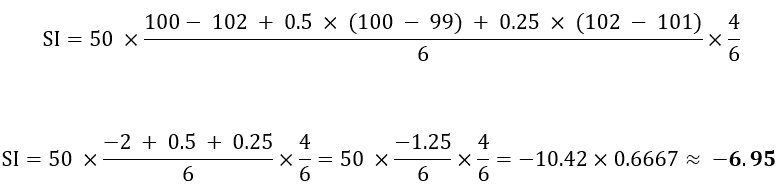
So, this day’s SI = -6.95
If the previous ASI was 150, then:

ASI in LightningChart JS Trader
In LightningChart JS Trader, the Accumulative Swing Index follows Wilder’s core approach with a notable adaptation: rather than using a dynamic calculation for normalizing SI values, it employs a fixed parameter called “Limit Move Value”.
This parameter essentially defines the maximum expected price change in one direction and serves as a replacement for the variable M found in Wilder’s original formula. The default setting is 10,000, though analysts often adjust this based on the specific asset’s volatility characteristics.
So instead of:

LightningChart JS simplifies it:

This change affects how the indicator works in ways that really matter:
- The numbers get much smaller (0.012 instead of 12).
- Values build up slowly bit by bit (going from 0.01 to 0.03 to 0.05).
- The chart shows which way prices are heading, not just how strong the moves are.
This makes charts much easier to read when you’re zooming in and out. It’s especially helpful when looking at different stocks side by side – otherwise, jumpy stocks would make your charts look messy compared to steady ones.
If you want to make the indicator more or less sensitive, you can use the setLimitMoveValue() tool to adjust it. Many traders change this setting depending on what they’re trading.
How to Create the Technical Indicator Using LC JS Trader
Step 1: Get LightningChart JS Trader
To begin, you’ll need access to LightningChart JS Trader. This specialized library contains all the necessary components for developing advanced technical indicators, including the Accumulative Swing Index Indicator. Visit the LightningChart JS Trader page to download the required components and review the documentation.
Step 2: Review the Interactive Example
LightningChart JS Trader includes interactive examples that demonstrate how to create custom technical indicators. These examples do more than just explain; they show you what works in practice. Start with the documentation, focusing on how to add the Accumulative Swing Index Indicator to your chart. The interactive examples take you through each step of the process, from importing the right modules to adjusting your chart settings for the best display.
Step 3: Code Explanation
In this step, we’ll examine the code that creates the chart with the Accumulative Swing Index Indicator, as shown in the image, using LightningChart JS Trader. The code reveals how to properly initialize a trading chart, apply the indicator, and customize its visual properties to enhance your technical analysis. Understanding these code components helps you see how the different parts work together to produce an effective analysis tool. This knowledge allows you to adapt the implementation for your specific trading requirements.
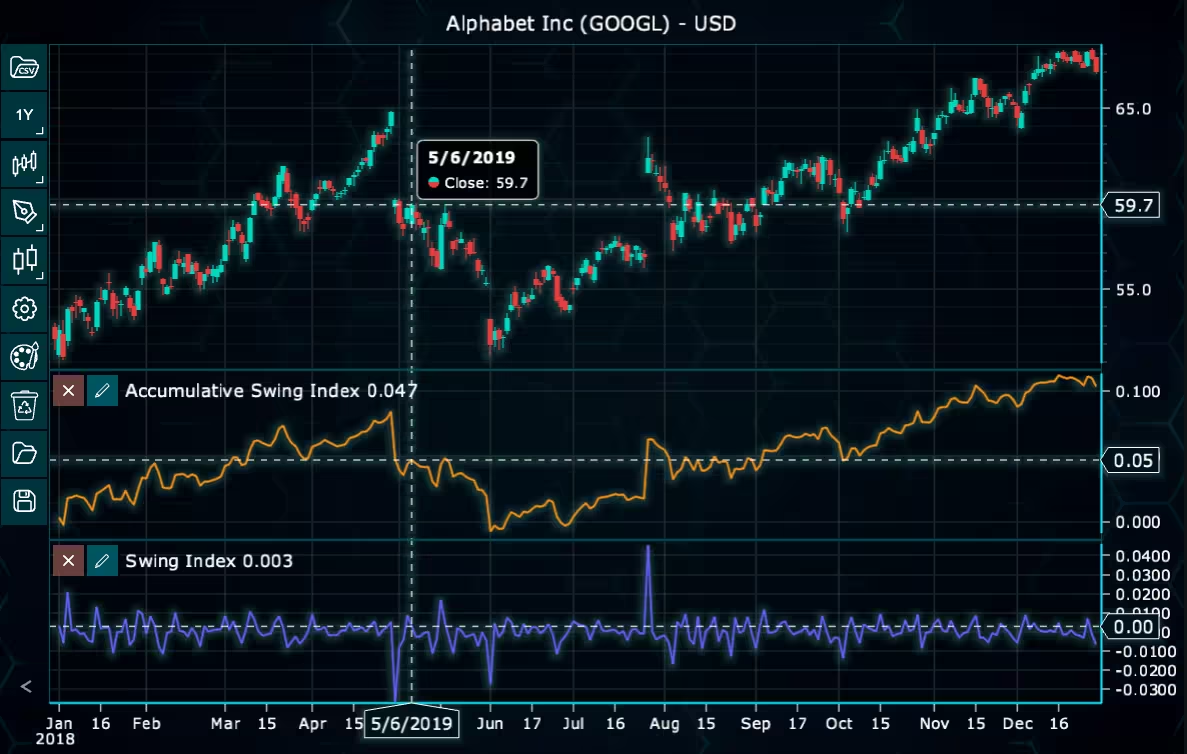
Here’s a detailed breakdown of each section:
A. Importing the Required Libraries:
const lcjsTrader = require('@lightningchart/lcjs-trader')
const lcjs = require('@lightningchart/lcjs')
const { Themes } = lcjs- lcjsTrader: This library provides access to the LightningChart JS Trader functionalities, allowing you to create advanced financial charts.
- lcjs: The main LightningChart JS library, used for general charting functionality.
- Themes: A property within LCJS that provides access to pre-built themes. In this case, we are using the darkGold theme to style the chart.
B. Initializing the Trading Chart:
lcjsTrader.trader(TRADER_LICENSE).then(async (trader) => {
  // Create a trading chart.
  const tradingChart = trader.tradingChart({ loadFromStorage: false, colorTheme: Themes.darkGold })
trader(TRADER_LICENSE): Initializes the LightningChart JS Trader with the provided license key (TRADER_LICENSE). This is required to access the charting functionalities for financial data.
Note you can request a LightningChart JS Trader trial license, which is free.
tradingChart(): This function creates a trading chart with certain options.loadFromStorage: false: This disables the loading of previously stored chart data from local storage, ensuring a fresh chart setup.colorTheme:Themes.darkGoldThis applies the darkGold theme to the chart, which influences the background color, gridlines, and other visual elements.
C. Adding and Customizing the Indicator
// Add an Accumulative Swing Index Indicator
const asi = tradingChart.indicators().addAccumulativeSwingIndex()
asi.setLimitMoveValue(10000)addAccumulativeSwingIndex(): ASI is a trend line based on the cumulative sum of the Swing Index. It measures long-term trends in prices. Shows also shows the Swing Index in a separate segment.
asi.setLimitMoveValue(10000): Sets the maximum price change in one direction.
D. Loading Data from a CSV File
    // Reading data from a file.
    await fetch(`${document.head.baseURI}examples/assets/0000/Alphabet Inc (GOOGL).csv`).then((res) => res.text()).then((text) => {
        tradingChart.readCsvString(text, 'Alphabet Inc (GOOGL)')
})fetch(): This function retrieves a CSV file containing historical data for Alphabet Inc. (GOOGL). The CSV file includes pricing information for the company’s stock, which is plotted on the chart.readCsvString(): This function reads the CSV data and interprets it as pricing data for Alphabet Inc. The second argument (‘Alphabet Inc (GOOGL)’) sets the label for the chart, as seen at the top of the chart image.
E. Setting the Currency for the Chart
    tradingChart.setCurrency('USD')
})setCurrency('USD'): This sets the currency of the chart to USD, ensuring that the pricing data is interpreted and displayed in US dollars.
Advantages and Limitations of the Indicator
One of the best things about the Accumulative Swing Index is how clearly it shows long-term market trends. By adding up daily Swing Index values, the ASI cuts through market noise and shows you the real direction prices are moving. This makes it particularly valuable for validating trendlines and confirming breakouts. When applied correctly, the ASI can help traders filter out false signals and avoid reacting to short-lived price movements that quickly reverse.
The ASI is also really flexible. You can adjust its scale, as they do in LightningChart JS Trader, to make it look clean and work well with all kinds of assets. This means it works just as well with jumpy stocks as it does with steady ones. Since it builds up over time, it’s great for spotting when price and momentum move in different directions – often a sign that the market might turn around.
But it’s not perfect. The ASI is what traders call a “lagging indicator” because it needs past price data to work. This means it’s sometimes slow to show sudden market changes. It works better for confirming trends than for catching the very beginning of moves. Also, you need good price data (opens, highs, lows, and closes) for it to work properly. Bad data can throw off your whole analysis.
It’s also worth noting that when comparing ASI values from trading literature to those displayed in LightningChart JS, slight differences may appear. This is because LC JS Trader applies a fixed “Limit Move Value,” which standardizes and scales the output to keep values more consistent and visually optimized for charting. That’s why it’s smart to use the ASI alongside other tools and explain how it works to anyone using your trading platform.
Conclusion
The Accumulative Swing Index, when built using the complete Swing Index formula, is a really valuable tool for trading apps. It gives you reliable trend analysis that works well across different markets by considering both volatility and how markets actually behave.
In LightningChart JS Trader, the ASI makes interactive charts much more useful, helping traders see what really matters instead of getting distracted by random price jumps. Since it builds up over time, it’s especially good for confirming when a price breakout is legitimate, spotting when trends are running out of steam, or checking if a long-term move is the real deal.
The “Limit Move Value” setting in LightningChart makes the ASI even better because it keeps the indicator looking clean and easy to understand across all kinds of markets and trading instruments.
Continue learning with LightningChart
HTML
Written by a human | Updated on April 9th, 2025HTML Charts with JavaScript HTML charts are standard and suitable for all-level developers with a simple implementation. The issue with basic HTML 5 charts is their limited functionalities and performance...

Volumetric Data Visualization
This article provides an overview of Volume Data, and the techniques which can be used to visualize it.

JavaScript Data Visualization With LightningChart JS
Written by a human | Updated on April 9th, 2025LightningChart JS LightningChart JS is the top contestant for next-generation JavaScript data visualization tools for web and mobile applications. From the start, it has been engineered to deal with maximum-size...





If you have any questions, feel free to contact us!
©LightningChart Ltd 2026. All rights reserved.