








Trade Volume Index (TVI) with LightningChart JS Trader
Article
Learn how to implement the Trade Volume Index indicator in your fintech software applications using LC JS Trader.
Ahmad Omid
Data Science Developer


Introduction to Trade Volume Index Indicator
The Trade Volume Index (TVI) is a pivotal technical indicator in the financial markets, designed to reflect whether a security is being accumulated (bought) or distributed (sold). Unlike some volume-based indicators that rely on end-of-day data, the TVI thrives on intraday activity, highlighting significant price and volume changes as they occur. By capturing real-time buying and selling pressure, it provides traders with actionable insights into market sentiment.
Often considered a complement to price analysis, the trading volume index is particularly effective for identifying the underlying strength or weakness of a trend. This makes it indispensable for day traders and short-term investors.
How is It Used in Trading?
Traders leverage the trade volume index indicator to:
- Confirm trends: Positive TVI values suggest accumulation, indicating buying interest, while negative values point to distribution, signaling selling pressure.
- Spot reversals: Sharp deviations in TVI can act as early warnings of trend reversals.
- Enhance entry and exit strategies: By combining TVI with other indicators, traders can refine their timing.
Brief Comparison Versus On-Balance Volume (OBV)
While both the TVI and On-Balance Volume (OBV) measure the relationship between price and volume, the TVI offers a more granular approach by considering intraday price movements. OBV, on the other hand, aggregates volume based on whether the closing price is higher or lower than the previous close, making it less responsive to real-time changes.
Brief Comparison Versus Volume-Weighted Average Price (VWAP)
The Volume-Weighted Average Price (VWAP) is a benchmark often used to assess whether a security is trading above or below its average price during the day. Unlike TVI, which focuses on the directional flow of buying and selling, VWAP provides an average price metric. While VWAP is useful for long-term positioning, TVI caters to traders seeking to exploit immediate price-volume dynamics.
Formula
The Trade Volume Index (TVI) works by capturing the relationship between price changes and trading volume, providing insights into whether a security is being accumulated (bought) or distributed (sold). Let’s break down the formula and its components step-by-step:
Direction Threshold (DT):
Identifying Price: DT = PriceCurrent – PricePrevious
- If DT > 0: The price has increased, indicating potential buying activity.
- If DT < 0: The price has decreased, indicating potential selling activity.
- If DT = 0: No significant price change is detected.
This directional threshold acts as a filter to decide whether the corresponding volume contributes to buying (accumulation) or selling (distribution).
Volume Contribution (VC):
Linking Price Direction to Volume. Once the price direction is established, the corresponding trading volume is added or subtracted based on the direction of DT:
- Positive Direction (DT > 0): VC = VolumeCurrent
- The current trade volume is added to the TVI, indicating accumulation.
- Negative Direction (DT < 0): VC = -VolumeCurrent
- The current trade volume is subtracted from the TVI, indicating distribution.
- Flat Market (DT = 0): No volume is added or subtracted. The TVI remains unchanged.
Filtering Noise:
Setting a Threshold. To avoid the TVI reacting to minor or irrelevant price fluctuations, traders often set a minimum price change threshold (Threshold):
DT = PriceCurrent – PricePrevious
If the absolute value of DT is below the threshold:
∣DT∣ < Threshold
The change is ignored, and the corresponding volume is not added to the TVI. This step helps remove market noise and ensures that the indicator reflects only significant movements.
Cumulative Calculation:
Building the TVI. The TVI is calculated as the cumulative sum of all volume contributions over a given period:
TVIt = TVIt-1 + VC
Where:
- TVIt: The Trade Volume Index at the current time.
- TVIt-1: The TVI from the previous time step.
- VC: The current volume contribution is based on price direction.
This formula creates a running total that tracks whether the market is experiencing net accumulation (positive TVI) or net distribution (negative TVI) over time.
Interpretation
- Rising TVI: Indicates sustained buying pressure and accumulation.
- Falling TVI: Indicates sustained selling pressure and distribution.
- Flat TVI: Suggests a balanced market, where buying and selling are roughly equal.
Example Calculation
Assume the following intraday data:

- 9:00: The price increase meets the threshold, so 1,000 is added to TVI.
- 9:15: Price movement does not exceed the threshold, so no volume is added.
- 9:30: A price increase adds 1,200 to TVI.
- 9:45: A price decrease subtracts 900 from TVI.
The TVI captures significant price-volume dynamics and adjusts based on trader-defined thresholds.
Key Components
- Directional Threshold: Distinguishes buying from selling.
- Volume Contribution: Ties directional price changes to trade volume.
- Threshold Setting: Filters out noise from small price changes.
- Cumulative Calculation: Builds the TVI over time.
This framework ensures the Trade Volume Index accurately reflects the market’s buying or selling pressure, offering a valuable perspective for intraday trading strategies.
How to Create the Technical Indicator Using LC JS Trader
Step 1: Get LightningChart JS Trader
To begin, you’ll need access to LightningChart JS Trader. This library provides the tools necessary to create advanced technical indicators, including the Trade Volume Index Indicator. Visit the LightningChart JS Trader page to download the required components and review the documentation.
Step 2: Review the Interactive Example
LightningChart JS Trader includes interactive examples that demonstrate how to create custom technical indicators. Start by reviewing the documentation, focusing on how to integrate the Trade Volume Index Indicator into your chart setup. The interactive examples will guide you through the process of setting up the TVI Indicator, from importing the necessary modules to modify the chart settings.
Step 3: Code Explanation
In this step, we will break down the code that creates the chart with the Trade Volume Index Indicator, as shown in the image, using LightningChart JS Trader. The code demonstrates how to initialize a trading chart, apply the TVI Indicator, and customize its appearance.

Here’s a detailed breakdown of each section:
A. Importing the Required Libraries:
   const lcjsTrader = require('@arction/lcjs-trader')
   const lcjs = require('@arction/lcjs')
const { Themes } = lcjs- lcjsTrader: This library provides access to the LightningChart JS Trader functionalities, allowing you to create advanced financial charts.
- lcjs: The main LightningChart JS library, used for general charting functionality.
- Themes: A property within lcjs that provides access to pre-built themes. In this case, we are using the darkGold theme to style the chart.
B. Initializing the Trading Chart:
   lcjsTrader.trader(TRADER_LICENSE).then(async (trader) => {
    // Create a trading chart.
const tradingChart = trader.tradingChart({ loadFromStorage: false, colorTheme: Themes.darkGold })trader(TRADER_LICENSE): Initializes the LightningChart JS Trader with the provided license key (TRADER_LICENSE). This is required to access the charting functionalities for financial data.
Note you can request a LightningChart JS Trader trial license, which is free.
tradingChart(): This function creates a trading chart with certain options.loadFromStorage: false: This disables the loading of previously stored chart data from local storage, ensuring a fresh chart setup.colorTheme: Themes.darkGold: This applies the darkGold theme to the chart, which influences the background color, gridlines, and other visual elements.
C. Adding and Customizing the Indicator
    // Add a Trade Volume Index indicator
    const tvi = tradingChart.indicators().addTradeVolumeIndex()
    tvi.setSource(3)
    tvi.setMinimumTickValue(0.5)
    tvi.setLineColor('#F42FE4')
tvi.setLineWidth(3)addTradeVolumeIndex(): TVI shows whether a security is being accumulated (bought) or distributed (sold). It moves distinctly when significant changes in price and volume happen simultaneously. TVI is most often used with intraday data.
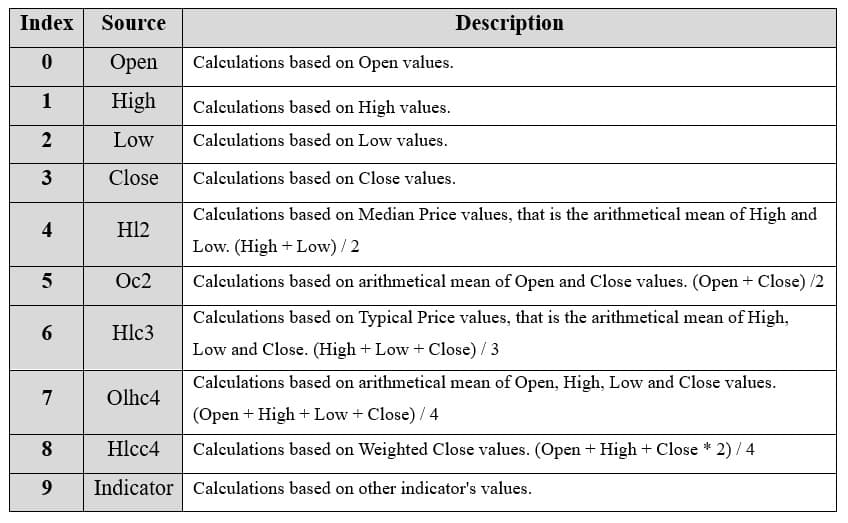
**tvi.setSource(3): Values to base the calculations on. In this case, 3 represents the close price.
tvi.setMinimumTickValue(0.5): Sets the minimum tick value used in TVI calculations. The default value is 0.5.
tvi.setLineColor('#F42FE4'): Changes the color of the TVI line to pink. This enhances the visual distinction of the indicator on the chart.
tvi.setLineWidth(3): Sets the line thickness of TVI to 3 pixels. This makes the line more prominent and easier to observe during analysis.
D. Loading Data from a CSV File
    // Reading data from a file.
    await fetch(`${document.head.baseURI}examples/assets/0000/Alphabet Inc (GOOGL).csv`).then((res) => res.text()).then((text) => {
        tradingChart.readCsvString(text, 'Alphabet Inc (GOOGL)')
})fetch(): This function retrieves a CSV file containing historical data for Alphabet Inc. (GOOGL). The CSV file includes pricing information for the company’s stock, which is plotted on the chart.readCsvString(): This function reads the CSV data and interprets it as pricing data for Alphabet Inc. The second argument (‘Alphabet Inc (GOOGL)’) sets the label for the chart, as seen at the top of the chart image.
E. Setting the Currency for the Chart
    tradingChart.setCurrency('USD')
})setCurrency('USD'): This sets the currency of the chart to USD, ensuring that the pricing data is interpreted and displayed in US dollars.
** Enumeration Source in LC JS Trader:
To select which values the indicator calculations are based on.
Advantages and Limitations of the Indicator
Advantages
- Real-Time Insights: Unlike end-of-day indicators, TVI provides intraday analysis, making it ideal for active traders.
- Granular Detail: By focusing on significant price-volume movements, it highlights actionable trends.
- Ease of Interpretation: A rising TVI suggests buying pressure, while a falling TVI indicates selling pressure.
Limitations
- Sensitivity to Noise: Without appropriate thresholds, TVI may react to minor price fluctuations, leading to false signals.
- Dependency on Intraday Data: It requires high-frequency data, which might not be accessible to all traders.
- Lack of Context: While TVI shows buying or selling pressure, it doesn’t provide information about the strength or sustainability of the trend.
Conclusion
The Trade Volume Index (TVI) is a powerful tool for traders aiming to uncover real-time buying and selling pressures in the market. Its reliance on intraday data makes it especially useful for short-term strategies, complementing other volume-based indicators like On-Balance Volume (OBV) and Volume-Weighted Average Price (VWAP).
By incorporating TVI into trading systems, investors can gain a deeper understanding of market dynamics and improve decision-making. Using LightningChart JS Trader, traders can visualize the TVI effectively, gaining the precision needed to succeed in fast-paced markets.
Continue learning with LightningChart
Real-time data visualization with WebSockets
Written by a human | Updated on April 10th, 2025WebSockets Data Visualization in Real-Time These days it is ever increasingly common that people require web solutions for their applications and services. Data visualization is not an exception to this, as...
Why Performance Matters in Data Visualization?
Written by a human | Updated on April 10th, 2025Performance in Data VisualizationI was doing a Google search a couple of days ago and particularly, I wanted to know what are the options for developers who need to visualize large amounts of data points within...

Geospatial data visualization with Google Maps & LightningChart
Written by a human | Updated on April 10th, 2025Geospatial Data Visualization This article showcases and describes a particular use case of LightningChart JS for geospatial data visualization. LightningChart JS is a JavaScript charting tool designed for...



If you have any questions, feel free to contact us!



©LightningChart Ltd 2026. All rights reserved.