





A Python Analysis of Global Temperature Anomalies Analysis Across Latitude Bands
Tutorial
Data visualization analysis using LightningChart Python.
Fateme Ajam
Data Science Python Developer


Introduction to Temperature Anomalies Analysis
The increasing global temperature anomalies over the past century are a significant indicator of climate change and its impacts. These anomalies, representing the deviation of temperature from a baseline average, are crucial for understanding how different regions of the Earth are experiencing warming at varying rates.
The poles, particularly the Arctic, are warming much faster than the rest of the world—a phenomenon known as Arctic amplification. Meanwhile, regions closer to the equator are warming at a slower rate, yet still experience significant climate impacts such as extreme weather patterns. Understanding the distribution of these temperature anomalies across different latitudes helps policymakers and scientists assess the specific impacts and plan mitigation strategies.
Several studies have highlighted the alarming trends of global warming. According to IPCC (2021), the global surface temperature has risen approximately 1.2°C since pre-industrial times. The impacts of these rising temperatures are diverse, including glacier melting, sea-level rise, and increased frequency of extreme weather events. Studies such as Smith et al. (2020) and Jones (2019) emphasize the need to closely monitor temperature anomalies to understand how various regions are being disproportionately affected by climate change.
This article provides a detailed analysis of global temperature anomalies using latitude-based data from 1880 to the present, visualized through multiple LightningChart Python visualizations.
About the Dataset
The dataset used for this analysis is titled ZonAnn.Ts+dSST.csv and contains latitude-based temperature anomaly data from 1880 to the present. It includes columns representing various latitude regions, such as “Glob” (global), “NHem” (Northern Hemisphere), “SHem” (Southern Hemisphere), and specific bands like “24N-90N” (covering the mid to high northern latitudes), and “90S-24S” (covering the southern latitudes).
Key latitude bands included:
- Glob: Global temperature anomaly.
- NHem and SHem: Anomalies for the Northern and Southern Hemispheres.
- 24N-90N: Temperature anomalies in mid to high northern latitudes.
- EQU-24N: Near equatorial regions.
- 64N-90N: Anomalies in polar regions of the Northern Hemisphere.
- 90S-64S: Southern Hemisphere polar region anomalies.
Key Points in Temperature Anomaly Analysis
For this analysis, we focus on key variables:
- Global and Regional Temperature Anomalies: Deviations from average temperature at the global level and within specific latitude bands.
- Latitude Bands: Different regions such as the Northern Hemisphere, Southern Hemisphere, and the equatorial zone to study warming patterns.
- Time Trends: Changes in temperature anomalies from 1880 to the present.
These key data points will be visualized through different chart types, providing a comprehensive view of temperature changes over time and space.
LightningChart Python
LightningChart Python is a high-performance data visualization library known for efficiently handling large datasets. LightningChart Python was instrumental in rendering multiple environmental parameters from NOAA’s API and simulating real-time data playback in this project.
Its flexibility allowed for the seamless integration of various chart types, such as line charts with stacked Y-axes, which visualized wind speeds, water levels, tide predictions, and temperature variations. LightningChart Python’s powerful rendering capabilities ensured smooth and responsive updates, even when processing multiple parameters in simulated real-time.

Chart Types to be used in the Project
Several chart types from LightningChart Python are leveraged for this project to offer a multi-faceted analysis:
- Line Charts: To show temperature anomaly trends over time, highlighting the warming patterns in different latitude bands.
- Polar Charts: To visualize temperature anomalies in circular layouts, emphasizing the distribution of temperature changes across hemispheres.
- Bar Charts: Used to represent the spread of anomalies across latitude regions in a straightforward and comparative format.
- Stacked Area Charts: To demonstrate how various regions cumulatively contribute to global temperature anomalies over time.
Optimizing Data Visualization Performance
LightningChart Python’s real-time performance capabilities ensure that even large datasets, like temperature anomalies recorded over multiple decades across multiple regions, can be visualized smoothly. This is especially important for analyses that require continuous updates or dynamic comparisons between regions. In this analysis, the dataset covers more than 140 years of temperature data, which LightningChart handles efficiently.
Key features of LightningChart Python used in this project include:
- Seamless large dataset handling: Ability to load and render data for hundreds of years without slowing down.
- Interactive capabilities: Charts can be zoomed, panned, and updated dynamically to explore specific periods or regions.
- High performance on complex charts: Even charts with multiple layers, such as stacked area charts, perform smoothly.
Setting Up Python Environment
To begin working on this project, it’s necessary to install the required libraries, including Pandas and LightningChart Python. You can do this by following the steps below:
- First, you need to install Python: Download and install the latest version of Python from the official Python website.
- Second, you need to Install Pandas and LightningChart:
Use the pip package manager to install the necessary libraries by running these commands:
pip install lightningchart
pip install pandas numpy
We will use Pandas for data manipulation, NumPy for numerical operations, and LightningChart Python for the visualizations.
Data Loading and Preprocessing
We begin by loading the dataset, cleaning it, and filtering the data to focus on the most relevant latitude bands and time periods (1880 to the present).
import pandas as pd

# Load the dataset from a CSV file
path = 'ZonAnn.Ts+dSST.csv'
data = pd.read_csv(path)

# Display the first few rows of the dataset
print(data.head())


# Filter relevant years and columns
temperature_data_cleaned = temperature_data[['Year', 'Glob', 'NHem', 'SHem', '24N-90N', '90S-24S', '64N-90N']]
Visualizing Data with LightningChart Python
LightningChart Python offers various ways to visualize temperature anomaly data. Below, we demonstrate several visualization techniques.
Line Chart: Temperature Changes in Different Regions
This line chart visualizes temperature changes in different regions over time. By plotting the anomalies for the global average alongside different latitude bands, it becomes clear how certain regions (such as polar areas) are experiencing greater warming compared to others.
The line chart provides a year-by-year overview of how anomalies have evolved since 1880. This chart provides a clear visualization of how global temperature anomalies have risen steadily, with sharper increases observed in the Northern Hemisphere.
# Code for Line Chart showing temperature changes
chart = lc.ChartXY(theme=lc.Themes.Black, title='Temperature Changes in Different Regions')
regions = ['Glob', 'NHem', 'SHem', '24N-90N', '24S-24N', '90S-24S']
for region in regions:
    line_series = chart.add_line_series().set_name(region).add(data['Year'], data[region])
chart.open()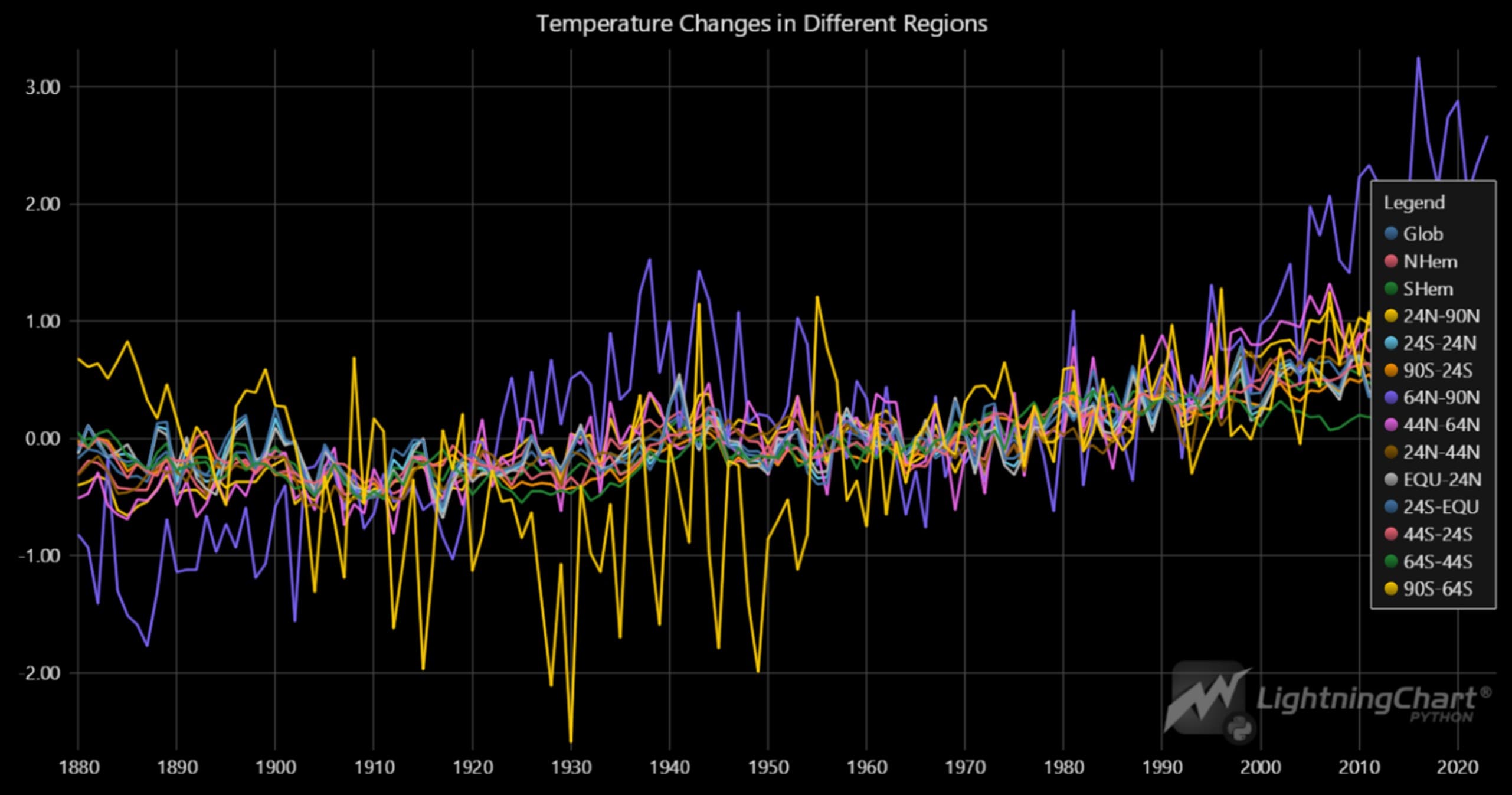
Scatter Plot Dashboard: Global Temperature Anomalies Over Time
This image shows a dashboard of scatter plots comparing temperature anomalies across various geographical regions with global temperature anomalies. Each scatter plot represents a specific region, with the horizontal axis representing global temperature anomalies and the vertical axis displaying the temperature data for that particular region.
The data points are displayed in different colors, making it easier to visually distinguish between the regions. This dashboard allows for a quick and simultaneous comparison of temperature changes across different geographical regions relative to global temperatures.
# Code for Scatter Plot Dashboard with ChartXY and PointSeries
dashboard = lc.Dashboard(columns=3, rows=(len(region_columns) + 2) // 3, theme=lc.Themes.Black)

# #ScatterPlot: Adding scatter plots for each region compared to global temperature anomalies
def create_scatter_chart(dashboard, x_values, y_values, xlabel, ylabel, column_index, row_index, color):

    chart = dashboard.ChartXY(
        column_index=column_index,
        row_index=row_index
    )
    # #PointSeries: Adding scatter plot points
    scatter_series = chart.add_point_series()
    scatter_series.add(x_values, y_values)
    scatter_series.set_point_color(color)
    scatter_series.set_point_size(4)
    chart.get_default_x_axis().set_title('')
    chart.get_default_y_axis().set_title(ylabel)
    chart.set_padding(0)
    chart.set_title('')

# Adding scatter plots for each region
for i, region_column in enumerate(region_columns):
    color = get_rainbow_gradient_color(i, len(region_columns))
    create_scatter_chart(dashboard, x_values=data['Glob'], y_values=data[region_column],
                         xlabel='Glob', ylabel=region_column,
                         column_index=i % 3, row_index=i // 3, color=color)

# #Display: Open the dashboard with scatter plots
dashboard.open('browser')
Bar Charts: Latitude-Based Temperature Anomaly Distribution
The first visualization consists of bar charts displaying the distribution of temperature anomalies across different latitude bands. This layout makes it easy to compare the spread of temperature anomalies within regions like the Northern Hemisphere (NHem), Southern Hemisphere (SHem), and specific latitude bands like 24N-90N and 90S-24S.
Each bar chart represents a specific latitude region, and the x-axis shows the anomaly values, while the y-axis shows the frequency of occurrences within each range. This visualization helps to detect the range of anomalies typical in each region. The corresponding code sets up the dashboard with 12 bar charts and populates them with histogram data:
# Code for Histogram Dashboard with BarChart
dashboard = lc.Dashboard(columns=3, rows=4, theme=lc.Themes.Dark)

# #BarChart: Adding histograms for selected features
def add_histogram_to_dashboard(dashboard, feature_name, column_index, row_index):
    feature_data = data[feature_name].dropna()
    counts, bin_edges = np.histogram(feature_data, bins=30)
    bar_data = [{"category": f"{bin_edges[i]:.2f}–{bin_edges[i+1]:.2f}", "value": int(count)} for i, count in enumerate(counts)]

    # Create BarChart
    chart = dashboard.BarChart(column_index=column_index, row_index=row_index)
    chart.set_title(f'{feature_name} Distribution')
    chart.set_data(bar_data)
    chart.set_sorting('disabled')

# Adding histograms for each selected feature
selected_features = ['NHem', 'SHem', '24N-90N', '24S-24N', '64N-90N', '44N-64N', '24N-44N', 'EQU-24N', '24S-EQU', '64S-44S', '90S-24S', '90S-64S']
for i, feature in enumerate(selected_features):
    add_histogram_to_dashboard(dashboard, feature, column_index=i % 3, row_index=i // 3)

# #Display: Open the dashboard with histograms
dashboard.open('browser')
Mixed Scatter and Bar Charts
This visualization combines scatter plots and bar charts into one cohesive display. In this layout, scatter plots demonstrate the relationships between regions, while bar charts provide insight into the distribution of anomalies within each region. This dual approach offers a comprehensive view, helping to capture both correlation and frequency distribution in one dashboard.
# Code for Scatter Plot and Histogram Dashboard
dashboard = lc.Dashboard(columns=len(selected_columns), rows=len(selected_columns), theme=lc.Themes.Dark)

# #ScatterPlot and #Histogram: Adding scatter plots and histograms to the dashboard
def create_scatter_chart(dashboard, x_values, y_values, xlabel, ylabel, column_index, row_index, color):
    chart = dashboard.ChartXY(column_index=column_index, row_index=row_index)
    scatter_series = chart.add_point_series().add(x_values, y_values)
    scatter_series.set_point_color(color).set_point_size(5)
    chart.get_default_x_axis().set_title(xlabel)
    chart.get_default_y_axis().set_title(ylabel)
    chart.set_padding(0)

def add_histogram_to_dashboard(dashboard, feature_data, feature_name, column_index, row_index):
    counts, bin_edges = np.histogram(feature_data, bins=30)
    bar_data = [{"category": f"{bin_edges[i]:.2f}–{bin_edges[i+1]:.2f}", "value": int(count)} for i, count in enumerate(counts)]
    chart = dashboard.BarChart(column_index=column_index, row_index=row_index)
    chart.set_title(f'{feature_name} Distribution').set_data(bar_data).set_sorting('disabled')

# Add scatter plots and histograms
for i, x_column in enumerate(selected_columns):
    for j, y_column in enumerate(selected_columns):
        color = get_rainbow_gradient_color(i * len(selected_columns) + j, total_combinations)
        if i == j:
            add_histogram_to_dashboard(dashboard, data[x_column], x_column, column_index=i, row_index=j)
        else:
            create_scatter_chart(dashboard, data[x_column], data[y_column], xlabel=x_column, ylabel=y_column, column_index=i, row_index=j, color=color)

# #Display: Open the dashboard with scatter plots and histograms
dashboard.open('browser')
Stacked Area Chart: Global Temperature Anomalies Over Time
The stacked area chart illustrates how global temperature anomalies have accumulated over time across different latitude bands. Each region’s contribution to the overall temperature anomaly is visualized as a stacked layer, which provides a clear sense of how different regions are contributing to global temperature change.
# Code for Stacked Area Chart
chart = lc.ChartXY(theme=lc.Themes.Light, title="Stacked Area Chart - Global Temperature Anomalies")

# Add area series for each region
nh_series = chart.add_area_series().set_name("NHem").add(years, nh_data)
sh_series = chart.add_area_series().set_name("SHem").add(years, stacked_sh_data)
n24_90n_series = chart.add_area_series().set_name("24N-90N").add(years, stacked_n24_90n_data)
n24_24n_series = chart.add_area_series().set_name("24N-44N").add(years, stacked_n24_24n_data)
equ_series = chart.add_area_series().set_name("EQU-24N").add(years, stacked_equ_data)

# Customize axes and legend
chart.get_default_x_axis().set_title("Year")
chart.get_default_y_axis().set_title("Temperature Anomaly (°C)")
chart.add_legend(x=15, y=80).add(chart)

# Open the chart
chart.open('browser')
Conclusion
The analysis of global temperature anomalies using latitude-based data from 1880 to the present provides a critical insight into the regional impacts of climate change. Polar regions, particularly in the Northern Hemisphere, are experiencing faster rates of warming compared to the equatorial and Southern Hemisphere regions.
The visualizations created using LightningChart Python were instrumental in effectively communicating these trends. LightningChart’s real-time data handling capabilities ensured smooth performance even with such a large dataset, making it an ideal tool for climate data analysis.
Continue learning with LightningChart
Real-time data visualization with WebSockets
Written by a human | Updated on April 10th, 2025WebSockets Data Visualization in Real-Time These days it is ever increasingly common that people require web solutions for their applications and services. Data visualization is not an exception to this, as...
Why Performance Matters in Data Visualization?
Written by a human | Updated on April 10th, 2025Performance in Data VisualizationI was doing a Google search a couple of days ago and particularly, I wanted to know what are the options for developers who need to visualize large amounts of data points within...

Geospatial data visualization with Google Maps & LightningChart
Written by a human | Updated on April 10th, 2025Geospatial Data Visualization This article showcases and describes a particular use case of LightningChart JS for geospatial data visualization. LightningChart JS is a JavaScript charting tool designed for...





If you have any questions, feel free to contact us!
©LightningChart Ltd 2026. All rights reserved.