





Introduction to Semiconductor Assembly Analysis and Testing Processes
Tutorial
Assisted by AI
Conduct a semiconductor assembly analysis using LightningChart in Python for efficiently visualizing semiconductor assembly data.
Soroush Sohrabian
Software Developer


What is semiconductor assembly?
Semiconductor assembly analysis delves into the packaging of integrated circuits into final products. This involves intricate processes like die attach, wire bonding, and encapsulation, all critical for device performance and reliability. Effective semiconductor assembly analysis ensures these steps are optimized.
What do testing processes in the semiconductor industry mean?
Testing processes, a key focus of semiconductor assembly analysis, involve rigorous checks at various stages to ensure functionality and identify defects. From wafer probing to final package testing, thorough analysis of these processes is essential for delivering reliable semiconductor devices.
How is semiconductor assembly data collected?
Effective semiconductor assembly analysis relies on meticulous data collection throughout the assembly process. This includes monitoring parameters like temperature, pressure, and electrical characteristics, providing valuable insights for process optimization and quality control.
LightningChart Python
LightningChart is a high-performance data visualization library that offers real-time rendering and different interactive charts that makes it ideal tool for vibration analysis.

Features and Chart Types Used in the Project
For this semiconductor assembly analysis project, we use LightningChart to visualize machine vibration and throughput analysis for the following chart types:
- Time Series Graphs – Track machine vibration over time.
- Heatmaps – Show correlations between different machine features.
- Histograms – Analyze feature distributions like wire width and grinding thickness.
- Scatter & Bubble Charts – Visualize relationships between variables.
- Boxplots – Identify variations in throughput rates.
- Regression Plots – Examine dependencies between features and throughput.
- t-SNE & PCA – Reduce dimensionality and visualize machine types.
Performance Characteristics
LightningChart Python has great performance in processing real-time data without slowdowns. It supports parallel rendering, GPU acceleration, and efficient data streaming that makes it perfect tool for large-scale industrial applications.
Setting Up Python Environment
pip install numpy pandas lightningchart matplotlib seaborn scikit-learn xgboostOverview of Libraries Used
- NumPy & Pandas – Handling and processing numerical data.
- LightningChart – Creating real-time, interactive visualizations.
- Matplotlib & Seaborn – Additional plotting and statistical analysis.
- Scikit-learn – Machine learning and dimensionality reduction.
- XGBoost – Predictive modeling and regression analysis.
Setting Up Your Development Environment
- Set up a virtual environment:
python -m venv rf_analysis_env
source rf_analysis_env/bin/activate # On Windows: rf_analysis_env\Scripts\activate- Use Visual Studio Code (VSCode) for a streamlined development experience.
Loading and Processing Data
Our dataset contains semiconductor assembly and testing machine data, with categorical and numerical attributes. Load it using Pandas:
import pandas as pd
data = pd.read_csv('mixed_categorical_numerical_data.csv')
Handling and Preprocessing the Data
Convert categorical data to numerical using one-hot encoding:
import pandas as pd
data = pd.read_csv('mixed_categorical_numerical_data.csv')
Normalize numerical values for better visualization:
import pandas as pd
data = pd.read_csv('mixed_categorical_numerical_data.csv')
Handle missing values:
import pandas as pd
data = pd.read_csv('mixed_categorical_numerical_data.csv')
Visualizing Data with LightningChart Python
LightningChart enables real-time, high-speed visualization. We use it to determine machine behavior, find anomalies, and optimize operations.
Box Plot
Description:
This chart shows the distribution of throughput rates for different recipe types (X5). It highlights the median, quartiles, and outliers.
Script Summary:
categories = data['X5'].unique()
box_data = [{'start': i, 'end': i+0.5, 'median': np.median(data[data['X5'] == i]['Y'])} for i in categories]
chart_box = lc.ChartXY().set_title('Throughput Rate by Recipe Type')
chart_box.add_box_series().add_multiple(box_data)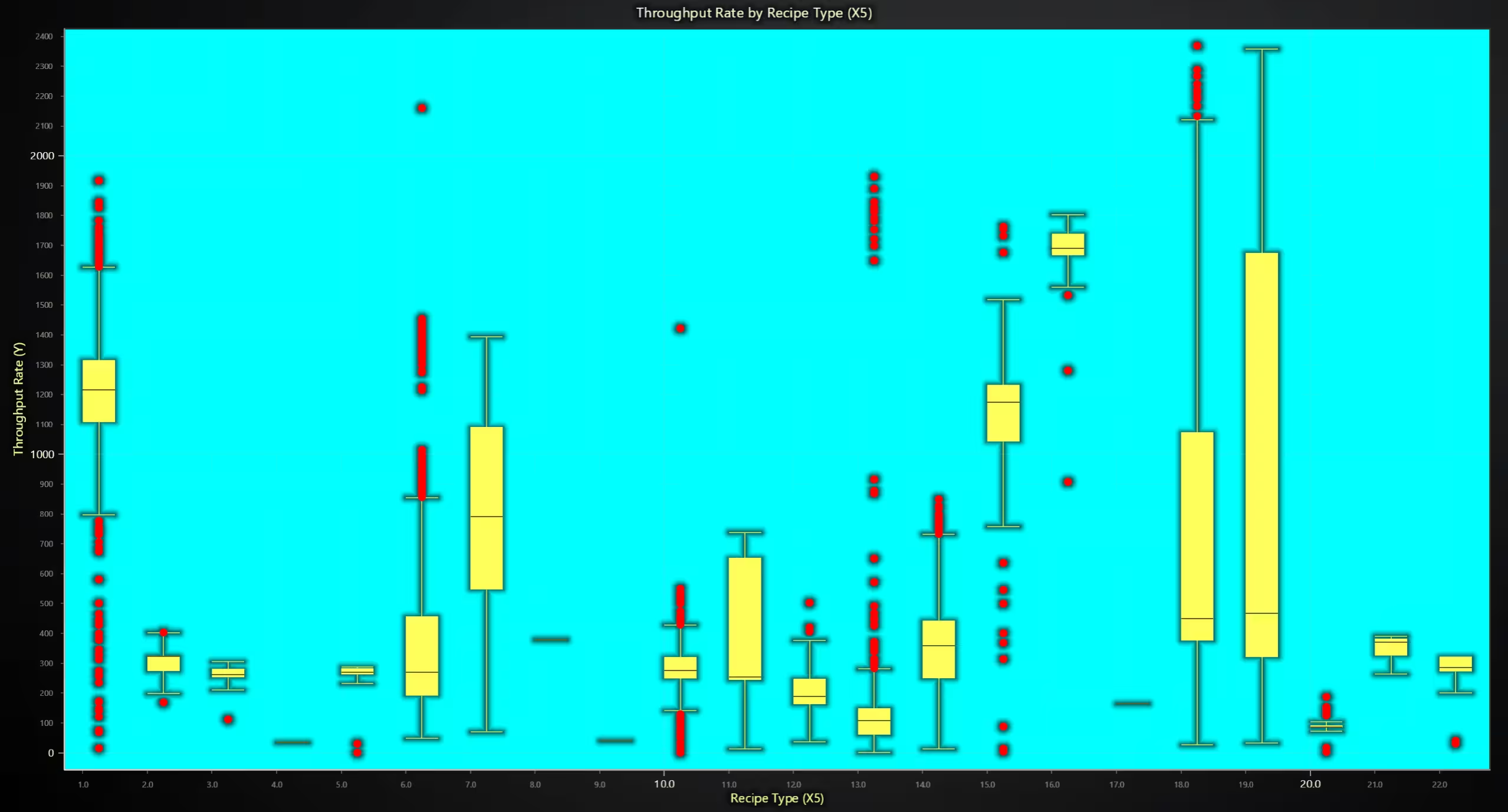
Cumulative Throughput Rate
Description: These area charts visualize the cumulative throughput over time for different machines (X1) and product types. It helps track production efficiency.
Script Snippet:
data['Cumulative_Y'] = data.groupby('X1')['Y'].cumsum()
data['Cumulative_Y_Product'] = data.groupby('X2')['Y'].cumsum()
chart_cumulative = lc.ChartXY().set_title("Cumulative Throughput by Machine Type")
chart_cumulative.add_line_series().append_samples(x=data.index, y=data['Cumulative_Y'])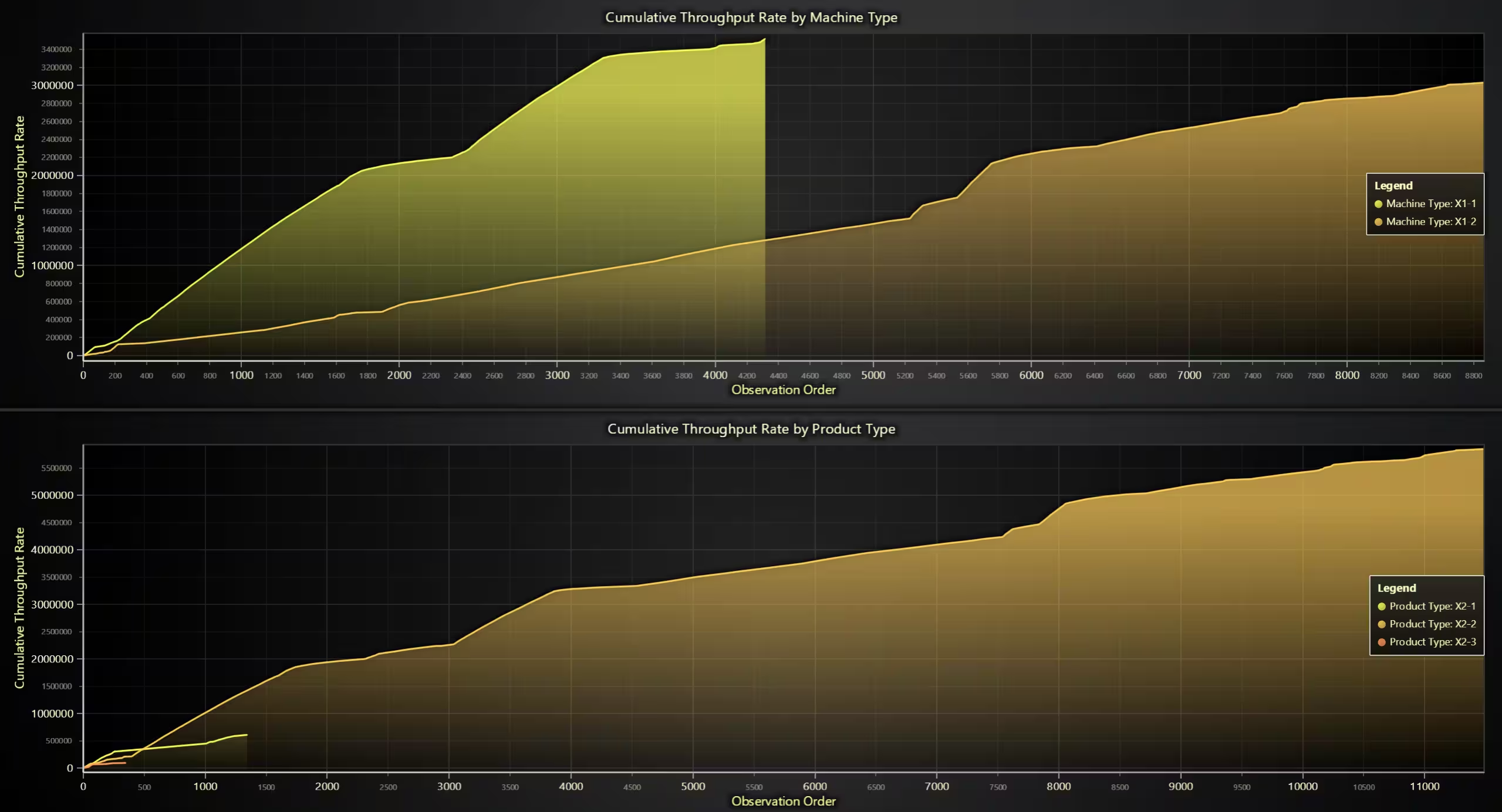
Correlation Heatmap
Description:A heatmap displays the correlation between numerical features, where red indicates a strong positive relationship and blue represents a strong negative correlation.
Script Snippet:
corr_matrix = data.corr().to_numpy()
heatmap = chart.add_heatmap_grid_series(rows=corr_matrix.shape[0], columns=corr_matrix.shape[1])
heatmap.invalidate_intensity_values(corr_matrix.tolist())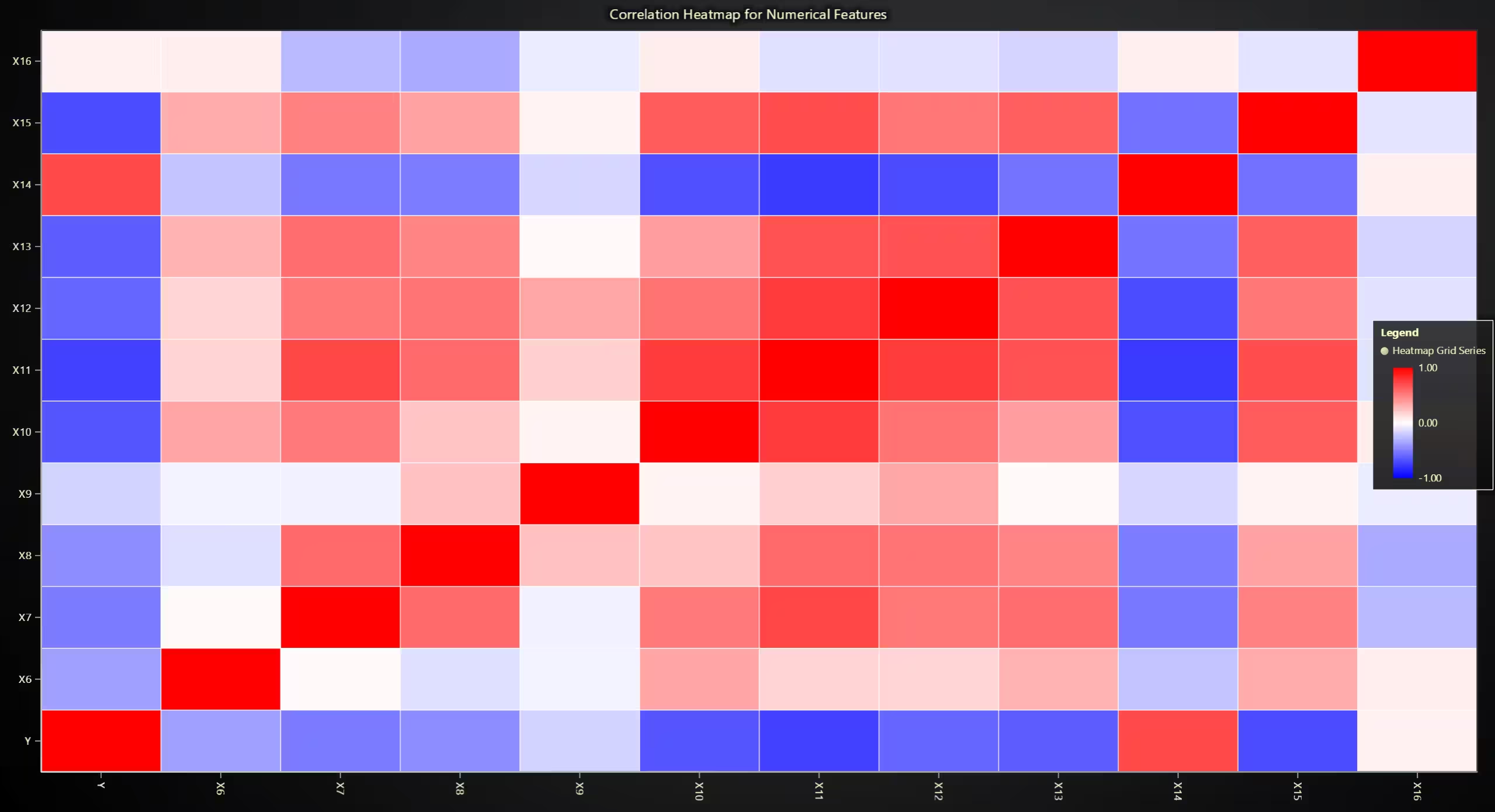
Dashboard View
Description: TA combined visualization that includes: • Stacked Bar Chart: Counts of machine and product types.
- Time Series Chart: Throughput rate over time.
- PCA Scatter Plot: Principal Component Analysis of numeric data.
- Bubble Chart: Grinding thickness vs. wire count, with throughput rate shown as bubble size.
Script Snippet:
category_counts = {col: data[col].value_counts().to_dict() for col in ['X1', 'X2', 'X3', 'X4', 'X5']}
bar_data = [{'subCategory': key, 'values': list(value.values())} for key, value in category_counts.items()]
chart_bar = dashboard.BarChart().set_title("Machine & Product Types").set_data_stacked(list(category_counts.keys()), bar_data)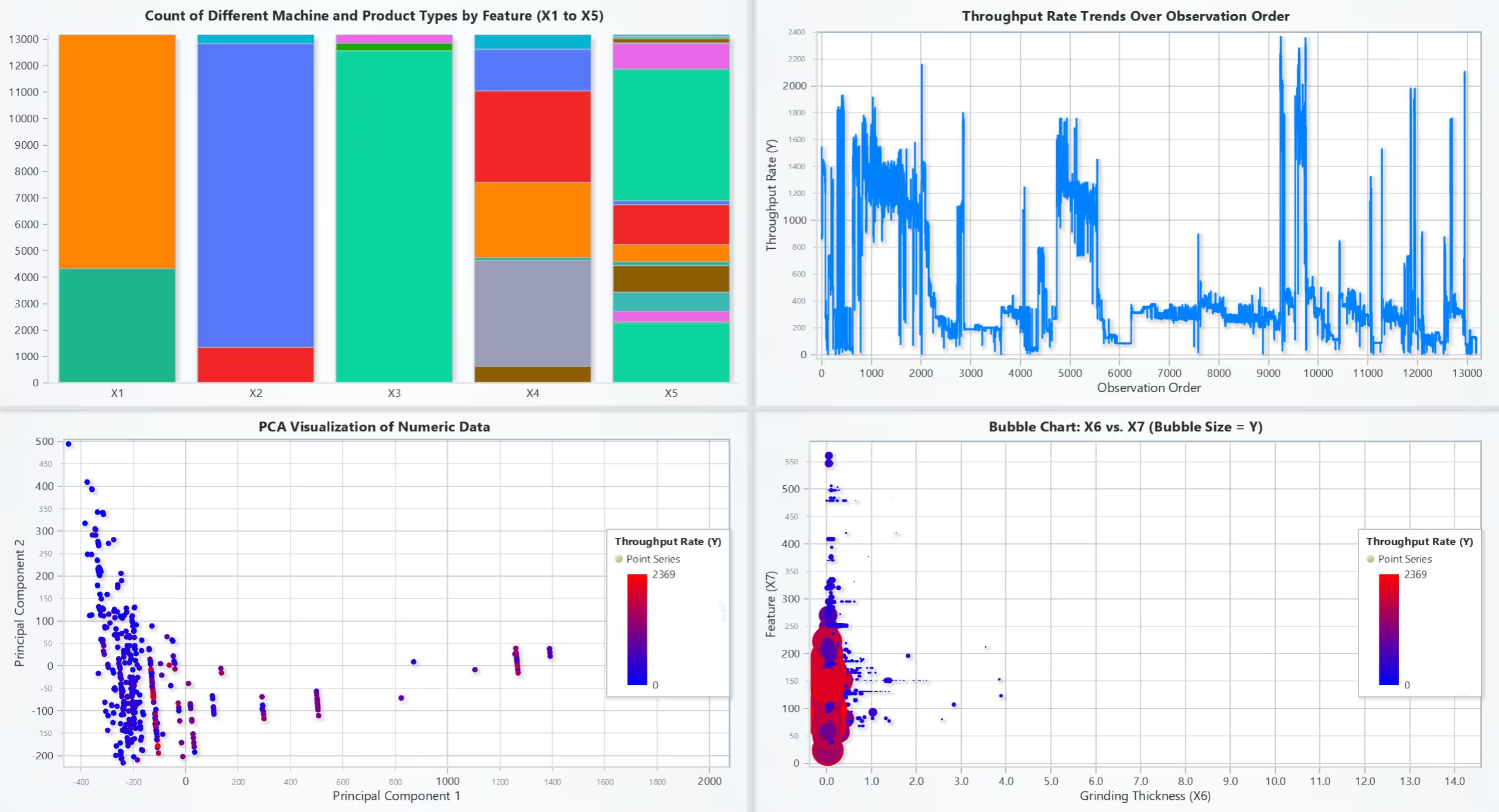
Distribution of Features
Description:Step charts display the distribution of grinding thickness (X6), number of wires (X7), and wire width (X8).
Script Snippet:
bins = {col: np.linspace(data[col].min(), data[col].max(), 30) for col in ['X6', 'X7', 'X8']}
hist_data = {col: np.histogram(data[col], bins=bins[col])[0] for col in bins}
chart_dist = dashboard.ChartXY().set_title("Feature Distribution").add_step_series().append_samples(hist_data['X6'])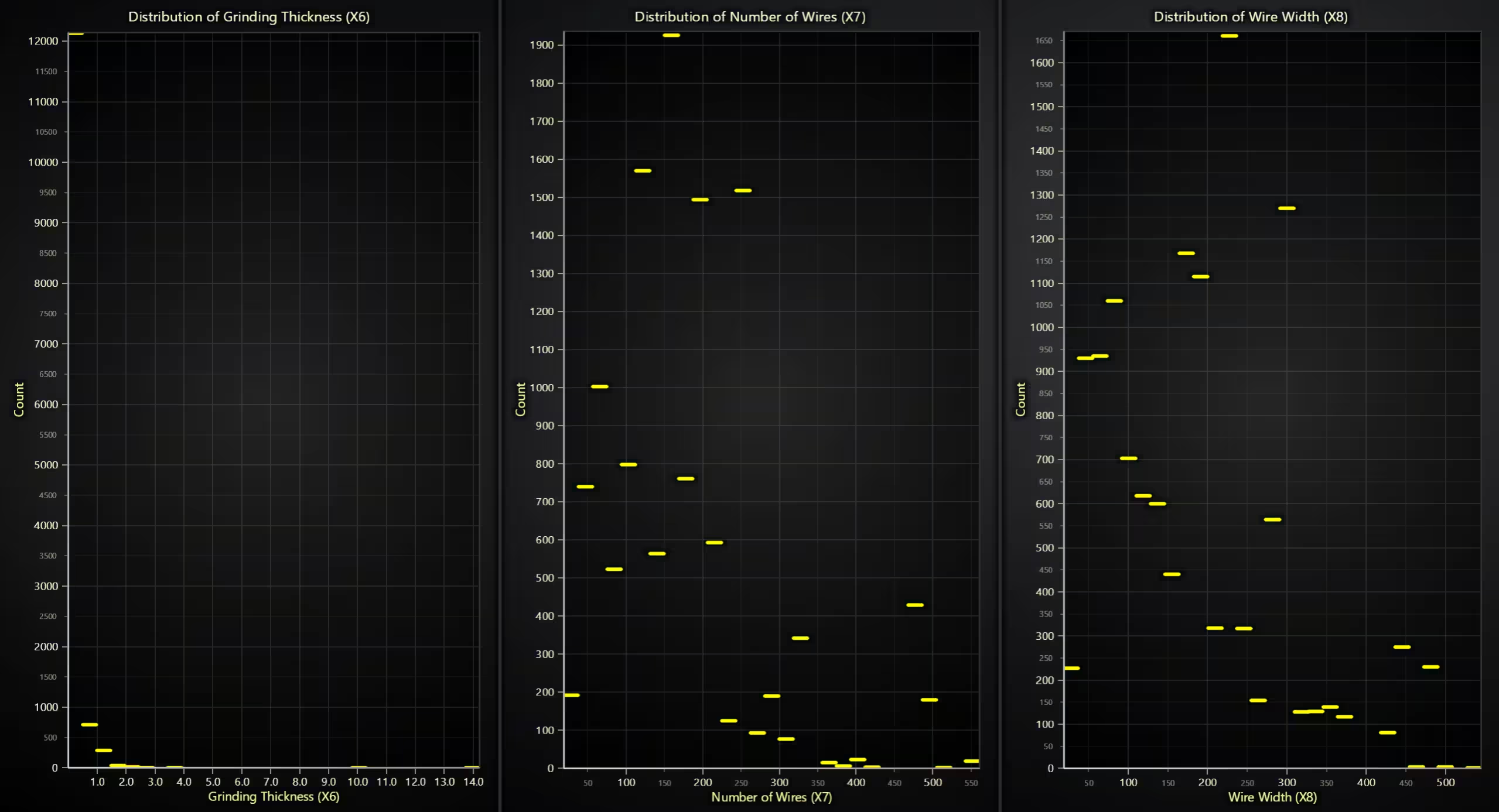
Histograms
Description: Histograms with color-coded intensity show the distribution of X6, X7, and X8 values using logarithmic and linear binning.
Script Snippet:
bins_x6 = np.logspace(np.log10(data['X6'].min() + 1e-6), np.log10(data['X6'].max()), 30)
counts_x6, bin_edges_x6 = np.histogram(data['X6'], bins=bins_x6)
chart_histogram = dashboard.BarChart().set_title("Histogram of X6").set_data([{"category": f"{bin_edges_x6[i]:.2f}", "value": int(count)} for i, count in enumerate(counts_x6)])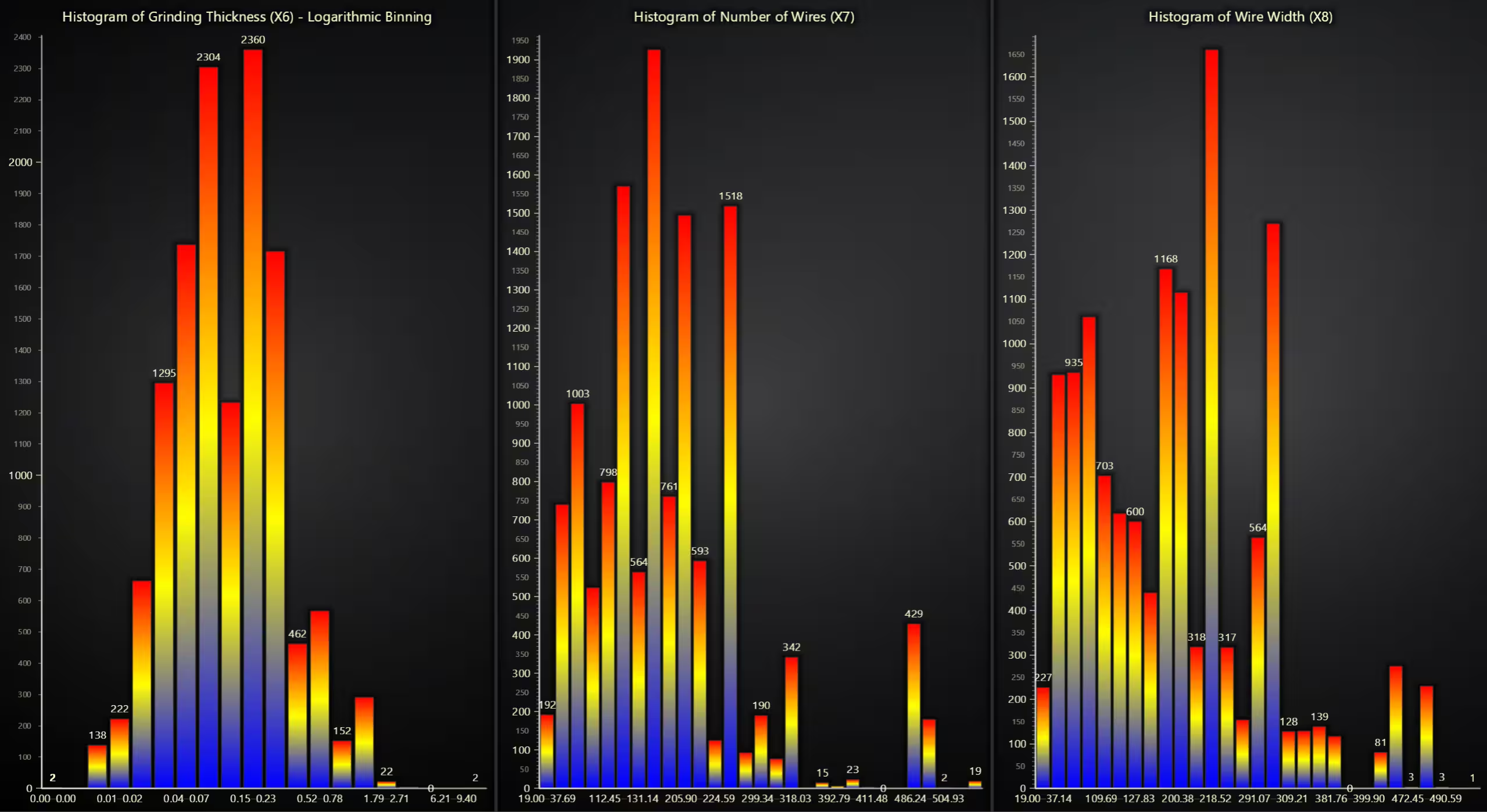
Pair Plot
Description:A grid of scatter plots and density plots shows relationships between features such as X6, X7, X8, and throughput rate (Y).
Script Snippet:
features = ['X6', 'X7', 'X8', 'Y']
for i, y_col in enumerate(features):
    for j, x_col in enumerate(features):
        if i == j:
            chart_density = dashboard.ChartXY().set_title(f'Density of {x_col}')
            chart_density.add_area_series().append_samples(x=data[x_col], y=np.random.rand(len(data)))
        else:
            chart_scatter = dashboard.ChartXY().set_title(f'{x_col} vs {y_col}')
            chart_scatter.add_point_series().append_samples(x=data[x_col], y=data[y_col])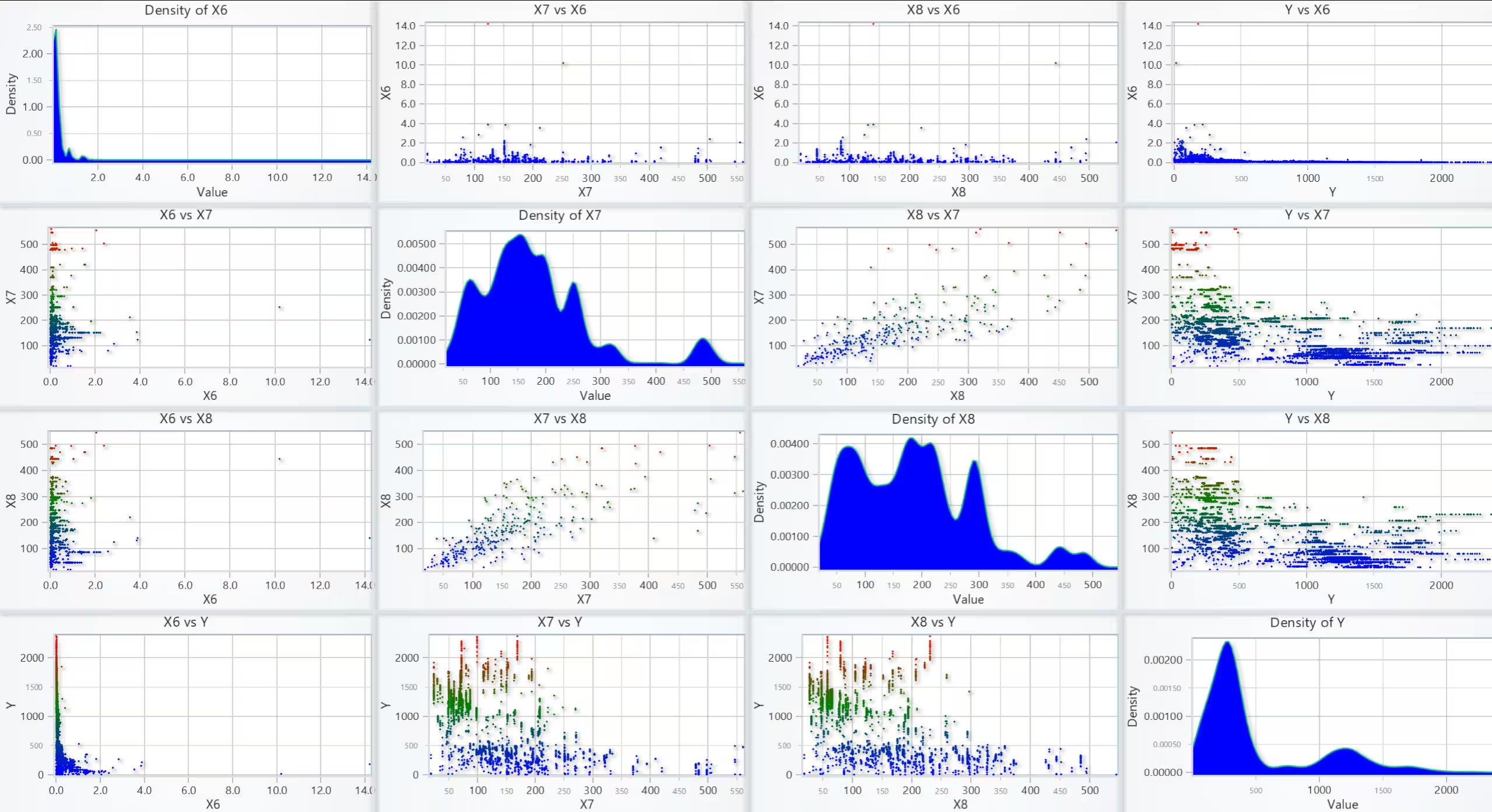
Real-Time Predictions (XGBoost Model)
Description: The first chart compares actual vs. predicted values using an XGBoost regression model. The second chart is a certainty heatmap showing confidence in predictions over time.
Script Snippet:
features = ['X6', 'X7', 'X8', 'Y']
for i, y_col in enumerate(features):
    for j, x_col in enumerate(features):
        if i == j:
            chart_density = dashboard.ChartXY().set_title(f'Density of {x_col}')
            chart_density.add_area_series().append_samples(x=data[x_col], y=np.random.rand(len(data)))
        else:
            chart_scatter = dashboard.ChartXY().set_title(f'{x_col} vs {y_col}')
            chart_scatter.add_point_series().append_samples(x=data[x_col], y=data[y_col])
Regression Analysis
Description:Regression plots for Grinding Thickness (X6) vs. Throughput (Y) and Number of Wires (X7) vs. Throughput (Y) show trend lines fitted to the data.
Script Snippet:
reg_x6 = LinearRegression().fit(data[['X6']], data['Y'])
y_x6_pred = reg_x6.predict(np.linspace(data['X6'].min(), data['X6'].max(), 100).reshape(-1, 1))
chart_reg = dashboard.ChartXY().set_title("Regression: X6 vs Y")
chart_reg.add_line_series().append_samples(x=data['X6'], y=y_x6_pred)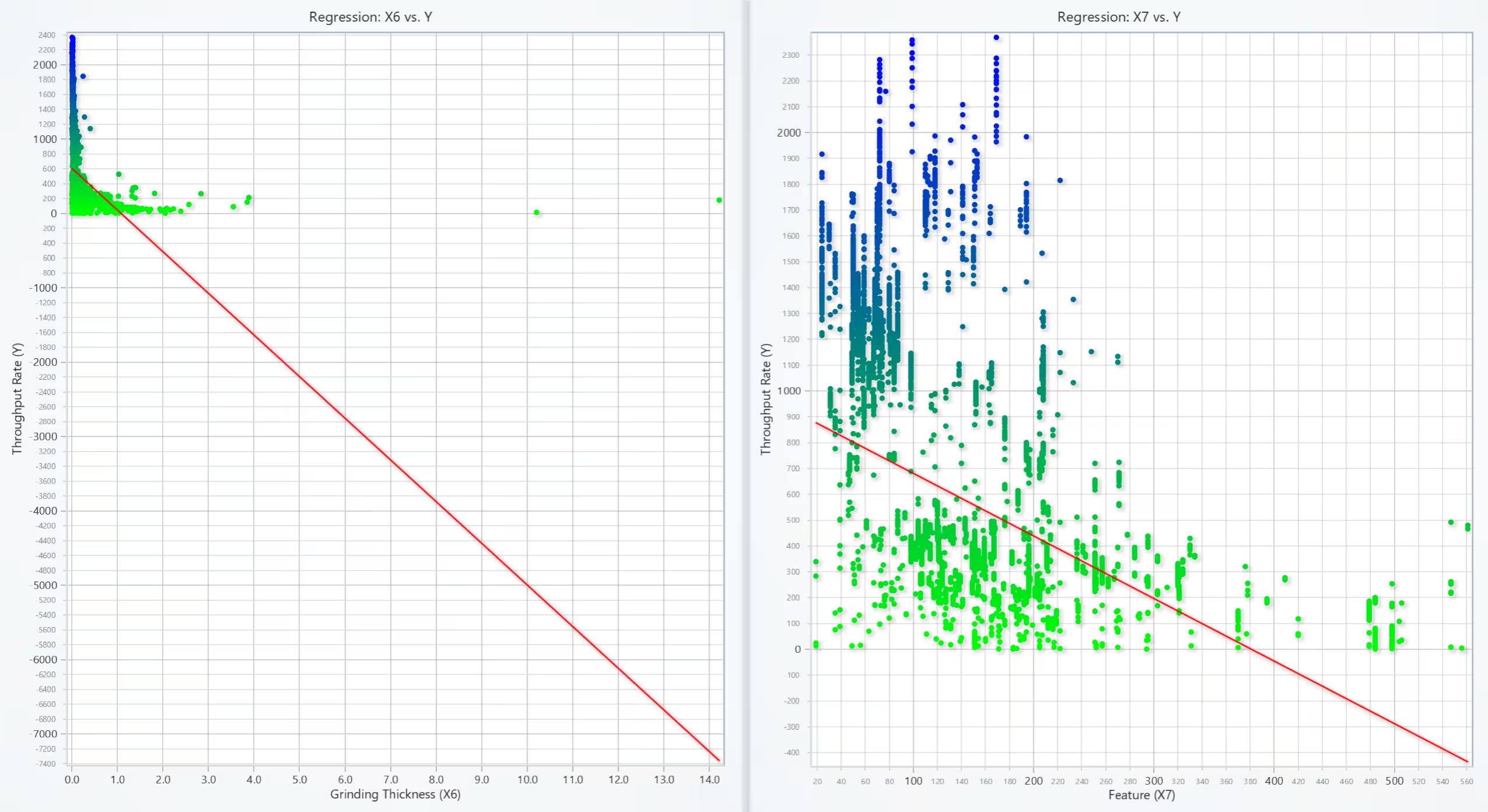
t-SNE Visualization
Description: A t-SNE plot represents machine types (X1) in a 2D space, helping to visualize patterns and clusters in the data.
Script Snippet:
reg_x6 = LinearRegression().fit(data[['X6']], data['Y'])
y_x6_pred = reg_x6.predict(np.linspace(data['X6'].min(), data['X6'].max(), 100).reshape(-1, 1))
chart_reg = dashboard.ChartXY().set_title("Regression: X6 vs Y")
chart_reg.add_line_series().append_samples(x=data['X6'], y=y_x6_pred)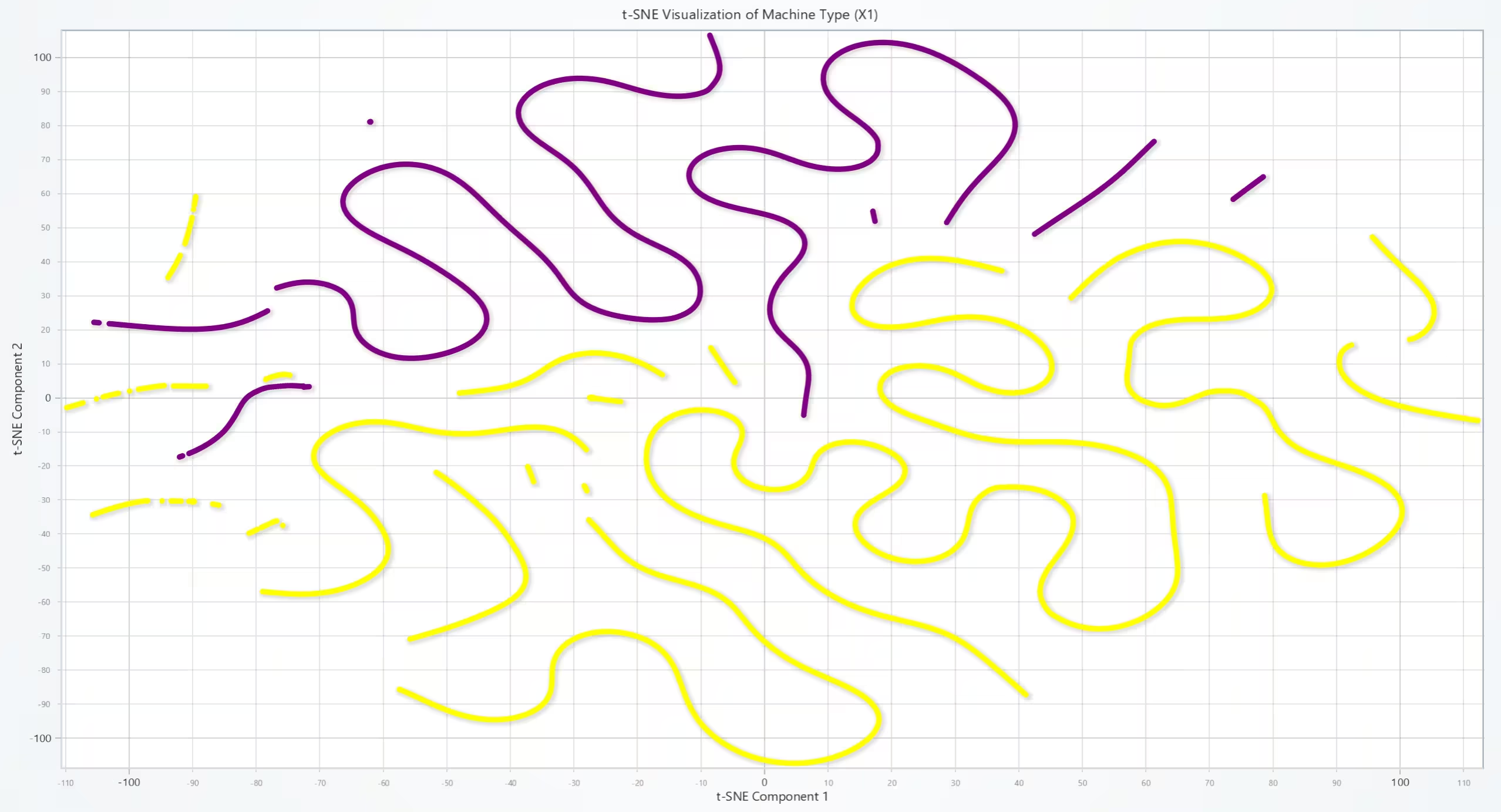
Conclusion
This semiconductor assembly analysis project shows how LightningChart can be used for high-performance data visualization in industrial applications. It helps to analyze throughput variations, find correlations, and track production trends. Additionally, machine learning techniques like XGBoost regression and t-SNE clustering can be used to monitor production performance.
By using Python with LightningChart, NumPy, Pandas, and Scikit-learn, we can visualize complex data in interactive way.
Continue learning with LightningChart
Javascript Charting Library comparison 2026
Every year someone publishes a listicle of JavaScript charting libraries. They screenshot a demo, note the GitHub stars, paste in the npm install command, and call it a day. Then you follow their recommendation, get six months into your project, and discover that your...

Visualizing 10 Million Data Points in the Browser (2026): The Technical Deep-Dive
Ten Million Data Points in the Browser: How WebGL Makes Mass Datasets Interactive Ten million data points. That number used to mean a database problem, not a front-end problem. Now research teams want to explore it interactively in a browser. Trading desks want...
Elliott Wave Theory in Trading
Financial markets often appear chaotic, but many traders believe that price movements follow recurring patterns driven by human psychology. One of the most influential approaches based on this idea is the Elliott Wave Theory. Developed nearly a century ago, it remains one of the most widely studied methods of technical analysis.





If you have any questions, feel free to contact us!
©LightningChart Ltd 2026. All rights reserved.