








LightningChart PythonSea Level Visualization App with LightningChart Python
TutorialImplementation of a historical sea level visualization of water rise changes using LightningChart Python.
Written by a human | Updated on April 23rd, 2025
Sea Level Visualization in Python
Over the past 50 years, global sea levels have experienced a significant rise, primarily driven by climate change and the melting of polar ice caps. According to satellite data, the Global Mean Sea Level (GMSL) has been rising at an average rate of about 3.4 mm per year.
This acceleration in sea level rise has been particularly notable over the past two and a half decades, with approximately a third of the total increase since 1880 occurring in this period.
Causes of Sea Level Rise
Several factors contribute to the rising sea levels, including:
- Thermal Expansion: As ocean temperatures rise, seawater expands, contributing to higher sea levels.
- Melting Glaciers and Ice Sheets: The melting of glaciers and ice sheets in Greenland and Antarctica adds significant amounts of freshwater to the oceans.
- Terrestrial Water Storage: Changes in the storage of water on land, such as groundwater depletion, can also impact sea levels.
Impact on Global Geography and Climate
Rising sea levels pose a threat to coastal communities, leading to increased flooding, erosion, and the displacement of populations. This phenomenon also affects marine ecosystems, altering habitats and impacting biodiversity.
Importance of Accurate Modeling and Projections
Accurate modeling and projections of sea level rise are crucial for informing policy decisions and preparing for future impacts. Visualization tools, such as LightningChart in Python, play a vital role in analyzing and communicating these changes effectively.
LightningChart Python

LightningChart is a high-performance charting library for Python, designed for creating visually stunning and interactive data visualizations. It is particularly useful for scientific and engineering applications where precise and dynamic visualizations are required.
Features and Chart Types
In this project, we will utilize various chart types available in LightningChart to visualize sea level data:
- Bar Chart
- Area Chart
- Box Plot
- Pyramid Chart
- Funnel Chart
Performance Characteristics
LightningChart is known for its exceptional performance, handling large datasets with ease and providing smooth interactions and animations.
Setting Up Python Environment
To get started with this sea level visualization exercise, you need to have Python installed on your system. You can download Python from the official website. Additionally, you will need to install the following libraries:
pip install pandas lightningchartOverview of libraries used
- NumPy: For numerical operations.
- Pandas: For data manipulation and analysis.
- LightningChart: For creating interactive and high-performance charts.
If you wish so, you can see this project on GitHub.
Setting Up Your Development Environment
Set up your development environment by installing the required libraries and organizing your project files, including the sea level data files.
Loading and Processing Data
You can load the sea level data files using Pandas. Here’s an example:
import pandas as pd

sea_level_data = pd.read_csv('sealevel.csv')
Handling and Preprocessing the Data
Convert the ‘Year’ column to datetime format and calculate the average sea level for each year:
sea_level_data['Year'] = pd.to_datetime(sea_level_data['Year'], format='%Y')
average_data = sea_level_data.groupby(sea_level_data['Year'].dt.year)['GMSL_GIA'].mean().reset_index()
Bar Charts
The bar chart illustrates the average Global Mean Sea Level (GMSL) by year. From the data, it’s evident that there has been a consistent rise in sea levels over the years. This rise is particularly noticeable in the last few decades, reflecting the accelerated impact of climate change
import pandas as pd
import lightningchart as lc

# Place your license key here
lc.set_license(my_license_key)
# Read sea level data (replace with your dataset path)
sea_level_data = pd.read_csv('/sealevel.csv')
# Convert 'Year' column to datetime format
sea_level_data['Year'] = pd.to_datetime(sea_level_data['Year'], format='%Y')
# Calculate average sea level for each year
average_data = sea_level_data.groupby(sea_level_data['Year'].dt.year)['GMSL_GIA'].mean().reset_index()
# Prepare data for the Bar Chart
data = [{'category': str(int(row['Year'])), 'value': row['GMSL_GIA']} for _, row in average_data.iterrows()]
# Create a Bar Chart
bar_chart = lc.BarChart(
    vertical=True,  # Vertical orientation of bars
    theme=lc.Themes.White,
    title='Average Global Mean Sea Level (GMSL) by Year'
)
# Disable sorting (optional)
bar_chart.set_sorting('disabled')
# Set data for the Bar Chart
bar_chart.set_data(data)
# Set the margin around each bar along category axis as percentage of bar thickness
bar_chart.set_bars_margin(0.1)  # Set margin to 10%
# Open the Bar Chart
bar_chart.open()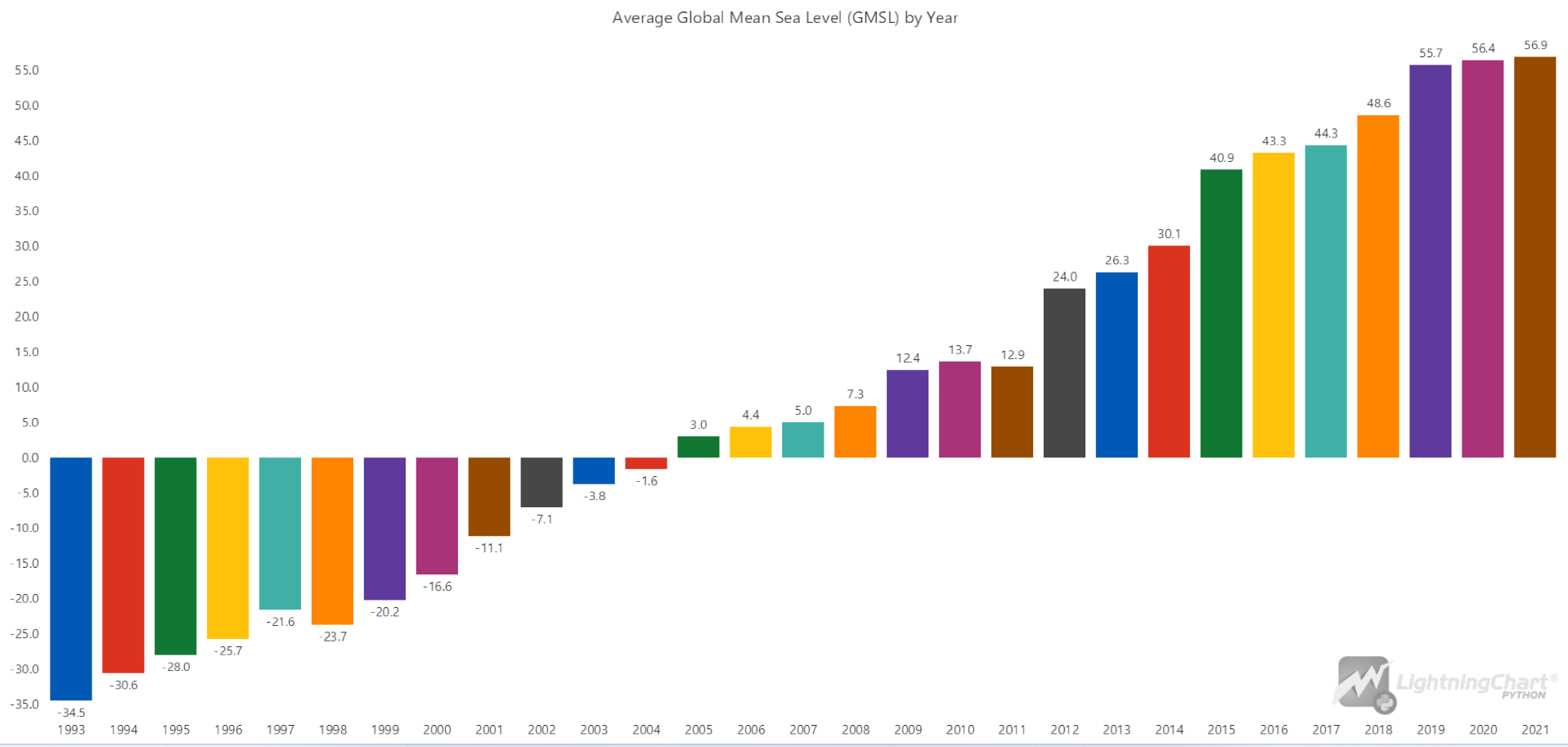
Area Charts
The area chart provides a visual representation of the GMSL over the years. The filled area under the curve highlights the increase in sea levels. The steep incline in recent years underscores the urgency of addressing climate change and its effects on global sea levels.
import pandas as pd
import lightningchart as lc

# Place your license key here
lc.set_license(my_license_key)
# Read sea level data (replace with your dataset path)
sea_level_data = pd.read_csv('/sealevel.csv')
# Convert 'Year' column to datetime format
sea_level_data['Year'] = pd.to_datetime(sea_level_data['Year'], format='%Y')
# Calculate average sea level for each year
average_data = sea_level_data.groupby(sea_level_data['Year'].dt.year)['GMSL_GIA'].mean().reset_index()
# Prepare data for the Area Chart
x_values = average_data['Year'].tolist()
y_values = average_data['GMSL_GIA'].tolist()
# Create the Area Chart
chart = lc.ChartXY(
    theme=lc.Themes.White,
    title='Global Mean Sea Level (GMSL) by Year'
)
# Add Area Series
area_series = chart.add_bipolar_area_series()
area_series.add(x_values, y_values)
area_series.set_name('GMSL')
# Customize x-axis to handle categorical data
x_axis = chart.get_default_x_axis()
x_axis.set_title('Year')
x_axis.set_interval(min(x_values), max(x_values))
x_axis.set_decimal_precision(0)
# Customize y-axis
y_axis = chart.get_default_y_axis()
y_axis.set_title('GMSL (mm)')
# Open the chart
chart.open()
Box Plot
The box plot showcases the distribution of GMSL data by year. Each box represents the spread of data, with the median, quartiles, and potential outliers clearly marked. This visualization helps identify the variability and central tendency of sea level data across different years.
import pandas as pd
import lightningchart as lc

lc.set_license(my_license_key)
# Load the datasets
sea_level_data = pd.read_csv('/sealevel.csv')
# Preprocess the data
sea_level_data['Year'] = pd.to_datetime(sea_level_data['Year'], format='%Y')
# Group data by year and prepare box plot data
grouped_data = sea_level_data.groupby(sea_level_data['Year'].dt.year)['GMSL_GIA'].apply(list).tolist()
years = sea_level_data['Year'].dt.year.unique().tolist()
# Create Box Plot
chart = lc.BoxPlot(
    data=grouped_data,
    theme=lc.Themes.White,
    title='Distribution of GMSL by Year',
    xlabel='Year',
    ylabel='GMSL (mm)'
)
# Set x-axis labels to years using custom ticks
x_axis = chart.get_default_x_axis()
for i, year in enumerate(years):
    custom_tick = x_axis.add_custom_tick()
    custom_tick.set_value(i * 2)
    custom_tick.set_text(year)
chart.open()
Pyramid Chart
The pyramid chart presents the average GMSL data for the most recent five years. The chart’s structure allows for an easy comparison of sea levels year by year, highlighting any recent trends or significant changes. This visualization effectively communicates the most up-to-date information on sea level rise.
import pandas as pd
import lightningchart as lc

# Place your license key here
lc.set_license(my_license_key)
# Read sea level data
sea_level_data = pd.read_csv('/sealevel.csv')
sea_level_data['Year'] = sea_level_data['Year'].astype(int)
# Convert 'Year' column to datetime format
sea_level_data['Year'] = pd.to_datetime(sea_level_data['Year'], format='%Y')
# Calculate average sea level for the last 5 years
last_six_years = sea_level_data['Year'].dt.year.max() - 4
filtered_data = sea_level_data[sea_level_data['Year'].dt.year >= last_six_years]
average_data = filtered_data.groupby(filtered_data['Year'].dt.year)['GMSL_GIA'].mean().reset_index()
# Prepare data for the Pyramid Chart
data = [{'name': str(int(row['Year'])), 'value': row['GMSL_GIA']} for _, row in average_data.iterrows()]
# Create a Pyramid Chart
chart = lc.PyramidChart(
    slice_mode='height',  # Adjust slice_mode as per your data characteristics
    theme=lc.Themes.White,
    title='Average Global Mean Sea Level (GMSL) for Last 5 Years'
)
# Add slices to the Pyramid Chart
chart.add_slices(data)
# Add legend
chart.add_legend().add(chart).set_title('Yearly Average Sea Level Changes')
# Open the chart
chart.open()
Funnel Chart
A funnel plot is used to visualize the average GMSL in some specific years over the past 20 years. The funnel shape helps show sea level progress over this period, providing a clear and impressive visual representation of the data.
import pandas as pd
import lightningchart as lc

# Place your license key here
lc.set_license(my_license_key)
# Read sea level data
sea_level_data = pd.read_csv('/sealevel.csv')
# Convert 'Year' column to datetime format
sea_level_data['Year'] = pd.to_datetime(sea_level_data['Year'], format='%Y')
# Calculate average sea level for the past 10 years
last_ten_years = sea_level_data['Year'].dt.year.max() - 9
filtered_data = sea_level_data[sea_level_data['Year'].dt.year >= last_ten_years]
average_data = filtered_data.groupby(filtered_data['Year'].dt.year)['GMSL_GIA'].mean().reset_index()
# Prepare data for the Funnel Chart
data = [{'stage': str(int(row['Year'])), 'value': row['GMSL_GIA']} for _, row in average_data.iterrows()]
# Create a Funnel Chart
funnel_chart = lc.FunnelChart(
    theme=lc.Themes.White,
    title='Average Global Mean Sea Level (GMSL) in the Last 10 Years'
)
# Set data for the Funnel Chart
funnel_chart.set_data(data)
# Open the Funnel Chart
funnel_chart.open()
Conclusion
In this project, we utilized LightningChart Python to visualize historical sea level rise data. By creating various charts, including bar charts, area charts, box plots, pyramid charts, and funnel charts, we gained insights into the trends and variability of global mean sea levels over the years. These visualizations help in understanding the impact of climate change on sea levels and the importance of accurate data representation.
LightningChart Python offers several advantages for data visualization:
- High Performance: It handles large datasets efficiently, providing smooth and responsive interactions.
- Versatility: A wide range of chart types and customization options are available, making it suitable for various data visualization needs.
- Ease of Use: The library is user-friendly, allowing for quick setup and implementation of visualizations.
By leveraging LightningChart Python, researchers and analysts can create detailed and interactive visualizations that effectively communicate complex data, aiding in decision-making and raising awareness about critical issues such as sea level rise.

Hosseinali Taheri Andani
Data Science Python Developer


Continue learning with LightningChart
Data Visualization in Medical & Healthcare Applications
Written by a human | Updated on April 10th, 2025Charting Controls for Medical Healthcare Data Visualization Applications The fact that data and data visualization are everywhere in today's world, makes me wonder how data visualization impacts medical...
Creating a Smith Chart Application in .NET
Written by a human | Updated on April 9th, 2025Smith Charts The Smith chart is a diagram designed for the study and resolution of problems with transmission lines. This diagram is aimed at electrical and electronic engineers specializing in radio frequency....
Nbody Simulation Data Visualization
Written by a human | Updated on April 9th, 2025N-body Simulation Nbody simulation is maybe one of the most advanced data visualization types out there. The truth is that we’re not talking anymore about visualizing traditional data with a business focus and it...



If you have any questions, feel free to contact us!



©LightningChart Ltd 2026. All rights reserved.