








Conducting a Global Wood Consumption Analysis in Python
Tutorial
Assisted by AI
Explore how to conduct a comprehensive analysis using Python for a detailed global wood consumption analysis using LightningChart Python.
Vindya Nukulasooriya
Data Science Developer

Introduction
This project presents a focused wood-consumption visualization analysis using the UNECE wood statistics and the LightningChart Python library. The dataset provides multi-year, country-level records for major product groups; wood fuel, industrial roundwood, sawnwood, and panels and trade flows (production, imports, exports).
We compute apparent consumption (AC = Production + Imports − Exports) to compare countries and regions consistently, examine temporal trends, and surface the markets driving the largest totals.
The primary objectives of this project are to:
- Quantify distribution of wood fuel consumption across countries in the latest year (identify skew, typical ranges, and long-tail behavior).
- Compare regions in industrial roundwood consumption (central tendency, spread, and outliers).
- Track global trends in sawnwood consumption over time (growth/decline phases and volatility).
- Assess cross-category linkage by relating panels vs. industrial roundwood (correlation and scale via bubble size).
- Highlight concentration by ranking top countries in total roundwood consumption in the most recent year.
To achieve these objectives, LightningChart Python was selected for its:
- High-performance rendering that remains smooth with dozens to hundreds of country points and multi-period views.
- Rich 2D components suited to this analysis: BarChart-as-Histogram, BoxSeries, LineSeries, PointSeries with per-point sizes (Bubble), and BarChart.
- Interactive, publication-ready visuals with custom ticks/labels, fixed axes where needed, and flexible theming for clear comparisons.
By converting raw country figures and trade flows into intuitive, interactive visuals, the project makes it easy to see where consumption is concentrated, how categories move together, and how patterns evolve over time, supporting monitoring, market intelligence, and policy discussion in the global wood sector..
Project Overview
Build 5 interactive charts with LightningChart Python to uncover patterns in global wood consumption (wood fuel, industrial roundwood, sawnwood, panels), how these patterns evolve over time, and how they differ across countries and regions.
Objectives
- Compute Apparent Consumption (AC) per country, year, and product: AC = Production + Imports – Exports.
- Measure distributions with a histogram of wood fuel to reveal skew, typical ranges, and long tails.
- Compare regions with a box plot of industrial roundwood (medians, IQR, outliers).
- Track trends with a line chart of global sawnwood across years and assess volatility.
- Relate categories with a bubble chart (panels vs. industrial roundwood) to show correlation and market scale.
- Identify concentration with a bar chart of top countries by total roundwood in the latest year.
- Ensure reproducible code and publication-ready visuals for monitoring and decision support.
Deliverables
- Five LightningChart Python visuals: Histogram, Box Plot, Line Chart, Bubble Chart, Bar Chart.
- Documented Python code for each chart (preprocessing, parameters: bins, IQR/outlier rules, axis policies) with rationale.
- Interpretive summaries highlighting distribution shifts, regional contrasts, correlations, and notable countries.
- A conclusion on how LightningChart supports monitoring, reporting, and decision-making for wood markets.
Tools Used
Python 3.13.5, LightningChart Python, Jupyter Notebook, AI Assistance
About the Dataset
Country-level UNECE wood statistics organized into a working table (tff) with multi-year records, product categories (wood fuel, industrial roundwood, sawnwood, panels), and flows (PRODUCTION, IMPORTS, EXPORTS).
- Units: typically, thousand m³ (as provided by the source).
- Non-country aggregates (e.g., WORLD) excluded from country analyses.
- Region mapping (Europe, North America, Asia-Pacific, LAC, Africa, CIS, Oceania, Other) used for group comparisons.
- For cross-category analysis, panels combine relevant subtypes (eg: plywood, particle/fibre board, veneer).
Key Fields
- Country – Country name
- Year – Data year
- Product Name – Wood category (wood fuel, industrial roundwood, sawnwood, panels)
- Flow – PRODUCTION / IMPORTS / EXPORTS
- Value – Quantity (typically thousand m³)
- Unit – Source unit label
- Region (derived) – Region grouping for comparisons
- Apparent Consumption (AC) (derived) – PRODUCTION + IMPORTS − EXPORTS
- Panels Aggregate (derived) – Combined panels category from subtypes
- Log/Size fields (derived) – Transformations for bubble-chart readability
LightningChart Python
LightningChart Python is a professional-grade data visualization library renowned for its ultra-fast rendering and analytical precision. Its ability to handle large-scale, granular datasets and produce multidimensional, interactive visualizations makes it highly effective for data analysis.

Setting Up Python Environment
Before running the project, install Python and the other required libraries using:
%pip install numpy pandas lightningchartSetting Up Your Development Environment:
- Set up a virtual environment:
- Use Visual Studio Code (VSCode) for a streamlined development experience.
Loading and Preprocessing Data
We will fetch the Complete Forest Products Dataset (TIMBER) Dataset and preprocess the data using the following function:
# Import necessary libraries (load pandas library to preprocess dataset)
import pandas as pd
Visualizing Data with LightningChart Python
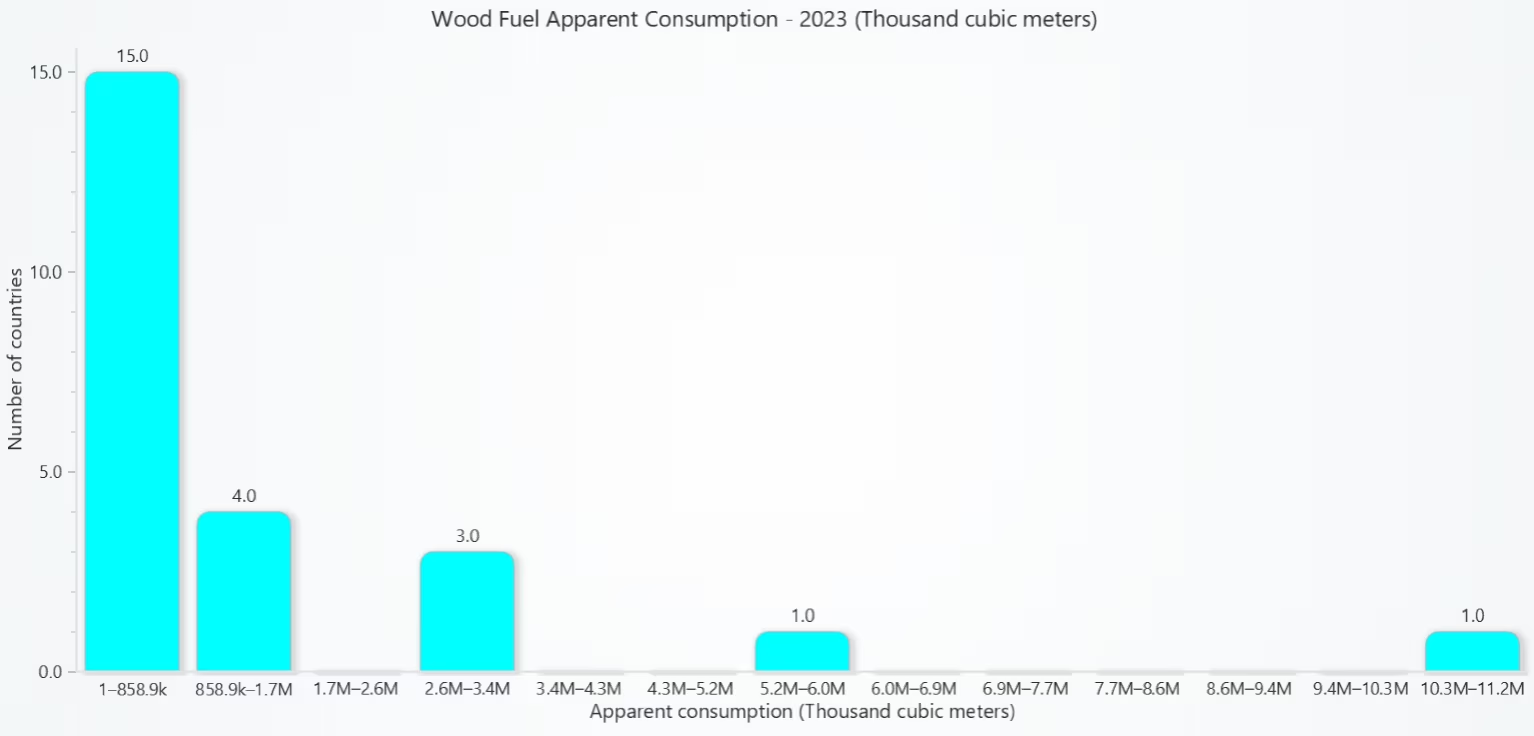
The histogram reveals a concentration of low wood fuel consumption across most countries, while a few dominate global demand with much larger values. This highlights the unequal distribution of wood fuel use and suggests that policy and sustainability discussions may need to focus on a small set of major consumers rather than treating all countries equally.
# Chart 1 — Histograms of Wood Fuel Consumption
# Developed with AI assistance to demonstrate LightningChart Python

import lightningchart as lc
import numpy as np
import pandas as pd


# License
with open("D:/HAMK/Internship/MyProjects/lc_license.txt", "r") as f:
    license_key = f.read().strip()
lc.set_license(license_key)

# Use existing tff
df = tff.copy()

# Standardize column names
df = df.rename(columns={
    "Name": "Country",
    "Product Name": "Product",
    "Value": "Datapoint"
})

# Coerce types
# Year to numeric
df["Year"] = pd.to_numeric(df["Year"], errors="coerce")

# Datapoint to numeric (handle "12,345" or "1 234.5")
df["Datapoint"] = (
    df["Datapoint"]
      .astype(str)
      .str.replace(r"[,\s]", "", regex=True)   # remove commas & spaces
)
df["Datapoint"] = pd.to_numeric(df["Datapoint"], errors="coerce")

# Filter to Wood Fuel + needed flows
PRODUCT_REGEX = r"^WOOD FUEL, INCLUDING WOOD FOR CHARCOAL$"
FLOWS = ["PRODUCTION", "IMPORTS", "EXPORTS"]

sub = df[
    df["Product"].str.contains(PRODUCT_REGEX, case=False, na=False)
    & df["Flow"].isin(FLOWS)
    & df["Year"].notna()
    & df["Datapoint"].notna()
].copy()

if sub.empty:
    raise ValueError("No rows found for product 'WOOD FUEL, INCLUDING WOOD FOR CHARCOAL' in tff.")

# Latest year with data for this product
latest_year = int(sub["Year"].max())
sub = sub[sub["Year"] == latest_year].copy()

# Pick most common unit for labeling
unit = sub["Unit"].mode().iat[0] if "Unit" in sub.columns and not sub["Unit"].isna().all() else ""

# Pivot -> Apparent Consumption per Country
piv = (
    sub.pivot_table(index=["Country"], columns="Flow", values="Datapoint",
                    aggfunc="sum", fill_value=0)
    .reindex(columns=FLOWS, fill_value=0)
)

# Ensure numeric (sometimes pivot yields object dtype)
piv = piv.apply(pd.to_numeric, errors="coerce").fillna(0)

# Apparent Consumption = Production + Imports − Exports
piv["ApparentConsumption"] = piv["PRODUCTION"] + piv["IMPORTS"] - piv["EXPORTS"]

# Values to histogram (positive only)
vals = piv["ApparentConsumption"].replace([np.inf, -np.inf], np.nan).dropna()
vals = vals[vals > 0]
if vals.empty:
    raise ValueError("No positive apparent consumption values found for the latest year.")

# Build histogram bins (Freedman–Diaconis)
q1, q3 = np.percentile(vals, [25, 75])
iqr = max(q3 - q1, 1e-9)
bin_width = 2 * iqr * (len(vals) ** (-1/3))
bins = int(np.ceil((vals.max() - vals.min()) / bin_width)) if bin_width > 0 else 20
bins = max(10, min(bins, 60))  # sensible range cap

counts, bin_edges = np.histogram(vals, bins=bins)

# Helper: pretty numbers for category labels
def fmt_num(x):
    x = float(x)
    if x >= 1e9: return f"{x/1e9:.1f}B"
    if x >= 1e6: return f"{x/1e6:.1f}M"
    if x >= 1e3: return f"{x/1e3:.1f}k"
    return f"{x:.0f}"

bar_data = [
    {"category": f"{fmt_num(bin_edges[i])}–{fmt_num(bin_edges[i+1])}",
     "value": int(count)}
    for i, count in enumerate(counts)
]

# Plot with LightningChart BarChart
chart = lc.BarChart(
    vertical=True,
    theme=lc.Themes.Light,
    title=f"Wood Fuel Apparent Consumption - {latest_year} ({unit})"
)
chart.set_data(bar_data)
chart.set_sorting('disabled')      # keep natural bin order
chart.set_bars_color('cyan')       # optional styling

# Correct way to set axis titles
chart.value_axis.set_title("Number of countries")
chart.category_axis.set_title(f"Apparent consumption ({unit})")

chart.open()

# (Optional) Print top 10 consumers for quick sanity-check
top10 = piv.sort_values("ApparentConsumption", ascending=False).head(10)
print("Top 10 countries by wood fuel apparent consumption in", latest_year)
print(top10["ApparentConsumption"].round(2))
Box Plot of Industrial Roundwood Consumption by Region
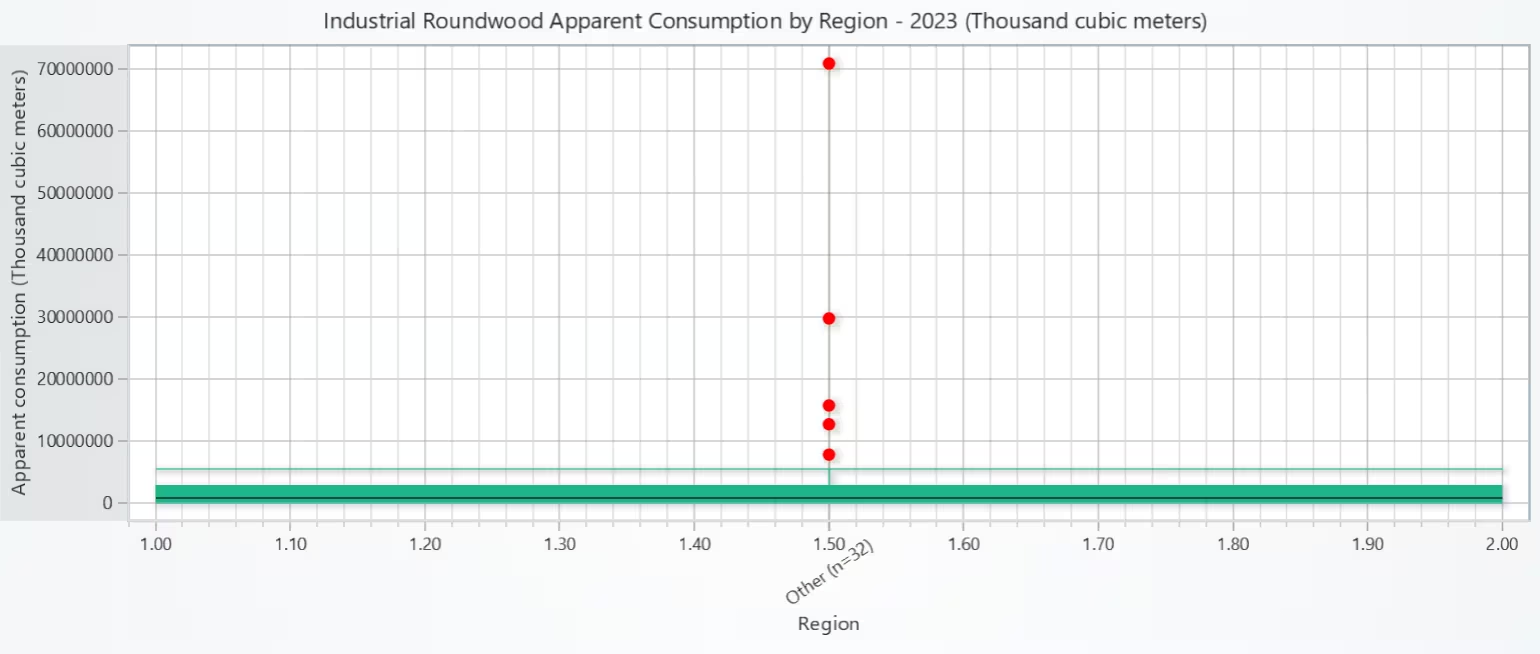
Regional consumption is unevenly distributed: some regions show a higher central tendency while others cluster at lower levels. The presence of outliers suggests country-level scale effects (eg: very large markets) within otherwise moderate regions.
# Chart 2 — Box Plot of Industrial Roundwood Consumption by Region
# Developed with AI assistance to demonstrate LightningChart Python

import lightningchart as lc
import numpy as np
import pandas as pd

# License
with open("D:/HAMK/Internship/MyProjects/lc_license.txt", "r") as f:
    license_key = f.read().strip()
lc.set_license(license_key)

# Use existing tff
df = tff.copy()

# Standardize column names used downstream
df = df.rename(columns={
    "Name": "Country",
    "Product Name": "Product",
    "Value": "Datapoint"
})

# Coerce types
df["Year"] = pd.to_numeric(df["Year"], errors="coerce")

# Clean numeric strings like "12,345" or "1 234.5"
df["Datapoint"] = (
    df["Datapoint"]
      .astype(str)
      .str.replace(r"[,\s]", "", regex=True)
)
df["Datapoint"] = pd.to_numeric(df["Datapoint"], errors="coerce")

# Filter for Industrial Roundwood & needed flows
PRODUCT_REGEX = r"^INDUSTRIAL ROUNDWOOD$"
FLOWS = ["PRODUCTION", "IMPORTS", "EXPORTS"]

sub = df[
    df["Product"].str.contains(PRODUCT_REGEX, case=False, na=False)
    & df["Flow"].isin(FLOWS)
    & df["Year"].notna()
    & df["Datapoint"].notna()
].copy()

if sub.empty:
    raise ValueError("No rows found for product 'INDUSTRIAL ROUNDWOOD' in tff.")

# Use the latest year available
latest_year = int(sub["Year"].max())
sub = sub[sub["Year"] == latest_year].copy()

# Determine a unit label (most common)
unit = sub["Unit"].mode().iat[0] if "Unit" in sub.columns and not sub["Unit"].isna().all() else ""

# Compute Apparent Consumption per Country
piv = (
    sub.pivot_table(index=["Country"], columns="Flow", values="Datapoint",
                    aggfunc="sum", fill_value=0)
    .reindex(columns=FLOWS, fill_value=0)
)

# Ensure numeric and fill missing
piv = piv.apply(pd.to_numeric, errors="coerce").fillna(0.0)

piv["ApparentConsumption"] = piv["PRODUCTION"] + piv["IMPORTS"] - piv["EXPORTS"]
ac = piv["ApparentConsumption"].replace([np.inf, -np.inf], np.nan).dropna()

# Keep positive consumptions
ac = ac[ac > 0].to_frame(name="AC").reset_index()  # columns: Country, AC

if ac.empty:
    raise ValueError("No positive apparent consumption values found for this year.")

# Map Countries to Regions
REGION_MAP = {
    # Europe
    'Finland': 'Europe', 'Sweden': 'Europe', 'Norway': 'Europe', 'Germany': 'Europe',
    'France': 'Europe', 'Italy': 'Europe', 'Poland': 'Europe', 'Estonia': 'Europe',
    'Latvia': 'Europe', 'Lithuania': 'Europe', 'Spain': 'Europe', 'Portugal': 'Europe',
    'United Kingdom': 'Europe', 'Netherlands': 'Europe', 'Belgium': 'Europe',
    'Austria': 'Europe', 'Czechia': 'Europe', 'Slovakia': 'Europe', 'Hungary': 'Europe',
    # North America
    'United States of America': 'North America', 'Canada': 'North America',
    # CIS
    'Russian Federation': 'CIS',
    # Asia-Pacific
    'China': 'Asia-Pacific', 'Japan': 'Asia-Pacific', 'Republic of Korea': 'Asia-Pacific',
    'India': 'Asia-Pacific', 'Indonesia': 'Asia-Pacific', 'Malaysia': 'Asia-Pacific',
    'Thailand': 'Asia-Pacific', 'Viet Nam': 'Asia-Pacific',
    # Latin America & Caribbean
    'Brazil': 'LAC', 'Chile': 'LAC', 'Argentina': 'LAC', 'Mexico': 'LAC', 'Peru': 'LAC', 'Colombia': 'LAC',
    # Oceania
    'Australia': 'Oceania', 'New Zealand': 'Oceania',
    # Africa (examples)
    'South Africa': 'Africa', 'Ghana': 'Africa', 'Nigeria': 'Africa', 'Kenya': 'Africa', 'Cameroon': 'Africa'
}
ac["Region"] = ac["Country"].map(REGION_MAP).fillna("Other")

# Prepare distributions by region
region_groups = {r: g["AC"].tolist() for r, g in ac.groupby("Region")}
region_groups = {r: v for r, v in region_groups.items() if len(v) >= 3}
if not region_groups:
    raise ValueError("Not enough data per region to form box plots (need at least 3 countries per region).")

# Build box dataset & outliers for LightningChart
dataset = []
x_values_outlier, y_values_outlier = [], []
regions_sorted = sorted(region_groups.keys())
for i, region in enumerate(regions_sorted):
    values = np.array(region_groups[region], dtype=float)

    q1 = float(np.percentile(values, 25))
    q3 = float(np.percentile(values, 75))
    med = float(np.median(values))
    iqr = q3 - q1
    lower_bound = q1 - 1.5 * iqr
    upper_bound = q3 + 1.5 * iqr

    non_outliers = values[(values >= lower_bound) & (values <= upper_bound)]
    if non_outliers.size == 0:
        lower_extreme = float(values.min())
        upper_extreme = float(values.max())
    else:
        lower_extreme = float(non_outliers.min())
        upper_extreme = float(non_outliers.max())

    start = (i * 2) + 1
    end = start + 1

    dataset.append({
        "start": start, "end": end,
        "lowerQuartile": q1, "upperQuartile": q3, "median": med,
        "lowerExtreme": lower_extreme, "upperExtreme": upper_extreme,
        "name": region
    })

    # outliers
    outliers = values[(values < lower_bound) | (values > upper_bound)]
    if outliers.size:
        x_values_outlier.extend([start + 0.5] * len(outliers))
        y_values_outlier.extend(outliers.tolist())

# Plot with LightningChart ChartXY + Box Series
chart = lc.ChartXY(theme=lc.Themes.Light,
                   title=f"Industrial Roundwood Apparent Consumption by Region - {latest_year} ({unit})")

box_series = chart.add_box_series()
box_series.add_multiple(dataset)

# Outliers as points
outlier_series = chart.add_point_series(sizes=True)
outlier_series.set_point_color('red')
if y_values_outlier:
    outlier_series.append_samples(
        x_values=x_values_outlier,
        y_values=y_values_outlier,
        sizes=[10] * len(y_values_outlier),
    )

# Axes
try:
    ax_x = chart.get_default_x_axis()
    ax_y = chart.get_default_y_axis()
except AttributeError:
    ax_x = chart.get_default_axis_x()
    ax_y = chart.get_default_axis_y()

# Create custom ticks at each region's midpoint + rotate to prevent overlap
for i, region in enumerate(regions_sorted):
    mid = (i * 2) + 1.5
    try:
        tick = ax_x.add_custom_tick()
        tick.set_value(mid).set_text(f"{region} (n={len(region_groups[region])})")
        # rotate if API supports it
        try:
            tick.set_tick_label_rotation(-35)
        except Exception:
            pass
    except Exception:
        pass

ax_x.set_title("Region")

# FIX: expand Y and keep it fixed
data_max = max([d["upperExtreme"] for d in dataset] + (y_values_outlier if y_values_outlier else [0.0]))
upper = max(10_000_000.0, float(data_max) * 1.15)  # at least 10,000,000
try:
    ax_y.set_interval(0.0, upper, stop_axis_after=False)   # preferred signature
except TypeError:
    ax_y.set_interval(0.0, upper)                          # fallback
ax_y.set_title(f"Apparent consumption ({unit})")

# extra bottom padding if labels are long
try:
    chart.set_padding(bottom=80)
except Exception:
    pass

chart.open()

print("Regions included:", regions_sorted)
for r in regions_sorted:
    v = np.array(region_groups[r], dtype=float)
    print(f"{r}: n={len(v)}, median={np.median(v):.2f}, IQR=({np.percentile(v,25):.2f}-{np.percentile(v,75):.2f})")
Line Chart of Global Sawnwood Apparent Consumption Over Time
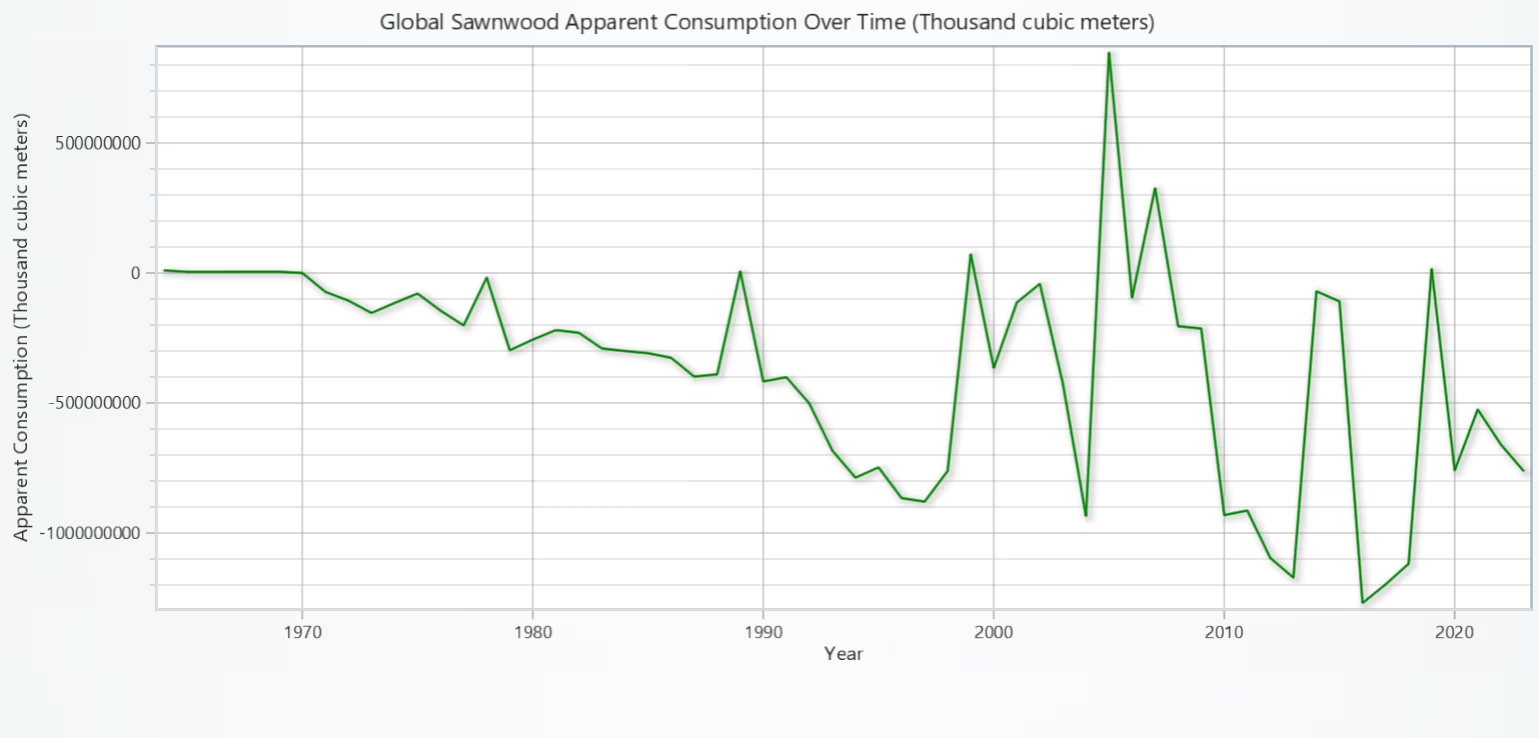
Global sawnwood consumption exhibits clear variability over decades, with episodes of expansion and contraction typical of trade-sensitive commodities.Global sawnwood consumption exhibits clear variability over decades, with episodes of expansion and contraction typical of trade-sensitive commodities.
# Chart 3 - Line Chart of Global Sawnwood Apparent Consumption Over Time
# Developed with AI assistance to demonstrate LightningChart Python

import lightningchart as lc
import numpy as np
import pandas as pd

# License
with open("D:/HAMK/Internship/MyProjects/lc_license.txt", "r") as f:
    license_key = f.read().strip()
lc.set_license(license_key)

# Use existing tff
df = tff.copy().rename(columns={
    "Name": "Country",
    "Product Name": "Product",
    "Value": "Datapoint"
})

# Types
df["Year"] = pd.to_numeric(df["Year"], errors="coerce")
df["Datapoint"] = df["Datapoint"].astype(str).str.replace(r"[,\s]", "", regex=True)
df["Datapoint"] = pd.to_numeric(df["Datapoint"], errors="coerce")

# Filter for Sawnwood
PRODUCT_REGEX = r"^SAWNWOOD$"
FLOWS = ["PRODUCTION", "IMPORTS", "EXPORTS"]

sub = df[
    df["Product"].str.contains(PRODUCT_REGEX, case=False, na=False)
    & df["Flow"].isin(FLOWS)
    & df["Year"].notna()
    & df["Datapoint"].notna()
].copy()
if sub.empty:
    raise ValueError("No rows found for product 'SAWNWOOD' in tff.")

unit = sub["Unit"].mode().iat[0] if "Unit" in sub else ""

# Aggregate by year (global)
piv = (
    sub.pivot_table(index=["Year", "Flow"], values="Datapoint", aggfunc="sum")
    .reset_index()
    .pivot(index="Year", columns="Flow", values="Datapoint")
    .reindex(columns=FLOWS, fill_value=0)
)

# Apparent Consumption
piv["Consumption"] = piv["PRODUCTION"] + piv["IMPORTS"] - piv["EXPORTS"]
piv = piv.reset_index().sort_values("Year")

x_values = piv["Year"].tolist()
y_values = piv["Consumption"].tolist()

# Plot
chart = lc.ChartXY(theme=lc.Themes.Light,
                   title=f"Global Sawnwood Apparent Consumption Over Time ({unit})")

series = chart.add_line_series()
series.append_samples(x_values=x_values, y_values=y_values)
series.set_name("Sawnwood Consumption")
series.set_line_color("green")

# Axes & year ticks
try:
    ax_x = chart.get_default_x_axis(); ax_y = chart.get_default_y_axis()
except AttributeError:
    ax_x = chart.get_default_axis_x(); ax_y = chart.get_default_axis_y()

ax_x.set_title("Year")
ax_y.set_title(f"Apparent Consumption ({unit})")

xmin, xmax = int(min(x_values)), int(max(x_values))
try:
    ax_x.set_interval(xmin, xmax)
except Exception:
    pass

# Set decade ticks (no overlapping)
try:
    ax_x.set_tick_strategy('Empty')
except Exception:
    ax_x.set_tick_strategy('Numeric')

step = 10 if (xmax - xmin) > 25 else 5
for yr in range((xmin // step) * step, xmax + 1, step):
    try:
        ax_x.add_custom_tick().set_value(yr).set_text(str(yr))
    except Exception:
        pass

# FIX: make Y-axis stable/fixed
ymin, ymax = float(min(y_values)), float(max(y_values))
# Pad a bit; if all positive, start at 0 for readability
if ymin >= 0:
    ymin_plot = 0.0
else:
    ymin_plot = ymin - 0.15 * max(1.0, (ymax - ymin))
ymax_plot = ymax + 0.15 * max(1.0, (ymax - ymin))

try:
    ax_y.set_interval(ymin_plot, ymax_plot, stop_axis_after=False)
except TypeError:
    ax_y.set_interval(ymin_plot, ymax_plot)

# Optional: extra bottom padding for labels
try:
    chart.set_padding(bottom=60)
except Exception:
    pass

chart.open()

print(piv.head())
Bubble Chart of Panel Consumption vs. Industrial Roundwood Consumption, coloured by Region
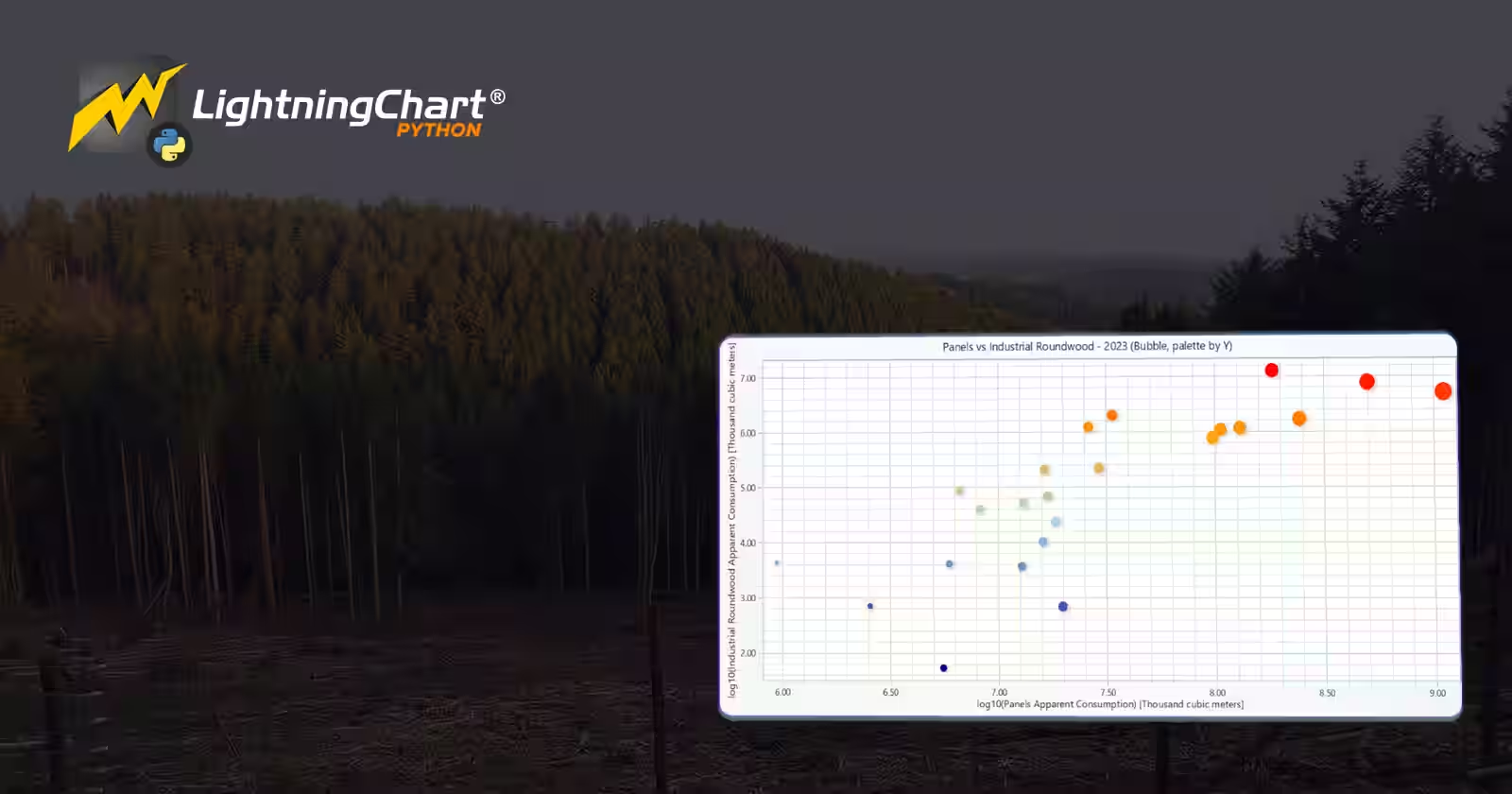
The relationship suggests linked demand between panels and their roundwood feedstock. Regional groups reveal different market structures (eg: some regions dominated by a few very large consumers, others more evenly distributed). Outliers (large bubbles far from the main cluster) can flag countries with distinct industrial profiles worth deeper study.
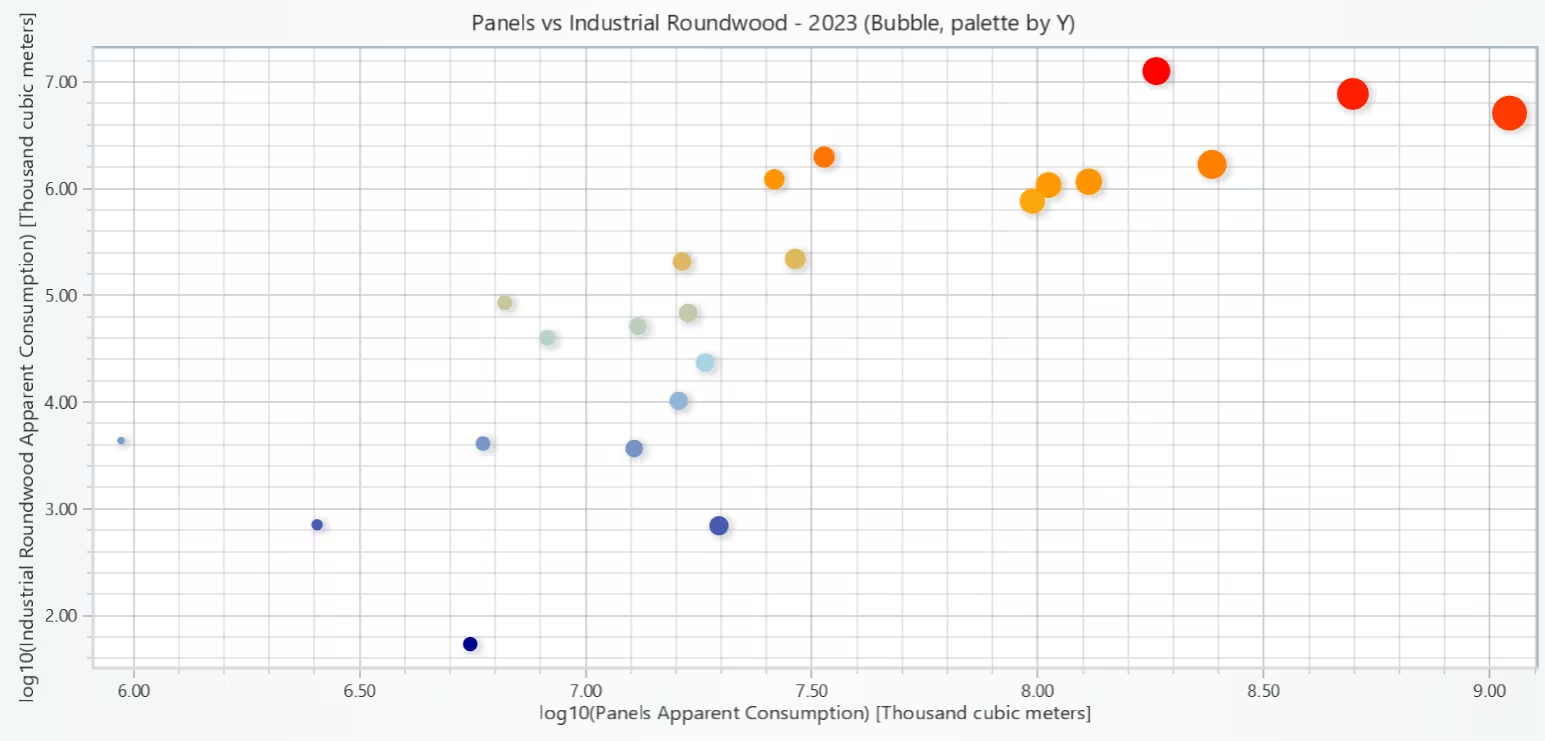
# Chart 4 — Bubble Chart of Panel Consumption vs. Industrial Roundwood Consumption, colored by Region
# Developed with AI assistance to demonstrate LightningChart Python

import lightningchart as lc
import numpy as np
import pandas as pd
import math

# License
with open("D:/HAMK/Internship/MyProjects/lc_license.txt", "r") as f:
    license_key = f.read().strip()
lc.set_license(license_key)

USE_LOG = True  # keep your switch

# Use existing tff and normalize column names/types
df = tff.copy().rename(columns={
    "Name": "Country",
    "Product Name": "Product",
    "Value": "Datapoint"
})
df["Year"] = pd.to_numeric(df["Year"], errors="coerce")
df["Datapoint"] = df["Datapoint"].astype(str).str.replace(r"[,\s]", "", regex=True)
df["Datapoint"] = pd.to_numeric(df["Datapoint"], errors="coerce")
df = df[df["Year"].notna() & df["Datapoint"].notna()]

FLOWS = ["PRODUCTION", "IMPORTS", "EXPORTS"]

def apparent_consumption(product_regex: str) -> pd.DataFrame:
    sub = df[
        df["Product"].str.contains(product_regex, case=False, na=False)
        & df["Flow"].isin(FLOWS)
    ].copy()
    if sub.empty:
        return pd.DataFrame(columns=["Country","Year","AC","Unit"])
    unit = sub["Unit"].mode().iat[0] if "Unit" in sub.columns else ""
    piv = (sub.pivot_table(index=["Country","Year"], columns="Flow", values="Datapoint",
                           aggfunc="sum", fill_value=0)
               .reindex(columns=FLOWS, fill_value=0))
    piv = piv.apply(pd.to_numeric, errors="coerce").fillna(0.0)
    piv["AC"] = piv["PRODUCTION"] + piv["IMPORTS"] - piv["EXPORTS"]
    out = piv.reset_index()[["Country","Year","AC"]]
    out["Unit"] = unit
    return out

PANELS_REGEX = r"(panel|plywood|particle board|fibreboard|fiberboard|hardboard|other board|veneer)"

ac_panels = apparent_consumption(PANELS_REGEX)
ac_irw    = apparent_consumption(r"^INDUSTRIAL ROUNDWOOD$")

if ac_panels.empty or ac_irw.empty:
    raise ValueError("Panels or Industrial Roundwood data not found in tff.")

# Latest common year
yr = int(min(ac_panels["Year"].max(), ac_irw["Year"].max()))

pan_y = (ac_panels[ac_panels["Year"] == yr]
         .groupby("Country", as_index=False)["AC"].sum()
         .rename(columns={"AC":"PanelsAC"}))
irw_y = (ac_irw[ac_irw["Year"] == yr]
         .groupby("Country", as_index=False)["AC"].sum()
         .rename(columns={"AC":"IRW_AC"}))

merged = pan_y.merge(irw_y, on="Country", how="inner")
merged = merged.replace([np.inf,-np.inf], np.nan).dropna()
merged = merged[(merged["PanelsAC"] > 0) & (merged["IRW_AC"] > 0)].copy()
if merged.empty:
    raise ValueError("No overlapping positive AC values for the chosen year.")

# Units (for labels)
unit_panels = ac_panels["Unit"].dropna().mode().iat[0] if not ac_panels["Unit"].dropna().empty else ""
unit_irw    = ac_irw["Unit"].dropna().mode().iat[0] if not ac_irw["Unit"].dropna().empty else ""

# Axes values (log or linear)
if USE_LOG:
    merged["x"] = np.log10(merged["PanelsAC"])
    merged["y"] = np.log10(merged["IRW_AC"])
    x_title = f"log10(Panels Apparent Consumption) [{unit_panels}]"
    y_title = f"log10(Industrial Roundwood Apparent Consumption) [{unit_irw}]"
else:
    merged["x"] = merged["PanelsAC"]
    merged["y"] = merged["IRW_AC"]
    x_title = f"Panels Apparent Consumption ({unit_panels})"
    y_title = f"Industrial Roundwood Apparent Consumption ({unit_irw})"

# Bubble sizes (same as before)
size_metric = "PanelsAC"
r_min, r_max = 6, 28
smin, smax = float(merged[size_metric].min()), float(merged[size_metric].max())
def size_px(v):
    if smax == smin:
        return (r_min + r_max) / 2
    # log-size to handle skew
    v = max(1.0, float(v))
    lv = math.log10(v)
    lmin = math.log10(max(1.0, smin))
    lmax = math.log10(max(1.0, smax))
    return r_min + (r_max - r_min) * ((lv - lmin) / max(1e-9, lmax - lmin))

merged["size_px"] = merged[size_metric].map(size_px)

# Plot (single point series + palette coloring by Y)
chart = lc.ChartXY(theme=lc.Themes.Light, title=f"Panels vs Industrial Roundwood - {yr} (Bubble, palette by Y)")

try:
    x_axis = chart.get_default_x_axis(); y_axis = chart.get_default_y_axis()
except AttributeError:
    x_axis = chart.get_default_axis_x(); y_axis = chart.get_default_axis_y()

x_axis.set_title(x_title)
y_axis.set_title(y_title)

# Add one point series with per-point sizes
point_series = chart.add_point_series(sizes=True)

# Compute dynamic palette steps from the Y distribution (like the example but data-driven)
y_vals = merged["y"].to_numpy()
y_min = float(np.min(y_vals))
y_q33 = float(np.percentile(y_vals, 33))
y_q66 = float(np.percentile(y_vals, 66))
y_max = float(np.max(y_vals))

# Map lower->cool, higher→warm (similar to example)
point_series.set_palette_point_coloring(
    steps=[
        {'value': y_min, 'color': 'darkblue'},
        {'value': y_q33, 'color': 'lightblue'},
        {'value': y_q66, 'color': 'orange'},
        {'value': y_max, 'color': 'red'},
    ],
    look_up_property='y',
    percentage_values=False
)

# Add samples
point_series.append_samples(
    x_values=merged["x"].tolist(),
    y_values=merged["y"].tolist(),
    sizes=merged["size_px"].tolist()
)

# Optional: tooltip data lookup (country, raw values). If your LC version supports lookups, attach here.
# You can also add annotations/formatting for better interpretability.

chart.open()

# Quick analytics
corr = np.corrcoef(merged["PanelsAC"], merged["IRW_AC"])[0, 1]
print(f"Year {yr} — Pearson correlation (Panels vs IRW): {corr:.3f}")
print("Countries plotted:", len(merged))
Bar Chart of Top 10 Countries by Total Roundwood Consumption (most recent year)
Global roundwood consumption is concentrated in a handful of countries. The steep drop after the leader(s) highlights market dominance and suggests that policies or shocks in a few economies could disproportionately influence global totals.
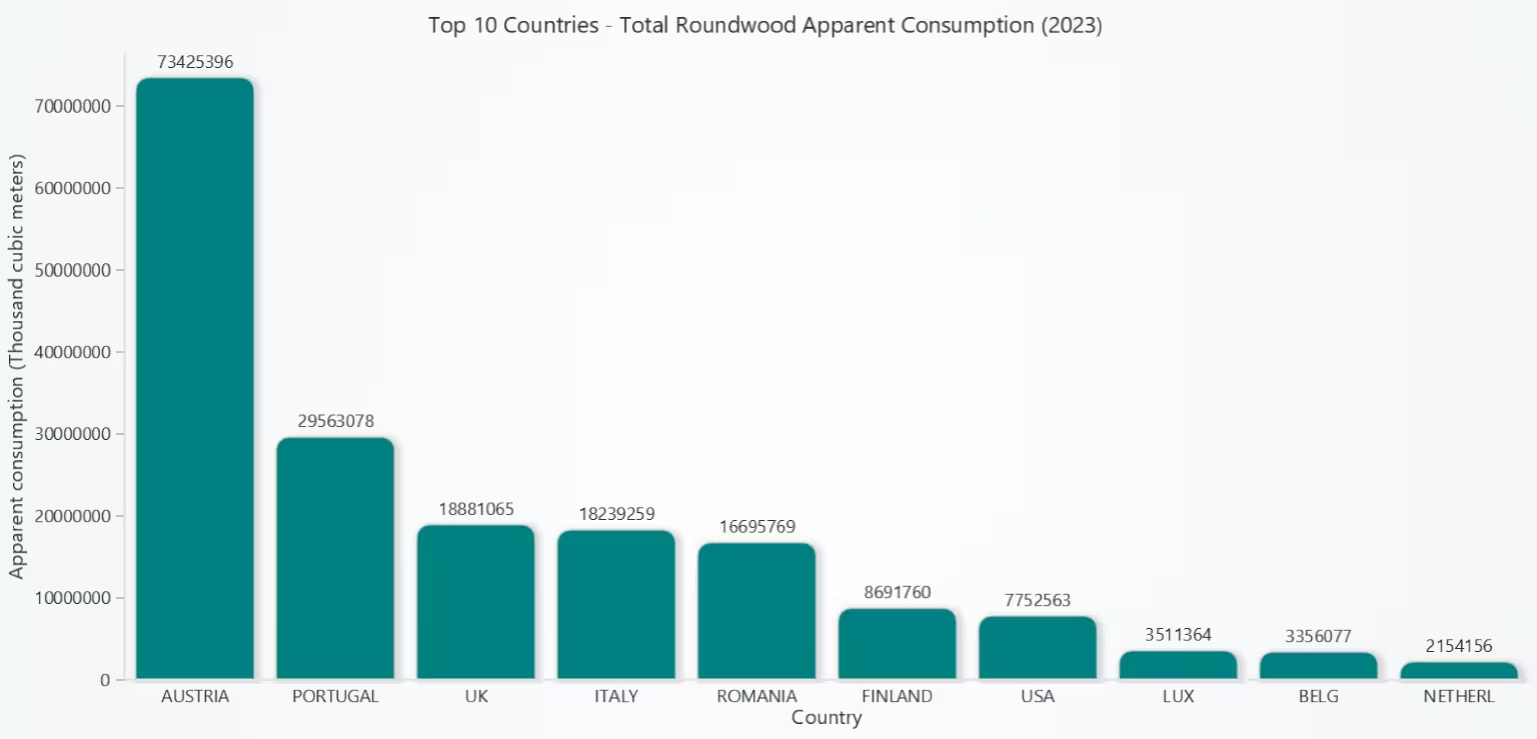
# Chart 5 - Bar Chart of Top 10 Countries by Total Roundwood Consumption (most recent year)
# Developed with AI assistance to demonstrate LightningChart Python

import lightningchart as lc
import numpy as np
import pandas as pd

# License
with open("D:/HAMK/Internship/MyProjects/lc_license.txt", "r") as f:
    license_key = f.read().strip()
lc.set_license(license_key)

# Use existing tff and normalize columns/types
df = tff.copy().rename(columns={
    "Name": "Country",
    "Product Name": "Product",
    "Value": "Datapoint"
})
df["Year"] = pd.to_numeric(df["Year"], errors="coerce")
df["Datapoint"] = df["Datapoint"].astype(str).str.replace(r"[,\s]", "", regex=True)
df["Datapoint"] = pd.to_numeric(df["Datapoint"], errors="coerce")
df = df[df["Year"].notna() & df["Datapoint"].notna()]

FLOWS = ["PRODUCTION", "IMPORTS", "EXPORTS"]

def apparent_consumption(product_regex: str) -> pd.DataFrame:
    sub = df[
        df["Product"].str.contains(product_regex, case=False, na=False)
        & df["Flow"].isin(FLOWS)
    ].copy()
    if sub.empty:
        return pd.DataFrame(columns=["Country","Year","AC","Unit"])
    unit = sub["Unit"].mode().iat[0] if "Unit" in sub.columns else ""
    piv = (sub.pivot_table(index=["Country","Year"], columns="Flow", values="Datapoint",
                           aggfunc="sum", fill_value=0)
               .reindex(columns=FLOWS, fill_value=0))
    piv = piv.apply(pd.to_numeric, errors="coerce").fillna(0.0)
    piv["AC"] = piv["PRODUCTION"] + piv["IMPORTS"] - piv["EXPORTS"]
    out = piv.reset_index()[["Country","Year","AC"]]
    out["Unit"] = unit
    return out

# AC for Industrial Roundwood and Wood Fuel
ac_irw   = apparent_consumption(r"^INDUSTRIAL ROUNDWOOD$")
ac_fuel  = apparent_consumption(r"^WOOD FUEL, INCLUDING WOOD FOR CHARCOAL$")

if ac_irw.empty or ac_fuel.empty:
    raise ValueError("Missing IRW or Wood Fuel data in tff for AC calculation.")

# Latest COMMON year
year = int(min(ac_irw["Year"].max(), ac_fuel["Year"].max()))

irw_y  = ac_irw[ac_irw["Year"] == year][["Country","AC"]].rename(columns={"AC":"IRW_AC"})
fuel_y = ac_fuel[ac_fuel["Year"] == year][["Country","AC"]].rename(columns={"AC":"Fuel_AC"})

tot = (irw_y.merge(fuel_y, on="Country", how="outer")
             .fillna(0.0))
tot["TotalRoundwoodAC"] = tot["IRW_AC"] + tot["Fuel_AC"]

# Remove non-positive / NaN
tot = tot.replace([np.inf,-np.inf], np.nan).dropna()
tot = tot[tot["TotalRoundwoodAC"] > 0]

if tot.empty:
    raise ValueError("No positive Total Roundwood AC values for the latest common year.")

# Determine unit label (prefer IRW, else Fuel)
unit_irw  = ac_irw["Unit"].dropna().mode().iat[0]  if not ac_irw["Unit"].dropna().empty  else ""
unit_fuel = ac_fuel["Unit"].dropna().mode().iat[0] if not ac_fuel["Unit"].dropna().empty else ""
unit = unit_irw or unit_fuel

# Top 10 countries
top10 = (tot.sort_values("TotalRoundwoodAC", ascending=False)
            .head(10)
            .reset_index(drop=True))

# Prepare BarChart data (keep our order → disable sorting)
def fmt_country(c):  # optional: shorten very long names
    return c.replace("United States of America", "United States")

bar_data = [
    {"category": fmt_country(row.Country), "value": float(row.TotalRoundwoodAC)}
    for row in top10.itertuples(index=False)
]

# Create BarChart
chart = lc.BarChart(
    vertical=True,
    theme=lc.Themes.Light,
    title=f"Top 10 Countries - Total Roundwood Apparent Consumption ({year})"
)

chart.set_data(bar_data)
chart.set_sorting('disabled')       # keep descending order we provided
chart.set_bars_color('teal')        # optional color

# Axis titles
chart.value_axis.set_title(f"Apparent consumption ({unit})")
chart.category_axis.set_title("Country")

# Optional: show values as labels on bars (if your LC version supports it)
try:
    chart.set_value_labels(True)
except Exception:
    pass

chart.open()

# Console check
print(top10[["Country","IRW_AC","Fuel_AC","TotalRoundwoodAC"]]
      .round(2).to_string(index=False))
Conclusion
This project used the UNECE timber dataset and LightningChart Python to explore global wood consumption. Five charts were built: a histogram (wood fuel by country), box plot (industrial roundwood by region), line chart (sawnwood trends over time), scatter plot (panels vs. roundwood), and bar chart (top 10 roundwood consumers).
After cleaning the data and mapping regions, the visuals revealed distribution patterns, regional differences, time fluctuations, correlations, and global dominance by a few countries.
Continue learning with LightningChart

Sweeping Line Chart for Medical Healthcare
Written by a human | Updated on April 11th, 2025Sweeping Line Chart for Medical Healthcare Hi again, today we'll be creating a Sweeping Line Chart most commonly used in the medical and healthcare industry for displaying changes in a particular variable over time. The...

Angular Bubble Chart
Written by a human | Updated on April 11th, 2025Angular Bubble Chart App Hello there, in this tutorial, we'll use Visual Studio Code and typescript to build a brand-new Angular template from scratch. Also, we'll modify a bubble chart's characteristics to fit the...

DataGrid Heatmap Monitoring
Written by a human | Updated on April 10th, 2025JavaScript Monitoring DataGrid Heatmap In our previous articles, we worked on TypeScript projects and as we know, we need a web browser to visualize all those projects. In other cases, you may need to create a...



If you have any questions, feel free to contact us!
©LightningChart Ltd 2025. All rights reserved.