





Global Natural Gas Prices Data Visualization Analysis | LightningChart Python
Tutorial
Assisted by AI
Discover effective techniques for visualizing data trends and patterns in global natural gas prices with LightningChart Python.
Vindya Nukulasooriya
Data Science Developer

Introduction
This project presents an analytical and visual exploration of global natural gas price trends using the high-performance visualization capabilities of the LightningChart Python library.
The dataset, sourced from DataHub.io, includes daily and monthly natural gas prices across several years and global regions, capturing key price variations and seasonal dynamics in energy markets.
Through a curated set of diverse chart types, including line plots, scatter charts, polar heatmaps, area plots, and gauge indicators, this project provides a comprehensive perspective on historical price behaviour and global fluctuations in natural gas markets.
These interactive and high-resolution charts aim to uncover long-term pricing trends, volatility periods, and regional insights that are valuable to analysts, energy economists, and policy advisors.
By leveraging LightningChart Python’s real-time rendering engine and interactivity, the project transforms raw pricing data into visually rich, meaningful insights. The results contribute to a more intuitive understanding of complex energy price behaviour and enable informed discussions around pricing policy, energy planning, and market strategy.
Project Overview
This project employs a structured time-series dataset on natural gas prices to conduct a multi-angle analysis of global energy cost trends across countries and time periods. The dataset includes daily, and monthly gas prices reported in U.S. dollars per million BTU, spanning multiple years and offering insight into pricing dynamics affected by market forces, geopolitical factors, and seasonal demand shifts.
Exclusively using LightningChart Python, the project visualizes this data through high-performance, interactive visual formats. This charting library is specifically selected for its ability to handle time-series data at scale, render complex interactions fluidly, and support responsive zooming, filtering, and comparison tasks which makes it ideal for energy market analytics.
The resulting set of visualizations delivers a clear, data-driven perspective on price patterns, volatility windows, and cross-temporal relationships, aiding researchers, analysts, and policy stakeholders.
Objectives:
- To analyze historical natural gas price data from daily and monthly timeframes.
- To create up to 10 interactive charts using LightningChart Python that highlight key pricing trends, volatility, and seasonality.
- To uncover insights on global gas pricing behaviour relevant to energy markets, industry forecasting, and economic planning.
- To demonstrate the strengths of LightningChart Python in handling time-series energy data and building advanced data visualization pipelines.
Deliverable:
A comprehensive report featuring:
- Up to 10 professional-level visualizations created with LightningChart Python
- Accompanying Python code and chart-specific explanations
- Analytical summaries that explore regional and temporal pricing trends
- A conclusion that reflects on the role of advanced charting tools in energy data interpretation
Tools Used:
Python 3.13.5, LightningChart Python, Jupyter Notebook, AI Assistance
About the Dataset:
The dataset records natural gas prices in USD per million BTU, reported both daily and monthly, and organized in a time-series format. It covers several countries and regions, including the U.S., Europe, Japan, and others, and provides crucial insight into how gas prices evolve in response to global supply-demand imbalances, political instability, and seasonal energy consumption.
LightningChart Python
In the context of global natural gas prices, LightningChart Python provides an ideal data visualization library for building a highly responsive and insightful data analytics application in Python.

Setting Up Python Environment
Before running the project, install Python and the other required libraries using:
%pip install numpy pandas lightningchartOverview of Libraries Used:
- Pandas: for data handling and time-based grouping
- Numpy: for numerical operations
- LightningChart: for high-performance visualization
- scipy.interpolate: for interpolating baseline FHR values across accelerations and uterine contractions
Setting Up Your Development Environment:
- Set up a virtual environment:
- Use Visual Studio Code (VSCode) for a streamlined development experience.
Loading and Preprocessing Data
To create this China Water Pollution Monitoring Application, we will fetch the China water pollution data using the following function:
Downloaded the dataset from datahub.io - https://datahub.io/core/natural-gasTo preprocess the dataset, we will import the pandas library:
# Import necessary libraries (load pandas library to preprocess dataset)
import pandas as pd
Visualizing Data with LightningChart Python
The following high-performance and interactive visualizations enable intuitive and comprehensive exploration of global natural gas prices and their market behaviour, capturing everything from short-term spikes to long-term pricing trends, and supporting data-driven insights in energy economics and forecasting.
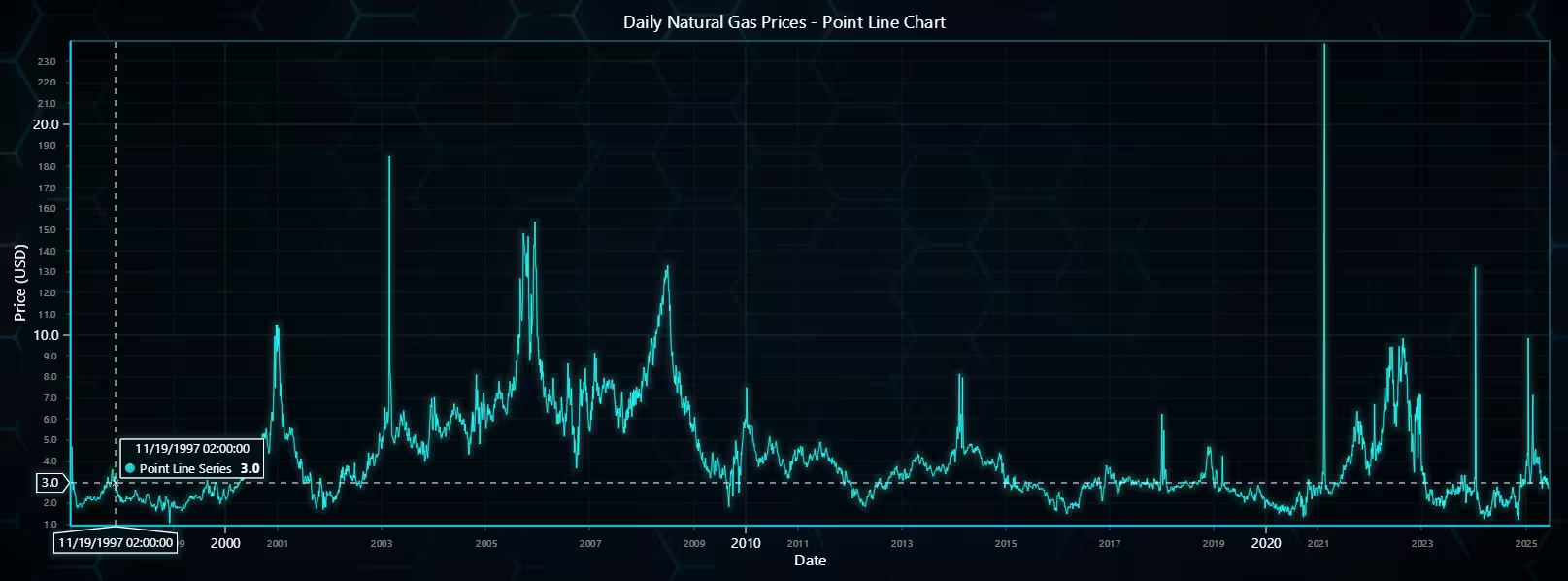
Daily Natural Gas Price Trend – Point Line Chart
This point line chart displays daily global natural gas prices over several years. The dense time-series data offers high temporal granularity, enabling the detection of short-term fluctuations, spikes, and dips.
The use of LightningChart’s high-precision X-axis with datetime formatting allows for precise interpretation of market activity. Ideal for analysts and traders, this visualization supports short-term forecasting and event impact tracking.
# Point Line Chart - Daily Natural Gas Price
# Developed with AI assistance to showcase the performance of LightningChart Python libraries.

import lightningchart as lc
import pandas as pd

# Load LightningChart license
with open("D:/Vindy/HAMK/Internship/MyProjects/lc_license.txt", "r") as f:
    license_key = f.read().strip()
lc.set_license(license_key)

# Prepare data
dgpd = pd.read_csv('daily.csv', encoding='ISO-8859-1')
dgpd_clensed = dgpd.dropna(subset=['Price']).copy()
dgpd_clensed['Date'] = pd.to_datetime(dgpd_clensed['Date'])

# Convert Date to Unix timestamp in milliseconds
x_values = dgpd_clensed['Date'].astype('int64') // 10**6  # milliseconds
y_values = dgpd_clensed['Price'].tolist()

# Create chart
chart = lc.ChartXY(
    theme=lc.Themes.TurquoiseHexagon,
    title='Daily Natural Gas Prices - Point Line Chart'
)

# Use high-precision X-axis with datetime ticks
chart.get_default_x_axis().dispose()
x_axis = chart.add_x_axis(axis_type='linear-highPrecision')
x_axis.set_title('Date')
x_axis.set_tick_strategy('DateTime')

# Set Y-axis title
chart.get_default_y_axis().set_title('Price (USD)')

# Add point line series
series = chart.add_point_line_series().set_point_shape('circle')
series.set_point_size(3)
series.set_point_color(lc.Color('black'))
series.set_line_thickness(1)

# Add data
series.add(x=x_values.tolist(), y=y_values)

chart.open()
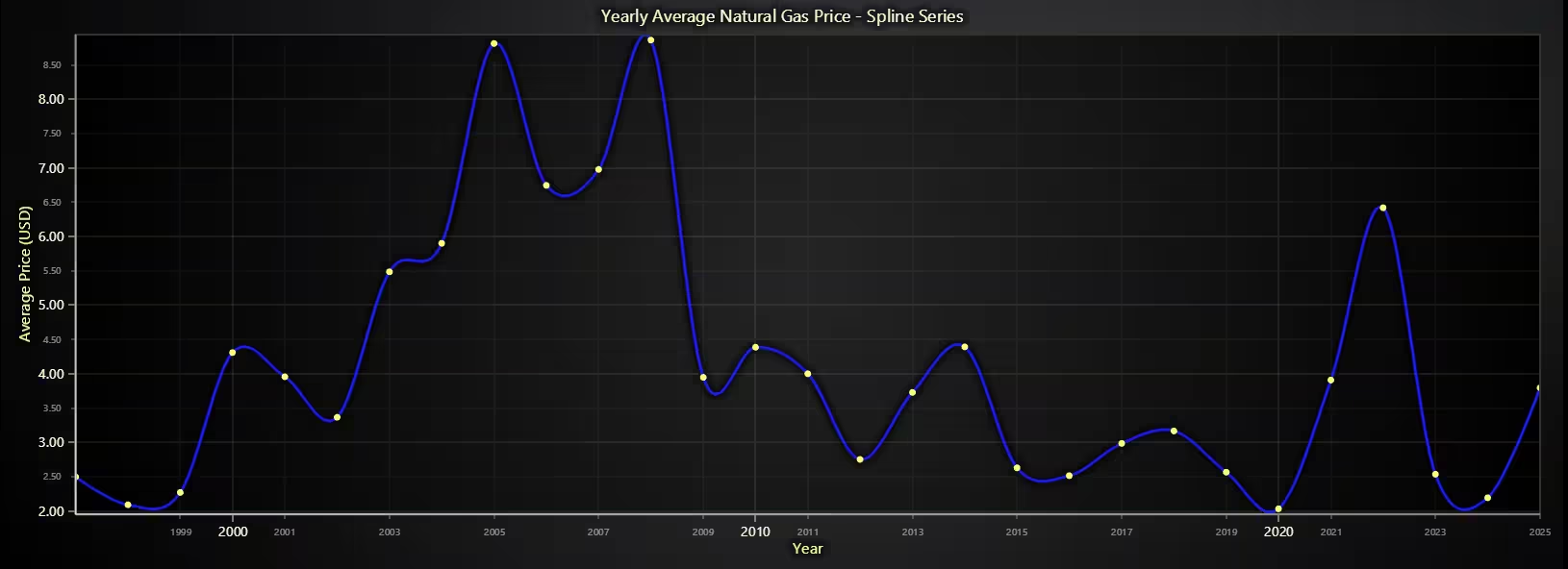
Yearly Average Natural Gas Price – Spline Chart
This spline line chart presents yearly average global natural gas prices, derived from monthly records. It offers a clean, smoothed visualization of long-term pricing trends, minimizing short-term noise while emphasizing larger market shifts.
This format is particularly valuable for macroeconomic evaluations, policy reviews, and investment strategy assessments. LightningChart’s spline series improves clarity, helping viewers interpret pricing trajectories with ease.
# Spline Chart - Yearly Average Natural Gas Price
# Developed with AI assistance to showcase the performance of LightningChart Python libraries.

import lightningchart as lc
import pandas as pd

# Load LightningChart license
with open("D:/Vindy/HAMK/Internship/MyProjects/lc_license.txt", "r") as f:
    license_key = f.read().strip()
lc.set_license(license_key)

# Load monthly dataset and convert to datetime
mgpd = pd.read_csv('monthly.csv', encoding='ISO-8859-1')
mgpd['Month'] = pd.to_datetime(mgpd['Month'])

# Compute average yearly gas price
mgpd['Year'] = mgpd['Month'].dt.year
yearly_avg = mgpd.groupby('Year')['Price'].mean().reset_index()

# Convert Year to Unix timestamp in milliseconds (Jan 1st of each year)
x_values = pd.to_datetime(yearly_avg['Year'].astype(str) + '-01-01').astype('int64') // 10**6
y_values = yearly_avg['Price'].tolist()

# Create chart
chart = lc.ChartXY(
    theme=lc.Themes.Dark,
    title='Yearly Average Natural Gas Price - Spline Series'
)

# Replace default X-axis with high-precision time-based axis
chart.get_default_x_axis().dispose()
x_axis = chart.add_x_axis(axis_type='linear-highPrecision')
x_axis.set_title('Year')
x_axis.set_tick_strategy('DateTime')

# Set Y-axis title
chart.get_default_y_axis().set_title('Average Price (USD)')

# Add spline series
spline_series = chart.add_spline_series()
spline_series.set_line_thickness(3)
spline_series.set_line_color(lc.Color('blue'))
spline_series.add(x=x_values.tolist(), y=y_values)

# Display chart
chart.open()
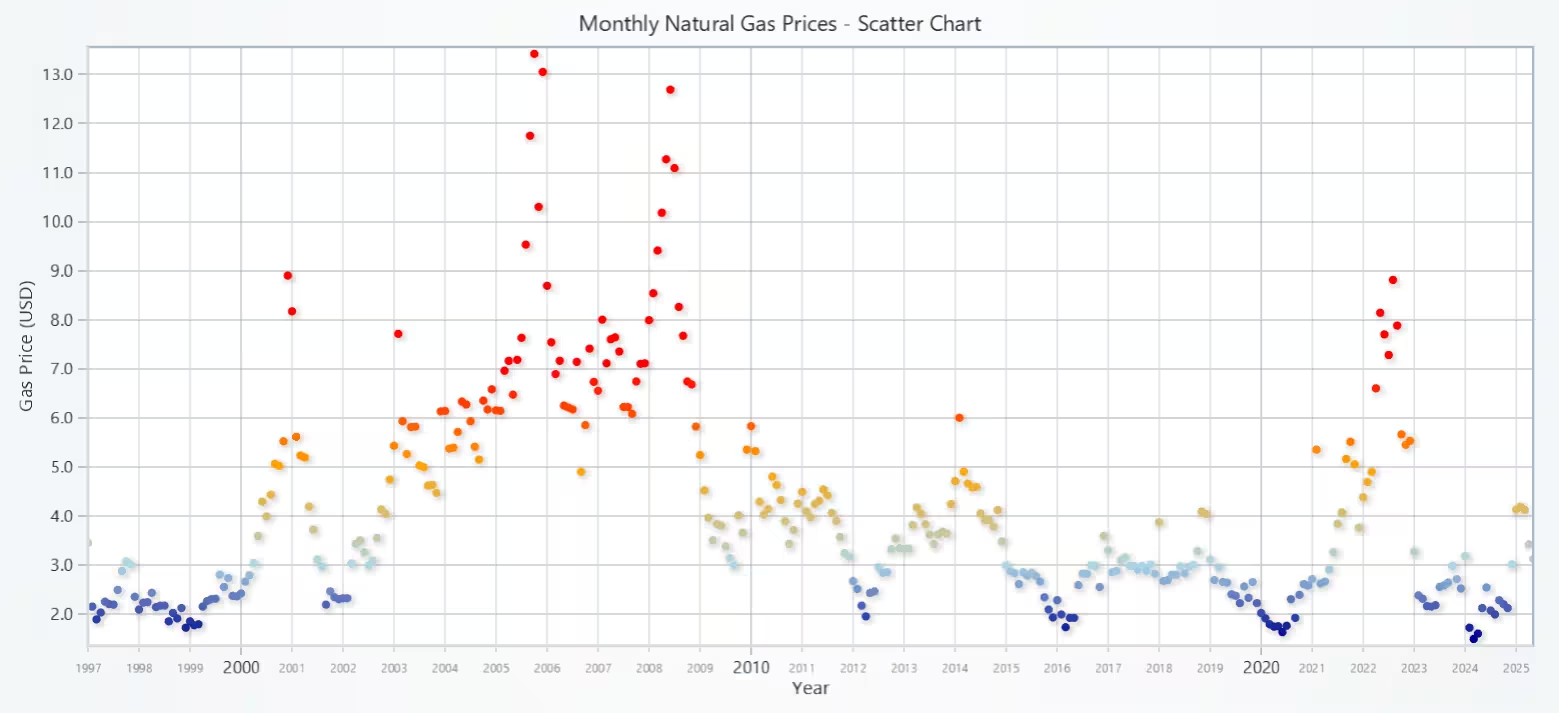
Monthly Global Natural Gas Prices – Scatter Chart
This scatter chart plots monthly global natural gas prices over time using a fractional year scale (YearFraction) to ensure even spacing between months across years. The points are color-coded based on price ranges, providing a clear heatmap-style overlay without needing a separate color axis.
This helps quickly identify high-price periods (eg: winter spikes or crisis-driven surges) and periods of stability. The use of LightningChart’s palette-based point colouring makes value differences instantly recognizable, offering a useful tool for seasonal and macroeconomic analysis.
# Scatter Chart - Monthly Natural Gas Prices
# Developed with AI assistance to showcase the performance of LightningChart Python libraries.

import lightningchart as lc
import pandas as pd

# Load license key securely
with open("D:/Vindy/HAMK/Internship/MyProjects/lc_license.txt", "r") as f:
    license_key = f.read().strip()

lc.set_license(license_key)

# Load and prepare data
mgpd = pd.read_csv('monthly.csv', encoding='ISO-8859-1')
mgpd['Month'] = pd.to_datetime(mgpd['Month'])
mgpd['Year'] = mgpd['Month'].dt.year
mgpd['MonthNum'] = mgpd['Month'].dt.month
mgpd['YearFraction'] = mgpd['Year'] + (mgpd['MonthNum'] - 1) / 12.0

x_values = mgpd['YearFraction'].tolist()
y_values = mgpd['Price'].tolist()

# Create chart
chart = lc.ChartXY(title="Monthly Natural Gas Prices - Scatter Chart", theme=lc.Themes.Light)

# Add point series
point_series = chart.add_point_series()
point_series.set_palette_point_coloring(
    steps=[
        {'value': 1.5, 'color': lc.Color('darkblue')},
        {'value': 3.0, 'color': lc.Color('lightblue')},
        {'value': 5.0, 'color': lc.Color('orange')},
        {'value': 7.0, 'color': lc.Color('red')},
    ],
    look_up_property='y',
    percentage_values=False
)

# Add data
point_series.add(x=x_values, y=y_values)

# Set axis titles
chart.get_default_x_axis().set_title("Year")
chart.get_default_y_axis().set_title("Gas Price (USD)")

# Remove unnecessary decimals on X-axis
chart.get_default_x_axis().set_decimal_precision(0)

# Show chart
chart.open()
Monthly Global Natural Gas Price Change – Bipolar Area Chart
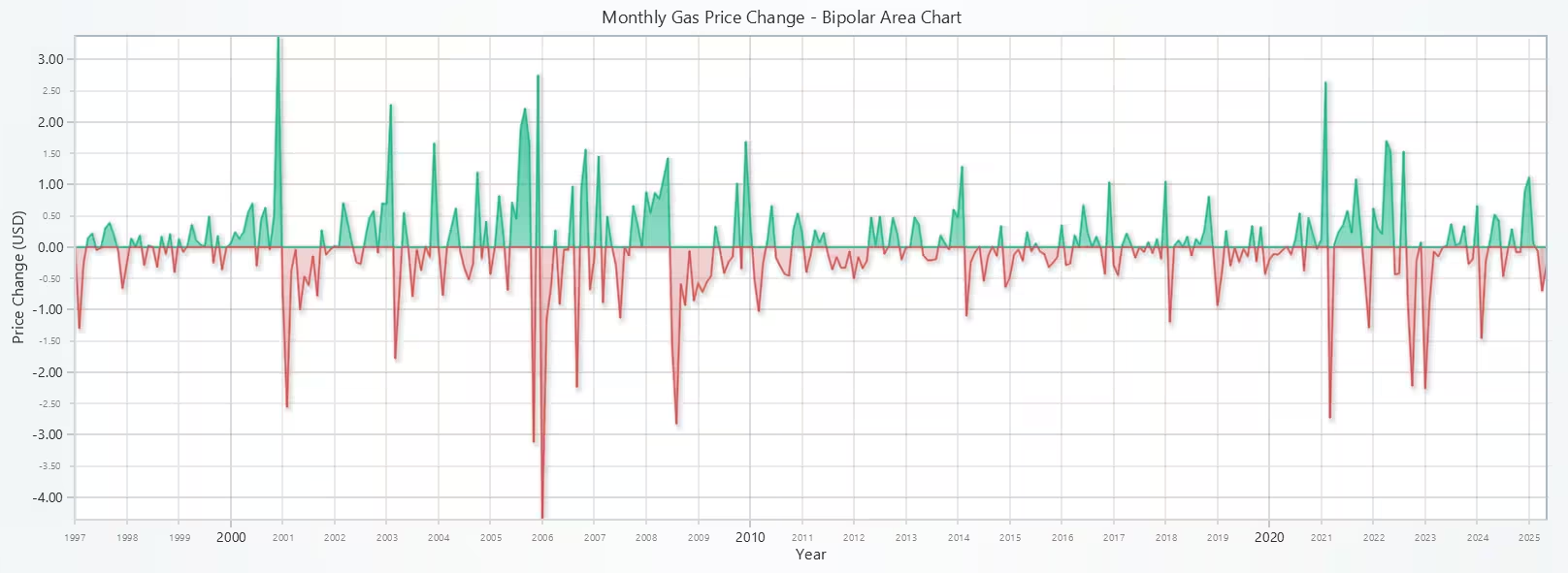
This bipolar area chart visualizes the month-over-month changes in global natural gas prices. Positive values (above the X-axis) indicate price increases, while negative values (below the X-axis) show decreases. This format is particularly effective for identifying periods of volatility and reversal points.
The use of YearFraction ensures a continuous X-axis for clean transitions between months. LightningChart’s bipolar area series provides a visually engaging way to evaluate market momentum over time, making it ideal for traders and economic analysts.
# Bipolar Area Chart - Monthly Natural Gas Prices Change
# Developed with AI assistance to showcase the performance of LightningChart Python libraries.

import lightningchart as lc
import pandas as pd

# Load license key
with open("D:/Vindy/HAMK/Internship/MyProjects/lc_license.txt", "r") as f:
    license_key = f.read().strip()

lc.set_license(license_key)

# Load and prepare dataset
mgpd = pd.read_csv('monthly.csv', encoding='ISO-8859-1')
mgpd['Month'] = pd.to_datetime(mgpd['Month'])

# Calculate price change per month
mgpd['PriceChange'] = mgpd['Price'].diff().fillna(0)

# Convert Month to fractional year (e.g., 2005.25 for April)
mgpd['Year'] = mgpd['Month'].dt.year
mgpd['MonthNum'] = mgpd['Month'].dt.month
mgpd['YearFraction'] = mgpd['Year'] + (mgpd['MonthNum'] - 1) / 12.0

x_values = mgpd['YearFraction'].tolist()
y_values = mgpd['PriceChange'].tolist()

# Create chart
chart = lc.ChartXY(
    theme=lc.Themes.Light,
    title='Monthly Gas Price Change - Bipolar Area Chart'
)

# Add bipolar area series
chart.add_bipolar_area_series().add(x=x_values, y=y_values)

# Set axis titles
chart.get_default_x_axis().set_title("Year")
chart.get_default_y_axis().set_title("Price Change (USD)")

# Remove decimals from X-axis
chart.get_default_x_axis().set_decimal_precision(0)

chart.open()
Daily Natural Gas Prices – 3D Bubble Chart
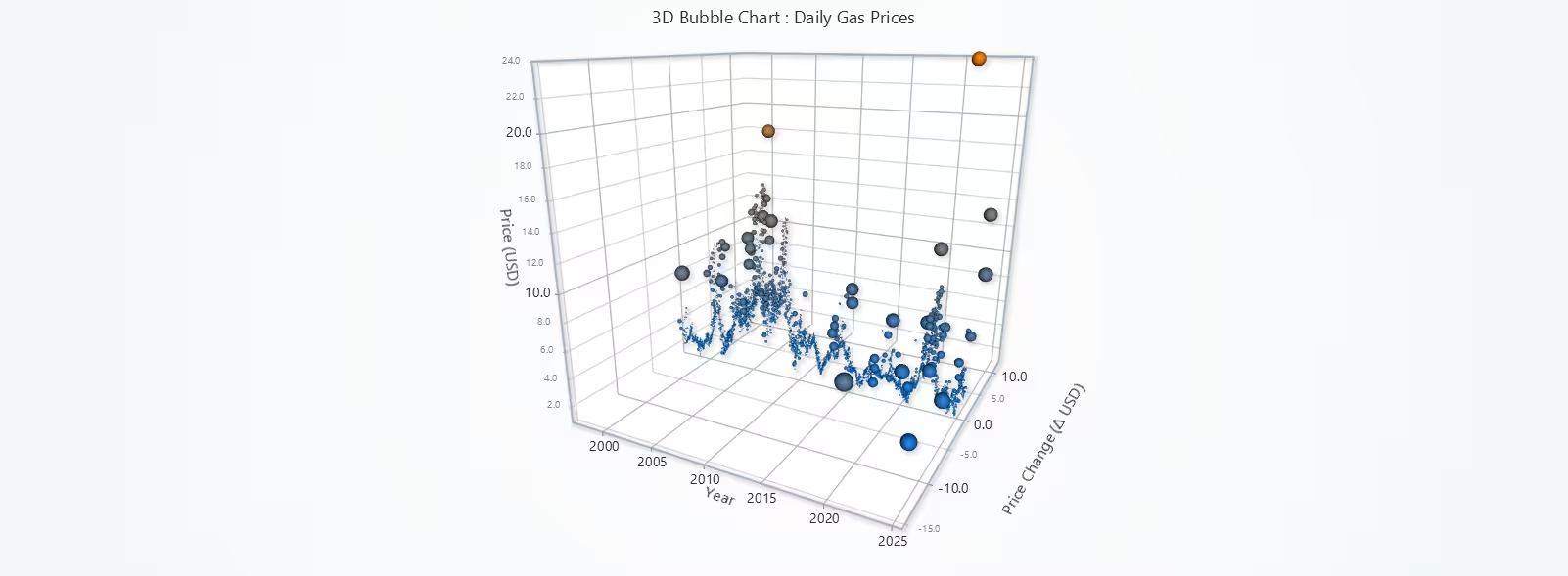
This 3D Bubble Chart presents a multidimensional view of daily natural gas prices, where:
- The X-axis shows time (FloatDate)
- The Y-axis shows the actual price
- The Z-axis displays daily price change
- The bubble size reflects the magnitude of price change (volatility)
- The color gradient shows the normalized price value
This visualization format helps analysts explore price level, volatility, and temporal context all at once. It is particularly powerful for identifying volatility clusters, such as during crises or seasonal demand spikes. LightningChart Python enables fluid, high-performance rendering of thousands of individual 3D points with interactive depth control which is ideal for exploratory energy market analytics.
# 3D Bubble Chart - Daily Natural Gas Prices
# # Developed with AI assistance to showcase the performance of LightningChart Python libraries.

import lightningchart as lc
import pandas as pd
import numpy as np

# Load LightningChart license
with open("D:/Vindy/HAMK/Internship/MyProjects/lc_license.txt", "r") as f:
    license_key = f.read().strip()
lc.set_license(license_key)

# Load and prepare data
dgpd = pd.read_csv('daily.csv', encoding='ISO-8859-1')
dgpd_clensed = dgpd.dropna(subset=['Price']).copy()
dgpd_clensed['Date'] = pd.to_datetime(dgpd_clensed['Date'])
dgpd_clensed['PriceChange'] = dgpd_clensed['Price'].diff().fillna(0)

# Float-style year for X-axis
dgpd_clensed['Year'] = dgpd_clensed['Date'].dt.year
dgpd_clensed['Month'] = dgpd_clensed['Date'].dt.month
dgpd_clensed['Day'] = dgpd_clensed['Date'].dt.day
dgpd_clensed['FloatDate'] = (
    dgpd_clensed['Year'] +
    (dgpd_clensed['Month'] - 1) / 12 +
    (dgpd_clensed['Day'] - 1) / 365
)

# Normalize values for visual mapping
price_min, price_max = dgpd_clensed['Price'].min(), dgpd_clensed['Price'].max()
dgpd_clensed['NormPrice'] = (dgpd_clensed['Price'] - price_min) / (price_max - price_min)
dgpd_clensed['AbsChange'] = dgpd_clensed['PriceChange'].abs()
dgpd_clensed['Size'] = np.clip(dgpd_clensed['AbsChange'] * 10, 2, 25)  # Size scaling

# Create chart
chart = lc.Chart3D(
    theme=lc.Themes.Light,
    title='3D Bubble Chart : Daily Gas Prices'
)

# Add bubble series
series = chart.add_point_series(
    render_2d=False,
    individual_lookup_values_enabled=True,
    individual_point_color_enabled=True,
    individual_point_size_axis_enabled=True,
    individual_point_size_enabled=True,
)
series.set_point_shape('sphere')

# Color by normalized price
series.set_palette_point_colors(
    steps=[
        {'value': 0.0, 'color': lc.Color(0, 128, 255)},   # Low = blue
        {'value': 1.0, 'color': lc.Color(255, 128, 0)},   # High = orange
    ],
    look_up_property='value',
    interpolate=True,
    percentage_values=True
)

# Prepare final data points
data = []
for _, row in dgpd_clensed.iterrows():
    data.append({
        'x': row['FloatDate'],
        'y': row['Price'],
        'z': row['PriceChange'],
        'size': row['Size'],
        'value': row['NormPrice']
    })

series.add(data)

# Axis titles
chart.get_default_x_axis().set_title("Year")
chart.get_default_y_axis().set_title("Price (USD)")
chart.get_default_z_axis().set_title("Price Change (Δ USD)")

# Custom tick strategy to display clean year labels
x_axis = chart.get_default_x_axis()
x_axis.set_tick_strategy('Empty')  # Turn off automatic ticks

# Add custom year labels (e.g. every 5 years from 2000–2025)
for year in range(2000, 2026, 5):
    tick = x_axis.add_custom_tick()
    tick.set_value(float(year))     # Must be float
    tick.set_text(str(year))        # Label as string

chart.open()
Monthly Natural Gas Prices (1997-2023) – Polar Heatmap Chart
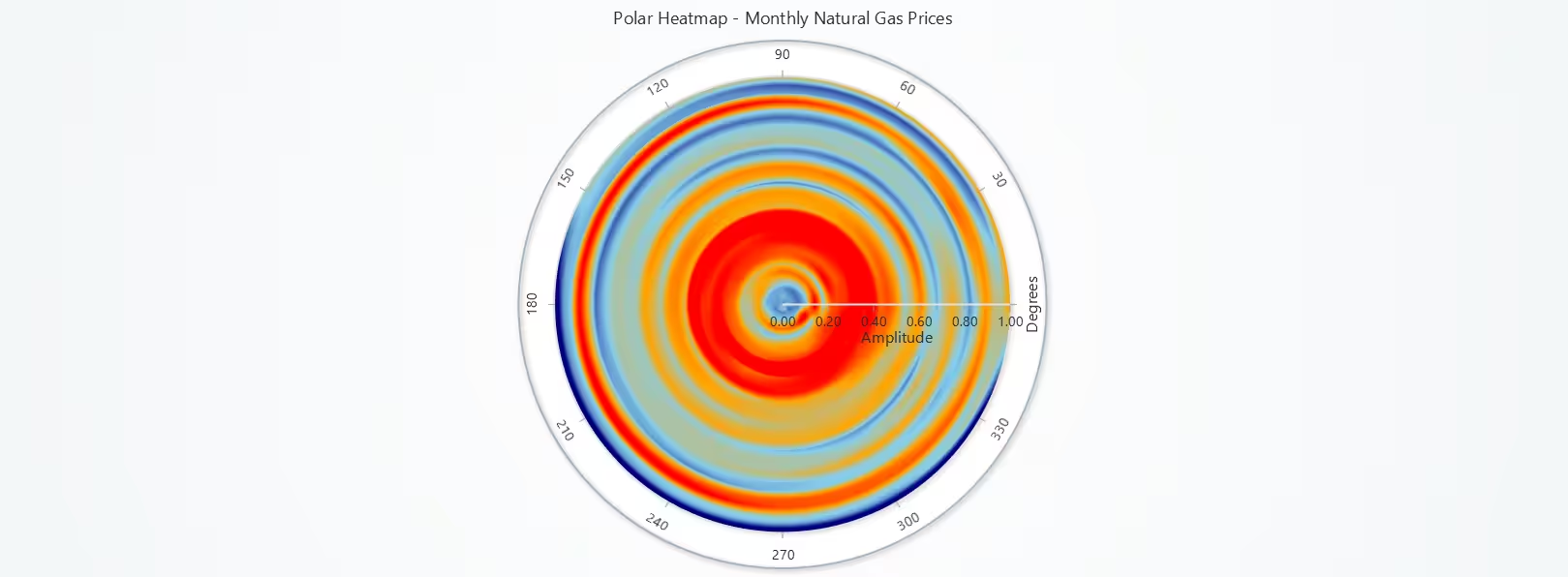
This polar heatmap chart visualizes monthly average global natural gas prices across the years 1997 to 2023. Each annulus represents a year, and each sector (angle) corresponds to a month (January to December). The color gradient reflects average price intensity, making it easy to spot seasonal patterns, winter surges, or crisis-driven anomalies over decades.
By using a radial layout, this chart emphasizes cyclical patterns in energy markets that might be harder to detect in traditional time-series formats. The inclusion of bilinear interpolation ensures smooth visual transitions across time. This visualization is especially valuable for researchers’ exploring seasonality, climate impact, or long-term energy pricing trends.
# Chart 6 – Polar Heatmap: Monthly Natural Gas Prices (1997–2023)
# Developed with AI assistance to showcase the performance of LightningChart Python libraries.

import lightningchart as lc
import pandas as pd

# Load LightningChart license
with open("D:/Vindy/HAMK/Internship/MyProjects/lc_license.txt", "r") as f:
    license_key = f.read().strip()
lc.set_license(license_key)

# Load and clean dataset
dgpd = pd.read_csv('daily.csv', encoding='ISO-8859-1')
dgpd_clensed = dgpd.dropna(subset=['Price']).copy()
dgpd_clensed['Date'] = pd.to_datetime(dgpd_clensed['Date'])
dgpd_clensed['Year'] = dgpd_clensed['Date'].dt.year
dgpd_clensed['Month'] = dgpd_clensed['Date'].dt.month

# Create pivot table: avg monthly price per year
pivot = dgpd_clensed.pivot_table(values='Price', index='Year', columns='Month', aggfunc='mean')
pivot_filled = pivot.fillna(0)
heatmap_values = pivot_filled.values.tolist()  # 2D list: annuli = years, sectors = months

# Create Polar Chart
chart = lc.PolarChart(theme=lc.Themes.Light, title="Polar Heatmap - Monthly Natural Gas Prices")

# Add Heatmap Series: 12 sectors (months), N annuli (years)
heatmap_series = chart.add_heatmap_series(sectors=12, annuli=len(heatmap_values))

# Set heatmap data
for annulus_index, ring_values in enumerate(heatmap_values):
    heatmap_series.invalidate_intensity_values(values=[ring_values], i_annulus=annulus_index, i_sector=0)

# Set color palette
heatmap_series.set_palette_coloring(
    steps=[
        {'value': 1.0, 'color': lc.Color('navy')},
        {'value': 2.5, 'color': lc.Color('skyblue')},
        {'value': 4.0, 'color': lc.Color('orange')},
        {'value': 7.0, 'color': lc.Color('red')}
    ],
    look_up_property='value',
    interpolate=True
)

# Use bilinear interpolation for smoother gradients
heatmap_series.set_intensity_interpolation('bilinear')
chart.open()
Latest Monthly Natural Gas Price – Basic Gauge Chart
This basic gauge chart visually presents the most recent monthly global natural gas price, set here as $3.12 per million BTU. It provides a quick and effective way to represent the current market condition on a scale ranging from 0 to 10. This visualization is ideal for dashboards, status reports, or real-time monitoring interfaces, where concise and intuitive data display is required.
While this chart doesn’t compare multiple values, it serves a vital purpose in highlighting a key performance indicator (KPI) or current benchmark, allowing stakeholders to immediately assess if the price is within a normal or critical range.

# Chart 7 – Basic Gauge: Latest Monthly Natural Gas Price
# Developed with AI assistance to showcase the performance of LightningChart Python libraries.

import lightningchart as lc

# Set your license key
with open("D:/Vindy/HAMK/Internship/MyProjects/lc_license.txt", "r") as f:
    license_key = f.read().strip()
lc.set_license(license_key)

# Create a basic gauge chart
chart = lc.GaugeChart(
    theme=lc.Themes.Dark,
    title='Latest Monthly Natural Gas Price - Basic Gauge'
)

# Set angle and value range
chart.set_angle_interval(start=180, end=0)
chart.set_interval(start=0, end=10)

# Set the latest monthly price (from mgpd)
chart.set_value(3.12)

chart.open()
Latest Daily Natural Gas Price – Gauge Chart (With Value Indicators)
This gauge chart with value indicators represents the daily global natural gas price (in this case, $2.90 on June 16, 2025) along a custom-defined range with color-coded segments. Each coloured band reflects a pricing tier:
- Red: Critical low
- Orange: Moderate/typical low
- Yellow: Rising caution zone
- Green: Elevated pricing
This design makes it easy to instantly categorize a price into an alert tier, supporting energy cost monitoring, risk analysis, and decision-making for suppliers and regulators. Unlike the basic gauge in Chart 7, this version adds visual thresholds for strategic interpretation.

# Chart 8 – Gauge with Value Indicators: Latest Daily Natural Gas Price
# Developed with AI assistance to showcase the performance of LightningChart Python libraries.

import lightningchart as lc

# Set your license key
with open("D:/Vindy/HAMK/Internship/MyProjects/lc_license.txt", "r") as f:
    license_key = f.read().strip()
lc.set_license(license_key)

# Create a gauge chart with color bands
chart = lc.GaugeChart(
    theme=lc.Themes.Light,
    title='Daily Gas Price Indicator Gauge (2025.06.16)'
)

# Customize angle and range
chart.set_angle_interval(start=225, end=-45)
chart.set_interval(start=0, end=10)
chart.set_value(2.90)

# Set color bands based on price tiers
chart.set_value_indicators([
    {'start': 0, 'end': 2, 'color': lc.Color('red')},
    {'start': 2, 'end': 4, 'color': lc.Color('orange')},
    {'start': 4, 'end': 6, 'color': lc.Color('yellow')},
    {'start': 6, 'end': 10, 'color': lc.Color('green')},
])

# Set thickness for clarity
chart.set_bar_thickness(80)
chart.set_value_indicator_thickness(30)

chart.open()
Median Daily Natural Gas Price – Gauge Chart (With Value Indicators)
This gauge chart displays the median daily global natural gas prices (set at $3.40) as a benchmark indicator. The use of color bands allows quick visual classification of the value:
- Red: Very low
- Orange: Low-normal
- Yellow: High-normal
- Green: Elevated
By using the median rather than an average, the chart minimizes skew caused by extreme spikes, providing a more robust central tendency indicator. This makes it especially useful for long-term monitoring, cost comparison, or setting pricing thresholds in energy contracts.

# Chart 9 – Gauge with Value Indicators: Median Daily Natural Gas Price
# Developed with AI assistance to showcase the performance of LightningChart Python libraries.

import lightningchart as lc

# Load LightningChart license
with open("D:/Vindy/HAMK/Internship/MyProjects/lc_license.txt", "r") as f:
    license_key = f.read().strip()
lc.set_license(license_key)

# Create a gauge chart with zones for median daily price
chart = lc.GaugeChart(
    theme=lc.Themes.Black,
    title='Median Daily Gas Price - With Value Indicators'
)

chart.set_angle_interval(start=225, end=-45)
chart.set_interval(start=0, end=10)
chart.set_value(3.40)  # Median daily price

# Add interpretation bands
chart.set_value_indicators([
    {'start': 0, 'end': 2, 'color': lc.Color('red')},
    {'start': 2, 'end': 4, 'color': lc.Color('orange')},
    {'start': 4, 'end': 6, 'color': lc.Color('yellow')},
    {'start': 6, 'end': 10, 'color': lc.Color('green')},
])

chart.set_bar_thickness(80)
chart.set_value_indicator_thickness(30)

chart.open()
Daily Vs Monthly Global Natural Gas Prices – 3D Line Chart
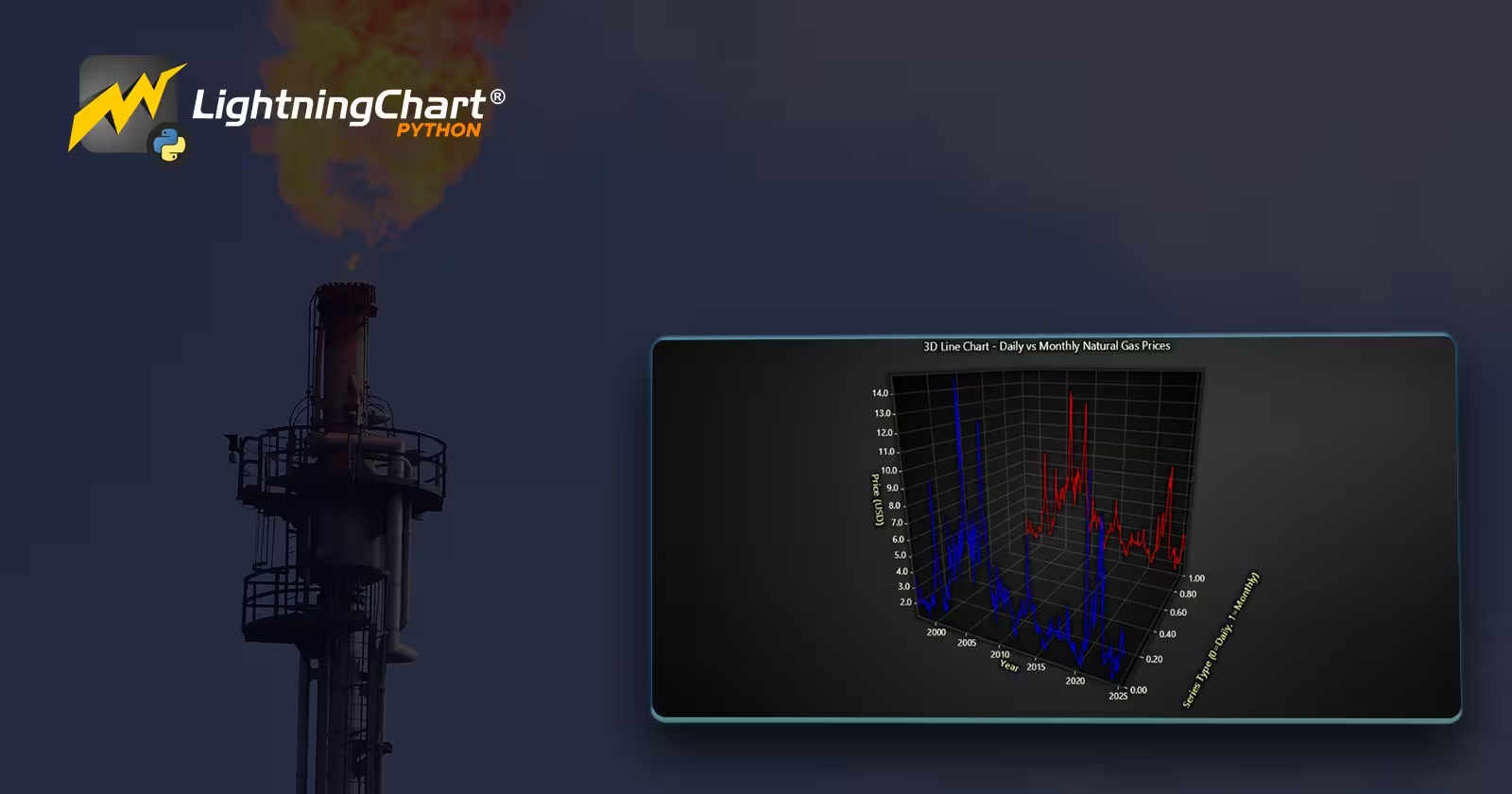
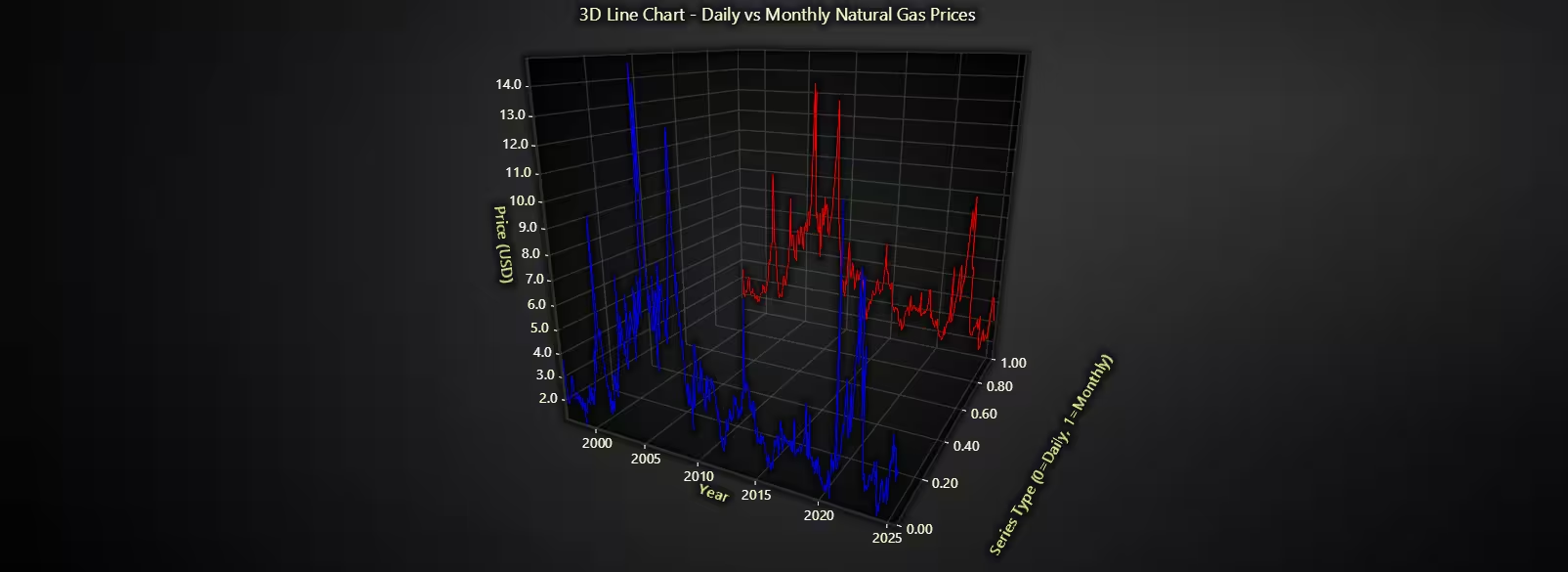
This 3D Line Chart overlays two time-series datasets:
- Daily prices are represented on Z = 0 (blue line)
- Monthly averages are on Z = 1 (red line)
This layered structure enables direct visual comparison between short-term fluctuations and smoothed long-term trends. Sampling is used on daily data to maintain performance without losing detail. The custom floating-point time scale (FloatDate) ensures proper alignment of both series in the 3D space. This visualization is valuable for:
- Detecting data smoothing effects
- Validating aggregation techniques
- Exploring resolution trade-offs in energy forecasting
The Z-axis adds a conceptual dimension, turning a flat line comparison into a more intuitive spatial analysis.
# Chart 10 – 3D Line Chart: Daily Vs Monthly Natural Gas Prices
# Developed with AI assistance to showcase the performance of LightningChart Python libraries.

import lightningchart as lc
import pandas as pd

# Load LightningChart license
with open("D:/Vindy/HAMK/Internship/MyProjects/lc_license.txt", "r") as f:
    license_key = f.read().strip()
lc.set_license(license_key)

# Load and prepare datasets
dgpd = pd.read_csv('daily.csv', encoding='ISO-8859-1')
mgpd = pd.read_csv('monthly.csv', encoding='ISO-8859-1')

# Clean and transform daily dataset
dgpd_clensed = dgpd.dropna(subset=['Price']).copy()
dgpd_clensed['Date'] = pd.to_datetime(dgpd_clensed['Date'])
dgpd_clensed['FloatDate'] = (
    dgpd_clensed['Date'].dt.year +
    (dgpd_clensed['Date'].dt.month - 1) / 12 +
    (dgpd_clensed['Date'].dt.day - 1) / 365
)

# Clean and transform monthly dataset
mgpd['Month'] = pd.to_datetime(mgpd['Month'])
mgpd['FloatDate'] = (
    mgpd['Month'].dt.year +
    (mgpd['Month'].dt.month - 1) / 12 +
    (15 / 365)
)

# Sample daily data for performance
daily_sample = dgpd_clensed.sort_values('Date').iloc[::10]
monthly_sorted = mgpd.sort_values('Month')

# Create 3D Chart
chart = lc.Chart3D(
    theme=lc.Themes.Dark,
    title='3D Line Chart - Daily vs Monthly Natural Gas Prices'
)

# Add line series for daily prices
daily_series = chart.add_line_series()
daily_series.set_line_color(lc.Color('blue')).set_line_thickness(2)

daily_data = [
    {'x': row['FloatDate'], 'y': row['Price'], 'z': 0}
    for _, row in daily_sample.iterrows()
]
daily_series.add(daily_data)

# Add line series for monthly prices
monthly_series = chart.add_line_series()
monthly_series.set_line_color(lc.Color('red')).set_line_thickness(3)

monthly_data = [
    {'x': row['FloatDate'], 'y': row['Price'], 'z': 1}
    for _, row in monthly_sorted.iterrows()
]
monthly_series.add(monthly_data)

# Axis titles
chart.get_default_x_axis().set_title("Year")
chart.get_default_y_axis().set_title("Price (USD)")
chart.get_default_z_axis().set_title("Series Type (0=Daily, 1=Monthly)")

# Custom year ticks on X-axis
x_axis = chart.get_default_x_axis()
x_axis.set_tick_strategy('Empty')  # Disable auto ticks
for year in range(2000, 2026, 5):
    tick = x_axis.add_custom_tick()
    tick.set_value(float(year))
    tick.set_text(str(year))

chart.open()
Conclusion
This project explored daily and monthly global natural gas prices patterns through 10 advanced chart types using LightningChart Python. The visualizations helped uncover volatility, seasonal patterns, median trends, and multi-resolution insights across decades of data.
Continue learning with LightningChart

What Can Vibration Analysis Detect?
Written by a human | Updated on April 9th, 2025Vibration Charts When you think about vibration analysis, what comes to mind? It is becoming a very common identification method in structural engineering to identify issues with potential structural integrity, such...
Quasar JS
Written by a human | Updated on April 9th, 2025What is Quasar JS? Hello! In this article, we will create a basic application using the Quasar JS framework. In this application, we will load three charts from the LC JS Library. But before we start, it would be...

Best JavaScript Charting Libraries
Written by a human | Updated on April 9th, 2025Reviewing 5 of the most popular JS charting libraries In all my previous articles I have been working with LightningChart for JS and .NET. However, in my experience, I have worked with other libraries related to...



If you have any questions, feel free to contact us!
©LightningChart Ltd 2025. All rights reserved.