





Create a Formula 1 data analysis with LightningChart Python
Tutorial
A data visualization analysis of Formula 1 racing parameters
Soroush Sohrabian
Software Developer


Introduction to Formula 1 Data Analysis
Formula 1 (F1) racing is a pinnacle of speed and technology, where data plays a crucial role in determining outcomes on and off the track. Teams collect vast amounts of telemetry and performance data to optimize their cars, drivers, and race strategies.
The types of data collected include:
- Telemetry Data: Speed, throttle, brake usage, and gear shifts.
- Mechanical Data: Tire temperatures, wear levels, engine RPM, and suspension dynamics.
- Strategy Data: Pit stop timing, fuel consumption, and track conditions.
- Environmental Data: Weather conditions, track temperature, and surface properties.
Through data analysis, teams can improve race performance, fine-tune strategies, and enhance car development.
Types of Telemetry Data in F1
In F1, telemetry data is crucial for understanding the car’s performance and the driver’s inputs in real time. Here are the main types of telemetry data used:
- Telemetry Data:
- Speed, Throttle, Brake Usage: Measures how the driver is using the car’s throttle and brakes, which directly affects lap times and cornering.
- Steering Angle: Captures how the driver is maneuvering the car through turns, providing insights into their driving style.
- Mechanical Data:
- Tire Wear and Temperature: Monitors tire conditions to optimize grip, reduce wear, and plan pit stops.
- Engine Performance: Tracks RPM and power output, which are critical for understanding how the engine performs over a race.
- Suspension Data: Assesses how well the car handles track conditions and helps in adjusting the suspension setup.
- Strategy Data:
- Pit Stops: Timing of pit stops is crucial, and teams use data to decide the best time to stop.
- Fuel Usage: Managing fuel levels during the race is essential to avoid unnecessary weight and maximize performance.
- Environmental Data:
- Weather Conditions: Data on temperature, humidity, and track surface helps teams adjust car setup and tire choices.
- Track Surface Conditions: Knowing whether the track is dry, damp, or wet informs tire selection and pit stop strategies.
LightningChart Python
LightningChart is a high-performance charting library used for visualizing data in Python applications. It offers powerful tools for creating real-time visualizations, enabling users to interact with complex datasets seamlessly. In this project, we use LightningChart to visualize F1 data.

Features and Chart Types to be Used in the Project
In this project, we utilize several chart types:
- Gauge Chart: Real-time monitoring of engine RPM, gear, and speed to assess car performance.
- 3D Track with Braking Areas: Displays the car’s track path in 3D with braking zones, providing spatial insight into braking patterns.
- Heatmap (Track Position vs. Speed): Shows speed distribution on the track, indicating faster and slower sections.
- Heatmap (Track Position vs. Gear Usage): Displays gear usage by track position, revealing the driver’s shifting patterns.
- Multi-Line Chart: Plots acceleration, throttle, engine RPM, gear, and speed for each lap, providing a comparative view of key metrics.
- Scatter Plot (Speed vs. Engine RPM): Analyzes the relationship between speed and engine RPM to understand engine performance.
- Line Chart (Engine RPM, Speed, and Throttle): Monitors these metrics to correlate engine performance and speed.
Performance Characteristics
LightningChart excels in rendering large datasets with minimal latency, making it suitable for real-time monitoring and analysis. It ensures smooth interactions such as zooming, panning, and updating dashboards dynamically.
Setting Up Python Environment
Install Python and the required libraries using the following commands:
pip install lightningchart==0.9.3
pip install lightningchart fastf1 pandas numpy
Overview of Libraries Used
Here you can see how to install the following libraries:
- NumPy: Used for efficient numerical calculations and handling multi-dimensional arrays, crucial for processing large datasets quickly.
- Pandas: For data manipulation and handling large datasets, particularly helpful in organizing telemetry data like lap times, engine RPM, and speed.
- LightningChart: The main visualization library used for high-performance, interactive data visualization. It supports specialized charts (e.g., 3D charts, heatmaps, and polar charts) ideal for telemetry analysis.
- Trimesh: Used for handling 3D models, specifically in loading the 3D car model in the animated track visualization. This library provides essential tools for managing 3D geometry data.
- Asyncio: Enables asynchronous execution, allowing for real-time updates in the 3D track visualization as the car progresses through different sections. This is critical for smooth, non-blocking animations.
- Math: Trigonometric calculations and distance measurements for 3D modeling.
interp1d(SciPy): Smooth interpolation of telemetry data for even spacing.
- FastF1: for accessing Formula 1 data analysis metrics.
Set up your development environment
1. Set up your development environment by creating a virtual environment and installing the necessary libraries. This ensures that your project dependencies are isolated and manageable.
python3 -m venv venv
source venv/bin/activate  # On Windows use `venv\Scripts\activate`
pip install -r requirements.txt
Using Visual Studio Code (VSCode) for development
2. Visual Studio Code (VSCode) is a popular code editor that offers a rich set of features to enhance your development workflow.
Loading and Processing Data
In this project, we utilize telemetry data from a Formula 1 car across multiple laps. If interested, you can also check the original GitHub project. This dataset includes metrics such as speed, throttle position, brake usage, and tire temperature, as well as information about track position and engine performance.
How to Load the Data Files
Using the FastF1 library, telemetry data for Max Verstappen’s fastest lap in Bahrain 2023 is loaded and processed:
import fastf1
fastf1.Cache.enable_cache('Dataset/cache')

session = fastf1.get_session(2023, 'Bahrain', 'R')
session.load()
laps = session.laps.pick_driver('VER')
fastest_lap = laps.pick_fastest()
telemetry = fastest_lap.get_telemetry()
Handling and Preprocessing the Data
Data handling and preprocessing involves interpolating telemetry and binning coordinates for heatmaps:
import pandas as pd
import numpy as np

df = telemetry[['X', 'Y', 'Speed', 'nGear']].dropna()
df['position_x_binned'] = pd.cut(df['X'], bins=100, labels=False)
df['position_y_binned'] = pd.cut(df['Y'], bins=100, labels=False)
Visualizing Data with LightningChart
LightningChart enables us to create a variety of visualizations to analyze telemetry data effectively. Let’s look at each chart created in this project and interpret the results.
3D Track Visualization with Braking Areas:
Description: This 3D visualization displays the Bahrain Grand Prix circuit using telemetry data, highlighting speed variations and braking zones. The track’s color gradient represents speed: blue for the lowest speeds and red for the highest. The blue points mark the braking areas where the driver slows down.
Results: The chart highlights the key braking zones, which align with the corners of the track. The red sections indicate where the car reaches its maximum speed, typically in straights.
Use Case: Teams can use this visualization to analyze braking patterns and optimize strategies for cornering and acceleration to improve lap times.
Script Summary:
chart = lc.Chart3D()
track_series = chart.add_point_series(individual_lookup_values_enabled=True)
track_series.add_dict_data(data)
braking_series = chart.add_point_series()
braking_series.add(braking_x, braking_y, braking_z)
chart.open()
Track Position vs. Speed and Gear Usage:
Description: These heatmaps illustrate the average speed and gear usage at various binned track positions (X and Y). The speed heatmap uses color to indicate areas of higher speed (red) versus lower speed (yellow/white), while the gear heatmap shows gear usage across the track, with red indicating higher gears.
Results and Interpretation: The speed heatmap reveals that straights are associated with higher speeds, while corners require lower speeds. The gear heatmap confirms the correlation between higher speeds and higher gears.
Use Case: These heatmaps assist in understanding the driver’s technique and identifying opportunities to optimize gear ratios or cornering strategies for improved lap performance.
Script Summary:
heatmap_speed = df.pivot_table(values='speed', index='position_x_binned', columns='position_y_binned')
heatmap_gear = df.pivot_table(values='gear', index='position_x_binned', columns='position_y_binned')
dashboard = lc.Dashboard()
speed_series = dashboard.ChartXY().add_heatmap_grid_series()
gear_series = dashboard.ChartXY().add_heatmap_grid_series()
dashboard.open()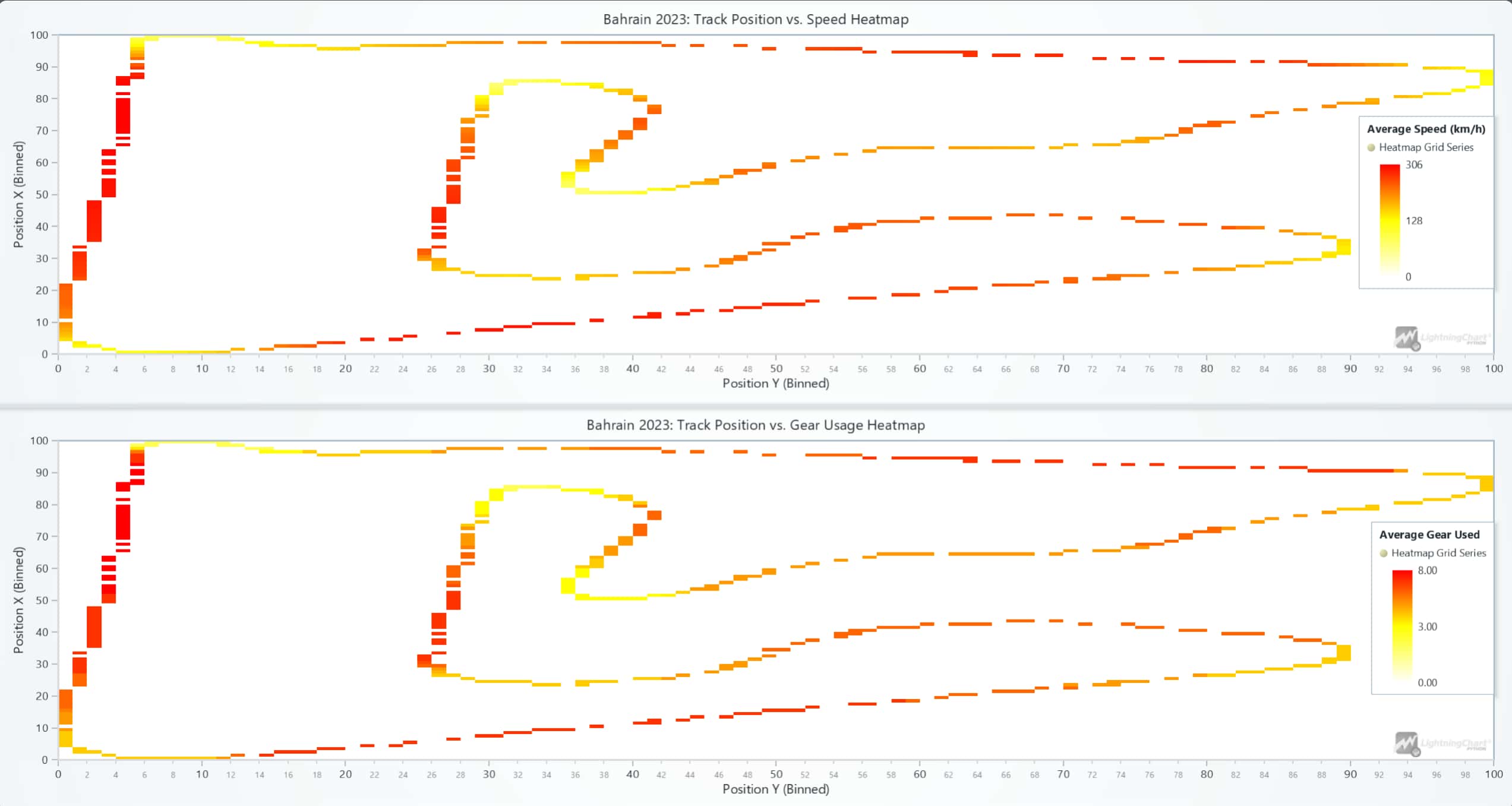
Multi-Line Chart:
Description: This multi-line chart plots the top five telemetry parameters—acceleration, gear, brake intensity, engine RPM, and speed—over time for the first five laps. Each line corresponds to one lap, allowing for comparisons across laps.
Results: This chart helps to evaluate consistency across laps. Variations in parameters such as braking intensity or speed indicate how the driver adjusts their technique based on track conditions or strategy.
Use Case: Engineers and strategists can use this chart to identify patterns and improve driver performance or adjust car setup for better consistency.
Script Summary:
chart = lc.ChartXY(title='Top 5 Data Columns for First 5 Laps')
for column in ['Speed', 'RPM', 'Throttle', 'Brake', 'nGear']:
    series = chart.add_line_series()
    series.add(df['Timestamp_ms'], df[column])
chart.open()
Scatter Plot of Speed vs. Engine RPM:
Description: This scatter plot visualizes the relationship between speed and engine RPM for each lap, with different colors representing individual laps.
Results: The chart demonstrates a direct relationship between speed and engine RPM, where higher speeds correspond to higher RPM. This provides insights into engine performance during acceleration and high-speed sections.
Use Case: Teams use this visualization to optimize engine power output and gear ratios for better acceleration and overall speed efficiency.
Script Summary:
scatter_series = chart.add_point_series()
scatter_series.add(df['Speed'], df['RPM'])
scatter_series.set_point_color(color=lap_colors.get(lap))
chart.open()
RPM, Speed, and Throttle Over Time:
Description: This multi-line chart overlays engine RPM, speed, and throttle data over time, using separate Y-axes for clarity. The chart enables analysis of how these parameters interact during a lap.
Results: The chart reveals a direct correlation between these three features. For instance, an increase in throttle input results in higher engine RPM and speed, highlighting the dynamic relationship between power delivery and acceleration.
Use Case: This chart is critical for optimizing throttle response and analyzing how engine performance impacts lap times.
Script Summary:
chart = lc.ChartXY(title="RPM, Speed, and Throttle Over Time")
chart.add_line_series().add(df['Timestamp_ms'], df['RPM'])
chart.add_line_series().add(df['Timestamp_ms'], df['Speed'])
chart.add_line_series().add(df['Timestamp_ms'], df['Throttle'])
chart.open()
Real-Time Dashboard with 3D Track and Nearest Driver:
Description: The dashboard integrates gauges for monitoring engine RPM, speed, and gear usage alongside a 3D track showing the car’s live position. The red sphere represents the winning driver, Max Verstappen, while the yellow sphere represents the nearest competitor.
Results: The gauges provide real-time insights into the car’s performance, and the 3D track helps visualize Verstappen’s position relative to other drivers.
Use Case: This setup is ideal for live race monitoring, allowing teams to make real-time decisions and communicate adjustments to the driver.
Script summary:
dashboard = lc.Dashboard()
rpm_gauge = dashboard.GaugeChart().set_interval(0, 12000)
speed_gauge = dashboard.GaugeChart().set_interval(0, 350)
gear_gauge = dashboard.GaugeChart().set_interval(0, 8)
track_chart = dashboard.Chart3D()
track_chart.add_line_series().add(ver_x, ver_y, ver_z)
dashboard.open()
Data Visualization Analysis for Formula 1
Data visualization is essential for interpreting telemetry data in F1, enabling teams to make quick decisions and strategize effectively. Real-time visualizations like gauge charts and 3D models allow for on-the-spot insights, while historical data visualizations like heatmaps and scatter plots help refine strategies for future races. Effective data visualization is key to understanding complex datasets and drawing actionable insights from them.
Challenges in Formula 1 Data Analysis
- Data Complexity and Volume: Requires efficient processing of vast amounts of telemetry data.
- Real-Time Requirements: Instant analysis for on-the-spot decisions.
- Data Accuracy: Critical for strategy and safety.
Conclusion
Formula 1 data analysis is the cornerstone of modern racing. With tools like LightningChart and FastF1, teams can harness telemetry data to optimize performance and strategies, gaining a competitive edge. This project demonstrates how Python and advanced visualization tools unlock insights from complex data.
Continue learning with LightningChart
![[Tutorial] How to embed interactive charts in PowerPoint presentations](https://lightningchart.com/wp-content/uploads/2022/12/Interactive-Charts-in-PowerPoint-feature-image.jpg)
[Tutorial] How to embed interactive charts in PowerPoint presentations
Written by a human | Updated on April 9th, 2025Embed interactive charts in PowerPoint presentations Embedding charts within PowerPoint presentations has always been possible but perhaps one of the most ignored possibilities is actually embedding web applications...
Motorsports Analytics
Updated on April 10th, 2025 | Written by human Motorsports Analytics Large companies in the motorsports industry are collecting huge volumes of real-time data coming from different sources on and off the pitch during racing competitions. These data are both...
High-Performance Charting Controls for Fintech App Development
Written by a human | Updated on April 10th, 2025Charting Controls for Fintech Apps Money makes the world go round and as such, tracking and controlling financial transactions and information are some of the most important activities to do for any...





If you have any questions, feel free to contact us!
©LightningChart Ltd 2026. All rights reserved.