





Create a Water Pollution Monitoring Application with LightningChart Python
Tutorial
Assisted by AI
Learn to develop a water pollution monitoring app utilizing China data to track and analyze water quality for a healthier environment using Python.
Vindya Nukulasooriya
Data Science Developer

Introduction
This project aims to analyze and visualize water pollution data across China’s provinces and time periods using high-performance interactive visualizations from the LightningChart Python library. The dataset contains key pollutants such as COD, BOD, Total Nitrogen, Total Phosphorus, and Ammonia across various provinces and dates.
Project Overview
Water pollution causes a significant and imminent threat to public health and environmental sustainability, particularly in rapidly industrializing countries like China. Accurate monitoring and clear visualization of water quality data are critical for efficient policy-making, public awareness, and effective environmental management.
The China water pollution monitoring application tutorial with LightningChart Python & kaggle focuses on creating a real-time water pollution monitoring dashboard using Python. This application gets data from kaggle and uses LightningChart Python for visualization.
LightningChart is known for its speed, responsiveness, and ability to handle large datasets with easily making it ideal for real-time environmental data visualization with high performance.
Objectives:
- Visualize spatial and temporal pollution patterns.
- Identify trends, anomalies, and regional disparities in water quality.
- Showcase a variety of LightningChart visualizations tailored to environmental data.
Deliverable:
The project will present 10 distinct chart types, each highlighting different aspects of the dataset to demonstrate the flexibility of LightningChart and reveal insights into China’s water quality trends.
Tools Used:
Python 3.13.0, LightningChart Python, Jupyter Notebook, AI Assistance
About the Dataset:
The dataset includes measurements from multiple monitoring stations across different Chinese provinces, tracking various water quality parameters. This dataset is a realistic simulation of water pollution data collected from monitoring stations in 10 major provinces of China during the year 2023. It tracks important water quality indicators such as:
- Chemical Oxygen Demand (COD)
- Biochemical Oxygen Demand (BOD)
- Ammonia
- Nitrogen
- Phosphorus
These measurements help assess the cleanliness and safety of water for people, nature, and industries.
LightningChart Python
LightningChart Python is a high-performance data visualization library designed for fast, interactive, and visually rich charting. It supports both 2D and 3D visualization, making it an excellent choice for handling large, complex datasets like environmental monitoring data.
For this project, LightningChart is used to create dynamic and insightful visualizations of water pollution levels across China. Its speed and interactivity make it ideal for exploring time-series trends, geographic distributions, and pollution patterns, helping users quickly identify environmental issues and draw meaningful conclusions from the data.

Setting Up Python Environment
Before running the project, install Python and the other required libraries using:
%pip install numpy pandas lightningchartOverview of Libraries Used:
- Pandas: for data handling and time-based grouping
- Numpy: for numerical operations
- LightningChart: for high-performance visualization
- DateTime: for parsing and formatting date strings
Setting Up Your Development Environment:
- Set up a virtual environment:
- Use Visual Studio Code (VSCode) for a streamlined development experience.
Loading and Preprocessing Data
To create this China Water Pollution Monitoring Application, we will fetch the China water pollution data using the following function:
Downloaded the dataset from Kaggle - https://www.kaggle.com/datasets/khushikyad001/china-water-pollution-monitoring-datasetTo preprocess the dataset, we will import the pandas library:
# Import necessary libraries (load pandas library to preprocess dataset)
import pandas as pd
And the dataset is named as cwpd (China Water Pollution Data):
# Name the dataset as cwpd = China Water Pollution Data
cwpd = pd.read_csv("china_water_pollution_data.csv")
We will get the basic information about the China Water Pollution Monitoring Dataset:
# Get basic information about the China Water Pollution Monitoring Dataset
cwpd.info()
Checking for Missing Values:
# Check for missing values
cwpd.isnull().sum()
Since the original dataset contains no missing values or duplicate rows, it meets the necessary quality standards for analysis. Therefore, it can be directly considered as the cleansed dataset, requiring no additional data cleaning or preprocessing steps.
Visualizing Data with LightningChart Python
In this project, we utilize 10 distinct chart types provided by the LightningChart Python library to analyze and communicate insights from China’s water pollution data:
- Line Chart – Used to visualize time-based trends of specific pollutants (COD)
- Line Chart – Used to visualize time-based trends of specific pollutants (BOD)
- Point Line Chart – Used to visualize time-based trends of specific pollutants (COD & BOD)
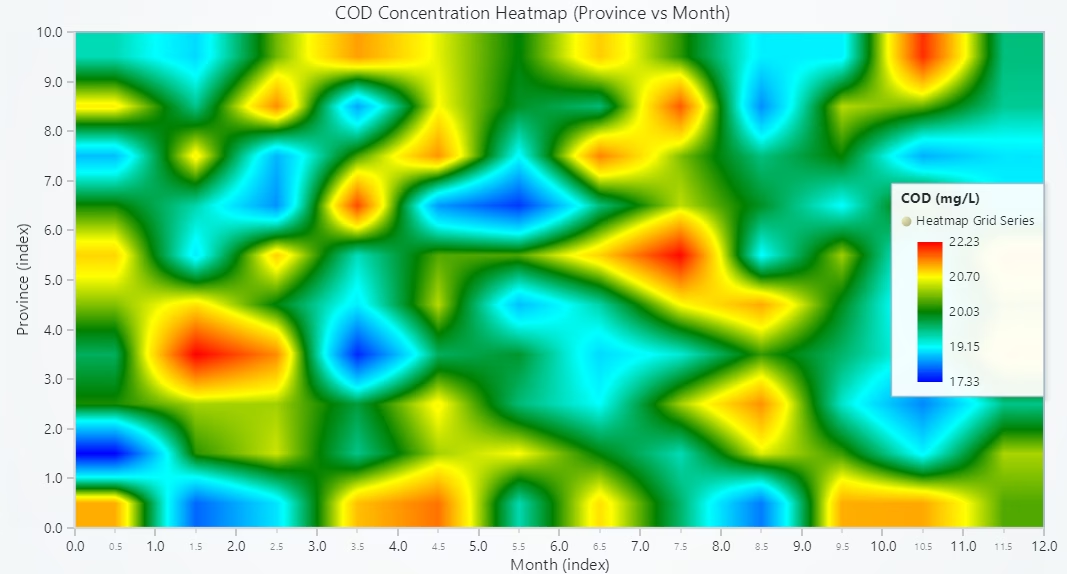
- Heatmap – Illustrates the intensity of pollutant concentrations over time and across monitoring stations, highlighting pollution peaks and patterns.
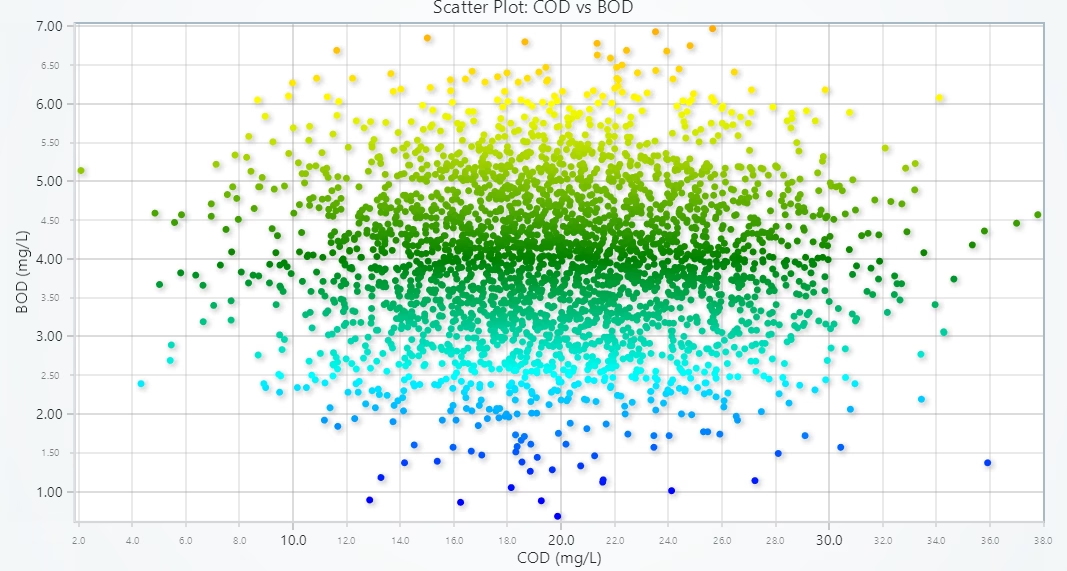
- Scatter Plot – Displays the correlation between different pollutants (COD vs BOD), helping uncover potential interdependencies.
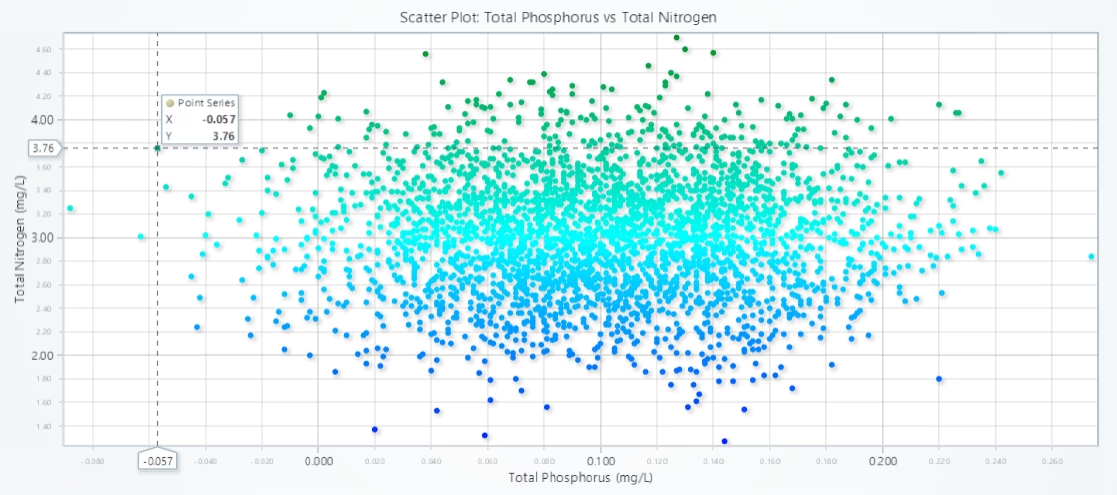
- Scatter Plot – Displays the correlation between different pollutants (Total Phosphorus vs Total Nitrogen), helping uncover potential interdependencies.
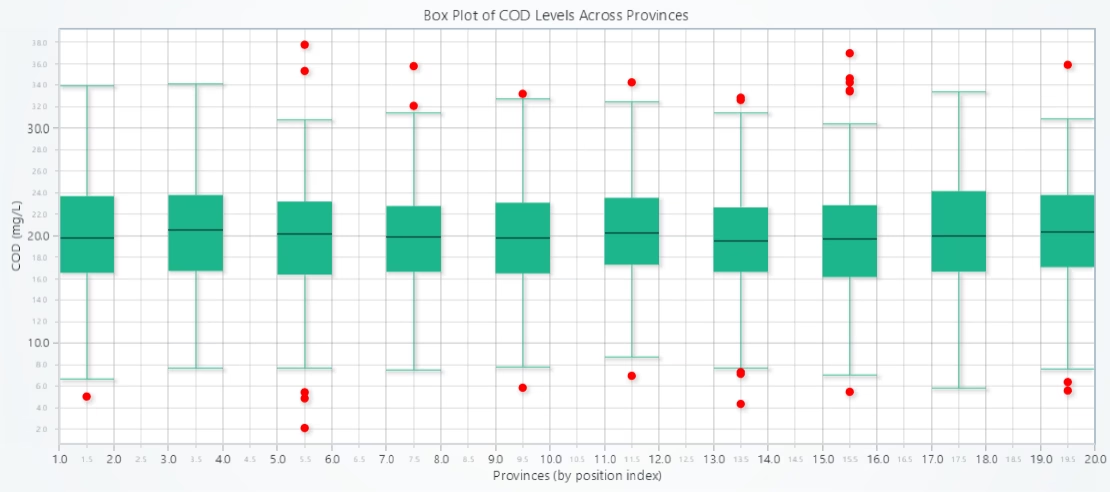
- Box Plot – Shows the distribution, variability, and outliers of pollutant levels across different provinces or stations.
- 3D Bubble Chart – Adds a third dimension (pollutant level across province & time) using bubble size, allowing comparison across provinces and time.
- Stacked Area Chart – Visualizes cumulative pollutant levels over time, enabling the analysis of overall pollution load dynamics.
- Grouped Bar Chart – Compares average values of pollutants by province or monitoring station, useful for ranking and regional comparisons.
Line Chart: COD Over Time
# Developed with AI assistance to showcase the performance of LightningChart Python libraries.
import lightningchart as lc
import pandas as pd
from datetime import datetime

# Load license key securely from file
with open("D:/Vindy/HAMK/Internship/MyProjects/lc_license.txt", "r") as f:
    license_key = f.read().strip()

# Set your LightningChart license key
lc.set_license(license_key)

# Load dataset
df = pd.read_csv("china_water_pollution_data.csv")

# Parse and clean 'Date' column
df['Date'] = pd.to_datetime(df['Date'], errors='coerce')  # force invalid dates to NaT
df = df.dropna(subset=['Date'])                           # drop rows where date is invalid

# Sort and group by date
df = df.sort_values('Date')
grouped = df.groupby('Date')['COD_mg_L'].mean().reset_index()

# Convert to UNIX timestamps for x-axis
grouped['Timestamp'] = grouped['Date'].apply(lambda d: d.timestamp() * 1000)
x_values = grouped['Timestamp'].tolist()
y_values = grouped['COD_mg_L'].fillna(0).astype(float).tolist()

# Chart setup
chart = lc.ChartXY(
    theme=lc.Themes.Light,
    title='Average COD Levels Over Time (2023)'
)

series = chart.add_line_series()
series.add(x=x_values, y=y_values)
series.set_line_thickness(2)
series.set_line_color(lc.Color('green'))

# Correct axis titles and strategy
chart.get_default_x_axis().set_title("Date")
chart.get_default_y_axis().set_title("COD (mg/L)")
chart.get_default_x_axis().set_tick_strategy('DateTime')

# Show chart
chart.open()Description:
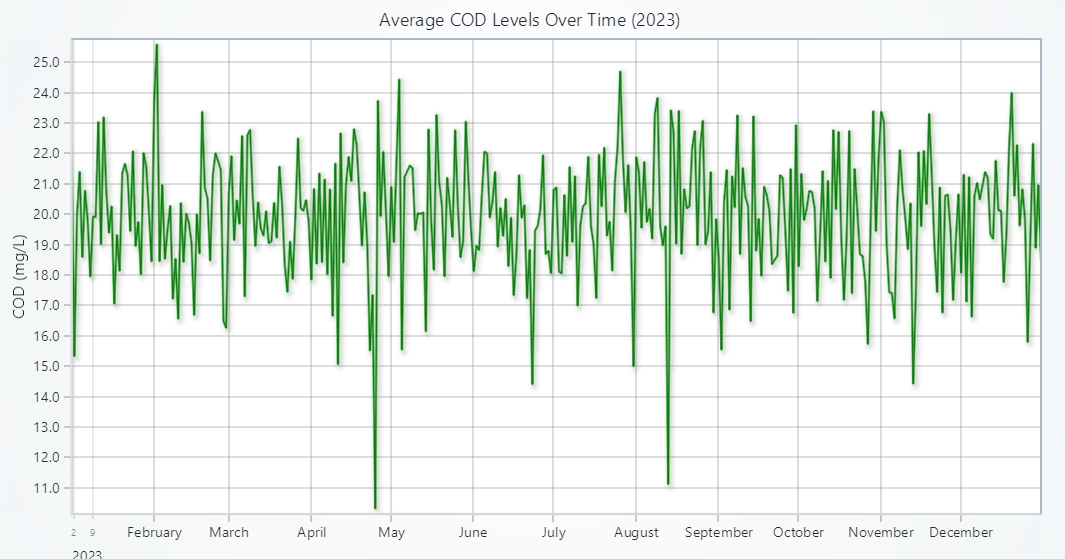
- Chart Type: Line Chart
- Purpose: To visualize how the average Chemical Oxygen Demand (COD) levels changed over time throughout 2023 in Chinese water monitoring data.
Explanation:
- X-Axis (Date): Represents the timeline, using daily or monthly intervals from the dataset, formatted as human-readable dates using UNIX timestamps.
- Y-Axis (COD in mg/L): Represents the average COD levels observed on each date.
- Line Color: Green, indicating environmental metrics and maintaining visual clarity.
Temporal Trends
You can identify peaks and dips in COD levels across the year. These fluctuations may correspond to seasonal factors, rainfall, or industrial activity. Any sharp spikes may indicate pollution events or anomalies that require further investigation.
Water Quality Monitoring
Sustained high COD values indicate significant organic pollution and reduced oxygen availability in water bodies. Periods of declining COD levels may reflect the success of environmental interventions or natural dilution processes.
Line Chart: BOD Over Time
# Developed with AI assistance to showcase the performance of LightningChart Python libraries.
import lightningchart as lc
import pandas as pd
from datetime import datetime

# Load license key securely from file
with open("D:/Vindy/HAMK/Internship/MyProjects/lc_license.txt", "r") as f:
    license_key = f.read().strip()

# Set your license key
lc.set_license(license_key)

# Load data
df = pd.read_csv("china_water_pollution_data.csv")

# Parse and clean 'Date' column
df['Date'] = pd.to_datetime(df['Date'], errors='coerce')  # force invalid dates to NaT
df = df.dropna(subset=['Date'])                           # drop rows where date is invalid

# Sort and group by date
df = df.sort_values('Date')
grouped = df.groupby('Date')['BOD_mg_L'].mean().reset_index()

# Convert to UNIX timestamps for x-axis
grouped['Timestamp'] = grouped['Date'].apply(lambda d: d.timestamp() * 1000)
x_values = grouped['Timestamp'].tolist()
y_values = grouped['BOD_mg_L'].fillna(0).astype(float).tolist()

# Chart setup
chart = lc.ChartXY(
    theme=lc.Themes.Light,
    title='Average BOD Levels Over Time (2023)'
)

series = chart.add_line_series()
series.add(x=x_values, y=y_values)
series.set_line_thickness(2)
series.set_line_color(lc.Color('blue'))

# Correct axis titles and strategy
chart.get_default_x_axis().set_title("Date")
chart.get_default_y_axis().set_title("BOD (mg/L)")
chart.get_default_x_axis().set_tick_strategy('DateTime')

# Show chart
chart.open()
Description
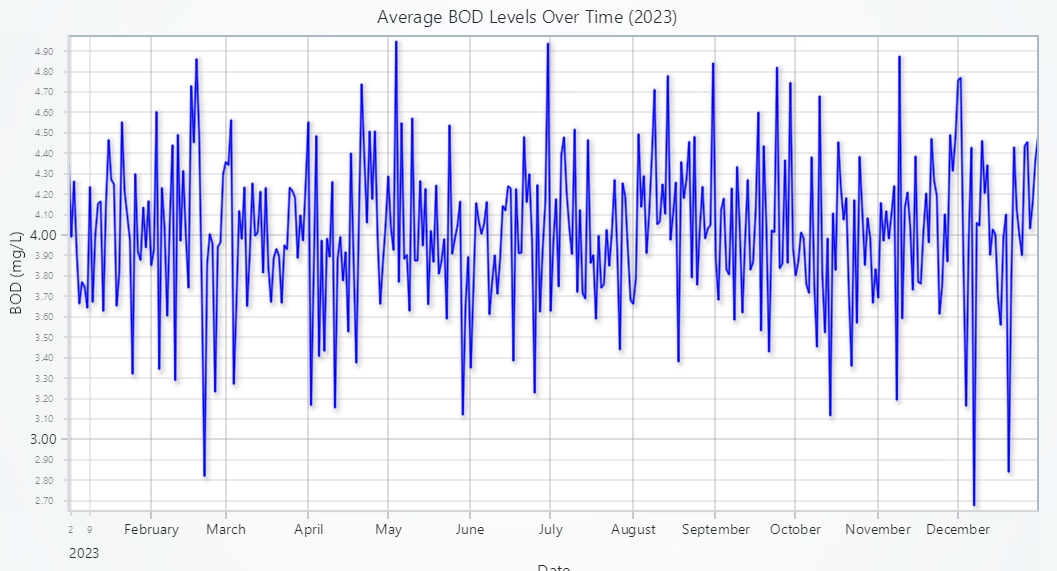
- Chart Type: Line Chart
- Purpose: To analyze the trend of Biochemical Oxygen Demand (BOD) over the year 2023, reflecting the organic pollution levels in water bodies across China.
Explanation
- X-Axis (Date): Displays the timeline throughout 2023, automatically formatted using UNIX timestamps and converted to readable calendar dates.
- Y-Axis (BOD in mg/L): Represents the average BOD concentration observed per day, aggregated across all provinces/stations.
- Line Color: Blue, often associated with water quality and commonly used to signify environmental measurements.
Organic Pollution Dynamics
BOD levels reflect the amount of biodegradable material present in water. High values typically indicate the presence of organic waste, leading to oxygen depletion. The chart helps identify periods when the organic load was significantly higher, which may correspond to events like agricultural runoff, industrial discharges, or seasonal decay of plant material.
Trend Monitoring & Alerting
Gradual increases in BOD could be early warnings of pollution buildup. Sudden spikes could indicate pollution incidents that require urgent attention or intervention.
Comparative Environmental Assessment
When analysed alongside the COD chart, this BOD trend can reveal the proportion of biodegradable vs. total oxidizable content in the water. Helps in assessing treatment efficiency or the effectiveness of environmental policies.
Point Line Chart: COD & BOD Levels Over Time
# Developed with AI assistance to showcase the performance of LightningChart Python libraries.
import lightningchart as lc
import pandas as pd

# Load license key securely from file
with open("D:/Vindy/HAMK/Internship/MyProjects/lc_license.txt", "r") as f:
    license_key = f.read().strip()

# Set license key
lc.set_license(license_key)

# Load dataset
df = pd.read_csv("china_water_pollution_data.csv")

# Parse and clean 'Date' column
df['Date'] = pd.to_datetime(df['Date'], errors='coerce')
df = df.dropna(subset=['Date'])

# Sort and group by date
df = df.sort_values('Date')
grouped = df.groupby('Date')[['COD_mg_L', 'BOD_mg_L']].mean().reset_index()

# Convert to UNIX timestamps for x-axis
grouped['Timestamp'] = grouped['Date'].apply(lambda d: d.timestamp() * 1000)

# Prepare x and y values
x_values = grouped['Timestamp'].tolist()
cod_values = grouped['COD_mg_L'].fillna(0).astype(float).tolist()
bod_values = grouped['BOD_mg_L'].fillna(0).astype(float).tolist()

# Create chart
chart = lc.ChartXY(
    theme=lc.Themes.Light,
    title='COD and BOD Levels Over Time (Point Line Series)'
)

# COD series with circle points
cod_series = chart.add_point_line_series()
cod_series.set_point_shape('circle')
cod_series.set_point_size(6)
cod_series.set_point_color(lc.Color('green'))
cod_series.set_line_color(lc.Color('green'))
cod_series.set_line_thickness(2)
cod_series.add(x=x_values, y=cod_values)

# BOD series with triangle points
bod_series = chart.add_point_line_series()
bod_series.set_point_shape('triangle')
bod_series.set_point_size(6)
bod_series.set_point_color(lc.Color('blue'))
bod_series.set_line_color(lc.Color('blue'))
bod_series.set_line_thickness(2)
bod_series.add(x=x_values, y=bod_values)

# Axis configuration
chart.get_default_x_axis().set_title("Date")
chart.get_default_y_axis().set_title("Pollutant Level (mg/L)")
chart.get_default_x_axis().set_tick_strategy('DateTime')

# Show chart
chart.open()Description:
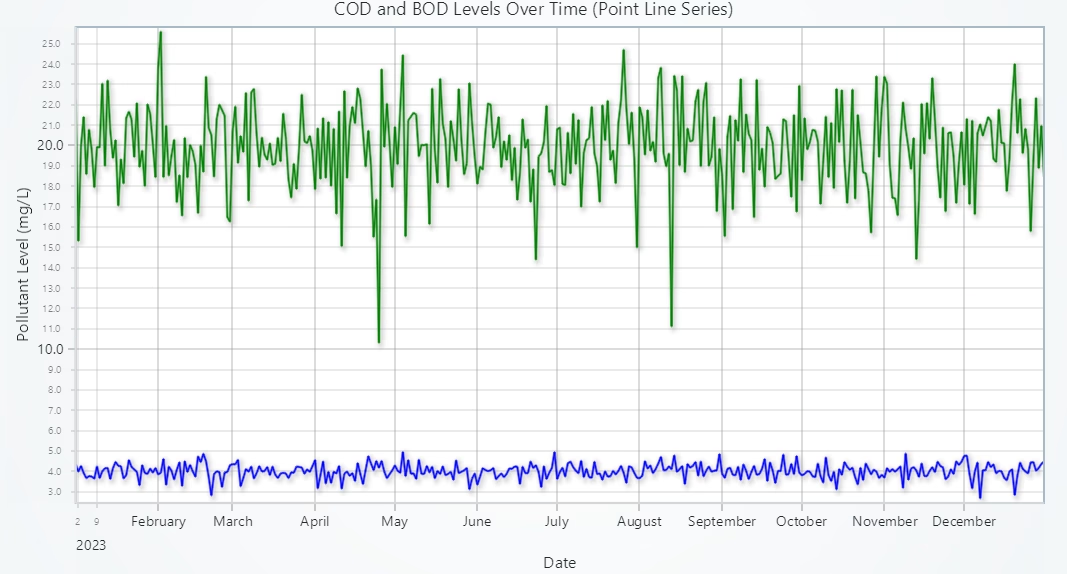
- Chart Type: Point Line Chart
- Purpose: To visualize and compare trends of Chemical Oxygen Demand (COD) and Biochemical Oxygen Demand (BOD) over time, using a unified chart for clearer insight into organic and chemical pollution dynamics.
Explanation:
- X-Axis (Date): Represents the timeline across 2023. Each point corresponds to a specific date, rendered as human-readable dates via UNIX timestamp conversion.
- Y-Axis (Pollutant level in mg/L): Displays pollutant concentrations, with two distinct lines:
- COD (Green): Visualized with circular markers and a green line.
- BOD (Blue): Visualized with triangular markers and a blue line.
- Marker Shapes: Help differentiate the two pollutants clearly, even when their values converge or overlap on the chart.
COD and BOD levels fluctuated consistently throughout the year, reflecting seasonal or operational changes in pollution discharge. Both pollutants showed similar overall trends, suggesting potential correlation in their sources or behaviour in the environment.
Heatmap: COD Concentration by Province & Month
# Developed with AI assistance to showcase the performance of LightningChart Python libraries.
import lightningchart as lc
import pandas as pd
import numpy as np

# Load license key securely
with open("D:/Vindy/HAMK/Internship/MyProjects/lc_license.txt", "r") as f:
    license_key = f.read().strip()

lc.set_license(license_key)

# Load dataset
df = pd.read_csv("china_water_pollution_data.csv")

print(df[['Date', 'Province', 'COD_mg_L']].head())
print(df['COD_mg_L'].describe())

# Get sizes
rows, cols = intensity_data.shape

# Initialize chart
chart = lc.ChartXY(
    title='COD Concentration Heatmap (Province vs Month)',
    theme=lc.Themes.Light
)

# Add heatmap series
heatmap_series = chart.add_heatmap_grid_series(columns=cols, rows=rows)
heatmap_series.set_start(x=0, y=0)
heatmap_series.set_end(x=cols, y=rows)
heatmap_series.set_step(x=1, y=1)
heatmap_series.set_intensity_interpolation(True)
heatmap_series.invalidate_intensity_values(intensity_data.T.tolist())
heatmap_series.hide_wireframe()

# Custom color palette
custom_palette = [
    {"value": np.min(intensity_data), "color": lc.Color('blue')},
    {"value": np.percentile(intensity_data, 25), "color": lc.Color('cyan')},
    {"value": np.median(intensity_data), "color": lc.Color('green')},
    {"value": np.percentile(intensity_data, 75), "color": lc.Color('yellow')},
    {"value": np.max(intensity_data), "color": lc.Color('red')}
]
heatmap_series.set_palette_coloring(
    steps=custom_palette,
    look_up_property='value',
    interpolate=True
)

# Set axis titles
x_axis = chart.get_default_x_axis()
y_axis = chart.get_default_y_axis()
x_axis.set_title("Month (index)")
y_axis.set_title("Province (index)")
Description:
- Chart Type: Heatmap Chart
- Purpose: To visualize COD concentration across provinces and months
Explanation:
- X-Axis (Month Index): Represents the month in which the data was recorded, formatted as ‘YYYY-MM’. Months are mapped as indices starting from 0.
- Y-Axis (Province Index): Represents each Chinese province where COD (Chemical Oxygen Demand) measurements were recorded. Each province is also mapped to a numeric index.
- Color Intensity:
- The color gradient represents COD concentration levels (in mg/L).
- Blue: Low COD values
- Green-Yellow: Moderate COD values
- Red: High COD values
Provinces like Zhejiang and Sichuan displayed higher COD levels in mid-year months, indicating regional pollution spikes. COD concentrations varied significantly by both location and time, emphasizing the need for region-specific water management policies.
Scatter Plot: COD vs BOD Levels
# Developed with AI assistance to showcase the performance of LightningChart Python libraries.
import pandas as pd
import lightningchart as lc
import numpy as np

# Load license
with open("D:/Vindy/HAMK/Internship/MyProjects/lc_license.txt", "r") as f:
    license_key = f.read().strip()
lc.set_license(license_key)

df = pd.read_csv("china_water_pollution_data.csv")
df = df.dropna(subset=['COD_mg_L', 'BOD_mg_L'])

cod = df['COD_mg_L'].astype(float).tolist()
bod = df['BOD_mg_L'].astype(float).tolist()

chart = lc.ChartXY(title="Scatter Plot: COD vs BOD", theme=lc.Themes.Light)
series = chart.add_point_series()

# Set fallback color
series.set_point_color(lc.Color('gray'))

# Developed with AI assistance to showcase the performance of LightningChart Python libraries.
# Set wider fixed color steps
series.set_palette_point_coloring(
    steps=[
        {'value': 1.0, 'color': lc.Color('blue')},
        {'value': 2.5, 'color': lc.Color('cyan')},
        {'value': 4.0, 'color': lc.Color('green')},
        {'value': 6.0, 'color': lc.Color('yellow')},
        {'value': 9.0, 'color': lc.Color('red')}
    ],
    look_up_property='y',
    percentage_values=False
)

series.add(x=cod, y=bod)
chart.get_default_x_axis().set_title("COD (mg/L)")
chart.get_default_y_axis().set_title("BOD (mg/L)")
chart.open()Description:
- Chart Type: Scatter Plot
- Purpose: To compare COD and BOD levels and to analyze the relationship between those Key Pollution Indicators
Explanation:
- X-Axis: COD Values (mg/L)
- Y-Axis: BOD Values (mg/L)
- Color: Based on BOD Intensity, with higher values shown in warmer colors (green to red), providing visual insight into pollution levels and clustering.
There is a strong positive correlation; higher COD values tend to align with higher BOD levels, indicating likely organic contamination. Most points fall in the 15–25 mg/L COD and BOD range, highlighting a consistently polluted baseline in many regions.
Scatter Plot: Total Phosphorus vs Total Nitrogen Levels
# Developed with AI assistance to showcase the performance of LightningChart Python libraries.
import pandas as pd
import lightningchart as lc
import numpy as np

# Load license
with open("D:/Vindy/HAMK/Internship/MyProjects/lc_license.txt", "r") as f:
    license_key = f.read().strip()
lc.set_license(license_key)

df = pd.read_csv("china_water_pollution_data.csv")

df = df.dropna(subset=['Total_Phosphorus_mg_L', 'Total_Nitrogen_mg_L'])
x_vals = df['Total_Phosphorus_mg_L'].astype(float).tolist()
y_vals = df['Total_Nitrogen_mg_L'].astype(float).tolist()

chart = lc.ChartXY(title="Scatter Plot: Total Phosphorus vs Total Nitrogen", theme=lc.Themes.Light)
series = chart.add_point_series()

# Fallback default color
series.set_point_color(lc.Color('gray'))

# Use fixed broader ranges
series.set_palette_point_coloring(
    steps=[
        {'value': 1, 'color': lc.Color('blue')},
        {'value': 3, 'color': lc.Color('cyan')},
        {'value': 5, 'color': lc.Color('green')},
        {'value': 7, 'color': lc.Color('yellow')},
        {'value': 9, 'color': lc.Color('red')}
    ],
    look_up_property='y',
    percentage_values=False
)

series.add(x=x_vals, y=y_vals)
chart.get_default_x_axis().set_title("Total Phosphorus (mg/L)")
chart.get_default_y_axis().set_title("Total Nitrogen (mg/L)")
chart.open()Description:
- Chart Type: Scatter Plot
- Purpose: To compare Total Phosphorus and Total Nitrogen levels and to analyze the relationship Between those Key Pollution Indicators
Explanation:
- X-Axis: Total Phosphorus Values (mg/L)
- Y-Axis: Total Nitrogen Values (mg/L)
- Color: Based on Total Nitrogen Intensity, using a color gradient to highlight areas of higher nutrient concentration and clustering patterns.
A clear upward trend suggests that as phosphorus levels increase, nitrogen levels also rise, which implies common pollution sources such as fertilizer runoff or sewage.
Box Plot: COD Levels Across Provinces
# Developed with AI assistance to showcase the performance of LightningChart Python libraries.
import pandas as pd
import numpy as np
import lightningchart as lc

# Load license key
with open("D:/Vindy/HAMK/Internship/MyProjects/lc_license.txt", "r") as f:
    license_key = f.read().strip()
lc.set_license(license_key)

# Developed with AI assistance to showcase the performance of LightningChart Python libraries.
# Load data
df = pd.read_csv("china_water_pollution_data.csv")
df = df.dropna(subset=['COD_mg_L', 'Province'])

# Group data
provinces = sorted(df['Province'].unique())
category_data = {prov: df[df['Province'] == prov]['COD_mg_L'].astype(float).tolist() for prov in provinces}

# Create chart
chart = lc.ChartXY(title='Box Plot of COD Levels Across Provinces', theme=lc.Themes.Light)

# Prepare box series
dataset = []
x_outliers, y_outliers = [], []

for i, province in enumerate(provinces):
    values = category_data[province]
    if len(values) < 5:
        continue  # Skip categories with very few data points

    start = (i * 2) + 1
    end = start + 1
    Q1 = np.percentile(values, 25)
    Q3 = np.percentile(values, 75)
    median = np.median(values)
    IQR = Q3 - Q1

    lower_bound = Q1 - 1.5 * IQR
    upper_bound = Q3 + 1.5 * IQR

    # Adjust whiskers to match standard box plot definition
    non_outliers = [v for v in values if lower_bound <= v <= upper_bound]
    lower_whisker = min(non_outliers)
    upper_whisker = max(non_outliers)

    dataset.append({
        'start': start,
        'end': end,
        'lowerQuartile': Q1,
        'upperQuartile': Q3,
        'median': median,
        'lowerExtreme': lower_whisker,
        'upperExtreme': upper_whisker
    })

    # Add outliers
    outliers = [v for v in values if v < lower_bound or v > upper_bound]
    x_outliers.extend([start + 0.5] * len(outliers))
    y_outliers.extend(outliers)

# Add to chart
box_series = chart.add_box_series()
box_series.add_multiple(dataset)

outlier_series = chart.add_point_series(sizes=True)
outlier_series.set_point_color(lc.Color('red'))
outlier_series.append_samples(x_values=x_outliers, y_values=y_outliers, sizes=[10] * len(y_outliers))

# Add axis labels
chart.get_default_x_axis().set_title("Provinces (by position index)")
chart.get_default_y_axis().set_title("COD (mg/L)")

# Print province mapping
print("Province X-Axis Mapping:")
for i, province in enumerate(provinces):
    print(f"{(i * 2) + 1.5}: {province}")

# Open chart
chart.open()Description:
- Chart Type: Box Plot
- Purpose: visualizes the distribution of Chemical Oxygen Demand (COD) levels across various Chinese provinces, offering a detailed summary of regional pollution variability.
Explanation:
- X-Axis: Each box represents a Province in China
- Y-Axis: COD Concentration (mg/L)
- Each Box: Shows the spread and distribution of COD values within a province
- Bottom Edge = 1st quartile (Q1, 25th percentile)
- Top Edge = 3rd quartile (Q3, 75th percentile)
- Box Height = Interquartile range (IQR = Q3 – Q1)
- Middle Line: The median (50th percentile) COD concentration for that province
- Whiskers: Extend to the lowest and highest COD values that are not considered outliers
- Red Dots (Outliers): COD levels that are unusually high or low, falling outside the whisker range
- Lower Quartile (Q1): 16.0 mg/L
- Upper Quartile (Q3): 24.0 mg/L
- Outlier Thresholds: below 4.0 mg/L or above 36.0 mg/L
Provinces with large interquartile ranges show high variability, possibly indicating inconsistent pollution control or seasonal fluctuations. Outliers in certain provinces may signal localized pollution events, such as industrial discharges, agricultural runoff, or sewage overflow. The province X-Axis mapping is as follows:
- 1.5: Beijing
- 3.5: Guangdong
- 5.5: Henan
- 7.5: Hubei
- 9.5: Jiangsu
- 11.5: Shandong
- 13.5: Shanghai
- 15.5: Sichuan
- 17.5: Yunnan
- 19.5: Zhejiang
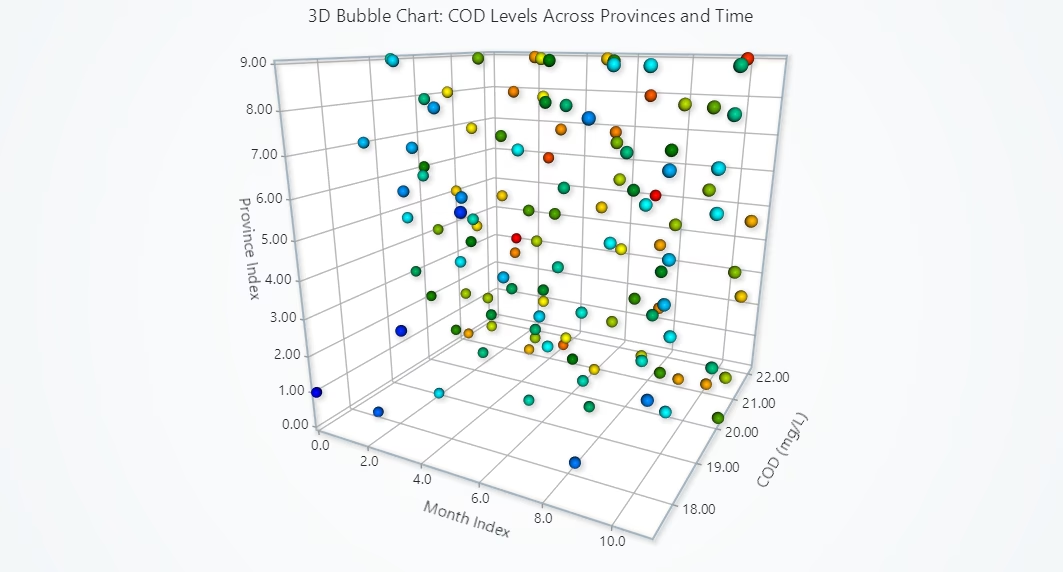
3D Bubble Chart: COD Levels Across Provinces & Months
# Developed with AI assistance to showcase the performance of LightningChart Python libraries.
import pandas as pd
import numpy as np
import lightningchart as lc

# Load license key
with open("D:/Vindy/HAMK/Internship/MyProjects/lc_license.txt", "r") as f:
    license_key = f.read().strip()
lc.set_license(license_key)

# Developed with AI assistance to showcase the performance of LightningChart Python libraries.
# Load dataset
df = pd.read_csv("china_water_pollution_data.csv")

# Clean and preprocess
df['Date'] = pd.to_datetime(df['Date'], errors='coerce')
df = df.dropna(subset=['Date', 'Province', 'COD_mg_L'])
df['Month'] = df['Date'].dt.to_period('M').astype(str)

# Map months and provinces to indices
month_list = sorted(df['Month'].unique())
province_list = sorted(df['Province'].unique())

month_map = {m: i for i, m in enumerate(month_list)}
province_map = {p: i for i, p in enumerate(province_list)}

df['MonthIndex'] = df['Month'].map(month_map)
df['ProvinceIndex'] = df['Province'].map(province_map)

# Group by Month and Province
grouped = df.groupby(['MonthIndex', 'ProvinceIndex'])['COD_mg_L'].mean().reset_index()

# Create bubble chart data
bubble_data = []
for _, row in grouped.iterrows():
    cod = row['COD_mg_L']
    bubble_data.append({
        'x': row['MonthIndex'],
        'y': row['ProvinceIndex'],
        'z': cod,
        'size': cod,
        'value': cod
    })

# Create 3D Chart
chart = lc.Chart3D(title="3D Bubble Chart: COD Levels Across Provinces and Time", theme=lc.Themes.Light)

# Set axis titles
chart.get_default_x_axis().set_title("Month Index")
chart.get_default_y_axis().set_title("Province Index")
chart.get_default_z_axis().set_title("COD (mg/L)")

# Add point series
series = chart.add_point_series(
    render_2d=False,
    individual_lookup_values_enabled=True,
    individual_point_color_enabled=True,
    individual_point_size_axis_enabled=True,
    individual_point_size_enabled=True,
)
series.set_point_shape('sphere')

# Color palette based on COD intensity
series.set_palette_point_colors(
    steps=[
        {'value': grouped['COD_mg_L'].min(), 'color': lc.Color('blue')},
        {'value': grouped['COD_mg_L'].quantile(0.25), 'color': lc.Color('cyan')},
        {'value': grouped['COD_mg_L'].median(), 'color': lc.Color('green')},
        {'value': grouped['COD_mg_L'].quantile(0.75), 'color': lc.Color('yellow')},
        {'value': grouped['COD_mg_L'].max(), 'color': lc.Color('red')}
    ],
    look_up_property='value',
    interpolate=True,
    percentage_values=False
)

# Add data
series.add(bubble_data)

# Show chart
chart.open()Description:
- Chart Type: 3D Bubble Chart
- Purpose: visualizes the Chemical Oxygen Demand (COD) concentration across different Chinese provinces over multiple months. It is a spatial-temporal visualization that brings three critical dimensions together:
- X-axis (Month Index): Represents the timeline, where each index corresponds to a specific month.
- Y-axis (Province Index): Each index maps to a province, showing regional coverage.
- Z-axis (COD in mg/L): Displays the average COD concentration for each province in a given month.
Explanation:
- X-Axis: Month (indexed from 0 = Jan to 11 = Dec)
- Y-Axis: Province (indexed by name, printed in the mapping below the chart)
- Z-Axis: COD value (mg/L)
- Bubble Size: Proportional to COD level
- Bubble Color: Indicates pollution severity
- Blue Bubbles = Low COD
- Green Bubbles = Moderate COD
- Red Bubbles = High COD
Seasonal Peaks: Higher COD values (larger/redder bubbles) appear concentrated in summer and early autumn months, indicating potential seasonal pollution increases. Provincial Hotspots: Certain provinces consistently show larger and warmer-coloured bubbles, suggesting they may face persistent industrial or municipal discharge challenges.
Month Index Mapping:
0: 2023-01 1: 2023-02 2: 2023-03 3: 2023-04 4: 2023-05 5: 2023-06 6: 2023-07 7: 2023-08 8: 2023-09 9: 2023-10 10: 2023-11 11: 2023-12
Province Index Mapping:
0: Beijing 1: Guangdong 2: Henan 3: Hubei 4: Jiangsu 5: Shandong 6: Shanghai 7: Sichuan 8: Yunnan 9: Zhejiang
Stacked Area Chart: Monthly Stacked Pollutant Levels
# Developed with AI assistance to showcase the performance of LightningChart Python libraries.
import lightningchart as lc
import pandas as pd
import numpy as np

# Load license
with open("D:/Vindy/HAMK/Internship/MyProjects/lc_license.txt", "r") as f:
    license_key = f.read().strip()

lc.set_license(license_key)

# Load data
df = pd.read_csv("china_water_pollution_data.csv")

# Clean and preprocess
df['Date'] = pd.to_datetime(df['Date'], errors='coerce')
df = df.dropna(subset=['Date', 'Ammonia_N_mg_L', 'Total_Phosphorus_mg_L',
                       'Total_Nitrogen_mg_L', 'COD_mg_L', 'BOD_mg_L'])
df['Month'] = df['Date'].dt.to_period('M').astype(str)

# Group and average
monthly_avg = df.groupby('Month')[['Ammonia_N_mg_L', 'Total_Phosphorus_mg_L',
                                   'Total_Nitrogen_mg_L', 'COD_mg_L', 'BOD_mg_L']].mean()
monthly_avg = monthly_avg.sort_index()
months = list(monthly_avg.index)
x_values = list(range(len(months)))

# Stack pollutant data
ammonia = monthly_avg['Ammonia_N_mg_L'].values
phosphorus = ammonia + monthly_avg['Total_Phosphorus_mg_L'].values
nitrogen = phosphorus + monthly_avg['Total_Nitrogen_mg_L'].values
cod = nitrogen + monthly_avg['COD_mg_L'].values
bod = cod + monthly_avg['BOD_mg_L'].values

# Create chart
chart = lc.ChartXY(theme=lc.Themes.Light, title="Monthly Stacked Pollutant Levels")

# Add stacked area series
series1 = chart.add_area_series()
series1.set_name("Ammonia (mg/L)")
series1.add(x_values, ammonia)

series2 = chart.add_area_series()
series2.set_name("Total Phosphorus (mg/L)")
series2.add(x_values, phosphorus)

series3 = chart.add_area_series()
series3.set_name("Total Nitrogen (mg/L)")
series3.add(x_values, nitrogen)

series4 = chart.add_area_series()
series4.set_name("COD (mg/L)")
series4.add(x_values, cod)

series5 = chart.add_area_series()
series5.set_name("BOD (mg/L)")
series5.add(x_values, bod)

# Configure axes
chart.get_default_x_axis().set_title("Month (Index)")
chart.get_default_y_axis().set_title("Cumulative Pollutant Level (mg/L)")

# Print month index mapping for reference
for i, month in enumerate(months):
    print(f"{i}: {month}")

# Show chart
chart.open()Description:
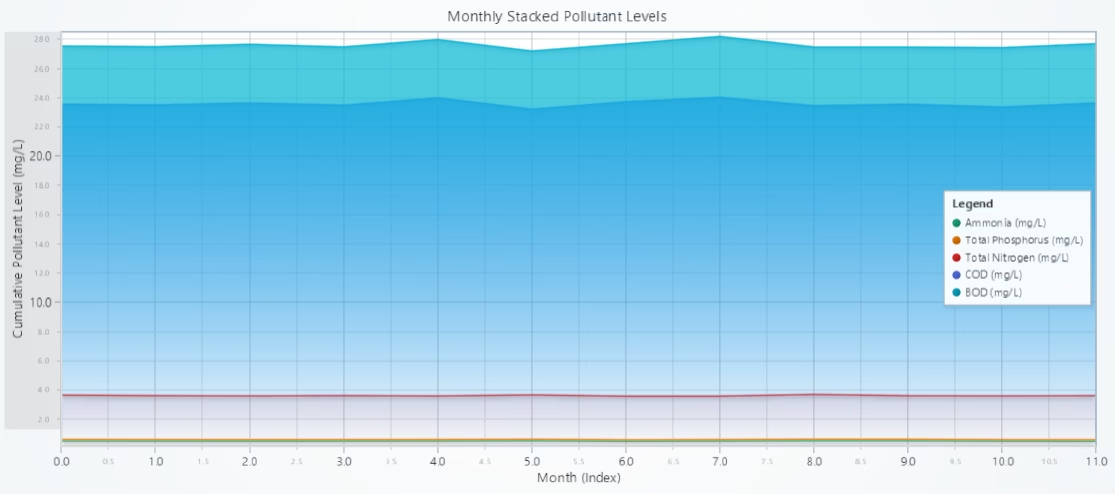
- Chart Type: Stacked Area Chart
- Purpose: presents the cumulative concentration of five key water pollutants measured across multiple months in China:
- Ammonia (mg/L)
- Total Phosphorus (mg/L)
- Total Nitrogen (mg/L)
- Chemical Oxygen Demand (COD in mg/L)
- Biochemical Oxygen Demand (BOD in mg/L)
Explanation:
- X-Axis: represents time (months indexed from January to December)
- Y-Axis: indicates the cumulative pollutant load (mg/L)
Each Coloured Layer: corresponds to a specific pollutant:
- Ammonia (mg/L)
- Total Phosphorus (mg/L)
- Total Nitrogen (mg/L)
- Chemical Oxygen Demand (COD in mg/L)
- Biochemical Oxygen Demand (BOD in mg/L)
Grouped Bar Chart: Grouped Monthly Pollutant Levels
# Developed with AI assistance to showcase the performance of LightningChart Python libraries.
import pandas as pd
import lightningchart as lc

# Load license key
with open("D:/Vindy/HAMK/Internship/MyProjects/lc_license.txt", "r") as f:
    license_key = f.read().strip()
lc.set_license(license_key)

# Load and preprocess dataset
df = pd.read_csv("china_water_pollution_data.csv")
df['Date'] = pd.to_datetime(df['Date'], errors='coerce')
df = df.dropna(subset=[
    'Date', 'Ammonia_N_mg_L', 'Total_Phosphorus_mg_L',
    'Total_Nitrogen_mg_L', 'COD_mg_L', 'BOD_mg_L'
])
df['Month'] = df['Date'].dt.to_period('M').astype(str)

# Calculate monthly averages
monthly_avg = df.groupby('Month')[[
    'Ammonia_N_mg_L', 'Total_Phosphorus_mg_L',
    'Total_Nitrogen_mg_L', 'COD_mg_L', 'BOD_mg_L'
]].mean()
monthly_avg = monthly_avg.sort_index()

# Prepare data for chart
months = list(monthly_avg.index)
data_grouped = [
    {'subCategory': 'Ammonia', 'values': monthly_avg['Ammonia_N_mg_L'].tolist()},
    {'subCategory': 'Total Phosphorus', 'values': monthly_avg['Total_Phosphorus_mg_L'].tolist()},
    {'subCategory': 'Total Nitrogen', 'values': monthly_avg['Total_Nitrogen_mg_L'].tolist()},
    {'subCategory': 'COD', 'values': monthly_avg['COD_mg_L'].tolist()},
    {'subCategory': 'BOD', 'values': monthly_avg['BOD_mg_L'].tolist()},
]

# Create bar chart
chart = lc.BarChart(
    vertical=True,
    theme=lc.Themes.Light,
    title="Grouped Monthly Pollutant Levels (Y-axis: mg/L)"
)
chart.set_data_grouped(months, data_grouped)

# Show chart
chart.open()Description:
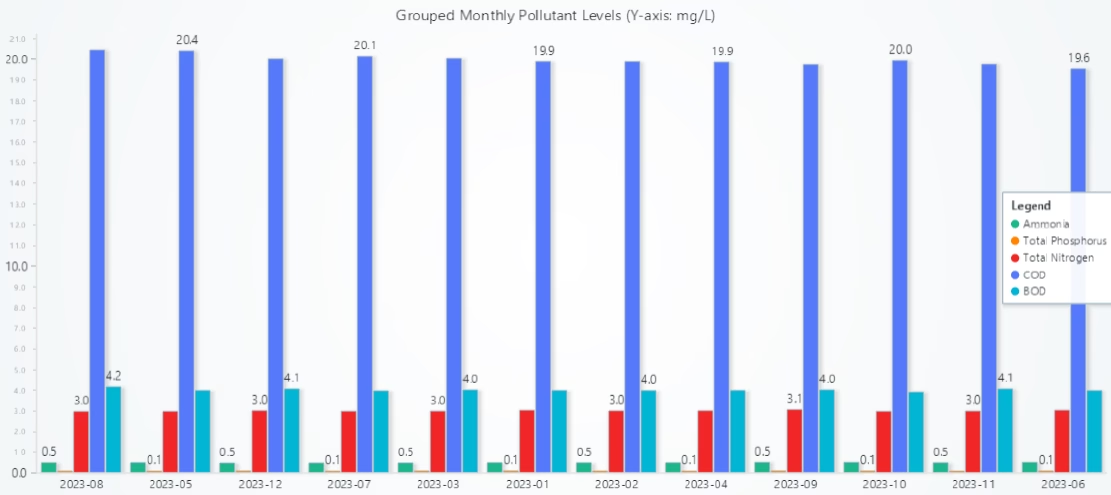
- Chart Type: Grouped Bar Chart
- Purpose: visualizes the monthly average concentrations of five critical water pollutants in China:
- Ammonia (mg/L)
- Total Phosphorus (mg/L)
- Total Nitrogen (mg/L)
- Chemical Oxygen Demand (COD in mg/L)
- Biochemical Oxygen Demand (BOD in mg/L)
Explanation:
- X-Axis: represents months
- Y-Axis: represents Pollutant Concentration (mg/L)
- Each Group of Bars corresponds to a month, and the five bars within each group represent:
- Ammonia (mg/L)
- Total Phosphorus (mg/L)
- Total Nitrogen (mg/L)
- Chemical Oxygen Demand (COD in mg/L)
- Biochemical Oxygen Demand (BOD in mg/L)
Insights: Consistent High COD & BOD Levels, Seasonal Trends in Ammonia & Nutrients, and Sharp Monthly Variations
Conclusion
This project successfully demonstrated how LightningChart Python can be utilized for fast, interactive, and high-resolution visualization of environmental data. Through 10 diverse chart types, trends, comparisons, and geospatial insights were clearly presented.
Continue learning with LightningChart

Visualizing 10 Million Data Points in the Browser (2026): The Technical Deep-Dive
Ten Million Data Points in the Browser: How WebGL Makes Mass Datasets Interactive Ten million data points. That number used to mean a database problem, not a front-end problem. Now research teams want to explore it interactively in a browser. Trading desks want...
Elliott Wave Theory in Trading
Financial markets often appear chaotic, but many traders believe that price movements follow recurring patterns driven by human psychology. One of the most influential approaches based on this idea is the Elliott Wave Theory. Developed nearly a century ago, it remains one of the most widely studied methods of technical analysis.
The Head and Shoulders Pattern in Technical Analysis
The Head and Shoulders Pattern in Technical Analysis The Head and Shoulders Pattern in Technical Analysis The Head and Shoulders pattern is one of the most recognized and widely used chart patterns in technical analysis. It is considered a reliable reversal pattern...



If you have any questions, feel free to contact us!
©LightningChart Ltd 2025. All rights reserved.