





LightningChart PythonVisualizing global CO2 emissions in Python
TutorialImplementation of carbon emissions visualization in Python with LightningChart.
Written by a human | Updated on April 23rd, 2025
Carbon Emissions Visualization in Python
Understanding global CO2 emissions is crucial for addressing climate change. Carbon dioxide (CO2) emissions are the primary driver of global climate change, originating from various sources such as fossil fuels and land-use changes. These emissions have significant impacts on the environment, contributing to global warming and climate change.
Analyzing and visualizing these emissions can help us understand the trends and identify key areas for improvement. In this article, we will explore how to use Python, particularly the LightningChart library, to visualize CO2 emissions data. We will create various charts, including line charts, map charts, and bar charts, to provide a comprehensive view of global CO2 emissions.
LightningChart Python

LightningChart Python is a powerful library for creating high-performance visualizations. It offers a variety of chart types, including line charts, bar charts, and map charts, which are particularly useful for visualizing data like CO2 emissions. LightningChart Python is known for its performance characteristics, making it suitable for handling large datasets and rendering complex visualizations smoothly.
Features and Chart Types
LightningChart provides various chart types, including line charts, bar charts, map charts, and more. Some key features include:
- High performance and fast rendering
- Advanced customization options
- Real-time data visualization
- Interactive charts with zoom and pan capabilities.
- Extensive customization options for appearance and behavior
- Advanced interactivity features: zooming, panning, and real-time updates.
- Support for 3D visualization and complex data structures.
Performance Characteristics
LightningChart is known for its high performance, capable of rendering millions of data points without significant lag. This makes it suitable for visualizing large datasets, such as global CO2 emissions data, which can span multiple years and include data from numerous countries.
Setting Up Python Environment
pip install numpy pandas lightningchart-py pycountryTo get started with visualizing CO2 emissions in Python, you need to set up your Python environment by installing the necessary libraries. You will need NumPy for numerical operations, pandas for data manipulation, and LightningChart for creating the visualizations. Ensure you have Python installed, and then you can set up your development environment using the following commands:
Overview of libraries used
- NumPy: For numerical operations.
- Pandas: For data manipulation and analysis.
- LightningChart: For creating interactive and high-performance charts.
- Pycountry: For Country, Currency, and Locale Information.
If you wish so, you can see this project on GitHub.
Loading and Processing Data
First, you need to load the dataset containing CO2 emissions data. This data can be obtained from various sources, such as Our World in Data. After loading the data, you will need to preprocess it to ensure it is in the correct format for visualization. This includes handling missing values, converting data types, and aggregating data as necessary.
import pandas as pd
data = pd.read_csv('path_to_your_file.csv')
data = pd.read_excel('path_to_your_file.xlsx')
Line Chart: CO2 Emissions by Continent
LightningChart provides a robust framework for creating a variety of visualizations. In this project, we used several types of charts to display CO2 emissions data: line charts, bar charts, and map charts. The first line chart visualizes CO2 emissions over the years by continent. This chart helps in understanding how different regions contribute to global CO2 emissions.
# Add a legend to the chart
chart.add_legend(
    horizontal=False,
    title='Regions',
    x=12 , y=42,
    data=chart
)

# Function to add data points
def add_data(entity, year, emission):
    if pd.notna(year) and pd.notna(emission):
        emission_million = emission / 1e6  # Convert to million metric tons
        line_series_dict[entity].add(year, emission_million)

# Aggregate data for North America and South America
north_america_data = data[(data['country'] == 'North America') & (data['year'].notna())]
south_america_data = data[(data['country'] == 'South America') & (data['year'].notna())]

# Combine North and South America data
combined_america_data = pd.concat([north_america_data, south_america_data])
americas_data = combined_america_data.groupby('year')['co2'].sum().reset_index()

# Open the chart
chart.open(live=True)

# Add data points for the rest of the entities
for index, row in data.iterrows():
    if row['country'] in entities and row['country'] != 'Americas':
        add_data(row['country'], row['year'], row['co2'])

# Add data points for Americas
for index, row in americas_data.iterrows():
    add_data('Americas', row['year'], row['co2'])

# Close the chart
chart.close()
This chart illustrates the trends in CO2 emissions across different continents over the years. It is evident that Asia has seen a significant rise in emissions, particularly driven by rapid industrialization in countries like China and India. Meanwhile, emissions from Europe and North America show a more stable or slightly declining trend.
Line Chart: CO2 Emissions by Major Regions and Countries
The second line chart shows the CO2 emissions of major regions and countries, offering a detailed view of the contribution of specific areas to global emissions.
import pandas as pd
import lightningchart as lc
import time

# Read the license key for LightningChart
lc.set_license(my_license_key)

# Load the dataset
file_path = 'owid-co2-data.csv'
data = pd.read_csv(file_path)

# List of countries and regions to include in the chart
entities = ['World', 'China', 'Europe', 'Oceania', 'United Kingdom', 'United States', 'India', 'Asia', 'Germany', 'France', 'Africa']

# Create the chart
chart = lc.ChartXY(
    theme=lc.Themes.White,
    title='CO2 Emissions Over the Years'
)

colors = [
    lc.Color(0, 0, 0),       # Black for World
    lc.Color(255, 0, 0),     # Red
    lc.Color(0, 255, 0),     # Green
    lc.Color(0, 0, 255),     # Blue
    lc.Color(255, 165, 0),   # Orange
    lc.Color(128, 0, 128),   # Purple
    lc.Color(0, 255, 255),   # Cyan
    lc.Color(75, 0, 130),    # Indigo
    lc.Color(238, 130, 238), # Violet
    lc.Color(139, 69, 19),   # Brown
    lc.Color(128, 128, 128)  # Grey
]

line_series_dict = {}
for i, entity in enumerate(entities):
    line_series = chart.add_line_series()
    line_series.set_name(entity)
    line_series.set_line_color(colors[i])
    line_series.set_line_thickness(2)
    line_series_dict[entity] = line_series

x_axis = chart.get_default_x_axis()
x_axis.set_title('Year')

y_axis = chart.get_default_y_axis()
y_axis.set_title('CO2 Emissions (Million Metric Tons)')

chart.add_legend(x=15, y=35, data=chart)
chart.open(live=True)

# Add data points with a delay to simulate real-time drawing
for index, row in data.iterrows():
    if row['country'] in entities:
        year = row['year']
        emission = row['co2']
        if pd.notna(year) and pd.notna(emission):
            emission_million = emission / 1e6  # Convert to million metric tons
            print(f"Adding data for {row['country']}: Year={year}, Emission={emission_million}")
            line_series_dict[row['country']].add(year, emission_million)
            time.sleep(0.005)  # 0.005 second delay between each data point

chart.close()
This chart provides an in-depth look at CO2 emissions from different regions and major countries. The data shows a sharp increase in emissions from China and India in recent decades, aligning with their economic growth. Conversely, regions like Europe and North America exhibit a slower growth rate in emissions.
Line Chart: Global CO2 Emissions from Fossil Fuels and Land-Use Change
This chart highlights the global CO2 emissions split into fossil fuels and land-use changes. It helps in understanding the sources of emissions over time.
import pandas as pd
import lightningchart as lc

# Read the license key for LightningChart
lc.set_license(my_license_key)

# Load the dataset
file_path = 'owid-co2-data.csv'
data = pd.read_csv(file_path)

# Filter data for the world
world_data = data[data['country'] == 'World']

# Ensure 'year' and CO2 columns are in the correct format
world_data['year'] = pd.to_numeric(world_data['year'], errors='coerce')
world_data['co2'] = pd.to_numeric(world_data['co2'], errors='coerce')
world_data['co2_including_luc'] = pd.to_numeric(world_data['co2_including_luc'], errors='coerce')
world_data['land_use_change_co2'] = pd.to_numeric(world_data['land_use_change_co2'], errors='coerce')

# Drop rows with NaN values
world_data = world_data.dropna(subset=['year', 'co2', 'co2_including_luc', 'land_use_change_co2'])

# Extract the relevant columns
years = world_data['year'].tolist()
total_emissions = world_data['co2_including_luc'].tolist()
fossil_fuel_emissions = world_data['co2'].tolist()
land_use_change_emissions = world_data['land_use_change_co2'].tolist()

# Convert emissions to billion metric tons
total_emissions = [e / 1e9 for e in total_emissions]
fossil_fuel_emissions = [e / 1e9 for e in fossil_fuel_emissions]
land_use_change_emissions = [e / 1e9 for e in land_use_change_emissions]

# Create the chart
chart = lc.ChartXY(
    theme=lc.Themes.White,
    title='Global CO2 Emissions Over the Years (Fossil Fuels Land-Use Change and Total Emissions)'
)
# Add the total emissions series
total_series = chart.add_line_series()
total_series.add(years, total_emissions)
total_series.set_name('Total (fossil fuels and land-use change)')
total_series.set_line_color(lc.Color(255, 0, 128))  # Pink color
total_series.set_line_thickness(2)  # Set line width
# Add the fossil fuel emissions series
fossil_fuel_series = chart.add_line_series()
fossil_fuel_series.add(years, fossil_fuel_emissions)
fossil_fuel_series.set_name('Fossil fuels')
fossil_fuel_series.set_line_color(lc.Color(255, 165, 0))  # Orange color
fossil_fuel_series.set_line_thickness(2)  # Set line width
# Add the land-use change emissions series
land_use_series = chart.add_line_series()
land_use_series.add(years, land_use_change_emissions)
land_use_series.set_name('Land-use change')
land_use_series.set_line_color(lc.Color(0, 128, 0))  # Green color
land_use_series.set_line_thickness(2)  # Set line width
# Customize x-axis
x_axis = chart.get_default_x_axis()
x_axis.set_title('Year')
x_axis.set_interval(min(world_data['year']), max(world_data['year']))
# Customize y-axis
y_axis = chart.get_default_y_axis()
y_axis.set_title('CO2 Emissions (Billion Metric Tons)')

chart.add_legend(x=25, y=40, data=chart)

chart.open()
We see that while emissions from fossil fuels have increased, emissions from land use change have declined slightly in recent years.
Map Charts: CO2 Emissions by Country
Map charts provide a geographical representation of CO2 emissions. The charts for the years 1990, 2000, 2010, and 2022 show how emissions have changed globally over these years.
import pandas as pd
import pycountry
import lightningchart as lc
from lightningchart import Color, Dashboard, Themes

# Set the license key
lc.set_license(my_license_key)

# Load the dataset
file_path = 'owid-co2-data.csv'
data = pd.read_csv(file_path)

# Manual mapping for countries with names that don't match pycountry
manual_mapping = {
    'Russia': 'RUS',
    'Iran': 'IRN',
    'Syria': 'SYR',
    'Turkey': 'TUR',
    'Venezuela': 'VEN',
    'Tanzania': 'TZA',
    'Vietnam': 'VNM',
    # Add more mappings if needed
}

# Convert country names to ISO_A3 codes
def get_iso_a3(country_name):
    if country_name in manual_mapping:
        return manual_mapping[country_name]
    try:
        country = pycountry.countries.get(name=country_name)
        return country.alpha_3 if country else None
    except AttributeError:
        return None

def create_map_chart(dashboard, data_year, year, column_index, row_index):
    data_year.loc[:, 'ISO_A3'] = data_year['country'].apply(get_iso_a3)
    data_year = data_year.dropna(subset=['ISO_A3'])

    # Select relevant columns for the chart
    co2_data = data_year[['ISO_A3', 'co2']].rename(columns={'co2': 'value'}).to_dict(orient='records')

    # Create world map chart
    chart = dashboard.MapChart(column_index=column_index, row_index=row_index)

    # Set CO2 data
    chart.invalidate_region_values(co2_data)

    # Set color palette with finer divisions
    chart.set_palette_colors(
        steps=[
            {'value': 0.0001, 'color': Color('#e0f7fa')},  # Light cyan
            {'value': 1, 'color': Color('#80deea')},  # Cyan
            {'value': 10, 'color': Color('#4dd0e1')},  # Light blue
            {'value': 20, 'color': Color('#26c6da')},  # Darker blue
            {'value': 30, 'color': Color('#00bcd4')},  # Even darker blue
            {'value': 40, 'color': Color('#00acc1')},  # Dark cyan
            {'value': 50, 'color': Color('#0097a7')},  # Cyan green
            {'value': 70, 'color': Color('#00838f')},  # Green cyan
            {'value': 100, 'color': Color('#006064')},  # Dark green cyan
            {'value': 200, 'color': Color('#004d40')},  # Dark green
            {'value': 300, 'color': Color('#2e7d32')},  # Dark green
            {'value': 400, 'color': Color('#388e3c')},  # Green
            {'value': 500, 'color': Color('#43a047')},  # Light green
            {'value': 700, 'color': Color('#66bb6a')},  # Light green
            {'value': 900, 'color': Color('#9ccc65')},  # Green yellow
            {'value': 1000, 'color': Color('#d4e157')},  # Yellow
            {'value': 1500, 'color': Color('#fbc02d')},  # Yellow orange
            {'value': 2000, 'color': Color('#ffa000')},  # Dark orange
            {'value': 2500, 'color': Color('#ff8f00')},  # Orange
            {'value': 3000, 'color': Color('#ff6f00')},  # Dark orange red
            {'value': 3500, 'color': Color('#ff5722')},  # Red
            {'value': 4000, 'color': Color('#f4511e')},  # Dark red
            {'value': 4500, 'color': Color('#e64a19')},  # Very dark red
            {'value': 5000, 'color': Color('#d84315')},  # Deep red
            {'value': 6000, 'color': Color('#bf360c')},  # Brown red
            {'value': 7000, 'color': Color('#a3320c')},  # Dark brown red
            {'value': 8000, 'color': Color('#87281e')},  # Dark maroon
            {'value': 9000, 'color': Color('#6d211c')},  # Very dark maroon
            {'value': 11000, 'color': Color('#212121')}  # Black
        ],
        look_up_property='value',
        percentage_values=False
    )

    # Enable hover highlighting
    chart.set_highlight_on_hover(enabled=True)

    return chart

# Create a dashboard to arrange the charts
dashboard = Dashboard(
    rows=2,
    columns=2,
    theme=Themes.White
)

# Create and add map charts to the dashboard
create_map_chart(dashboard, data[data['year'] == 1990].copy(), 1990, column_index=0, row_index=0)
create_map_chart(dashboard, data[data['year'] == 2000].copy(), 2000, column_index=1, row_index=0)
create_map_chart(dashboard, data[data['year'] == 2010].copy(), 2010, column_index=0, row_index=1)
create_map_chart(dashboard, data[data['year'] == 2022].copy(), 2022, column_index=1, row_index=1)

# Open the dashboard
dashboard.open(live=True)
The maps highlight the geographical distribution of CO2 emissions for the years 1990 and 2022. A stark contrast can be seen in regions such as China and India, where emissions have surged significantly. In contrast, many Western countries have managed to either stabilize or reduce their emissions over the same period, reflecting the impact of environmental policies and technological advancements.
Map Charts: CO2 Emissions per Capita
Map charts provide a geographical representation of CO2 and CO2 per capita emissions. The chart is a dashboard with four map charts to compare CO2 emissions and emissions per capita for the years 1990 and 2022.
import pandas as pd
import pycountry
import lightningchart as lc
from lightningchart import Color, Dashboard, Themes

# Set the license key
lc.set_license(my_license_key)

# Load the dataset
file_path = 'owid-co2-data.csv'
data = pd.read_csv(file_path)

# Manual mapping for countries with names that don't match pycountry
manual_mapping = {
    'Russia': 'RUS',
    'Iran': 'IRN',
    'Syria': 'SYR',
    'Turkey': 'TUR',
    'Venezuela': 'VEN',
    'Tanzania': 'TZA',
    'Vietnam': 'VNM',
    # Add more mappings if needed
}

# Convert country names to ISO_A3 codes
def get_iso_a3(country_name):
    if country_name in manual_mapping:
        return manual_mapping[country_name]
    try:
        country = pycountry.countries.get(name=country_name)
        return country.alpha_3 if country else None
    except AttributeError:
        return None

def create_map_chart(dashboard, data_year, year, value_column, title_suffix, column_index, row_index):
    data_year.loc[:, 'ISO_A3'] = data_year['country'].apply(get_iso_a3)
    data_year = data_year.dropna(subset=['ISO_A3'])

    # Select relevant columns for the chart
    co2_data = data_year[['ISO_A3', value_column]].rename(columns={value_column: 'value'}).to_dict(orient='records')

    # Create world map chart
    chart = dashboard.MapChart(column_index=column_index, row_index=row_index)

    # Set CO2 data
    chart.invalidate_region_values(co2_data)

    # Set color palette with finer divisions
    chart.set_palette_colors(
        steps =[
        {'value': 0.0001, 'color': Color('#e0f7fa')},  # Light cyan
        {'value': 1, 'color': Color('#b3e5fc')},  # Light blue
        {'value': 2, 'color': Color('#81d4fa')},  # Light blue
        {'value': 3, 'color': Color('#4fc3f7')},  # Blue
        {'value': 4, 'color': Color('#29b6f6')},  # Blue
        {'value': 5, 'color': Color('#03a9f4')},  # Blue
        {'value': 6, 'color': Color('#039be5')},  # Dark blue
        {'value': 7, 'color': Color('#0288d1')},  # Dark blue
        {'value': 8, 'color': Color('#0277bd')},  # Dark blue
        {'value': 9, 'color': Color('#01579b')},  # Dark blue
        {'value': 10, 'color': Color('#80deea')},  # Cyan
        {'value': 11, 'color': Color('#4dd0e1')},  # Light blue
        {'value': 12, 'color': Color('#26c6da')},  # Darker blue
        {'value': 13, 'color': Color('#00bcd4')},  # Even darker blue
        {'value': 14, 'color': Color('#00acc1')},  # Dark cyan
        {'value': 15, 'color': Color('#0097a7')},  # Cyan green
        {'value': 16, 'color': Color('#00838f')},  # Green cyan
        {'value': 17, 'color': Color('#006064')},  # Dark green cyan
        {'value': 18, 'color': Color('#004d40')},  # Dark green
        {'value': 19, 'color': Color('#2e7d32')},  # Dark green
        {'value': 20, 'color': Color('#388e3c')},  # Green
        {'value': 40, 'color': Color('#43a047')},  # Light green
        {'value': 60, 'color': Color('#4caf50')},  # Light green
        {'value': 80, 'color': Color('#66bb6a')},  # Light green
        {'value': 100, 'color': Color('#81c784')},  # Light green
        {'value': 150, 'color': Color('#9ccc65')},  # Green yellow
        {'value': 200, 'color': Color('#d4e157')},  # Yellow
        {'value': 250, 'color': Color('#dce775')},  # Yellow
        {'value': 300, 'color': Color('#fbc02d')},  # Yellow orange
        {'value': 400, 'color': Color('#ffeb3b')},  # Yellow
        {'value': 500, 'color': Color('#ffc107')},  # Yellow orange
        {'value': 600, 'color': Color('#ffa000')},  # Dark orange
        {'value': 700, 'color': Color('#ff8f00')},  # Orange
        {'value': 800, 'color': Color('#ff6f00')},  # Dark orange red
        {'value': 900, 'color': Color('#ff5722')},  # Red
        {'value': 1000, 'color': Color('#f4511e')},  # Dark red
        {'value': 1500, 'color': Color('#e64a19')},  # Very dark red
        {'value': 2000, 'color': Color('#d84315')},  # Deep red
        {'value': 2500, 'color': Color('#bf360c')},  # Brown red
        {'value': 3000, 'color': Color('#a3320c')},  # Dark brown red
        {'value': 3500, 'color': Color('#87281e')},  # Dark maroon
        {'value': 4000, 'color': Color('#6d211c')},  # Very dark maroon
        {'value': 4500, 'color': Color('#4e342e')},  # Brown
        {'value': 5000, 'color': Color('#3e2723')},  # Dark brown
        {'value': 5500, 'color': Color('#5d4037')},  # Brown
        {'value': 6000, 'color': Color('#4e342e')},  # Dark brown
        {'value': 6500, 'color': Color('#3e2723')},  # Very dark brown
        {'value': 7000, 'color': Color('#6e3b3b')},  # Dark brown-black
        {'value': 8000, 'color': Color('#4e2b2b')},  # Very dark brown-black
        {'value': 9000, 'color': Color('#2e1f1f')},  # Extremely dark brown-black
        {'value': 11000, 'color': Color('#212121')}  # Black
    ],
        look_up_property='value',
        percentage_values=False
    )

    # Enable hover highlighting
    chart.set_highlight_on_hover(enabled=True)

    return chart

# Create a dashboard to arrange the charts
dashboard = Dashboard(
    rows=2,
    columns=2,
    theme=Themes.White
)

# Create and add map charts to the dashboard
create_map_chart(dashboard, data[data['year'] == 1990].copy(), 1990, 'co2', 't', column_index=0, row_index=0)
create_map_chart(dashboard, data[data['year'] == 2022].copy(), 2022, 'co2', 't', column_index=1, row_index=0)
create_map_chart(dashboard, data[data['year'] == 1990].copy(), 1990, 'co2_per_capita', 't per capita', column_index=0, row_index=1)
create_map_chart(dashboard, data[data['year'] == 2022].copy(), 2022, 'co2_per_capita', 't per capita', column_index=1, row_index=1)

# Open the dashboard
dashboard.open(live=True)
There are very large inequalities in per capita emissions across the world. The world’s largest per capita CO2 emitters are the major oil-producing countries; this is particularly true for those with relatively low population size.
Most are in the Middle East and include Qatar, the United Arab Emirates, Bahrain, and Kuwait. This disparity emphasizes the need for tailored environmental strategies that account for both population size and economic activities.
Top CO2 Emitting Countries
The bar charts display the top 30 CO2 emitting countries in 2022, both in total emissions and emissions per capita. This comparison helps in identifying which countries have the highest emissions and the impact relative to their population size.
import pandas as pd
import lightningchart as lc
import pycountry
from lightningchart import Dashboard, Themes

# Set the license key
lc.set_license(my_license_key)

# Load data from CSV file
file_path = 'owid-co2-data.csv'
data = pd.read_csv(file_path)

# Dictionary for country names to abbreviations
def get_country_code(country_name):
    try:
        return pycountry.countries.lookup(country_name).alpha_3
    except LookupError:
        # Manual check for countries that may not be in pycountry
        manual_codes = {
            'Russia': 'RUS',
            'Turkey': 'TUR',
            'United Arab Emirates': 'ARE',
            'South Africa': 'ZAF',
            'South Korea': 'KOR',
            'Brunei': 'BRN',
            'Greenland': 'GRL',
            'Libya': 'LBY',
            'Singapore': 'SGP'
        }
        return manual_codes.get(country_name, country_name[:3].upper())

# Filter data for the year 2022
data_2022 = data[data['year'] == 2022]

# Complete list of non-country regions to remove
non_countries = [
    'World', 'Asia', 'Asia (GCP)', 'Europe', 'Europe (GCP)', 'European Union (27)', 'North America', 'North America (GCP)', 'South America',
    'Africa', 'Africa (GCP)', 'Oceania', 'Upper-middle-income countries', 'High-income countries', 'South America (GCP)',
    'Lower-middle-income countries', 'Low-income countries', 'International transport', 'North America (excl. USA)', 'International shipping',
    'Non-OECD (GCP)', 'OECD (GCP)', 'Asia (excl. China and India)', 'European Union (28)', 'International aviation',
    'Europe (excl. EU-28)', 'South America (GCP)', 'Oceania (GCP)', 'Africa (excl. South Africa)',
    'Asia (excl. China and India)', 'Europe (excl. EU-27)', 'International transport',
    'Lower-middle-income economies', 'Low-income economies', 'Non-OECD members', 'OECD members',
    'Other Africa', 'Other Asia', 'Other Europe', 'Rest of world', 'Upper-middle-income economies',
    'Middle East', 'Middle East (GCP)', 'Other non-OECD'
]

# Remove non-country regions from the data
data_countries_2022 = data_2022[~data_2022['country'].isin(non_countries)]

# Select top 30 countries by CO2 emissions
top_30_countries = data_countries_2022.nlargest(30, 'co2')

# Select top 30 countries by CO2 emissions per capita
top_30_countries_per_capita = data_countries_2022.nlargest(30, 'co2_per_capita')

# Prepare data for the first chart
chart_data_total = [{'category': get_country_code(row['country']), 'value': row['co2']} for _, row in top_30_countries.iterrows()]

# Prepare data for the second chart
chart_data_per_capita = [{'category': get_country_code(row['country']), 'value': row['co2_per_capita']} for _, row in top_30_countries_per_capita.iterrows()]

# Create dashboard
dashboard = Dashboard(
    rows=2,
    columns=1,
    theme=Themes.White
)

# Create bar chart for the first chart
chart_total = dashboard.BarChart(
    column_index=0,
    row_index=0,
    column_span=1,
    row_span=1
)
chart_total.set_title('Top 30 CO2 Emitting Countries - Year 2022')
chart_total.set_sorting('disabled')
chart_total.set_data(chart_data_total)

# Create bar chart for the second chart
chart_per_capita = dashboard.BarChart(
    column_index=0,
    row_index=1,
    column_span=1,
    row_span=1
)
chart_per_capita.set_title('Top 30 CO2 Emitting Countries per Capita - Year 2022')
chart_per_capita.set_sorting('disabled')
chart_per_capita.set_data(chart_data_per_capita)

# Open the dashboard
dashboard.open()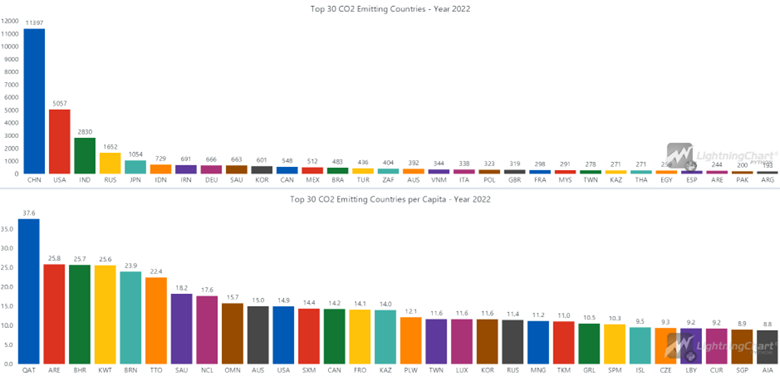
This bar chart shows the top 30 countries by their total CO2 emissions in 2022, along with their per capita emissions. It clearly demonstrates that China, the USA, and India are the largest emitters due to their large populations and industrial activities.
However, when examining per capita emissions, it becomes evident that there are significant inequalities across the world. The world’s largest per capita CO2 emitters are primarily major oil-producing countries, such as Qatar, the United Arab Emirates, Bahrain, and Kuwait.
Conclusion
Creating visualizations of global CO2 emissions using Python and LightningChart provides valuable insights into how different regions and activities contribute to climate change. These visualizations help in identifying trends, making comparisons, and understanding the impact of various factors on CO2 emissions.

Hosseinali Taheri Andani
Data Science Python Developer


Continue learning with LightningChart

Data Visualization in Medical & Healthcare Applications
Written by a human | Updated on April 10th, 2025Charting Controls for Medical Healthcare Data Visualization Applications The fact that data and data visualization are everywhere in today's world, makes me wonder how data visualization impacts medical...

Creating a Smith Chart Application in .NET
Written by a human | Updated on April 9th, 2025Smith Charts The Smith chart is a diagram designed for the study and resolution of problems with transmission lines. This diagram is aimed at electrical and electronic engineers specializing in radio frequency....

Nbody Simulation Data Visualization
Written by a human | Updated on April 9th, 2025N-body Simulation Nbody simulation is maybe one of the most advanced data visualization types out there. The truth is that we’re not talking anymore about visualizing traditional data with a business focus and it...





If you have any questions, feel free to contact us!
©LightningChart Ltd 2026. All rights reserved.