








Creating a Defense Industry AI sensors Data Analysis with LightningChart Python
Tutorial
Assisted by AI
Discover how AI sensors data analysis is transforming the defense industry by enhancing decision-making and operational efficiency.
Fateme Ajam
Data Science Python Developer

Introduction
In the era of digital transformation, sensor-based monitoring systems play a pivotal role in various industries, from environmental analysis to industrial automation. These systems generate vast amounts of real-time data, requiring advanced visualization techniques to extract meaningful insights.
Effective monitoring of sensor data is crucial for optimizing performance, detecting anomalies, and improving decision-making processes.
This study leverages real-time sensor readings, environmental conditions, and machine learning models to analyze patterns, forecast trends, and classify different environmental states. By integrating time-series forecasting, interference heatmaps, and classification models, the research aims to enhance situational awareness and predictive analytics.
Through advanced visualization techniques, this analysis provides a comprehensive understanding of sensor behaviors, their response to environmental variations, and the impact of external conditions on measurement accuracy.
The findings contribute to developing more robust monitoring systems capable of real-time adaptation and intelligent decision-making across multiple applications.
About the Dataset
The dataset consists of real-time sensor readings and environmental conditions collected over time. It includes multiple variables such as radar signal strength, infrared temperature, sonar distance, temperature, humidity, and signal interference levels.
The data is timestamped, allowing for time-series analysis, forecasting, and classification of environmental conditions. Additionally, the dataset contains labeled weather conditions (e.g., clear, rain, fog, storm) to enable machine learning-based classification.
This structured dataset supports comprehensive analysis, including real-time monitoring, predictive modeling, and interference detection.
LightningChart Python
LightningChart Python is a high-performance data visualization library designed for real-time, large-scale data rendering. It provides advanced charting capabilities, including 2D and 3D visualizations, time-series analysis, heatmaps, and real-time dashboards.
With GPU acceleration, LightningChart ensures ultra-fast rendering, making it ideal for applications in industrial monitoring, financial analysis, scientific research, and IoT visualization.
Its flexibility allows seamless integration with machine learning models, interactive visual analytics, and real-time data streaming, making it a powerful tool for handling complex and dynamic datasets with precision and speed.

Setting Up Python Environment
First, you need to install Python: Download and install the latest version of Python from the official Python website. Second, you need to import Pandas and LightningChart:
import pandas as pd
import lightningchart as lc
import time
import numpy as np
Data Loading and Preprocessing
First, we load the dataset and clean it. In our AI sensors data analysis case, the dataset is a CSV file:
file_path = 'your csv File Address'
df = pd.read_csv(file_path)
Visualizing Data with LightningChart Python
Polar Heatmap: Signal Interference Intensity
This Polar Heatmap visualizes signal interference levels across different directions and distances. The color gradient represents intensity, with blue indicating low interference, green moderate, and red high interference.
The heatmap is divided into 36 angular sectors and 5 radial zones, showing how interference varies across different orientations. This visualization helps in identifying interference hotspots, improving signal transmission, and minimizing disruptions in critical environments.
import lightningchart as lc
import pandas as pd
import numpy as np

# Load dataset
environment_data = pd.read_csv("D:/fatemeh_ajam/lightningChart/12/dataset/environmental_conditions_train.csv")

# Set LightningChart license
with open("D:/fatemeh_ajam/lightningChart/A/license-key", "r") as f:
    lc.set_license(f.read().strip())

# Convert timestamp and map interference levels
environment_data["timestamp"] = pd.to_datetime(environment_data["timestamp"])
interference_mapping = {"Low": 25, "Moderate": 50, "High": 100}
environment_data["signal_interference_numeric"] = environment_data["signal_interference_level"].map(interference_mapping)

# Define heatmap dimensions
sectors, annuli = 36, 5
chart = lc.PolarChart(theme=lc.Themes.Dark, title="Static Polar Heatmap: Signal Interference Intensity")
heatmap_series = chart.add_heatmap_series(sectors=sectors, annuli=annuli, data_order="annuli")

# Set color palette
heatmap_series.set_palette_coloring(steps=[
    {"value": 0, "color": lc.Color(0, 0, 255)},
    {"value": 50, "color": lc.Color(0, 255, 0)},
    {"value": 100, "color": lc.Color(255, 0, 0)}
], look_up_property="value", interpolate=True, percentage_values=False)

# Fill heatmap with data
valid_data = environment_data["signal_interference_numeric"].dropna().values
intensity_values = np.pad(valid_data, (0, annuli * sectors - len(valid_data)), 'edge').reshape((annuli, sectors)).tolist()

for a in range(annuli):
    for s in range(sectors):
        heatmap_series.invalidate_intensity_values(values=[[intensity_values[a][s]]], i_annulus=a, i_sector=s)

# Add legend and display chart
chart.add_legend(title="Signal Interference Intensity").add(heatmap_series)
chart.open()
Weather Classification & Sensor Data Analysis: A Machine Learning Approach
This dashboard visualizes weather classification and sensor data analysis. The Confusion Matrix (top) shows that the model predicts “Clear” weather accurately (red) but struggles with fog and storms (blue). The 3D Scatter Plot (bottom left) separates sensor readings in a 3D space, revealing distinct patterns.
The 3D Bar Chart (bottom right) compares sensor averages, showing that radar signal strength and sonar distance vary significantly with weather conditions. The key insight is that clear weather is the easiest to classify, while adverse conditions affect sensor performance and classification accuracy.
sensor_data["timestamp"] = pd.to_datetime(sensor_data["timestamp"])
environment_data["timestamp"] = pd.to_datetime(environment_data["timestamp"])

merged_data = pd.merge(sensor_data, environment_data, on="timestamp")
merged_data["original_weather_condition"] = merged_data["weather_condition"]
merged_data["weather_condition"] = merged_data["weather_condition"].astype("category").cat.codes.astype(int)

weather_mapping = dict(merged_data[["weather_condition", "original_weather_condition"]].drop_duplicates().values)

X = merged_data[["radar_signal_strength", "sonar_distance", "infrared_temperature"]]
y = merged_data["weather_condition"]

X_train, X_test, y_train, y_test = train_test_split(X, y, test_size=0.2, random_state=42)

# Train the Random Forest model
model = RandomForestClassifier(n_estimators=100, random_state=42)
model.fit(X_train, y_train)

# Predict values
y_pred = model.predict(X_test)

# Compute confusion matrix
conf_matrix = confusion_matrix(y_test, y_pred).astype(float)

unique_labels = sorted(set(y_test).union(set(y_pred)))
class_names = [weather_mapping[c] for c in unique_labels]  # Convert numbers to labels

min_value = conf_matrix.min()
max_value = conf_matrix.max()
mean_value = conf_matrix.mean()

# Create a dashboard
dashboard = lc.Dashboard(rows=2, columns=2, theme=lc.Themes.Dark)

# 1. Confusion Matrix (Heatmap)
heatmap_chart = dashboard.ChartXY(
    row_index=0, column_index=0, column_span=2,
    title="Confusion Matrix: Predicted vs. Actual Weather Conditions",
)
heatmap_series = heatmap_chart.add_heatmap_grid_series(
    columns=conf_matrix.shape[1], rows=conf_matrix.shape[0]
)
heatmap_series.set_intensity_interpolation(True)
heatmap_series.invalidate_intensity_values(conf_matrix.tolist())

palette_steps = [
    {"value": min_value, "color": lc.Color('blue')},
    {"value": mean_value, "color": lc.Color('white')},
    {"value": max_value, "color": lc.Color('red')}
]
heatmap_series.set_palette_coloring(
    steps=palette_steps,
    look_up_property='value',
    interpolate=True
)

x_axis = heatmap_chart.get_default_x_axis()
y_axis = heatmap_chart.get_default_y_axis()
x_axis.set_tick_strategy('Empty')
y_axis.set_tick_strategy('Empty')

for i, label in enumerate(class_names):
    custom_tick_x = x_axis.add_custom_tick().set_tick_label_rotation(90)
    custom_tick_x.set_value(i + 0.5)
    custom_tick_x.set_text(label)

    custom_tick_y = y_axis.add_custom_tick()
    custom_tick_y.set_value(i + 0.5)
    custom_tick_y.set_text(label)

heatmap_chart.add_legend(data=heatmap_series).set_margin(-20)

# 2. 3D Bar Chart: Sensor Data Across Weather Conditions
bar_chart = dashboard.Chart3D(
    row_index=1, column_index=1,
    title="Sensor Data Across Different Weather Conditions"
)

sensor_avg_per_weather = merged_data.groupby("weather_condition")[
    ["radar_signal_strength", "sonar_distance", "infrared_temperature"]
].mean()

x_axis = bar_chart.get_default_x_axis()
y_axis = bar_chart.get_default_y_axis()
z_axis = bar_chart.get_default_z_axis()

x_axis.set_title("Sensor Type")
y_axis.set_title("Value")
z_axis.set_title("Weather Condition")

x_axis.set_tick_strategy('Empty')
z_axis.set_tick_strategy('Empty')

# Add sensor names
for i, sensor in enumerate(sensor_avg_per_weather.columns):
    tick = x_axis.add_custom_tick()
    tick.set_value(float(i))
    tick.set_text(sensor)

for i, condition in enumerate(sensor_avg_per_weather.index):
    tick = z_axis.add_custom_tick()
    tick.set_value(float(i))
    tick.set_text(weather_mapping[condition])

box_series = bar_chart.add_box_series()
box_series.set_palette_coloring(
    steps=[
        {'value': 0.0, 'color': lc.Color(22, 14, 138)},
        {'value': 0.25, 'color': lc.Color(5, 229, 245)},
        {'value': 0.5, 'color': lc.Color(238, 255, 5)},
        {'value': 0.75, 'color': lc.Color(255, 113, 5)},
        {'value': 1.0, 'color': lc.Color(212, 2, 2)}
    ],
    percentage_values=True,
    look_up_property='y'
)

data_boxes = []
for i, condition in enumerate(sensor_avg_per_weather.index):
    for j, sensor in enumerate(sensor_avg_per_weather.columns):
        value = sensor_avg_per_weather.loc[condition, sensor]
        data_boxes.append({
            'xCenter': float(j),
            'yCenter': value / 2,
            'zCenter': float(i),
            'xSize': 0.8,
            'ySize': value,
            'zSize': 0.8
        })
box_series.add(data_boxes)

# 3. 3D Scatter Plot
scatter_chart = dashboard.Chart3D(
    row_index=1, column_index=0,
    title="3D Data Separation Based on Sensor Readings"
)
scatter_series = scatter_chart.add_point_series(
    render_2d=False,
    individual_lookup_values_enabled=True,
    individual_point_color_enabled=True
)

scatter_series.set_palette_point_colors(
    steps=[
        {"value": float(min(y_pred)), "color": lc.Color("blue")},
        {"value": float(max(y_pred)), "color": lc.Color("red")}
    ],
    look_up_property="value",
    interpolate=True
)

x_axis_scatter = scatter_chart.get_default_x_axis()
y_axis_scatter = scatter_chart.get_default_y_axis()
z_axis_scatter = scatter_chart.get_default_z_axis()

x_axis_scatter.set_title("Radar Signal Strength")
y_axis_scatter.set_title("Sonar Distance")
z_axis_scatter.set_title("Infrared Temperature")

scatter_series.add([
    {"x": float(X_test.iloc[i, 0]), "y": float(X_test.iloc[i, 1]), "z": float(X_test.iloc[i, 2]), "size": 5, "value": float(y_pred[i])}
    for i in range(len(X_test))
])

# Show dashboard
dashboard.open()
Time Series Forecasting of Sensor Data
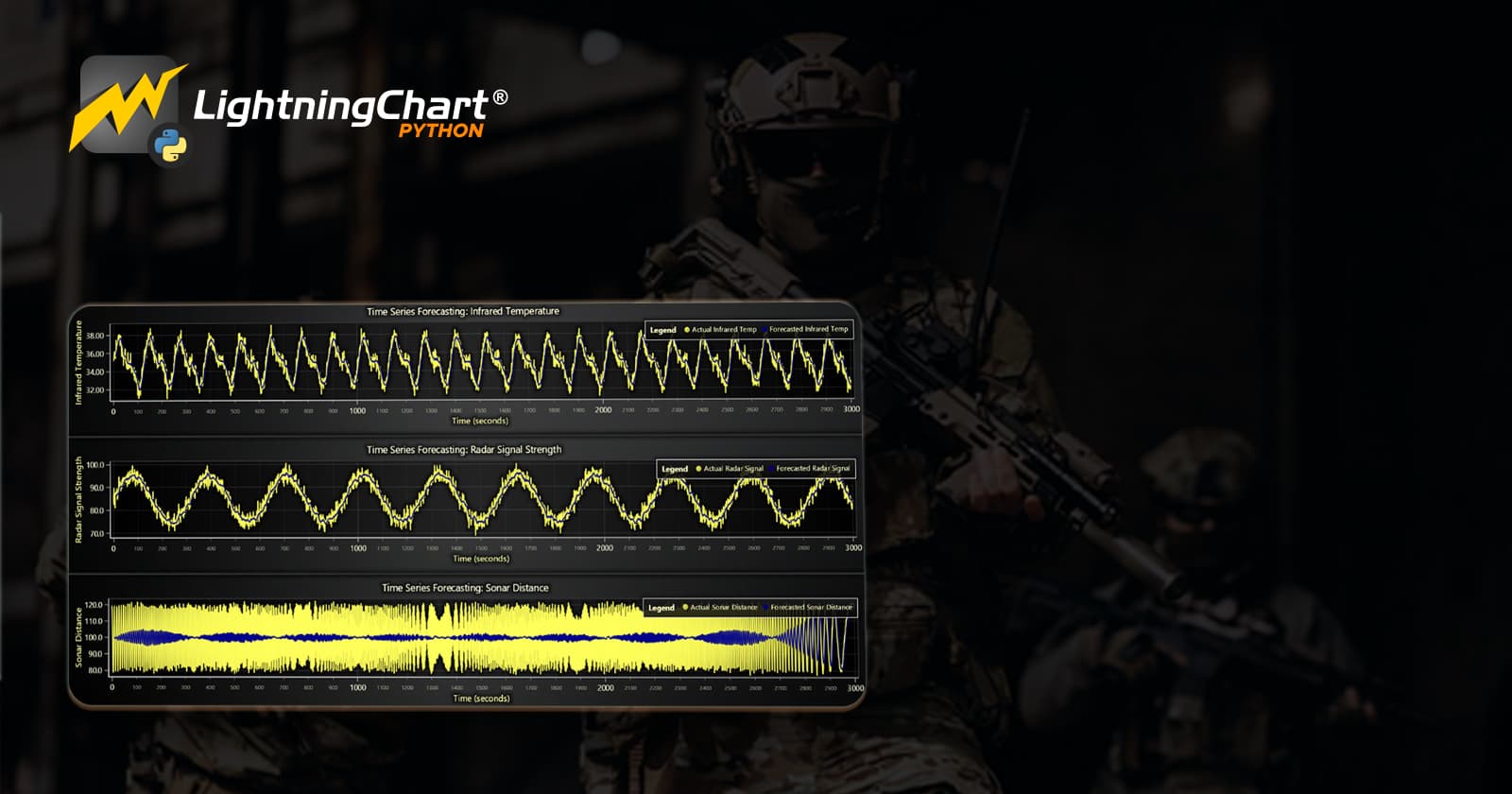
This code processes real-time sensor data, applying a rolling average method to predict future values for infrared temperature, radar signal strength, and sonar distance. The dashboard consists of three time-series charts, where yellow lines represent actual sensor readings, and blue lines show forecasted values.
The results indicate periodic patterns in infrared temperature and radar signal strength, while sonar distance exhibits higher variance, suggesting more fluctuations in its measurements. The forecast closely follows the actual data, demonstrating the effectiveness of time-series forecasting for sensor analysis.
sensor_data["timestamp"] = pd.to_datetime(sensor_data["timestamp"])

sensor_data = sensor_data.sort_values("timestamp")

sensor_values = sensor_data[["timestamp", "infrared_temperature", "radar_signal_strength", "sonar_distance"]].copy()

window_size = 10
sensor_values.loc[:, "infrared_forecast"] = sensor_values["infrared_temperature"].rolling(window=window_size).mean()
sensor_values.loc[:, "radar_forecast"] = sensor_values["radar_signal_strength"].rolling(window=window_size).mean()
sensor_values.loc[:, "sonar_forecast"] = sensor_values["sonar_distance"].rolling(window=window_size).mean()

dashboard = lc.Dashboard(rows=3, columns=1, theme=lc.Themes.Dark)

infrared_chart = dashboard.ChartXY(row_index=0, column_index=0)
infrared_chart.set_title("Time Series Forecasting: Infrared Temperature")

x_axis = infrared_chart.get_default_x_axis()
x_axis.set_title("Time (seconds)")

y_axis = infrared_chart.get_default_y_axis()
y_axis.set_title("Infrared Temperature")

actual_infrared = infrared_chart.add_line_series().set_name("Actual Infrared Temp")
forecast_infrared = infrared_chart.add_line_series().set_name("Forecasted Infrared Temp")
forecast_infrared.set_line_color(lc.Color(0, 0, 139))

for i in range(len(sensor_values)):
    actual_infrared.add(x=[i], y=[sensor_values.iloc[i]["infrared_temperature"]])
    forecast_infrared.add(x=[i], y=[sensor_values.iloc[i]["infrared_forecast"]])

legend = infrared_chart.add_legend(horizontal=True, title="Legend")
legend.add(actual_infrared)
legend.add(forecast_infrared)

radar_chart = dashboard.ChartXY(row_index=1, column_index=0)
radar_chart.set_title("Time Series Forecasting: Radar Signal Strength")

x_axis = radar_chart.get_default_x_axis()
x_axis.set_title("Time (seconds)")

y_axis = radar_chart.get_default_y_axis()
y_axis.set_title("Radar Signal Strength")

actual_radar = radar_chart.add_line_series().set_name("Actual Radar Signal")
forecast_radar = radar_chart.add_line_series().set_name("Forecasted Radar Signal")
forecast_radar.set_line_color(lc.Color(0, 0, 139))

for i in range(len(sensor_values)):
    actual_radar.add(x=[i], y=[sensor_values.iloc[i]["radar_signal_strength"]])
    forecast_radar.add(x=[i], y=[sensor_values.iloc[i]["radar_forecast"]])

legend = radar_chart.add_legend(horizontal=True, title="Legend")
legend.add(actual_radar)
legend.add(forecast_radar)

sonar_chart = dashboard.ChartXY(row_index=2, column_index=0)
sonar_chart.set_title("Time Series Forecasting: Sonar Distance")

x_axis = sonar_chart.get_default_x_axis()
x_axis.set_title("Time (seconds)")

y_axis = sonar_chart.get_default_y_axis()
y_axis.set_title("Sonar Distance")

actual_sonar = sonar_chart.add_line_series().set_name("Actual Sonar Distance")
forecast_sonar = sonar_chart.add_line_series().set_name("Forecasted Sonar Distance")
forecast_sonar.set_line_color(lc.Color(0, 0, 139))

for i in range(len(sensor_values)):
    actual_sonar.add(x=[i], y=[sensor_values.iloc[i]["sonar_distance"]])
    forecast_sonar.add(x=[i], y=[sensor_values.iloc[i]["sonar_forecast"]])

legend = sonar_chart.add_legend(horizontal=True, title="Legend")
legend.add(actual_sonar)
legend.add(forecast_sonar)

dashboard.open(live=True)
Real-Time Sensor Monitoring Dashboard
This dashboard visualizes real-time sensor data, including radar signal, infrared temperature, and sonar distance over time. The line chart displays sensor fluctuations, showing how readings change dynamically.
The gauge chart presents the average temperature and humidity, providing an intuitive view of environmental conditions. The heatmap illustrates signal interference intensity, where color variations indicate different interference levels. The combined view enables efficient monitoring and analysis of sensor performance and environmental impacts.
sensor_data["timestamp"] = pd.to_datetime(sensor_data["timestamp"])
environment_data["timestamp"] = pd.to_datetime(environment_data["timestamp"])

merged_data = pd.merge(sensor_data, environment_data, on="timestamp")

merged_data["time_only"] = merged_data["timestamp"].dt.strftime('%H:%M:%S')

merged_data["seconds_since_midnight"] = (
    merged_data["timestamp"].dt.hour * 3600 +
    merged_data["timestamp"].dt.minute * 60 +
    merged_data["timestamp"].dt.second
).astype(int)

interference_mapping = {"Low": 25, "Moderate": 50, "High": 100}
merged_data["signal_interference_numeric"] = merged_data["signal_interference_level"].map(interference_mapping)

dashboard = lc.Dashboard(theme=lc.Themes.Dark, rows=2, columns=2)

line_chart = dashboard.ChartXY(row_index=0, column_index=0, column_span=2)
line_chart.set_title("Real-time Sensor Data - 2024-01-01")

x_axis = line_chart.get_default_x_axis()
x_axis.set_title("Time (HH:MM:SS)")
x_axis.set_tick_strategy("Empty")

for i, seconds in enumerate(merged_data["seconds_since_midnight"].values):
    if seconds % 60 == 0:
        tick = x_axis.add_custom_tick()
        tick.set_value(int(seconds))
        tick.set_text(merged_data["time_only"].values[i])

line_chart.get_default_y_axis().set_title("Sensor Readings")

sensor_series = {
    "Radar Signal": line_chart.add_line_series().set_name("Radar Signal"),
    "Infrared Temperature": line_chart.add_line_series().set_name("Infrared Temperature"),
    "Sonar Distance": line_chart.add_line_series().set_name("Sonar Distance"),
}

legend = line_chart.add_legend(horizontal=False, title="Sensors")
for series in sensor_series.values():
    legend.add(series)

gauge_chart = dashboard.GaugeChart(row_index=1, column_index=0)
gauge_chart.set_title("Average Temperature & Humidity (Time: --:--:--)")
gauge_chart.set_angle_interval(start=225, end=-45)
gauge_chart.set_interval(start=0, end=100)

gauge_chart.set_value_indicators([
    {'start': 0, 'end': 25, 'color': lc.Color("blue")},
    {'start': 25, 'end': 50, 'color': lc.Color("yellow")},
    {'start': 50, 'end': 75, 'color': lc.Color("orange")},
    {'start': 75, 'end': 100, 'color': lc.Color("red")},
])
gauge_chart.set_bar_thickness(10)
gauge_chart.set_value_indicator_thickness(5)

heatmap_chart = dashboard.ChartXY(row_index=1, column_index=1)
heatmap_chart.set_title("Signal Interference Heatmap - 2024-01-01")

heatmap_chart.get_default_x_axis().set_title("Time (HH:MM:SS)")
heatmap_chart.get_default_y_axis().set_title("Signal Intensity")

heatmap_x_axis = heatmap_chart.get_default_x_axis()
heatmap_x_axis.set_tick_strategy("Empty")

for i, seconds in enumerate(merged_data["seconds_since_midnight"].values):
    if seconds % 120 == 0:
        tick = heatmap_x_axis.add_custom_tick()
        tick.set_value(int(seconds))
        tick.set_text(merged_data["time_only"].values[i])

heatmap_series = heatmap_chart.add_heatmap_scrolling_grid_series(
    resolution=500,
    scroll_dimension='columns',
)
heatmap_series.set_start(0, 0)
heatmap_series.set_step(1, 1)
heatmap_series.hide_wireframe()
heatmap_series.enable_data_cleaning(True)

heatmap_series.set_palette_coloring(
    steps=[
        {'value': 0, 'color': lc.Color(0, 0, 255)},  # Blue for low interference
        {'value': 50, 'color': lc.Color(0, 255, 0)},  # Green for moderate
        {'value': 100, 'color': lc.Color(255, 0, 0)},  # Red for high interference
    ],
    look_up_property="value",
    percentage_values=False
)

def update_dashboard():
    timestamps = merged_data["seconds_since_midnight"].astype(int).values
    time_labels = merged_data["time_only"].values
    radar_values = merged_data["radar_signal_strength"].astype(float).values
    infrared_values = merged_data["infrared_temperature"].astype(float).values
    sonar_values = merged_data["sonar_distance"].astype(float).values
    temp_values = merged_data["temperature"].astype(float).values
    humidity_values = merged_data["humidity"].astype(float).values
    signal_interference = merged_data["signal_interference_numeric"].astype(float).values

    for i in range(len(timestamps)):
        x_value = int(timestamps[i])
        radar_y = float(radar_values[i])
        infrared_y = float(infrared_values[i])
        sonar_y = float(sonar_values[i])


        sensor_series["Radar Signal"].add(x=[x_value], y=[radar_y])
        sensor_series["Infrared Temperature"].add(x=[x_value], y=[infrared_y])
        sensor_series["Sonar Distance"].add(x=[x_value], y=[sonar_y])


        avg_temp_humidity = float((temp_values[i] + humidity_values[i]) / 2)
        gauge_chart.set_value(avg_temp_humidity)
        gauge_chart.set_title(f"Average Temperature & Humidity (Time: {time_labels[i]})")

        heatmap_series.add_intensity_values([[float(signal_interference[i]) for _ in range(500)]])

        time.sleep(0.001)

dashboard.open(live=True)
update_dashboard()
Conclusion
The analysis of sensor data through advanced visualization techniques provides valuable insights into environmental conditions, sensor performance, and predictive modeling.
By leveraging real-time monitoring, time-series forecasting, machine learning-based classification, and interference heatmaps, this study highlights the intricate relationships between sensor readings, weather conditions, and external interferences.
The findings suggest that weather conditions significantly influence sensor accuracy, with sonar distance being the most affected parameter. Predictive models demonstrate strong pattern recognition capabilities, enabling proactive decision-making in dynamic environments.
Real-time dashboards further enhance situational awareness, allowing for immediate responses to fluctuations in environmental variables.
By utilizing LightningChart’s high-performance rendering, we achieve smooth, interactive, and visually compelling representations of complex datasets.
These insights can drive improvements in sensor optimization, environmental monitoring, and predictive analytics, contributing to more efficient and reliable decision-making in industrial and scientific applications.
Continue learning with LightningChart

Best WPF Charting Library
Written by a human | Updated on April 10th, 2025What is the best WPF charting library? WPF (Windows Presentation Foundation) is a graphical subsystem in .NET for building Windows desktop applications. It provides rich graphical capabilities, allowing developers...
Choosing the right XY line series
LightningChart .NET features 10 different line series. Read more about their characteristics and functionalities and choose the best for your app.

JavaScript Refreshing Spectrum Chart
Written by a human | Updated on April 10th, 2025JavaScript Refreshing Spectrum Chart Hello again, this time I bring a quick but helpful tutorial on how to create a JavaScript refreshing spectrum chart. A spectrum chart is commonly used in reading and plotting...



If you have any questions, feel free to contact us!



©LightningChart Ltd 2026. All rights reserved.