





LightningChart JS Trader3 Point Moving Averages Indicator with LightningChart JS Trader for Financial Analysis
ArticleReviewing Moving Averages indicator for financial technical analysis
Written by a human | Updated on April 24th, 2025
Moving Averages
Moving averages (MAs) are one of the most commonly used technical indicators in trading and finance. They help traders and analysts smooth out price data, identify trends, and make predictions. This guide will cover the basics of moving averages, explore their types, explain how they’re used in financial markets, and touch on how to implement them using LC JS Trader. Whether you are a beginner or an advanced trader, understanding these moving averages will be invaluable to your trading strategy.
What Are Moving Averages?
A moving average (MA) is a statistical tool that calculates the average of a set number of previous series data points—typically price points in a time-ordered series. This helps traders reduce short-term noise from market prices, focusing on long-term trends. While there are different types of moving averages, how they function in trading is essentially the same—the only difference lies in their mathematical formulas.
The most commonly used moving averages are:
- Simple Moving Average (SMA)
- Exponential Moving Average (EMA)
- Weighted Moving Average (WMA)
Three-Point Moving Average (3-Point MA)
A simple and intuitive example of a moving average is the three-point moving average, which calculates the average of the most recent three data points. This short period makes it very responsive to recent price changes, helping traders quickly identify short-term trends and fluctuations. While less common for long-term analysis, the 3-point moving average is useful for smoothing out very short-term noise and spotting immediate market movements.
Other types, like the Time Series Moving Average (TSMA), Variable Moving Average (VMA), and Variable Index Dynamic Average (VIDYA), cater to more specific needs but still follow the same basic principles.
PeriodCount Property
One key property of all moving averages is the PeriodCount, which specifies how many previous values the average is based on. For example, a 20-day SMA averages the prices from the last 20 days. This property plays a crucial role in smoothing out price data and determining how responsive the moving average is to new price movements.
Relevance for Stock Market Analysis
- Trend Identification: Moving averages are essential for spotting upward (bullish) and downward (bearish) trends. By smoothing out fluctuations, they reveal the general direction of the market. For example, a rising moving average suggests an uptrend, while a declining one indicates a downtrend.
- Support and Resistance Levels: Moving averages often act as dynamic support and resistance levels. Traders use these to gauge potential areas where a stock might find support during a downtrend or face resistance during an uptrend.
- Buy and Sell Signals: Traders often use moving averages to generate buy or sell signals. For instance, when a short-term moving average (like a 50-day SMA) crosses above a long-term moving average (like a 200-day SMA), it may signal a buying opportunity, commonly referred to as a golden cross. Conversely, when a short-term average crosses below a long-term average (a death cross), it could indicate a selling opportunity.
- Market Volatility: Volatility-based moving averages like the VMA and VIDYA are used in volatile markets to dynamically adjust the smoothing of the average, ensuring that traders can react to changes in market conditions more effectively.
Simple Moving Average (SMA)
There are nine types of moving averages applied in LightningChart JS Trader that traders can use, each with a unique way of calculating averages but with the same overall purpose of analyzing price trends. Let’s briefly explore each type.
The Simple Moving Average (SMA) calculates the arithmetic mean of a set of data points over a specified period. For instance, a 14-day SMA averages the closing prices of the last 14 days. The SMA is straightforward but may not react as quickly to price changes as some other averages. Generally, it indicates the average of a security’s closing price over several periods (periodCount: default number = 14).

Calculations:
Here’s how you can calculate the 5-day SMA for a stock as an example: Prices over the last 5 days: 100, 102, 104, 106, 108
Formula:
SMA = (Price1 + Price2 + Price3 + Price4 + Price5) / 5
SMA = (100 + 102 + 104 + 106 + 108) / 5 = 520 / 5 = 104

// Result: The 5-day SMA is 104.
Exponential Moving Average (EMA)
The Exponential Moving Average (EMA) gives more weight to recent prices, making it more responsive to new information compared to the SMA. This is ideal for traders who want to capture trends more quickly. It adds a percentage of the closing price to a percentage of the moving average value of the previous day (periodCount: default number = 14).

Calculations:
To calculate the EMA, we first need the SMA as the initial EMA value. Then, we use the following formula:
EMA_today = (Price_today - EMA_yesterday) × Multiplier + EMA_yesterday
Multiplier = 2 / (Period + 1)
Example (5-day EMA):
Using the same price data as above (100, 102, 104, 106, 108), let’s assume the previous EMA value is 104 (from the SMA example above).
Step 1: Calculate the multiplier:
Multiplier = 2 / (5 + 1) = 2 / 6 = 0.333Step 2: Calculate the EMA for the next day (price = 108):
EMA_today = (108 - 104) × 0.333 + 104
EMA_today = 4 × 0.333 + 104 = 1.332 + 104 = 105.332

// Result: The 5-day EMA for the next day is 105.33.
Weighted Moving Average (WMA)
The Weighted Moving Average (WMA) assigns more importance to recent data points by multiplying each price by a weighting factor. This makes the WMA more sensitive to recent price movements, compared to the SMA. It places more weight on recent data values by multiplying the previous day’s data value by a weighting factor, based on the moving average of a set number of days (periodCount: default number = 14).

Calculations:
The Weighted Moving Average (WMA) gives more weight to recent data points. In this example, we’ll calculate the 3-day WMA for stock prices.
Example:
Prices over the last 3 days: 100, 105, 110. We assign weights: 1 (oldest), 2, and 3 (newest).
Formula:
WMA = (Price1 × 1 + Price2 × 2 + Price3 × 3) / (1 + 2 + 3)Calculation
WMA = (100 × 1 + 105 × 2 + 110 × 3) / (1 + 2 + 3)
WMA = (100 + 210 + 330) / 6 = 640 / 6 = 106.67

// Result: The 3-day WMA is 106.67
Time Series Moving Average (TSMA)
Also known as the Least Squares Moving Average. TSMA fits a linear regression line through the past prices and uses it to predict the next value. It is more complex but offers a unique way to smooth data over time (periodCount: default number = 25).

The Time Series Moving Average (TSMA) is based on the idea of fitting a straight line through a set of data points (in this case, stock prices) over a specific period and using that line to predict future values. Let’s break it down into a simple approach:
To simplify, you can think of TSMA as taking the prices over a certain period, fitting a trend line (a straight line that best represents the data), and predicting the next value based on this trend. Here’s a simple formula you can use to calculate the slope (rate of change):

Then, to calculate the next value (TSMA), use:

Example of TSMA Calculation (5-Day):
Prices over the last 5 days: 100, 102, 104, 106, 108
Step 1: Calculate the slope:
Price difference = Price on Day 5 - Price on Day 1
Price difference = 108 - 100 = 8

...

Day difference = Day 5 - Day 1 = 5 - 1 = 4

...

Slope = Price difference / Day difference = 8 / 4 = 2
Step 2: Predict the price for the next day (Day 6):
Next Value (TSMA) = Current Price (Day 5) + (Slope × 1)
Next Value (TSMA) = 108 + (2 × 1) = 108 + 2 = 110

// Result: The predicted price for Day 6 using the Time Series Moving Average (TSMA) is 110.
Triangular Moving Average (TMA)
The Triangular Moving Average (TMA) is a double-smoothed SMA, giving more weight to the middle section of the data. This makes it more resistant to short-term fluctuations while providing a clearer trend signal (periodCount: default number = 20).

Formula

- n: is the number of periods (e.g., 5 days).
- Sum of Prices: is the sum of the stock prices for n periods.
Example (5-day TMA):
Step 1: Calculate the SMA for 5 days (100, 102, 104, 106, 108):
Sum of Prices = 100 + 102 + 104 + 106 + 108 = 520We have n = 5 (the number of days).

Result: The 5-day Triangular Moving Average (TMA) for the given prices is 86.67.
Variable Moving Average (VMA)
The Variable Moving Average (VMA) adjusts its smoothing based on the volatility of the price. It uses the Chande Momentum Oscillator to measure volatility, making it more dynamic in fast-moving markets. The VMA is often confused with the Variable Index Dynamic Average (VIDYA), which uses a standard deviation for volatility measurement (periodCount: default number = 9).

The general formula for VMA involves calculating the Exponential Moving Average (EMA) and applying a dynamic adjustment using the Chande Momentum Oscillator (CMO).
Step 1: CMO Calculation (Chande Momentum Oscillator):
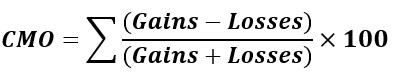
- Gains: The sum of price increases over a given period.
- Losses: The sum of price decreases over the given period.
Step 2: VMA Calculation:

- VMA_t: The Variable Moving Average at time t.
- VMA_{t-1}: The previous day’s VMA.
- Price_t: The current day’s price.
- α (Alpha): This is the smoothing factor, which is adjusted based on market volatility. For VMA, α is modified dynamically using the Chande Momentum Oscillator (CMO).
Example (5-day VMA):
100, 102, 104, 106, 108
Step 1: Calculate the Chande Momentum Oscillator (CMO) for 5 days:
- Gains:
- Day 2: +2 (102 – 100),
- Day 4: +4 (105 – 101),
- Day 5: +5 (110 – 105)
- Losses:
- Day 3: -1 (101 – 102)
- CMO:

Step 2: Adjust the Smoothing Factor (α) Based on CMO
- Assume that α is adjusted between 0.05 and 0.15 depending on the CMO value.
- Given the high CMO value (81.82), α could be set closer to 0.15, indicating a stronger trend.
Step 3: Calculate the VMA for Day 6 Let’s assume the previous day’s VMA (Day 5) was 105, and the current day’s price (Day 6) is 112. Using the formula:
- VMA6=105+0.15×(112−105)
- VMA6=105+0.15×7=105+1.05=106.05
Result: The Variable Moving Average (VMA) for Day 6 is 106.05, calculated using a dynamically adjusted smoothing factor based on the CMO.
Variable Index Dynamic Average (VIDYA)
The Variable Index Dynamic Average (VIDYA) is similar to the VMA but uses standard deviation to calculate volatility. This results in a moving average that adapts to changing market conditions more fluidly (periodCount: default number = 9).

The formula for VIDYA:
VIDYAt=VIDYAt−1+α×(Pricet−VIDYAt−1)
- VIDYA_t: The VIDYA value at time t (current day).
- VIDYA_{t-1}: The VIDYA value at time t-1 (previous day).
- Price_t: The current day’s price.
- α (Alpha): The smoothing factor, dynamically adjusted based on volatility (using standard deviation).
Example (5-day VMA):
100, 102, 101, 105, 110
We will calculate the VIDYA for Day 6 using the data from the previous 5 days.
Step 1: Calculate Standard Deviation (Volatility Measure)
To adjust the smoothing factor α, we first calculate the standard deviation of price changes over the past 5 days.
- Calculate the average price:

- Calculate the variance (average squared deviation from the mean):

- Calculate the standard deviation:

Step 2: Adjust Smoothing Factor (α)
Let’s assume that α is set dynamically between 0.05 and 0.15, depending on volatility. With the standard deviation calculated as 3.61, which indicates moderate volatility, we can adjust α. Let’s assume the value of α for this level of volatility is 0.10.
Step 3: Calculate VIDYA for Day 6
Now, suppose the VIDYA for Day 5 (the previous day) was 107, and the price for Day 6 was 112. We can calculate the VIDYA for Day 6 using the formula:
VIDYA6=VIDYA5+α×(Price6−VIDYA5)
VIDYA6=107+0.10×(112−107)
VIDYA6=107+0.10×5=107+0.5=107.5
Result: The VIDYA for Day 6 is 107.5.
Volume-Weighted Moving Average (VWMA)
The Volume-Weighted Moving Average (VWMA) takes into account the trading volume when calculating the average, giving more weight to periods with higher trading activity. This can provide a more accurate reflection of price trends in high-volume markets (periodCount: default number = 20).
Formula:

Example:
- Prices: 100, 102, 104
- Volumes: 200, 180, 220

Result: The VWMA is 102.07.
Welles Wilder’s Smoothing (WWS)
Welles Wilder’s Smoothing (WWS) is a moving average that smoothens price movements (smoothing factor of 1/n), helping traders identify bullish and bearish trends more easily. It was created by Welles Wilder, the developer of the Relative Strength Index (RSI), and is particularly useful in trending markets (periodCount: default number = 14).
Example (5-day WWS):
If the prices are 100, 102, 104, 106, or 108, the WWS formula is very similar to the EMA but uses Wilder’s smoothing constant.
Formula:
WWS_today = (Price_today - WWS_yesterday) × (1 / n) + WWS_yesterdayAssuming a previous value of 104:
WWS_today = (108 - 104) × (1 / 5) + 104 = 4 × 0.2 + 104 = 104.8

// Result: The 5-day WWS is 104.8.
How Are Moving Averages Used in Financial Markets?
Forecasting
Moving averages are frequently used in forecasting because they help smooth out price data and reveal long-term trends. Traders rely on them to predict future price movements based on past performance.
Crossing Moving Averages and Crossover Strategies
A widely used trading strategy is the moving average crossover, where a short-term moving average crosses above or below a long-term moving average.
- Bullish crossover: When a short-term MA crosses above a long-term MA, it indicates an upward trend, signaling a potential buying opportunity.
- Bearish crossover: When a short-term MA crosses below a long-term MA, it suggests a downward trend, indicating a selling signal.
Volatility-Based Moving Averages
Volatility-adjusted moving averages like the VMA and VIDYA adapt to changes in price volatility, making them valuable in fast-moving or highly volatile markets. This ensures that the moving average reflects current market conditions more accurately than fixed-period averages.
How to Create the Technical Indicator Using LC JS Trader
Step 1: Get LightningChart JS Trader
To begin, you’ll need access to LightningChart JS Trader. This library provides the tools necessary to create advanced technical indicators, including different Moving Averages. Visit the LightningChart JS Trader page to download the required components and documentation.
Step 2: Review the Interactive Example
LightningChart JS Trader includes interactive examples that demonstrate how to create custom technical indicators. Start by reviewing the documentation, focusing on how to integrate different Moving Averages into your chart setup. The interactive examples will guide you through the process of setting up different MAs, from importing the necessary modules to modifying the chart settings.
Step 3: Code Explanation
In this step, we will break down the code that creates the chart with different Moving Averages indicators, as shown in the image, using LightningChart JS Trader. The code demonstrates how to initialize a trading chart, apply a kind of MA indicator, and customize its appearance.

Here’s a detailed breakdown of each section:
A. Importing the Required Libraries:
const lcjsTrader = require('@arction/lcjs-trader')
const lcjs = require('@arction/lcjs')
const { Themes } = lcjs- lcjsTrader: This library provides access to the LightningChart JS Trader functionalities, allowing you to create advanced financial charts.
- lcjs: The main LightningChart JS library, used for general charting functionality.
- Themes: A property within lcjs that provides access to pre-built themes. In this case, we are using the
darkGoldtheme to style the chart.
B. Initializing the Trading Chart:
lcjsTrader.trader(TRADER_LICENSE).then(async (trader) => {
    // Create a trading chart.
const tradingChart = trader.tradingChart({ loadFromStorage: false, colorTheme: Themes.darkGold })- trader(TRADER_LICENSE): Initializes the LightningChart JS Trader with the provided license key (TRADER_LICENSE). This is required to access the charting functionalities for financial data. Note you can request a LightningChart JS Trader trial license, which is free.
tradingChart(): This function creates a trading chart with certain options. In this example:loadFromStorage: false: This disables the loading of previously stored chart data from local storage, ensuring a fresh chart setup.colorTheme: Themes.darkGold: This applies the darkGold theme to the chart, which influences the background color, grid lines, and other visual elements.
C. Adding and Customizing a Simple Moving Average Indicator as an example
    // Add a Simple Moving Average indicator with time period count of 10.
    tradingChart.indicators().addSimpleMovingAverage(10)

    // Adding another SMA with an alternative way of setting the period count.
    const sma20 = tradingChart.indicators().addSimpleMovingAverage()
    sma20.setPeriodCount(20)
    sma20.setLineColor('#80FF00') //Green
sma20.setLineWidth(4)addSimpleMovingAverage(10): Adds a Simple Moving Average (SMA) with a period of 10, which calculates the average price over the last 10 data points and displays it as a line on the chart. The last 10 data points are the 10 most recent data points from the time series of the chart (whether hourly, daily, weekly, etc.) that are used to calculate the moving average.
const sma20 = tradingChart.indicators().addSimpleMovingAverage(): Adds another SMA, initially without specifying the period, allowing for further customization.
setPeriodCount(20): Sets the period for the second SMA to 20, calculating the average price over the last 20 data points.
setLineColor('#80FF00'): Sets the line color of the second SMA to green (#80FF00), making it visually distinct on the chart.
setLineWidth(4): Increases the line thickness of the second SMA to 4 pixels, making the line more prominent on the chart.
D. Adding and Customizing an Exponential Moving Average Indicator as an example
// Add an Exponential Moving Average indicator with time period count of 14.
  tradingChart.indicators().addExponentialMovingAverage(14)

  // Adding another EMA with an alternative way of setting the period count.
  const ema30 = tradingChart.indicators().addExponentialMovingAverage()
  ema30.setPeriodCount(30)
  ema30.setLineColor('#800FF0') //Purple
ema30.setLineWidth(4)addExponentialMovingAverage(14): Adds an Exponential Moving Average (EMA) with a period of 14, which gives more weight to recent data points over the last 14 periods.
const ema30 = tradingChart.indicators().addExponentialMovingAverage(): Adds another EMA without specifying the period initially, allowing for further customization.
setPeriodCount(30): Sets the period for the second EMA to 30, calculating the weighted average over the last 30 data points.
setLineColor('#800FF0'): Sets the line color of the second EMA to purple (#800FF0), making it stand out against other chart elements.
setLineWidth(4): Increases the line thickness of the second EMA to 4 pixels, making it easier to see on the chart.
E. Loading Data from a CSV File
    // Reading data from a file.
    await fetch(`${document.head.baseURI}examples/assets/0000/Alphabet Inc (GOOGL).csv`).then((res) => res.text()).then((text) => {
        tradingChart.readCsvString(text, 'Alphabet Inc (GOOGL)')
})fetch(): This function retrieves a CSV file containing historical data for Alphabet Inc. (GOOGL). The CSV file includes pricing information for the company’s stock, which is plotted on the chart.
readCsvString(): This function reads the CSV data and interprets it as pricing data for Alphabet Inc. The second argument (‘Alphabet Inc (GOOGL)’) sets the label for the chart, as seen at the top of the chart image.
F. Setting the Currency for the Chart
tradingChart.setCurrency('USD')
})setCurrency('USD'): This sets the currency of the chart to USD, ensuring that the pricing data is interpreted and displayed in US dollars.
In summary, once the code is executed, the chart is created, and the SMA and EMA indicators are applied to the price data for Alphabet Inc. (GOOGL). The yellow and green lines in the chart represent the SMA indicator, one with time 10 and the second with 20; while the pink and purple lines highlight the EMA indicator in the chart with the same period.
Advantages and Limitations of MAs
Advantages:
- Simplicity: MAs are easy to calculate and interpret, making them accessible to both beginner and advanced traders.
- Trend Identification: They are excellent for identifying long-term trends in market prices.
- Customizable: The PeriodCount property allows for flexibility in adjusting moving averages to fit specific market conditions.
Disadvantages:
- Lagging Indicator: MAs are based on historical data, which may cause delays in responding to sudden price movements.
- False Signals: In flat or sideways markets, moving averages may generate misleading signals, especially when volatility is low.
Conclusion
This technical indicator is a powerful tool in technical analysis, helping traders identify trends, forecast price movements, and make informed trading decisions. While there are various types of moving averages such as Simple Moving Average (SMA), Exponential Moving Average (EMA), and Variable Moving Average (VMA), their purpose remains the same. Whether you are using an EMA to capture short-term movements or a VMA to adjust for volatility, moving averages are an essential component of any trader’s toolkit.
Key Takeaways:
- Smooth out price fluctuations, helping traders focus on trends.
- The Simple Moving Average (SMA), Exponential Moving Average (EMA), and Weighted Moving Average (WMA) are the most commonly used moving averages.
- Advanced moving averages like VIDYA and VMA adjust their smoothing based on market volatility, making them useful in fast-moving markets.
- LC JS Trader provides a flexible platform for implementing moving averages in real-time trading strategies.

Ahmad Omid
Data Science Developer


Continue learning with LightningChart
Motorsports Analytics
Updated on April 10th, 2025 | Written by human Motorsports Analytics Large companies in the motorsports industry are collecting huge volumes of real-time data coming from different sources on and off the pitch during racing competitions. These data are both...
High-Performance Charting Controls for Fintech App Development
Written by a human | Updated on April 10th, 2025Charting Controls for Fintech Apps Money makes the world go round and as such, tracking and controlling financial transactions and information are some of the most important activities to do for any...
Data Visualization in Medical & Healthcare Applications
Written by a human | Updated on April 10th, 2025Charting Controls for Medical Healthcare Data Visualization Applications The fact that data and data visualization are everywhere in today's world, makes me wonder how data visualization impacts medical...



If you have any questions, feel free to contact us!



©LightningChart Ltd 2026. All rights reserved.