



LightningChartFlow Cytometry Graphs for Scientific Data Analysis
ArticleFlow cytometry is a powerful technique used in various scientific fields such as biology and medicine.
Written by a human | Updated on April 24th, 2025
Introduction to Flow Cytometry Graphs
Flow cytometry is a powerful technique used in various fields of biology and medicine to analyze multiple characteristics of individual cells within a heterogeneous population. By measuring characteristics such as size, complexity, and fluorescence intensity, flow cytometry allows researchers to gather large amounts of data from individual cells within a sample. At the heart of this analysis are flow cytometry graphs, which provide visual representations of the data collected from thousands or even millions of cells. These graphs are essential tools for researchers and clinicians alike, offering insights into cell populations, protein expression, and cellular processes.
Flow cytometry graphs play a crucial role in both research and diagnostics. In research, they help scientists investigate cellular mechanisms, study disease progression, and develop new therapies. In clinical settings, these graphs are instrumental in diagnosing diseases, monitoring treatment responses, and guiding patient care decisions.
What Are Flow Cytometry Graphs?
Flow cytometry graphs are visual plots that display data collected from flow cytometry experiments. These graphs help illustrate relationships between different cellular parameters, such as cell size and fluorescence intensity, making it easier to identify cell populations or analyze specific cellular behaviors. The data is usually represented in a scatter plot format, where each point corresponds to a single cell or particle in the sample.
Types of Flow Cytometry Graphs
Several types of graphs are used in flow cytometry, with scatter plots being the most common. The two main types of scatter plots are:
- Scatter Plot: This graph is used to differentiate cells based on size (Forward Scatter, FSC) and granularity or internal complexity (Side Scatter, SSC).
- Dot Plots: These display two parameters (e.g., FSC and fluorescence intensity) simultaneously, allowing for multidimensional analysis.
- Histograms: These graphs plot the frequency of a single parameter, such as fluorescence intensity, across the cell population.
- Density Plots: These show the distribution of data points and are often used to visualize crowded regions of the data.
Components of Flow Cytometry Graphs
Flow cytometry graphs contain several key components:
- Axes: The X and Y axes represent different parameters, such as forward scatter (X-axis) and side scatter (Y-axis), or fluorescence intensity.
- Data Points: Each dot or point represents an individual cell or particle measured during the flow cytometry process.
- Markers and Gates: Gates are drawn on the graph to define specific cell populations based on certain criteria (e.g., size or fluorescence). Markers are used to highlight significant events or populations within the data.
Quadrants: In dot plots, quadrants are often drawn to divide the graph into sections representing distinct populations or behaviors.
Importance of Accurate Interpretation
The accurate interpretation of flow cytometry graphs is crucial for several reasons:
- Research validity: Misinterpretation can lead to incorrect conclusions, potentially impacting the validity of research findings.
- Clinical decisions: In medical settings, flow cytometry graphs often guide diagnostic and treatment decisions. Accurate interpretation is vital for patient care.
- Data reproducibility: Proper understanding and interpretation of these graphs are essential for reproducing experimental results and comparing data across different studies.
Identifying rare cell populations: Careful analysis of flow cytometry graphs can reveal small but significant cell populations that might be overlooked with less rigorous examination.
Key Concepts in Flow Cytometry Graph Analysis
Several concepts are essential for interpreting flow cytometry graphs effectively:
- Fluorescence Intensity: Different fluorescent dyes are used to tag specific cell components. The intensity of the fluorescence signal indicates the abundance of the target molecule (e.g., a specific protein or antigen).
- Compensation: In multicolor flow cytometry, the fluorescent signals from different dyes may overlap, requiring compensation to adjust the data for accurate interpretation.
- Gating Strategy: Gates are set on the graph to select specific populations for further analysis. Correct gating is essential for distinguishing between relevant and irrelevant data.
Common Flow Cytometry Graph Patterns
- FSC vs. SSC Plot: Cells with high forward scatter and low side scatter are typically larger and less granular (e.g., lymphocytes), while cells with low forward scatter and high side scatter are smaller and more granular (e.g., granulocytes).
- Fluorescence vs. FSC Plot: This type of dot plot is often used to assess the expression of a specific marker in a population of cells. A shift in fluorescence intensity along the Y-axis indicates increased expression of the marker.
- Histograms: Peaks in histograms can indicate the presence of specific subpopulations within a cell sample, such as different levels of antigen expression.
Reading and Understanding Different Flow Cytometry Graphs
Interpreting flow cytometry graphs involves identifying patterns and using them to make meaningful conclusions. For example, a dot plot showing two distinct clusters of cells with different fluorescence intensities might indicate the presence of two different cell types or a population expressing a marker at varying levels. Additionally, gates and markers help isolate specific populations for detailed analysis.
Flow Cytometry Data Analysis with LightningChart Python
LightningChart Python is a data visualization library for the Python programming language. LightningChart Python allows you to see real-time or static data in interactive charts with high performance.
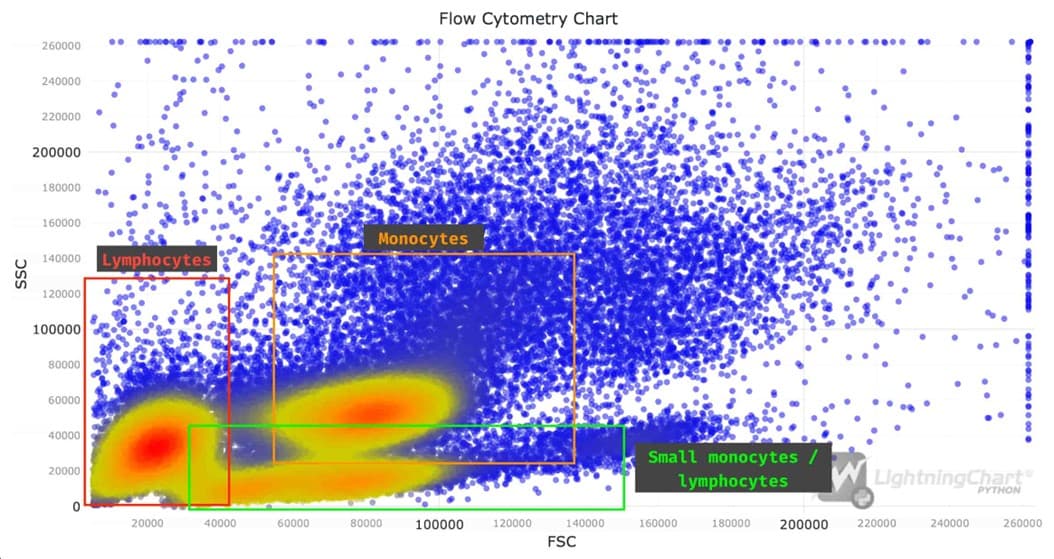
LightningChart Python can be used for Flow Cytometry Data Analysis. This article discusses how to perform flow cytometry data analysis, focusing on white blood cells. It covers setting up a Python environment, loading and processing datasets, and visualizing the data using LightningChart Python. Key tools include XY charts and Point Series, and the article walks through plotting a scatter plot of white blood cell characteristics based on flow cytometry metrics (FSC and SSC) with color-coded KDE values to highlight concentrations.
JavaScript Flow Cytometry Chart Example with LightningChart JS
LightningChart JS is a library for developing high-performance, dynamic data visualization apps. LightningChart enables developers to use high-level components to embed high-performant graphs into their JS applications with minimal effort. LightningChart offers online Interactive Examples, an easy-to-use exploration tool to help you get started quickly with the most important concepts. Here is an Interactive Example of a Flow Cytometry Chart with LightningChart JS.

Research Applications of Flow Cytometry Graphs
Flow cytometry graphs are integral to many research fields, including Immunology, Cancer research, Stem cell research and Microbiology.
- Immunology: Studying immune cell populations and their responses to stimuli.
- Cancer research: Analysing tumour cell characteristics and identifying cancer stem cells.
- Stem cell research: Monitoring differentiation processes and characterizing stem cell populations.
Microbiology: Investigating bacterial populations and their responses to antibiotics.
Clinical Applications
Flow cytometry is also widely used in clinical diagnostics, where flow cytometry graphs play a role in diagnosing diseases such as leukaemia, lymphoma, and HIV. By examining the expression of specific markers on blood cells, clinicians can identify abnormal cell populations and monitor disease progression. Flow cytometry graphs are also used to assess patient responses to treatment, allowing for personalized and timely adjustments to therapeutic regimens.
Conclusion
Flow cytometry graphs are a crucial tool for scientific data analysis, offering clear and detailed visualizations of cellular properties and behaviors. Understanding the key components, types of graphs, and proper interpretation techniques is essential for making informed decisions in both research and clinical settings. Whether it’s identifying cell populations in cancer research or diagnosing diseases in a clinical lab, the insights gained from flow cytometry graphs have a profound impact on scientific and medical advancements.
Key points to remember:
- Flow cytometry graphs come in various types, each offering unique advantages for data visualization.
- Understanding the components of these graphs is crucial for accurate interpretation.
- Proper analysis of flow cytometry graphs requires knowledge of key concepts like gating and compensation.
- These graphs have wide-ranging applications in both research and clinical settings.
As technology continues to advance, the importance of flow cytometry graphs in scientific data analysis is likely to grow, making proficiency in their interpretation an increasingly valuable skill for researchers and healthcare professionals alike.

Deepak Wagh
Senior Digital Marketing Associate


Continue learning with LightningChart

Trend Lines in Trading
Trend lines are among the simplest yet most powerful tools in technical analysis. They help traders visualize market direction, identify potential support and resistance levels, and make more informed trading decisions. Despite their simplicity, trend lines remain a...

Best Python Charting Library in 2026
Python's charting ecosystem is large, overlapping, and regularly misunderstood. Most comparison guides stop at Matplotlib, Plotly, and Seaborn. This one goes further: it covers what happens when your datasets grow large, your update rates increase, or your chart types...

Best TradingView Charting Library Alternative
TradingView's charting libraries are the most visible option for fintech developers. Visibility is not the same as capability. This guide is for developers who have hit the wall on candle count limits, watermark restrictions, branding requirements, real-time...



If you have any questions, feel free to contact us!



©LightningChart Ltd 2026. All rights reserved.





