





LightningChart JS TraderA Complete Guide to Trend Indicators in Financial Analysis
ArticleTrend indicators in help traders identify the direction and strength of stock price movements
Written by a human | Updated on April 24th, 2025
Introduction to Trend Indicators
In the world of financial markets, predicting stock price trends is essential for making informed trading decisions. Trend indicators play a vital role in technical analysis, helping traders identify the direction and strength of price movements. By focusing on the analysis of historical price data, trend indicators assist in detecting emerging trends, predicting reversals, and guiding trading strategies. In this article, we’ll provide an overview of trend indicators, and their importance in technical analysis, and introduce the 16 trend indicators available in LightningChart LC JS Trader.
What Are Trend Indicators?
Trend indicators are tools used in technical analysis to identify the overall direction of the market or a particular asset. Traders rely on these indicators to understand whether a stock, commodity, or other financial instrument is trending upwards, downwards, or moving sideways. Trend indicators are critical for determining the best technical indicator for trend reversal, providing insights into when a price trend may be about to change direction.
Stock trend predictions based on these indicators help traders make well-timed entry and exit decisions, improving the accuracy of their trades. While they do not guarantee profits, trend indicators are invaluable for spotting favourable market conditions and avoiding potential losses.
Trend Indicators Overview
LightningChart LC JS Trader offers a wide array of trend indicators, each designed to highlight different aspects of a price trend. Let’s briefly review the 16 trend indicators supported by the platform, focusing on their application in technical analysis trend indicators.
- Accumulative Swing Index (ASI)
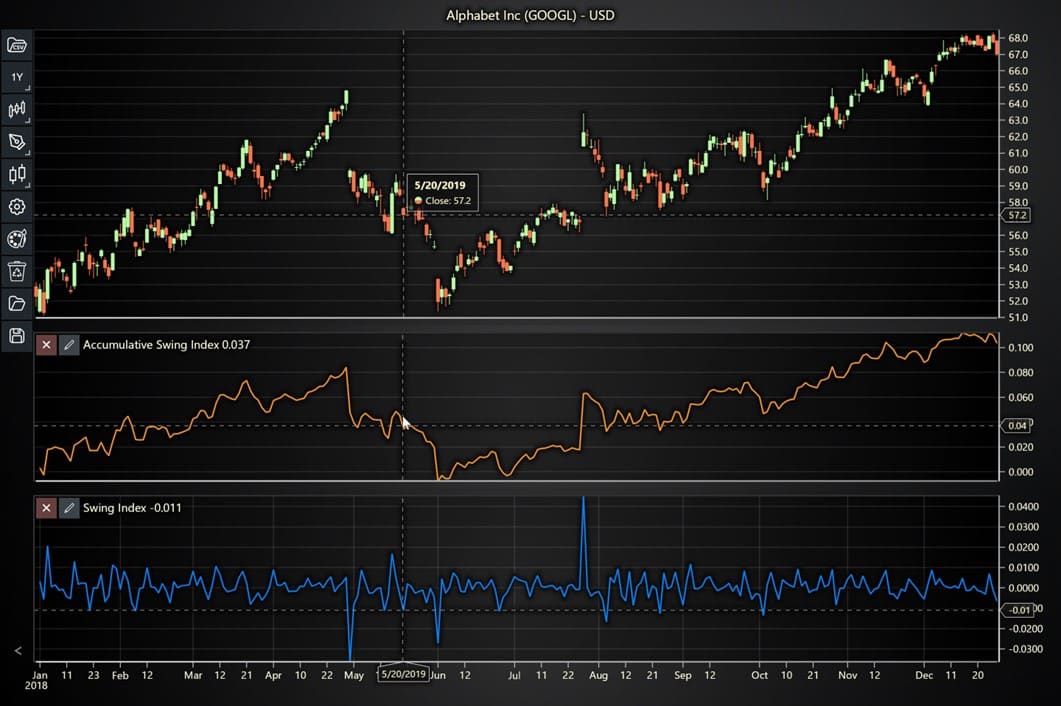
The Accumulative Swing Index (ASI) is used to measure long-term trends in prices by summing the values of the Swing Index over time. This cumulative value helps traders identify whether the current market trend is bullish or bearish. The ASI is particularly helpful for traders looking to understand trending indicators and technical analysis when seeking long-term market direction.
- Swing Index
The Swing Index (SI) helps detect the price trends of securities by analyzing price movements and volatility. It is often used in conjunction with the Accumulative Swing Index to provide a comprehensive view of the trend.
- Aroon Indicator
The Aroon Indicator identifies potential trend changes and measures the strength of trends. It consists of two lines, Aroon Up and Aroon Down, which respectively measure the strength of an uptrend and a downtrend. This indicator is useful for traders who aim to anticipate trend reversals, as it helps confirm whether the current trend is losing strength.

- Average Directional Index (ADX)
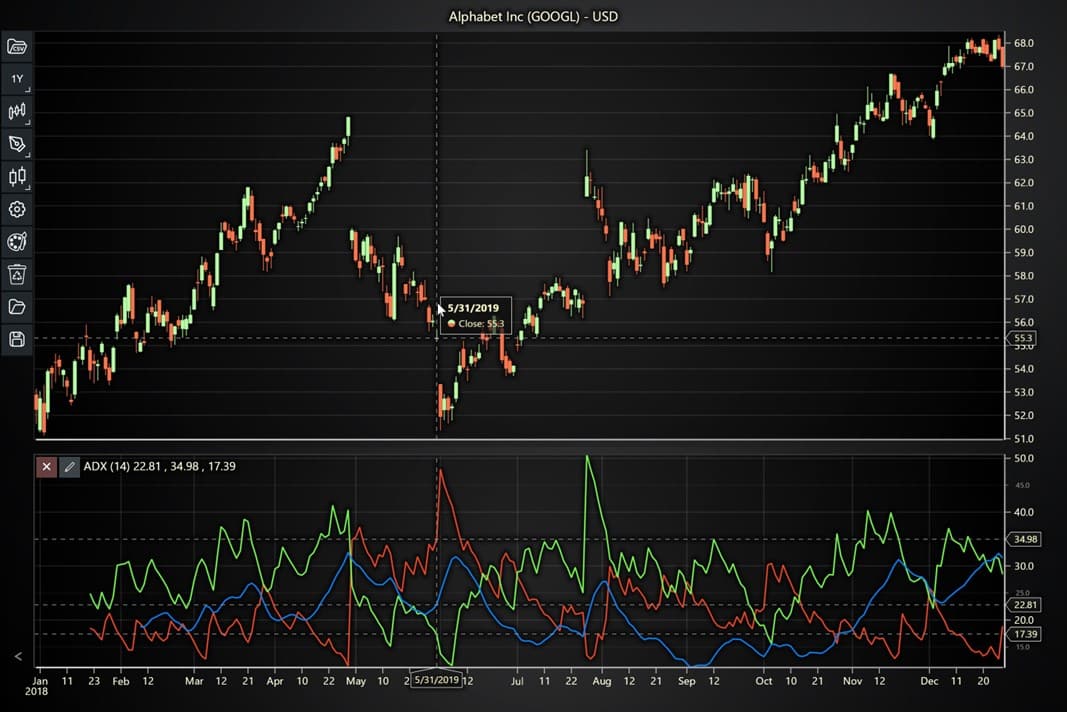
The Average Directional Index (ADX) measures the strength of a trend but does not indicate its direction. It works in conjunction with the Directional Movement Indicators (-DI and +DI), helping traders assess whether the market is trending strongly or weakly. A high ADX value indicates a strong trend, while a low value suggests a ranging market, making it one of the best trend indicators for technical analysis.
- Gopalakrishnan Range Index (GAPO)
The Gopalakrishnan Range Index (GAPO) measures market volatility by assessing the variability of price data over time. Although GAPO is not directly a trend indicator, its assessment of volatility helps traders understand when to expect sharp price movements, allowing them to better position themselves during trending markets.

- Ichimoku Cloud
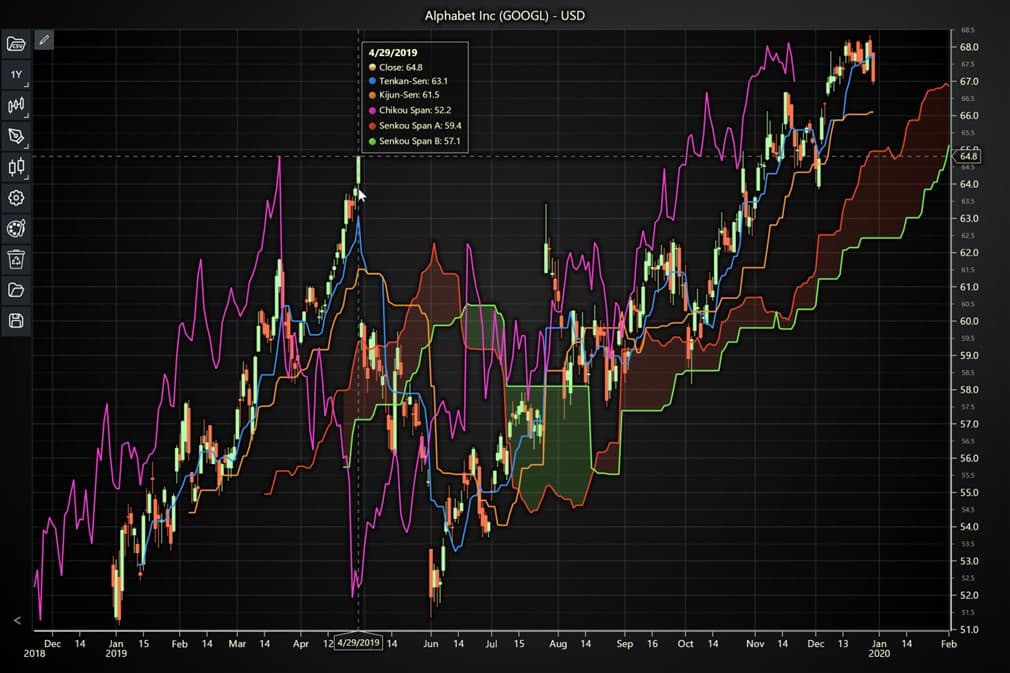
The Ichimoku Cloud is a comprehensive indicator combining several elements, including support and resistance levels, momentum, and trend direction. It helps traders by visually representing the market’s trend strength and potential reversals, making it a powerful tool in the technical analysis of trend indicators.
- Linear Regression
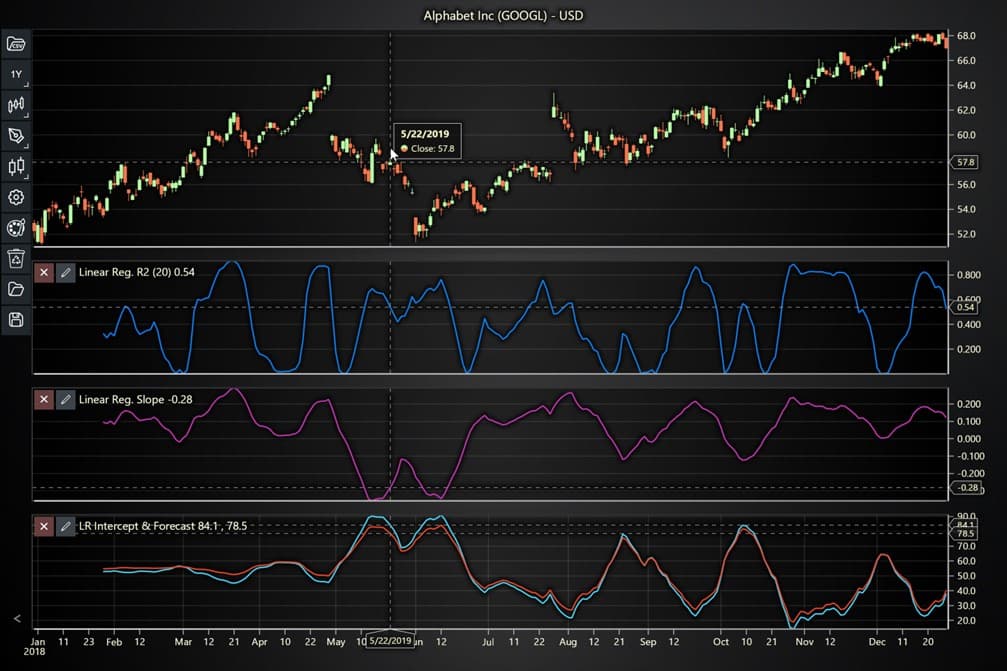
The Linear Regression indicator fits a trendline to price data, providing a clear visual of the trend’s slope. By calculating the best-fit line using the least squares method, Linear Regression offers insights into the trend’s direction and strength, helping traders use technical indicators for trending markets.
- Parabolic Stop and Reverse (PSAR)
The Parabolic Stop and Reverse (PSAR) indicator is designed to follow trends and highlight potential reversals. Appearing as dots either above or below price data, it indicates whether the market is in an uptrend or downtrend. Traders use PSAR to detect stock trend predictions and time their buy or sell decisions.

More Trend Indicators in LightningChart JS Trader
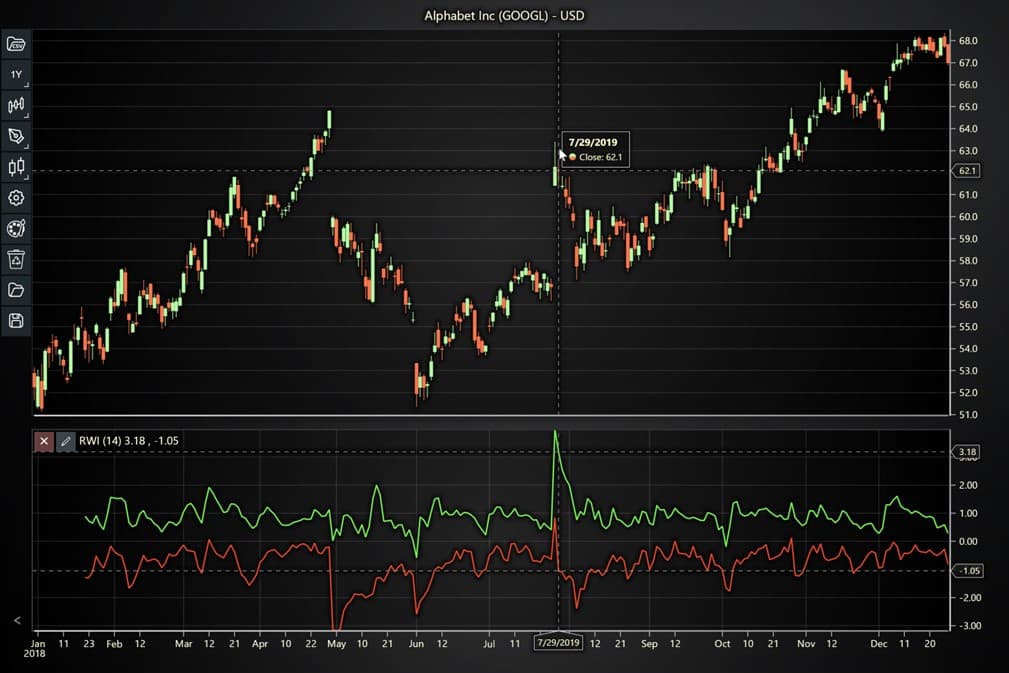
- Random Walk Index (RWI)
The Random Walk Index (RWI) compares actual price movements to random movements, determining if price changes are part of a meaningful trend. This indicator helps traders differentiate between random fluctuations and genuine trend technical indicators, making it a valuable tool for assessing trend strength.
- Range Action Verification Index (RAVI)
The Range Action Verification Index (RAVI) compares short-term and long-term moving averages to assess whether the market is trending. If the RAVI value rises, the market is trending; if it declines, the market is in a range, providing valuable insights for technical trend indicators.

- Schaff Trend Cycle (STC)
The Schaff Trend Cycle (STC) combines elements of the MACD and stochastic indicators to provide a signal line indicating both trend direction and potential reversals. The STC is often used to identify market trends and predict buy and sell signals.
- Schaff Trend Cycle Signal
The Schaff Trend Cycle Signal works similarly to the STC but focuses on the MACD signal line as the basis for stochastic calculations. This indicator offers traders an even more refined view of technical analysis trend indicators.

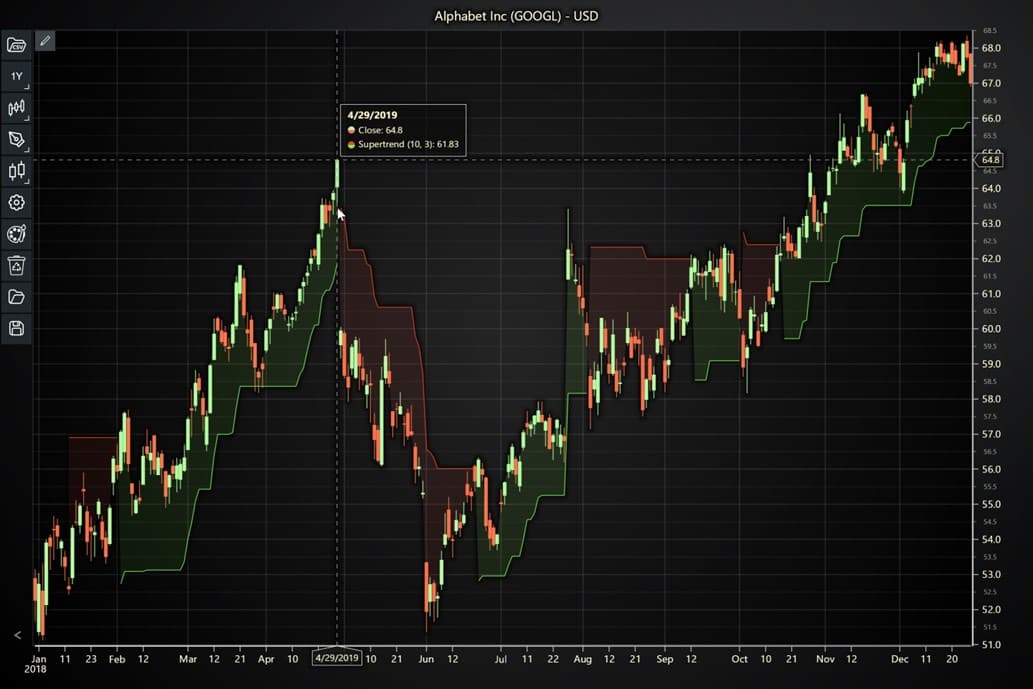
- Supertrend
The Supertrend is a simple but effective indicator designed to spot trends and signal buy and sell opportunities. It is plotted over price data and helps traders identify strong trend movements, making it one of the best trend indicators in technical analysis.
- System Quality Number (SQN) Trend
The System Quality Number (SQN) is typically used to evaluate the effectiveness of a trading strategy. When applied to daily price data, it helps measure the market’s overall trendiness, giving traders insights into trending indicators technical analysis.

- Triple Exponential Average (TRIX)
The Triple Exponential Average (TRIX) smooths price data over three periods to filter out insignificant price movements. It’s a versatile indicator used to detect trend reversals and measure momentum in technical analysis trend indicators.

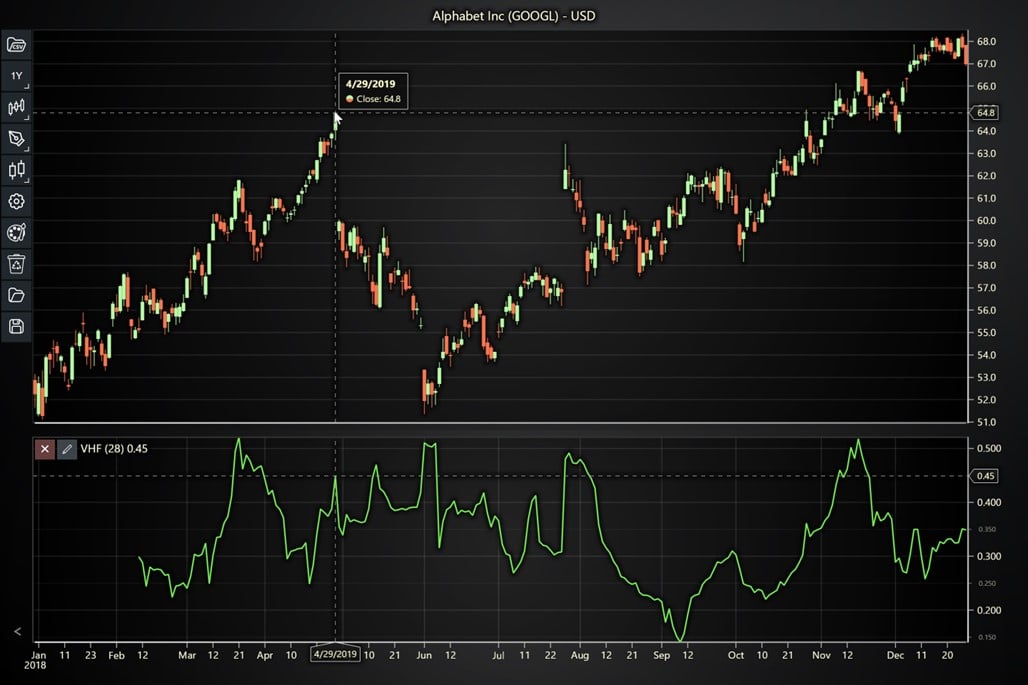
- Vertical Horizontal Filter (VHF)
The Vertical Horizontal Filter (VHF) distinguishes between trending and ranging markets, helping traders identify when a market is moving in a consistent direction versus when it is consolidating.
The Role of LightningChart JS Trader in Financial Analysis

Financial analysis involves examining historical data to forecast future trends, make informed decisions, and assess risk. In this domain, applications like LightningChart JS Trader serve a critical role by providing real-time, high-performance data visualization tools that help traders and analysts better interpret complex datasets. It enables traders to track market trends using built-in indicators.
The platform’s ability to handle large datasets and real-time updates makes it essential for fast decision-making in dynamic markets. Additionally, its customization options allow users to create tailored charts and apply statistical indicators, enhancing both the precision of analysis and risk management. This tool helps streamline financial analysis and supports more informed, data-driven trading strategies.
How Are Technical Indicators Used for Trending Markets?
Technical indicators, particularly trend indicators, are essential for traders when analyzing trending markets. In such markets, traders need to confirm trends, predict potential trend reversals, and make informed decisions about when to enter or exit trades. Let’s explore how some of the LC JS Trader trend indicators are used to analyze and navigate trending markets.
Accumulative Swing Index (ASI) for Long-Term Trends
The Accumulative Swing Index (ASI) is particularly effective in trending markets because it focuses on long-term price trends. It accumulates values over time to provide traders with a bigger picture of market behavior. The Swing Index (SI) itself detects price trends over shorter periods, but the ASI adds these movements together, offering a clearer indication of the overall trend direction. In technical trend indicators, the ASI allows traders to assess whether a trend is gaining strength or starting to reverse, which is critical in trending markets where early identification of trend shifts can result in profitable trades.
Example: In a bullish trend, an increasing ASI value confirms the strength of the uptrend, helping traders maintain long positions. If the ASI starts to flatten or decline, it could signal the beginning of a trend reversal, suggesting traders should consider closing their positions.
Aroon Indicator for Detecting Trend Strength and Reversals
The Aroon Indicator helps traders detect both the direction and strength of a trend, making it one of the best tools for analyzing trends in technical analysis. It consists of two lines: Aroon Up and Aroon Down. These lines measure how long it has been since the highest high or the lowest low, respectively, within a specified period.
In trending markets, the Aroon Indicator can signal when a trend is gaining momentum or when it is weakening and potentially reversing. For instance, if the Aroon Up line stays above the Aroon Down line for an extended period, it confirms a strong uptrend. On the other hand, if the Aroon Down line crosses above the Aroon Up line, it signals a potential shift to a downtrend.
Example: A trader using the Aroon indicator might observe that the Aroon Up line is nearing 100 while the Aroon Down line is close to zero. This would suggest a strong upward trend, and the trader may decide to enter a long position. However, if the lines start to converge, the trader might prepare for a possible trend reversal.
Ichimoku Cloud for Comprehensive Market Analysis
The Ichimoku Cloud is one of the most complex and comprehensive trend indicators available on LC JS Trader. It provides multiple layers of information, including trend direction, momentum, and support and resistance levels. By plotting several lines and shading areas (the “cloud”), Ichimoku helps traders see the big picture.
In trending markets, the Ichimoku Cloud is particularly useful because of its ability to indicate whether the market is experiencing strong momentum or if a trend is weakening. The position of the price in relation to the cloud provides key insights:
- If the price is above the cloud, the market is considered to be in an uptrend.
- If the price is below the cloud, the market is in a downtrend.
- When the price is within the cloud, it indicates consolidation or indecision, making it harder to predict market movements.
Example: A trader observing that the price has moved decisively above the Ichimoku Cloud might interpret this as a sign of a strong uptrend and enter a long trade. Conversely, if the price drops below the cloud, the trader may exit their position, expecting a potential downtrend to develop.
Parabolic Stop and Reverse (PSAR) for Identifying Reversals
The Parabolic Stop and Reverse (PSAR) is an excellent tool for trend analysis indicators and is commonly used to identify potential trend reversals. The PSAR appears as dots on a price chart, and their position relative to the price provides clear visual signals about the direction of the trend:
- When the dots are below the price, it indicates an uptrend.
- When the dots are above the price, it indicates a downtrend.
The key advantage of PSAR is its ability to highlight potential trend reversals. As the price moves, the dots will shift position. A change in position (from above to below the price or vice versa) indicates that the current trend may be reversing.
Example: A trader might notice that the PSAR dots have moved from below the price to above it. This would signal a potential downtrend, prompting the trader to close any long positions and consider opening short positions.
Schaff Trend Cycle (STC) for Early Trend Detection
The Schaff Trend Cycle (STC) combines aspects of the Moving Average Convergence Divergence (MACD) and Stochastic Oscillator to identify trends early, making it valuable for traders seeking to capitalize on emerging trends. The STC generates buy and sell signals based on trend cycles, and it tends to be faster than other oscillators in detecting trend changes.
The STC is useful in technical analysis trend indicators because it offers traders a timely warning about the strength and direction of a market trend. It’s particularly effective in trending markets because it identifies the cycle of a trend earlier than traditional indicators like MACD.
Example: If the STC generates a buy signal by crossing above a certain threshold, it could indicate the start of a new uptrend, encouraging traders to take a long position. Conversely, if the STC signals a sell by crossing below a threshold, it suggests that the uptrend is weakening or reversing, helping traders exit before losses occur.
How to Create the Trend Indicators Using LightningChart JS Trader
Step 1: Get LightningChart JS Trader
To begin, you’ll need access to LightningChart JS Trader. This library provides the tools necessary to create advanced technical indicators, including different Trend indicators. Visit the LightningChart JS Trader page to download the required components and documentation.
Step 2: Review the Interactive Example
LightningChart JS Trader includes interactive examples that demonstrate how to create custom technical indicators. Start by reviewing the documentation, focusing on how to integrate different Trend indicators into your chart setup. The interactive examples will guide you through the process of setting up different Trend indicators, from importing the necessary modules to modifying the chart settings.
Step 3: Code Explanation
In this step, we will break down the code that creates the chart with different Trend indicators, as shown in the image, using LightningChart JS Trader. The code demonstrates how to initialize a trading chart, apply a kind of Trend indicator, and customize its appearance.

Here’s a detailed breakdown of each section:
A. Importing the Required Libraries:
   const lcjsTrader = require('@arction/lcjs-trader')
   const lcjs = require('@arction/lcjs')
const { Themes } = lcjs- lcjsTrader: This library provides access to the LightningChart JS Trader functionalities, allowing you to create advanced financial charts.
- lcjs: The main LightningChart JS library is used for general charting functionality.
- Themes: A property within lcjs that provides access to pre-built themes. In this case, we are using the
darkGoldtheme to style the chart.
B. Initializing the Trading Chart:
lcjsTrader.trader(TRADER_LICENSE).then(async (trader) => {
    // Create a trading chart.
const tradingChart = trader.tradingChart({ loadFromStorage: false, colorTheme: Themes.darkGold })- trader(TRADER_LICENSE): Initializes the LightningChart JS Trader with the provided license key (TRADER_LICENSE). This is required to access the charting functionalities for financial data.
Note you can request a LightningChart JS Trader trial license, which is free.
tradingChart(): This function creates a trading chart with certain options. In this example:
loadFromStorage: false: This disables the loading of previously stored chart data from local storage, ensuring a fresh chart setup.colorTheme: Themes.darkGold: This applies the darkGold theme to the chart which influences the background color, grid lines, and other visual elements.
C. Adding and Customizing a Super Trend Indicator as an example
// Add a Super Trend indicator
    const st10 = tradingChart.indicators().addSuperTrend()
    st10.setPeriodCount(10)
    st10.setMultiplier(3)
    st10.setLineWidth(2)
const st10 = tradingChart.indicators().addSuperTrend(): Adds a Super Trend indicator to the chart, which is used to identify the trend direction and potential reversal points. The Super Trend indicator appears as a line that moves above or below the price based on trend direction.setPeriodCount(10): Sets the Period Count of the Super Trend indicator to 10. This means the Super Trend calculation will use the last 10 periods (e.g., 10 days if the chart is daily) to determine the trend and adjust its positioning accordingly.setMultiplier(3): Sets the Multiplier for the Super Trend to 3. The multiplier determines how far the indicator’s line is placed relative to the price action. A larger multiplier causes the indicator to stay further from the price, reducing the likelihood of false signals, while a smaller multiplier makes it more sensitive to price changes.st10.setLineWidth(2): Sets the line width of the Super Trend to 2 pixels, making it more visible on the chart. A thicker line helps traders easily spot the Super Trend’s position in relation to the price action.
D. Adding and Customizing an Average Directional Index Indicator as an example
// Add an Average Directional Index indicator
    const adx14 = tradingChart.indicators().addAverageDirectionalIndex()
    adx14.setPeriodCount(14)
    adx14.setLineWidth(2)
    adx14.setLineColor('#FFFF00') // yellow
const adx14 = tradingChart.indicators().addAverageDirectionalIndex(): Adds an Average Directional Index (ADX) indicator to the chart. The ADX is used to measure the strength of a trend, without indicating its direction. It helps traders assess whether the market is trending strongly or in a range.setPeriodCount(14): Sets the Period Count for the ADX to 14, meaning the ADX will be calculated based on the last 14 data points (e.g., 14 days if using daily data). This period count affects how the indicator calculates trend strength.setLineWidth(2): Sets the line width of the ADX to 2 pixels, ensuring the ADX line is visible on the chart. A thicker line makes it easier for traders to track the strength of the trend.adx14.setLineColor('#FFFF00'): Sets the color of the ADX line to yellow (#FFFF00). This line represents the strength of the trend, with higher values indicating a stronger trend, regardless of direction.
E. Loading Data from a CSV File
    // Reading data from a file.
    await fetch(`${document.head.baseURI}examples/assets/0000/Alphabet Inc (GOOGL).csv`).then((res) => res.text()).then((text) => {
        tradingChart.readCsvString(text, 'Alphabet Inc (GOOGL)')
})fetch(): This function retrieves a CSV file containing historical data for Alphabet Inc. (GOOGL). The CSV file includes pricing information for the company’s stock, which is plotted on the chart.readCsvString(): This function reads the CSV data and interprets it as pricing data for Alphabet Inc. The second argument (‘Alphabet Inc (GOOGL)’) sets the label for the chart, as seen at the top of the chart image.
F. Setting the Currency for the Chart
    tradingChart.setCurrency('USD')
})setCurrency('USD'): This sets the currency of the chart to USD, ensuring that the pricing data is interpreted and displayed in US dollars.
Advantages and Limitations of Trend Indicators
Advantages
- Early trend detection: Tools like the Schaff Trend Cycle (STC) allow traders to spot trends early, potentially giving them a head start in the market.
- Trend confirmation: Indicators like ADX and Aroon confirm whether a market is trending, giving traders more confidence in their decisions.
- Ease of use: Most trend indicators, like PSAR and Ichimoku Cloud, offer easy-to-interpret visual signals for traders, allowing for quick analysis in fast-moving markets.
Limitations:
- Lagging nature: Many trend indicators, such as PSAR and ADX, tend to lag behind the market because they rely on historical price data. This lag can lead to delayed signals, causing traders to miss optimal entry or exit points.
- False signals in choppy markets: In sideways or volatile markets, trend indicators can produce false signals, leading traders to enter trades based on what turns out to be insignificant price fluctuations.
- Dependence on settings: Many trend indicators require specific settings or time periods to work effectively. Incorrect settings can lead to inaccurate signals.
Additional Notes on Specific Trend Indicators
While we’ve covered the 16 trend indicators available in LC JS Trader, it’s important to highlight a few unique aspects of some of these tools. These details will help traders use them more effectively and understand their interactions within the platform:
- Accumulative Swing Index (ASI) and Swing Index
The Accumulative Swing Index (ASI) and Swing Index are closely linked. When a trader adds the ASI to a chart, the Swing Index is automatically included. This is because the ASI uses the cumulative sum of the Swing Index values to track long-term trends, making both indicators complementary when used together.
- Linear Regression
The Linear Regression indicator in LC JS Trader has three distinct components: R-squared (R2), Slope, and Intercept + Forecast. It’s essential to note that when you remove the R2 line, the Slope and Intercept + Forecast lines are automatically removed as well. Moreover, only one Linear Regression indicator can be added to a chart at a time, a restriction that does not apply to any of the other indicators in the platform.
- Schaff Trend Cycle (STC) and STC Signal
The Schaff Trend Cycle (STC) indicator is a powerful tool for detecting trends, but there is also a custom version available in LC JS Trader called STC Signal. The STC Signal uses a slightly different calculation but functions similarly to the regular STC indicator. Both are effective for identifying trend direction and reversal points, but traders should be aware of the slight differences in how they operate.
- Average Directional Index (ADX) and Directional Movement Index (DMI) Lines
The Average Directional Index (ADX) measures the strength of a trend, but it also includes Directional Movement Index (DMI) lines, specifically +DI and -DI, which indicate the strength of the uptrend and downtrend, respectively. In LC JS Trader, traders can switch these DMI lines on or off depending on their analysis needs. The +DI line signals upward movement strength, while the -DI line tracks downward movement. Together, these components offer a more comprehensive view of trend direction and strength.
Conclusion
The 16 trend indicators available in LightningChart JS Trader provide a broad range of tools for analyzing market trends, detecting reversals, and making informed trading decisions. Each indicator has its strengths and is suited to different aspects of market analysis, whether it’s identifying a trend, confirming its strength, or spotting potential reversals.
By mastering these technical analysis trend indicators, traders can enhance their ability to navigate trending markets, improve their timing on entries and exits, and make more accurate stock trend predictions. Whether using Aroon to measure trend strength, Ichimoku Cloud to gauge market momentum, or PSAR to detect reversals, these tools offer essential insights into market behavior, making them invaluable components of any trader’s strategy.

Ahmad Omid
Data Science Developer


Continue learning with LightningChart
Data Visualization Components for React Applications
Written by a human | Updated on April 9th, 2025React Data Visualization Components React is one of the most popular front-end development frameworks on the web in the year 2022. It is a free and open-source front-end JS library that is used to build interactive...
What Is LiDAR Data Visualization?
LiDAR Data Visualization The LiDAR method conveys another yet complex level of data visualization as it is widely used in demanding industries that require plotting, e.g., topographic or cartography 3D data. But the use of LiDAR goes further as it is also used...
Android
Written by a human | Updated on April 9th, 2025Android Charts Here's a new article I'm really excited about...this time, we will create an android charts data visualization application. For this application, we will work with Android Studio and LightningChart JS...





If you have any questions, feel free to contact us!
©LightningChart Ltd 2026. All rights reserved.