





Weighted Close Indicator in Technical Analysis with LightningChart JS Trader
Article
Assisted by AI
Learn how the Weighted Close Indicator emphasizes the closing price to smooth trends, gauge momentum, and enhance technical analysis strategies.
Ahmad Omid
Data Science Developer

Introduction
The Weighted Close indicator is a price-based technical analysis tool that gives extra emphasis to the closing price of a trading session. Unlike the typical average price, which weighs High, Low, and Close equally, the Weighted Close indicator tips the scale toward the Close. It reflects the belief that the closing price is the most important of the three because it shows where the market ultimately settled by the end of the session. Displayed as a single overlay line on a price chart, the Weighted Close smooths price action while staying more in line with market sentiment captured at the close. Traders often use it to identify trend direction or spot subtle shifts in momentum.
Formula
The Weighted Close indicator is calculated using the following formula:
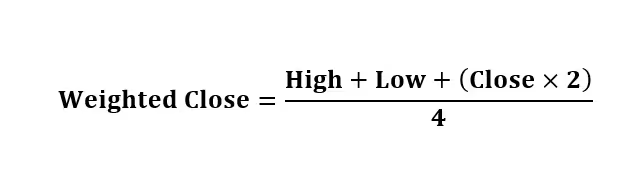
This means the Close has twice the weight of the High and Low prices, making it the dominant influence in the final value.
Interpretation:
This indicator helps traders observe an adjusted price level that leans into the importance of the Close. By applying more weight to the Close, it prioritizes how the market concluded a trading session. This can be especially useful when comparing it with other indicators or when plotting it alongside candlestick charts to spot trend confirmations.
The Weighted Close line behaves similarly to a moving average but is more responsive to closing prices. It’s not predictive on its own, but it can add context when used with other tools like volume analysis, moving averages, or momentum indicators.
Calculation Example:
Let’s say a stock has the following daily values:
- High: $110
- Low: $100
- Close: $108

So, the Weighted Close for that day is 106.5. This value gives you a price level slightly below the Close but higher than the average of High and Low, capturing more of the session’s final market sentiment.
How to Create the Technical Indicator Using LC JS Trader
Step 1: Get LightningChart JS Trader
To begin, you’ll need access to LightningChart JS Trader. This library provides the tools necessary to create advanced technical indicators, including the Weighted Close Indicator. Visit the LightningChart JS Trader page to download the required components and review the documentation.
Step 2: Review the Interactive Example
LightningChart JS Trader includes interactive examples that demonstrate how to create custom technical indicators. Start by reviewing the documentation, focusing on how to integrate the Weighted Close Indicator into your chart setup. The interactive examples will guide you through the process of setting up the Weighted Close Indicator, from importing the necessary modules to modifying the chart settings.
Step 3: Code Explanation
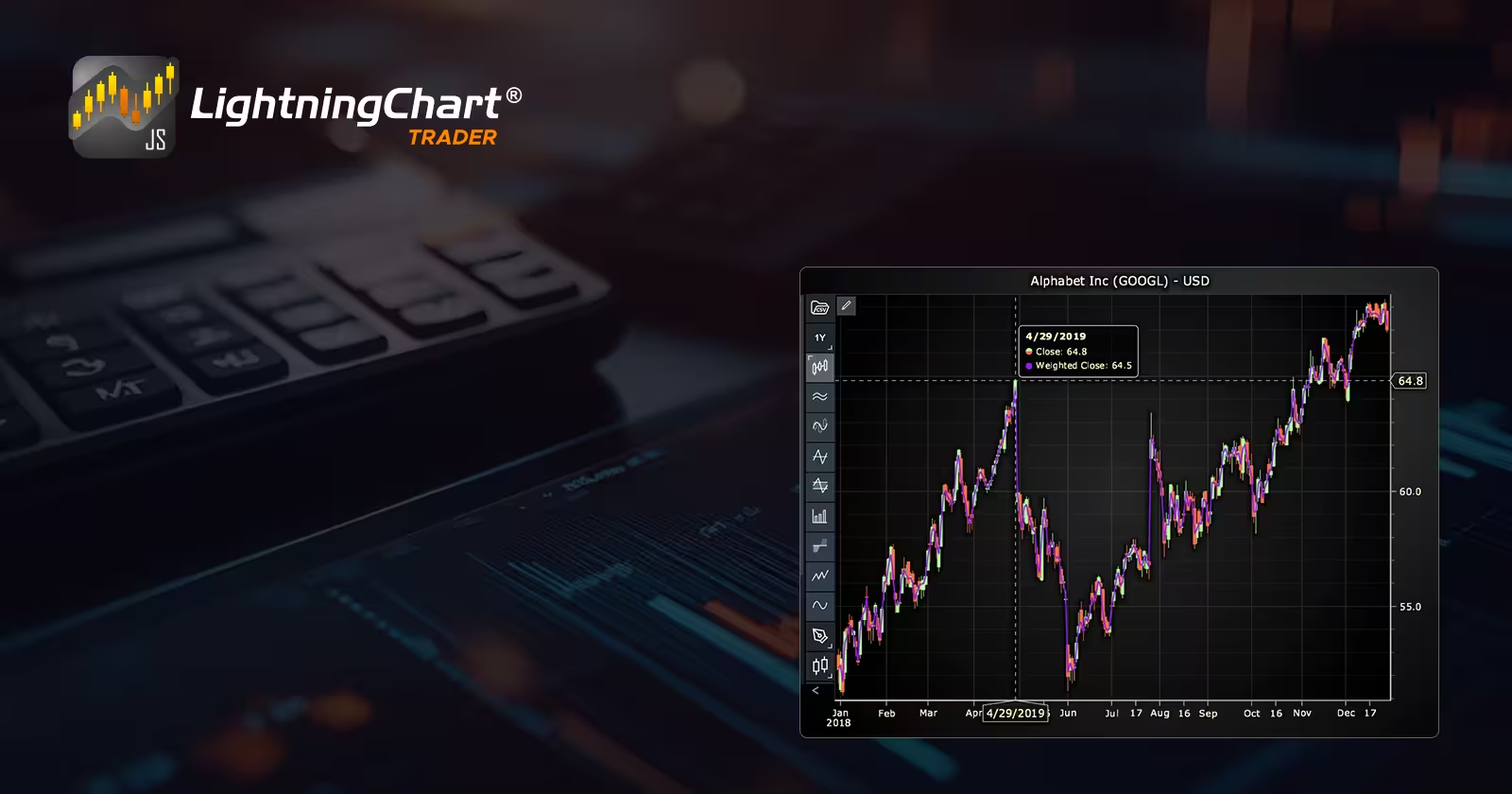
In this step, we will break down the code that creates the chart with the Weighted Close Indicator, as shown in the image, using LightningChart JS Trader. The code demonstrates how to initialize a trading chart, apply the Weighted Close Indicator, and customize its appearance.
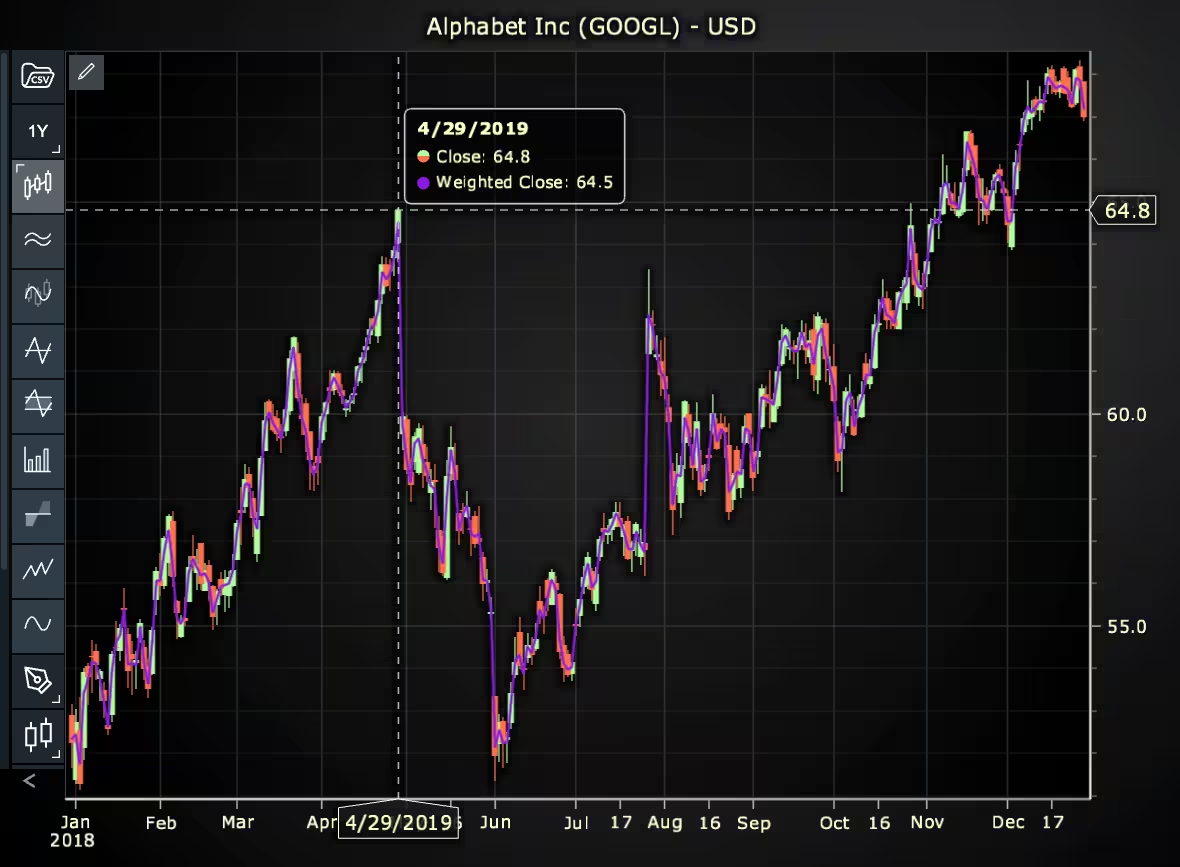
Here’s a detailed breakdown of each section:
A. Importing the Required Libraries:
const lcjsTrader = require('@lightningchart/lcjs-trader')
const lcjs = require('@lightningchart/lcjs')
const { Themes } = lcjs- lcjsTrader: This library provides access to the LightningChart JS Trader functionalities, allowing you to create advanced financial charts.
- lcjs: The main LightningChart JS library, used for general charting functionality.
- Themes: A property within LCJS that provides access to pre-built themes. In this case, we are using the darkGold theme to style the chart.
B. Initializing the Trading Chart:
lcjsTrader.trader(TRADER_LICENSE).then(async (trader) => {
  // Create a trading chart.
  const tradingChart = trader.tradingChart({ loadFromStorage: false, colorTheme: Themes.darkGold })
trader(TRADER_LICENSE): Initializes the LightningChart JS Trader with the provided license key (TRADER_LICENSE). This is required to access the charting functionalities for financial data.
Note you can request a LightningChart JS Trader trial license, which is free.
tradingChart(): This function creates a trading chart with certain options.loadFromStorage: false: This disables the loading of previously stored chart data from local storage, ensuring a fresh chart setup.colorTheme:Themes.darkGoldThis applies the darkGold theme to the chart, which influences the background color, gridlines, and other visual elements.
C. Adding and Customizing the Indicator
// Add a Weighted Close Indicator
const wc = tradingChart.indicators().addWeightedClose()
wc.setLineColor('#8A19E6')
wc.setLineWidth(2)
addWeightedClose(): Adds Weighted Close indicator, which is the average price of each day, that puts more weight on the Close price compared to High and Low. Weighted Close is drawn as a single overlay line.
wc.setLineColor('#8A19E6’): Sets the color of the indicator line to purple.
wc.setLineWidth(2): Sets the width of the indicator line to 2 pixels.
D. Loading Data from a CSV File
    // Reading data from a file.
    await fetch(`${document.head.baseURI}examples/assets/0000/Alphabet Inc (GOOGL).csv`).then((res) => res.text()).then((text) => {
        tradingChart.readCsvString(text, 'Alphabet Inc (GOOGL)')
})fetch(): This function retrieves a CSV file containing historical data for Alphabet Inc. (GOOGL). The CSV file includes pricing information for the company’s stock, which is plotted on the chart.readCsvString(): This function reads the CSV data and interprets it as pricing data for Alphabet Inc. The second argument (‘Alphabet Inc (GOOGL)’) sets the label for the chart, as seen at the top of the chart image.
E. Setting the Currency for the Chart
    tradingChart.setCurrency('USD')
})setCurrency('USD'): This sets the currency of the chart to USD, ensuring that the pricing data is interpreted and displayed in US dollars.
Advantages and Limitations of the Indicator
Advantages
- Close-centric view: The main strength of the Weighted Close indicator is its focus on the closing price, which many traders consider the most important data point of the day.
- Smooths noise: It smooths out price fluctuations without being as laggy as some moving averages.
- Simple to calculate: With only High, Low, and Close needed, it’s easy to compute and fast to implement.
- Works well in trend analysis: The indicator can be used to detect trend directions or confirm other price action signals.
Limitations
- Not predictive: The Weighted Close indicator doesn’t provide forecasts. It reacts to price changes, making it a lagging indicator.
- Shouldn’t be used in isolation: Alone, it doesn’t offer buy/sell signals. It’s best paired with other indicators like RSI, MACD, or volume to build a full trading strategy.
- Limited use in sideways markets: In choppy or range-bound conditions, it may provide limited value and can appear flat or uninformative.
Conclusion
The Weighted Close indicator is a valuable tool in technical analysis for traders who want a clean, closing-price-weighted view of price movement. By giving more emphasis to where the market ends the day, it provides a clearer signal of sentiment and potential direction than a simple average of High, Low, and Close.
By using the LightningChart JS Trader, traders can visualize and implement the Weighted Close indicator into their custom strategies. It’s especially effective when used as part of a broader technical toolkit. While it shouldn’t be relied on alone, its simplicity and focus on the Close make it a practical addition to any chart analysis setup.
Continue learning with LightningChart
Javascript Charting Library comparison 2026
Every year someone publishes a listicle of JavaScript charting libraries. They screenshot a demo, note the GitHub stars, paste in the npm install command, and call it a day. Then you follow their recommendation, get six months into your project, and discover that your...

Visualizing 10 Million Data Points in the Browser (2026): The Technical Deep-Dive
Ten Million Data Points in the Browser: How WebGL Makes Mass Datasets Interactive Ten million data points. That number used to mean a database problem, not a front-end problem. Now research teams want to explore it interactively in a browser. Trading desks want...
Elliott Wave Theory in Trading
Financial markets often appear chaotic, but many traders believe that price movements follow recurring patterns driven by human psychology. One of the most influential approaches based on this idea is the Elliott Wave Theory. Developed nearly a century ago, it remains one of the most widely studied methods of technical analysis.





If you have any questions, feel free to contact us!
©LightningChart Ltd 2026. All rights reserved.