








Swing index indicator: formula and implementation with LightningChart JS Trader
Article
Assisted by AI
Learn the Swing Index indicator formula and implementation with LightningChart JS Trader to detect trend direction and refine trading signals.
Ahmad Omid
Data Science Developer

Introduction
The swing index indicator is a technical analysis tool developed by Welles Wilder to help traders detect price trends in a security. It works by analyzing price movements, including open, high, low, and close, and expressing them as a single value that reflects the true direction and strength of a price swing. Often used as the foundation of the Accumulative Swing Index (ASI), the swing index indicator aims to filter out noise and give a clearer signal of trend changes.
One of the biggest questions traders have is: What are the best settings for the swing index indicator? While Wilder originally suggested a limit to move value (often set to the maximum expected daily price change) of 12 for stocks, many traders adjust this based on the asset’s volatility. Fine-tuning this limit is essential for achieving better responsiveness without generating false signals.
So how does this indicator measure price movement? The swing index indicator calculates a normalized value between -100 and +100 for each trading period, helping traders understand not just the magnitude but also the direction of the swing. A positive value suggests bullish momentum, while a negative value indicates bearish pressure.
Importantly, the swing index indicator is also connected to market volatility. Because it incorporates the range between highs and lows and accounts for gaps between sessions, it becomes more sensitive during volatile periods. This makes it a useful tool not only for trend detection but also for gauging the intensity of price fluctuations.
Formula
The Swing Index formula according to Wilder is:

Where:
- Close = Current close price
- pClose = Previous close price
- Open = Current open price
- pOpen = Previous open price
- High = Current high
- Low = Current low
- R = max(High – pClose, Low – pClose, High – Low)
- K = max(High – pClose, Low – pClose)
- M = max(High – Low, abs(pClose – pOpen))
This version includes a volatility adjustment factor (K / M) to normalize the signal within a consistent scale, often between -100 and +100.
Interpretation:
The swing index output lies between -100 and +100. A value close to +100 signals strong bullish pressure, while a value near -100 reflects strong bearish pressure. A value near zero means little or no directional movement. Because SI incorporates price gaps, volatility, and directional movement, it is more comprehensive than simple momentum indicators.
Calculation Example
Example Data:
- pClose = 100
- Close = 102
- Open = 101
- pOpen = 99
- High = 104
- Low = 98
Step 1: Calculate R, K, and M
- R = max (104 – 100, 98 – 100, 104 – 98) = max (4, -2, 6) = 6
- K = max (104 – 100, 98 – 100) = max (4, -2) = 4
- M = max (104 – 98, abs (100 – 99)) = max (6, 1) = 6
Step 2: Plug into the SI formula
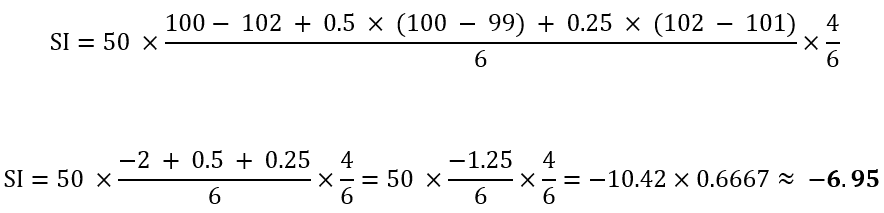
So, this day’s SI = -6.95
SI in LightningChart JS Trader
In LightningChart JS Trader, the Swing Index follows Wilder’s core approach with a notable adaptation: rather than using a dynamic calculation for normalizing SI values, it employs a fixed parameter called “Limit Move Value”.
This parameter essentially defines the maximum expected price change in one direction and serves as a replacement for the variable M found in Wilder’s original formula. The default setting is 10,000, though analysts often adjust this based on the specific asset’s volatility characteristics.
So instead of:
M = max (High – Low, abs (pClose – pOpen))
LightningChart JS simplifies it:
M = LimitMoveValue
This change affects how the indicator works in ways that really matter:
- The numbers get much smaller (0.012 instead of 12).
- Values build up slowly bit by bit (going from 0.01 to 0.03 to 0.05).
- The chart shows which way prices are heading, not just how strong the moves are.
This makes charts much easier to read when you are zooming in and out. It’s especially helpful when looking at different stocks side by side; otherwise, jumpy stocks would make your charts look messy compared to steady ones. If you want to make the indicator more or less sensitive, you can use the setLimitMoveValue() tool to adjust it. Many traders change this setting depending on what they’re trading.
How to Create the Technical Indicator Using LC JS Trader
Step 1: Get LightningChart JS Trader
To begin, you’ll need access to LightningChart JS Trader. This specialized library contains all the necessary components for developing advanced technical indicators, including the Swing Index indicator. Visit the LightningChart JS Trader page to download the required components and review the documentation.
Step 2: Review the Interactive Example
LightningChart JS Trader includes interactive examples that demonstrate how to create custom technical indicators. These examples do more than just explain; they show you what works in practice.
Start with the documentation and focus on how to add the Swing Index indicator to your chart. The interactive examples take you through each step of the process, from importing the right modules to adjusting your chart settings for the best display.
Step 3: Code Explanation
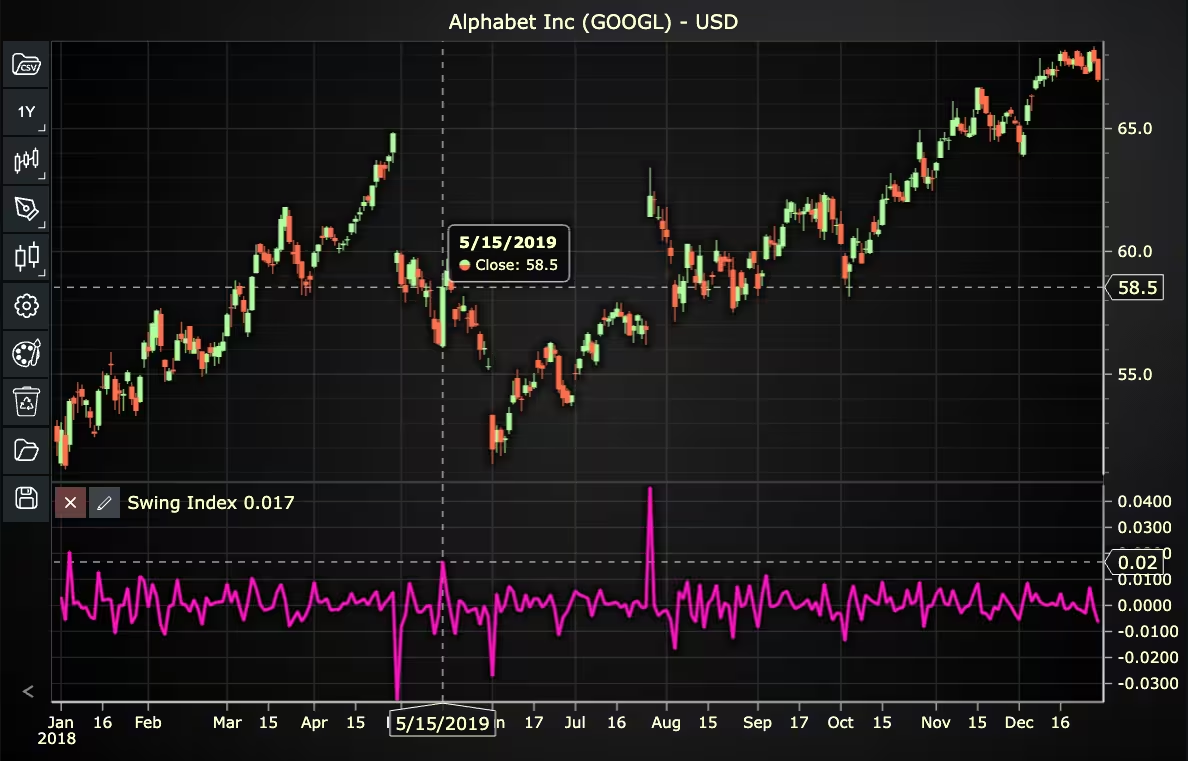
In this step, we’ll examine the code that creates the chart with the Swing Index indicator, as shown in the image, using LightningChart JS Trader. The code reveals how to properly initialize a trading chart, apply the indicator, and customize its visual properties to enhance your technical analysis. Understanding these code components helps you see how the different parts work together to produce an effective analysis tool. This knowledge allows you to adapt the implementation for your specific trading requirements.
Here’s a detailed breakdown of each section:
A. Importing the Required Libraries:
const lcjsTrader = require('@lightningchart/lcjs-trader')
const lcjs = require('@lightningchart/lcjs')- lcjsTrader: This library provides access to the LightningChart JS Trader functionalities, allowing you to create advanced financial charts.
- lcjs: The main LightningChart JS library, used for general charting functionality.
B. Initializing the Trading Chart:
lcjsTrader.trader(TRADER_LICENSE).then(async (trader) => {
  // Create a trading chart.
  const tradingChart = trader.tradingChart({ loadFromStorage: false, colorTheme: Themes.darkGold })
trader(TRADER_LICENSE): Initializes the LightningChart JS Trader with the provided license key (TRADER_LICENSE). This is required to access the charting functionalities for financial data.
Note you can request a LightningChart JS Trader trial license, which is free.
tradingChart(): This function creates a trading chart with certain options.loadFromStorage: false: This disables the loading of previously stored chart data from local storage, ensuring a fresh chart setup.
C. Adding and Customizing the Indicator
// Add a Swing Index Indicator
const si = tradingChart.indicators().addSwingIndex()
si.setLimitMoveValue(10000)
si.setLineColor('#FF14C0')
si.setLineWidth(3)addSwingIndex(): SI detects price trends of a security. It is often used as a part of the Accumulative Swing Index.si.setLimitMoveValue(10000): Sets the maximum price change in one direction.si.setLineColor('#FF14C0'): Sets the color of the indicator to pink.si.setLineWidth(3): Sets the line width of the indicator to 3 pixels.
D. Loading Data from a CSV File
    // Reading data from a file.
    await fetch(`${document.head.baseURI}examples/assets/0000/Alphabet Inc (GOOGL).csv`).then((res) => res.text()).then((text) => {
        tradingChart.readCsvString(text, 'Alphabet Inc (GOOGL)')
})fetch(): This function retrieves a CSV file containing historical data for Alphabet Inc. (GOOGL). The CSV file includes pricing information for the company’s stock, which is plotted on the chart.readCsvString(): This function reads the CSV data and interprets it as pricing data for Alphabet Inc. The second argument (‘Alphabet Inc (GOOGL)’) sets the label for the chart, as seen at the top of the chart image.
E. Setting the Currency for the Chart
    tradingChart.setCurrency('USD')
})setCurrency('USD'): This sets the currency of the chart to USD, ensuring that the pricing data is interpreted and displayed in US dollars.
Advantages and Limitations of the Indicator
The swing index indicator in LightningChart JS Trader retains the essence of Wilder’s original formula while adapting it to make it more practical and visually digestible. Replacing the dynamic, asset-dependent normalization denominator with a fixed Limit Move Value removes a layer of complexity while offering greater control.
One of the biggest advantages of this approach is clarity. Values are smaller and scale more gradually from 0.01 to 0.03, and so on, making it easier to spot directional shifts on the chart without being distracted by dramatic spikes. This is especially valuable when analyzing multiple assets side by side. Without this normalization, charts of volatile assets would overwhelm those of more stable ones.
The fixed limit move also makes the indicator easier to tune. Using the setLimitMoveValue() method, traders can adjust sensitivity based on the asset’s behavior. A lower value makes the swing index more responsive; a higher one smooths it out. This flexibility adds utility across different markets without requiring constant formula adjustments.
However, this simplification does come with trade-offs. By using a fixed limit rather than a dynamically calculated one, the indicator may underreact or overreact to price changes if the Limit Move Value isn’t well-matched to the asset’s volatility. It assumes a fixed scale price movement, which might not hold true during market events or news-driven price swings.
Conclusion
The swing index indicator, as implemented in LightningChart JS Trader, takes Wilder’s powerful trend-detection method and refines it for a cleaner, more adaptive charting experience. By replacing the dynamic normalization factor with a tunable Limit Move Value, it prioritizes visual consistency and user control.
This makes the indicator easier to read and more customizable across different asset types. Instead of focusing solely on strength, the swing index in LC JS Trader excels at showing direction with stability, even in fast-moving or erratic markets.
Continue learning with LightningChart

Trend Lines in Trading
Trend lines are among the simplest yet most powerful tools in technical analysis. They help traders visualize market direction, identify potential support and resistance levels, and make more informed trading decisions. Despite their simplicity, trend lines remain a...

Best Python Charting Library in 2026
Python's charting ecosystem is large, overlapping, and regularly misunderstood. Most comparison guides stop at Matplotlib, Plotly, and Seaborn. This one goes further: it covers what happens when your datasets grow large, your update rates increase, or your chart types...

Best TradingView Charting Library Alternative
TradingView's charting libraries are the most visible option for fintech developers. Visibility is not the same as capability. This guide is for developers who have hit the wall on candle count limits, watermark restrictions, branding requirements, real-time...



If you have any questions, feel free to contact us!



©LightningChart Ltd 2026. All rights reserved.