








Random Walk Index Indicator for Fintech App Development
Article
Assisted by AI
Discover how the Random Walk Index helps fintech apps detect true market trends, filter noise, and deliver smarter trading insights in real time.
Ahmad Omid
Data Science Developer


Introduction
The Random Walk Index (RWI) is a technical analysis tool that evaluates whether a financial instrument is trending or moving randomly. Unlike other momentum or trend indicators, the Random Walk Index compares actual price movements to those expected under a random walk hypothesis. If prices deviate significantly from what randomness would produce, it signals a real trend. In fintech app development, integrating the Random Walk Index can provide users with smarter analytics and clearer insights into market behavior.
The core purpose of the RWI is to help traders identify statistically significant trends. It does this by generating two main signals: RWI High and RWI Low. When the RWI High value is above a certain threshold (often 1.0 or 1.5), it suggests a strong uptrend. Conversely, if the RWI Low value is above the threshold, it indicates a strong downtrend. Readings below the threshold suggest the price action might just be noise—random fluctuations with no actionable pattern.
Trading with the Random Walk Index involves watching for these signals and comparing them across different time frames. For example, if the RWI High is consistently greater than 1.5 over several periods, it may validate a long position. Similarly, a persistent RWI Low above 1.5 may suggest shorting opportunities. When integrated into a fintech environment, especially one using interactive visual libraries like LightningChart JS Trader, RWI can guide users through market trends in real time, separating meaningful movements from statistical noise.
Formula
The Random Walk Index formula evaluates how far a price has moved in relation to what would be expected under a pure random walk. The calculation is done for both up and down trends.
For each period n, compute:
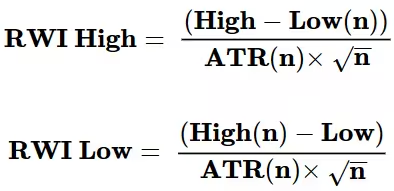
Where:
- High = current high
- Low = current low
- High(n) = highest high over the past n periods
- Low(n) = lowest low over the past n periods
- ATR(n) = Average True Range over n periods
Interpretation:
The Random Walk Index provides values that indicate whether price moves are statistically significant.
- If RWI High > 1.0 and RWI Low < 1.0, the uptrend is likely stronger.
- If the RWI Low > 1.0 and RWI High < 1.0, the downtrend dominates.
- A value below 1.0 generally suggests random price behavior.
Calculation Example
Suppose we want to calculate RWI for a 10-period lookback:
- High = 108
- Low = 95
- High(10) = 110
- Low(10) = 90
- ATR(10) = 3
Then:
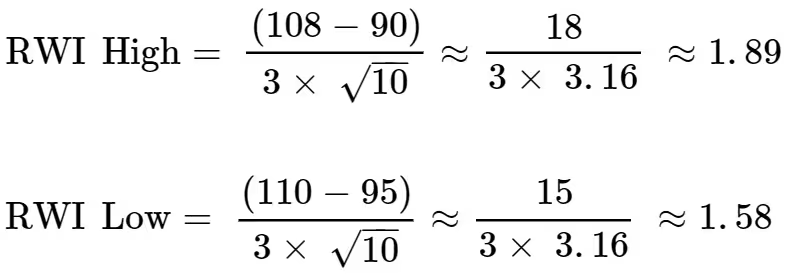
These values suggest both upward and downward movements are beyond what randomness would generate, with the uptrend slightly stronger.
How to Create the Technical Indicator Using LC JS Trader
Step 1: Get LightningChart JS Trader
To begin, you’ll need access to LightningChart JS Trader. This specialized library contains all the necessary components for developing advanced technical indicators, including the Random Walk Index (RWI) indicator. Visit the LightningChart JS Trader page to download the required components and review the documentation.
Step 2: Review the Interactive Example
LightningChart JS Trader includes interactive examples that demonstrate how to create custom technical indicators. These examples do more than just explain; they show you what works in practice.
Start with the documentation and focus on how to add the Random Walk Index indicator to your chart. The interactive examples take you through each step of the process, from importing the right modules to adjusting your chart settings for the best display.
Step 3: Code Explanation
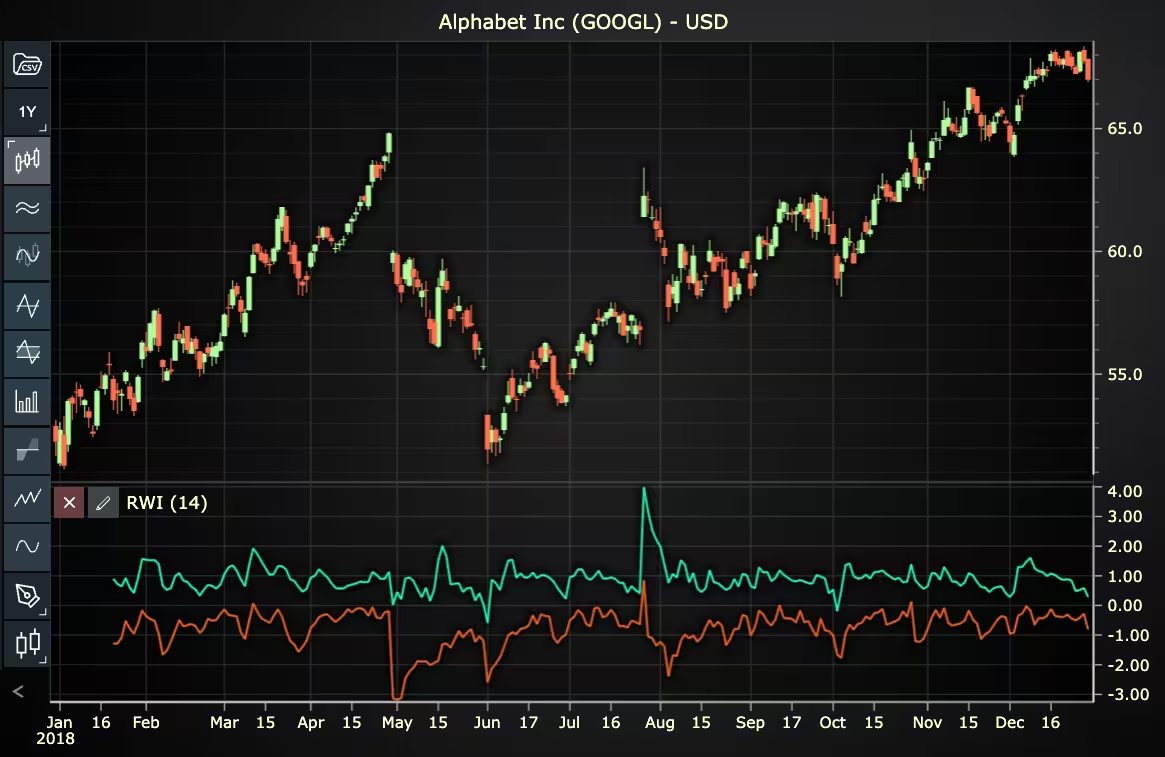
In this step, we’ll examine the code that creates the chart with the Random Walk Index indicator, as shown in the image, using LightningChart JS Trader. The code reveals how to initialize a trading chart properly, apply the indicator, and customize its visual properties to enhance your technical analysis. Understanding these code components helps you see how the different parts work together to produce an effective analysis tool. This knowledge allows you to adapt the implementation for your specific trading requirements.
Here’s a detailed breakdown of each section:
A. Importing the Required Libraries:
const lcjsTrader = require('@lightningchart/lcjs-trader')
const lcjs = require('@lightningchart/lcjs')- lcjsTrader: This library provides access to the LightningChart JS Trader functionalities, allowing you to create advanced financial charts.
- lcjs: The main LightningChart JS library, used for general charting functionality.
B. Initializing the Trading Chart:
lcjsTrader.trader(TRADER_LICENSE).then(async (trader) => {
  // Create a trading chart.
  const tradingChart = trader.tradingChart({ loadFromStorage: false, colorTheme: Themes.darkGold })
trader(TRADER_LICENSE): Initializes the LightningChart JS Trader with the provided license key (TRADER_LICENSE). This is required to access the charting functionalities for financial data.
Note you can request a LightningChart JS Trader trial license, which is free.
tradingChart(): This function creates a trading chart with certain options.loadFromStorage: false: This disables the loading of previously stored chart data from local storage, ensuring a fresh chart setup.
C. Adding and Customizing the Indicator
// Add a Random Walk Index indicator
const rwi = tradingChart.indicators().addRandomWalkIndex()
rwi.setPeriodCount(14)
rwi.setRWIHighColor('#29FAB4')
rwi.setRWILowColor('#F06428')
rwi.setLineWidth(3)addRandomWalkIndex(): RWI compares price movements to random movements to determine if the movement is of a random nature or part of a statistically significant trend. RWI is therefore used to measure the strength of uptrends and downtrends.rwi.setPeriodCount(14): Sets the number of time periods (n) used to calculate the indicator.rwi.setRWIHighColor('#29FAB4'): Sets the color of the RWI High line to a shade of green.rwi.setRWILowColor('#F06428'): Sets the color of the RWI Low line to orange.rwi.setLineWidth(3): Sets the line width of the indicator to 3 pixels.
D. Loading Data from a CSV File
    // Reading data from a file.
    await fetch(`${document.head.baseURI}examples/assets/0000/Alphabet Inc (GOOGL).csv`).then((res) => res.text()).then((text) => {
        tradingChart.readCsvString(text, 'Alphabet Inc (GOOGL)')
})fetch(): This function retrieves a CSV file containing historical data for Alphabet Inc. (GOOGL). The CSV file includes pricing information for the company’s stock, which is plotted on the chart.readCsvString(): This function reads the CSV data and interprets it as pricing data for Alphabet Inc. The second argument (‘Alphabet Inc (GOOGL)’) sets the label for the chart, as seen at the top of the chart image.
E. Setting the Currency for the Chart
    tradingChart.setCurrency('USD')
})setCurrency('USD'): This sets the currency of the chart to USD, ensuring that the pricing data is interpreted and displayed in US dollars.
Advantages and Limitations of the Indicator
One major advantage of the Random Walk Index is its foundation in statistical theory, which makes it more objective than many subjective trend indicators. It doesn’t just tell you if prices are rising or falling, it tells you if the move is meaningful. This is particularly helpful in volatile or sideways markets where distinguishing noise from trend is difficult.
Another benefit is its dual signaling capability. Because RWI generates separate values for up and down movements, traders can gauge directional strength more clearly. When incorporated into fintech environments, this dual insight can provide users with stronger, data-backed signals for both buying and selling decisions.
However, the Random Walk Index also has limitations. It depends heavily on the chosen time period and the quality of ATR calculations. In highly volatile markets, the RWI might frequently move above or below the critical 1.0 threshold, generating too many signals. Also, like many indicators, it performs poorly during sudden market reversals. It may lag price turning points, especially if ATR lags behind new volatility patterns.
For developers integrating RWI into fintech environments, the challenge lies in presenting it intuitively. Because it isn’t as widely known as RSI or MACD, visual clarity and educational overlays are key. This is where using LC JS Trader can make a real difference by turning data into insight with dynamic charts and overlays.
Conclusion
The Random Walk Index is a powerful yet underutilized tool in the technical analysis toolkit. It helps traders distinguish between real trends and noise by comparing price action to a theoretical random walk. With separate signals for up and down trends, and a mathematically grounded approach, RWI offers nuanced market insight that’s especially useful in algorithmic or app-based trading systems.
For fintech developers, embedding the Random Walk Index using libraries like LC JS Trader can add depth and intelligence to charting features. By helping users see not just what the price is doing, but why it might be happening, the RWI becomes a powerful ally in smarter, more informed trading.
Continue learning with LightningChart
Create a JavaScript Pie Chart with NodeJS, TypeScript & LightningChart
Written by a human | Updated on April 10th, 2025JavaScript Pie Chart with NodeJS & TypeScript Today, we are going to do a short tutorial on how to generate a pie chart using Node JS, TypeScript, and LigningCharts JS. To see how to get LightningChart JS for...
Real-time data visualization with WebSockets
Written by a human | Updated on April 10th, 2025WebSockets Data Visualization in Real-Time These days it is ever increasingly common that people require web solutions for their applications and services. Data visualization is not an exception to this, as...
Why Performance Matters in Data Visualization?
Written by a human | Updated on April 10th, 2025Performance in Data VisualizationI was doing a Google search a couple of days ago and particularly, I wanted to know what are the options for developers who need to visualize large amounts of data points within...



If you have any questions, feel free to contact us!



©LightningChart Ltd 2026. All rights reserved.