



Rainbow Oscillator Theory & Chart Implementation
Article
Assisted by AI
Discover how to integrate the Rainbow Oscillator in your trading applications and utilize its chart strategies for effective trading insights.
Ahmad Omid
Data Science Developer

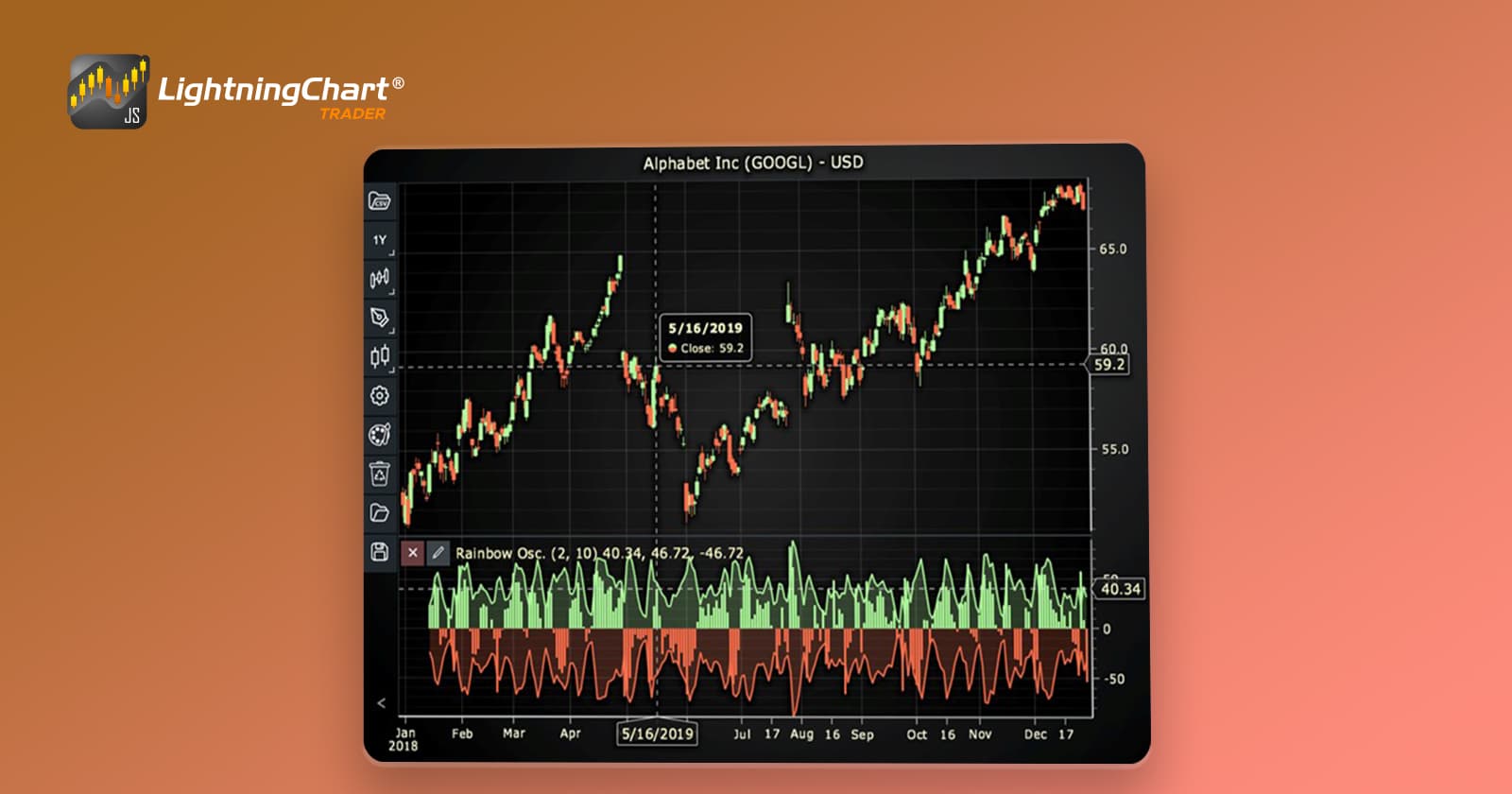
Introduction to the Rainbow Oscillator
The Rainbow Oscillator is a sophisticated trend-following indicator that leverages multiple layers of moving average smoothings to analyze market trends. Unlike traditional oscillators that rely on single smoothing techniques, the Rainbow Oscillator applies recursive smoothing, creating a nuanced view of price action. This multi-layered approach visually resembles a rainbow, hence the name.
The concept of using multiple moving averages isn’t new, but the Rainbow Oscillator elevates this idea by focusing on the highest and lowest values among these averages to generate an oscillator and a bandwidth. While there are numerous versions of the Rainbow Oscillator, including those that plot ten lines or more, the focus here will be on the version used in LightningChart JS Trader, which utilizes bars and areas for a more interactive visualization.
Importance in Trading
The Rainbow Oscillator provides traders with a deeper insight into market momentum and trend strength. By analyzing multiple layers of smoothed data, it offers a more reliable signal compared to single moving average indicators. This can help traders identify trends, confirm reversals, and filter out market noise, making it an essential tool in technical analysis.
Formula
The Rainbow Oscillator involves several layers of recursive smoothing using moving averages and calculates the oscillator based on the smoothed values.
Step 1: Recursive Smoothing of Price
Let:
- Pt = Price at time t
- MA k/n = Moving Average at level k with period n
First smoothing (k = 1):
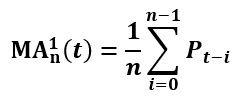
Recursive smoothing (k > 1):
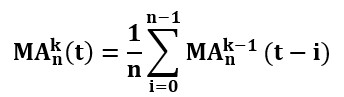
Repeat this process for k levels of smoothing, where k is determined by the setSmoothingLevels() parameter in LightningChart JS Trader.
Step 2: Calculating the Oscillator
In LightningChart JS Trader, the oscillator reflects the raw difference between the price and the recursively smoothed average:

Where:
- Pt = The current closing price at time t
- MA k/n (t) = The recursively smoothed moving average after k levels of smoothing
This approach means the oscillator can take on a wide range of positive and negative values, representing the deviation of the current price from the smoothed average.
Step 3: Calculating the Bandwidth
The bandwidth reflects market volatility and is calculated as:
Bandwidth(t) = MAmax – MAmin(t)
where:
- MAmax(t) = The highest value among the smoothed moving averages at time t
- MAmin(t) = The lowest value among the smoothed moving averages at time t
Default Customization in LightningChart JS Trader
Based on LightningChart JS Trader, the following default settings are used:
- Source: Close
- Average Type: Simple Moving Average (SMA)
- Period Count: 2
- Lookback Periods: 10
- Smoothing Levels: 10
- Line Width: 2
- Up/Down Color: Green for positive values, Red for negative values.
- Fill Enabled: Shaded areas highlight positive and negative regions.
All these settings will be explained in the code explanation part thoroughly.
Interpretation
The Rainbow Oscillator helps traders interpret market conditions in the following ways:
- Oscillator Above Zero (Green Bars): The price is above the smoothed average, suggesting bullish momentum. Higher positive values indicate stronger upward deviations.
- Oscillator Below Zero (Red Bars): The price is below the smoothed average, indicating bearish momentum. Larger negative values reflect stronger downward pressure.
The visualization in LightningChart JS Trader using bars and areas makes these patterns more accessible, allowing traders to react quickly to market changes.
Calculation Example
Let’s walk through a simplified example:
- Step 1: Apply a 2-period moving average to the closing price data.
- Step 2: Smooth the resulting average ten more times using recursive smoothing.
- Step 3: Calculate the oscillator value as the difference between the current price and the smoothed average.
- Step 4: Positive results (e.g., 38.49) indicate bullish conditions; negative results (e.g., -30.74) suggest bearish conditions.
By adjusting the setLookbackPeriods() and setSmoothingLevels() in LC JS Trader, traders can fine-tune the indicator to match their specific trading strategies.
Versions of the Rainbow Oscillator
- Multi-Line Versions (Classic Rainbow Indicators)
Some versions of the Rainbow Oscillator plot multiple moving averages, often ten or more, on the price chart. These moving averages are smoothed with different lookback periods, creating a layered, rainbow-like appearance. For example:
- Ten-Line Rainbow: Displays ten different moving averages, each with a progressively longer smoothing period, like MA(5), MA(10), MA(15), up to MA(50).
Visual Interpretation:
- When the lines are tightly packed and aligned in one direction (all sloping upward or downward), it indicates a strong trend.
- When they converge or cross, it signals potential reversals or consolidations.
2. LightningChart JS Trader Version (Bars + Area Visualization)
In contrast to the multi-line approach, the LightningChart JS Trader version simplifies the visualization by focusing on bars and area charts:
- Green Bars represent positive momentum (price above the smoothed average).
- Red Bars represent negative momentum (price below the smoothed average).
- The line traces the oscillator’s continuous movement, giving a clearer trend visualization over time.
The oscillator values are not confined to a fixed range but fluctuate based on the price’s deviation from the smoothed moving averages.
3. Other Variations
- Heatmap Rainbow Indicators: Some platforms display the smoothed values as a heatmap below the price chart, where color intensity indicates trend strength.
- Custom Smoothing Techniques: Beyond simple moving averages, some versions use exponential moving averages (EMA), weighted moving averages (WMA), or Gaussian filters to smooth the data differently.
How to Create the Technical Indicator Using LC JS Trader
Step 1: Get LightningChart JS Trader
To begin, you’ll need access to LightningChart JS Trader. This library provides the tools necessary to create advanced technical indicators, including the Rainbow Oscillator Indicator. Visit the LightningChart JS Trader page to download the required components and review the documentation.
Step 2: Review the Interactive Example
LightningChart JS Trader includes interactive examples that demonstrate how to create custom technical indicators. Start by reviewing the documentation, focusing on how to integrate the Rainbow Oscillator Indicator into your chart setup. The interactive examples will guide you through the process of setting up the Rainbow Oscillator Indicator, from importing the necessary modules to modify the chart settings.
Step 3: Code Explanation
In this step, we will break down the code that creates the chart with the Rainbow Oscillator Indicator, as shown in the image, using LightningChart JS Trader. The code demonstrates how to initialize a trading chart, apply the Rainbow Oscillator Indicator, and customize its appearance.
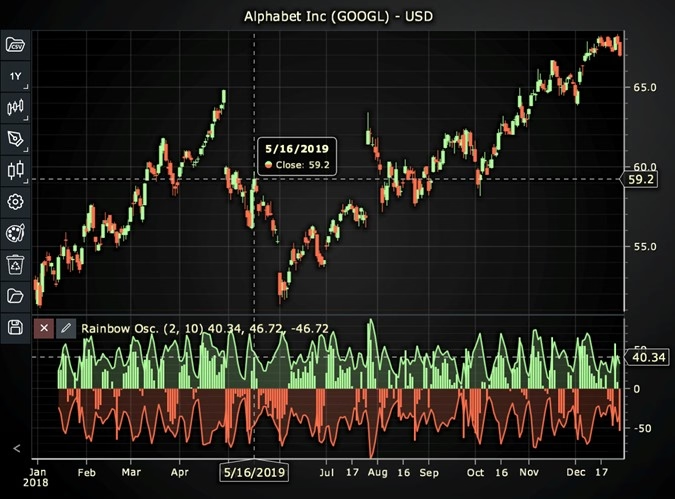
Here’s a detailed breakdown of each section:
A. Importing the Required Libraries:
   const lcjsTrader = require('@arction/lcjs-trader')
   const lcjs = require('@arction/lcjs')
const { Themes } = lcjs- lcjsTrader: This library provides access to the LightningChart JS Trader functionalities, allowing you to create advanced financial charts.
- lcjs: The main LightningChart JS library, used for general charting functionality.
- Themes: A property within lcjs that provides access to pre-built themes. In this case, we are using the darkGold theme to style the chart.
B. Initializing the Trading Chart:
   lcjsTrader.trader(TRADER_LICENSE).then(async (trader) => {
    // Create a trading chart.
const tradingChart = trader.tradingChart({ loadFromStorage: false, colorTheme: Themes.darkGold })trader(TRADER_LICENSE): Initializes the LightningChart JS Trader with the provided license key (TRADER_LICENSE). This is required to access the charting functionalities for financial data.
Note you can request a LightningChart JS Trader trial license, which is free.
tradingChart(): This function creates a trading chart with certain options.loadFromStorage: false: This disables the loading of previously stored chart data from local storage, ensuring a fresh chart setup.colorTheme: Themes.darkGold: This applies the darkGold theme to the chart, which influences the background color, gridlines, and other visual elements.
C. Adding and Customizing the Indicator
    // Add a Rainbow Oscillator indicator
    const ro = tradingChart.indicators().addRainbowOscillator()
    ro.setPeriodCount(2)
    ro.setSource(3)
    ro.setMovingAverageType(2)
    ro.setLookbackPeriods(10)
    ro.setSmoothingLevels(10)
    ro.setFillEnabled(true)
ro.setLineWidth(2)addRainbowOscillator(): Rainbow Oscillator is a trend-following indicator based on several recursive smoothings via moving averages of the price. It finds the highest and lowest values among these averages and creates an oscillator and a bandwidth based on them.
ro.setPeriodCount(2): Sets the number of time periods (n) used to calculate the indicator.
**ro.setSource(3): Sets which values the indicator calculations are based on. In this case, calculations based on Close values.
***ro.setMovingAverageTypes(2): Sets the types of moving averages used in indicator calculations. In this case, 2 represents the Simple Moving Average (SMA) that could be changed to another moving average types.
-
ro.setLookbackPeriods(10): Sets how many time periods are checked when finding out the highest and lowest prices.
-
ro.setSmoothingLevels(10): Sets the number of times the oscillator is smoothed by calculating a moving average.
-
ro.setFillEnabled(true): Sets whether the area between the high and low lines is colored. True means that area is colored.
ro.setLineWidth(2): Sets the line thickness of the indicator to 2 pixels.
D. Loading Data from a CSV File
    // Reading data from a file.
    await fetch(`${document.head.baseURI}examples/assets/0000/Alphabet Inc (GOOGL).csv`).then((res) => res.text()).then((text) => {
        tradingChart.readCsvString(text, 'Alphabet Inc (GOOGL)')
})fetch(): This function retrieves a CSV file containing historical data for Alphabet Inc. (GOOGL). The CSV file includes pricing information for the company’s stock, which is plotted on the chart.readCsvString(): This function reads the CSV data and interprets it as pricing data for Alphabet Inc. The second argument (‘Alphabet Inc (GOOGL)’) sets the label for the chart, as seen at the top of the chart image.
E. Setting the Currency for the Chart
    tradingChart.setCurrency('USD')
})setCurrency('USD'): This sets the currency of the chart to USD, ensuring that the pricing data is interpreted and displayed in US dollars.
*** Enumeration of Moving Average Types in LC JS Trader:
- Exponential Moving Average (EMA): 0
- None: 1 (No moving average applied)
- Simple Moving Average (SMA): 2
- Time Series Moving Average (TSMA): 3
- Triangular Moving Average (TMA): 4
- Variable Moving Average (VMA): 5
- Variable Index Dynamic Average (VIDYA): 6
- Volume Weighted Moving Average (VWMA): 7
- Weighted Moving Average (WMA): 8
- Welles Wilder’s Smoothing (WWS): 9
Advantages and Limitations of the Indicator
Advantages
- Enhanced Trend Detection: The multiple smoothing layers reduce noise and highlight genuine trends.
- Customizable Parameters: Using
setLookbackPeriods()andsetSmoothingLevels(), traders can adjust the sensitivity of the oscillator. - Versatile Visualization: The LightningChart JS Trader version uses interactive bars and area plots, offering a clearer, more intuitive representation.
- Effective in Volatile Markets: The bandwidth highlights periods of high and low volatility, aiding in risk management.
Limitations
- Lagging Indicator: As with most moving average-based indicators, the Rainbow Oscillator may lag in highly volatile or rapidly changing markets.
- Overfitting Risk: Excessive customization of smoothing levels might lead to overfitting, where the indicator works well on historical data but poorly in live trading.
- Complexity: For novice traders, the concept of recursive smoothing and multiple averages can be difficult to grasp initially.
While many versions of the Rainbow Oscillator exist, the LC JS Trader’s bar and area approach provides a modern, interactive experience that addresses some of these limitations.
Conclusion
The Rainbow Oscillator is a powerful trend-following indicator that leverages recursive smoothing of moving averages to provide a detailed view of market trends and volatility. Its ability to highlight both trend strength and market noise makes it an invaluable tool for traders seeking to refine their technical analysis.
The LightningChart JS Trader stands out with its dynamic bar and area visualization, offering traders an intuitive way to interact with the data. By utilizing the setLookbackPeriods() and setSmoothingLevels() methods, traders can customize the oscillator to fit their unique strategies.
Continue learning with LightningChart

Trend Lines in Trading
Trend lines are among the simplest yet most powerful tools in technical analysis. They help traders visualize market direction, identify potential support and resistance levels, and make more informed trading decisions. Despite their simplicity, trend lines remain a...

Best Python Charting Library in 2026
Python's charting ecosystem is large, overlapping, and regularly misunderstood. Most comparison guides stop at Matplotlib, Plotly, and Seaborn. This one goes further: it covers what happens when your datasets grow large, your update rates increase, or your chart types...

Best TradingView Charting Library Alternative
TradingView's charting libraries are the most visible option for fintech developers. Visibility is not the same as capability. This guide is for developers who have hit the wall on candle count limits, watermark restrictions, branding requirements, real-time...



If you have any questions, feel free to contact us!



©LightningChart Ltd 2026. All rights reserved.





