








How to use the Prime Number Oscillator for Financial Analysis?
Article
Assisted by AI
Discover how to integrate the Prime Number Oscillator into your financial applications to enhance analysis and support decision-making processes.
Ahmad Omid
Data Science Developer


Introduction to the Prime Number Oscillator
The Prime Number Oscillator (PNO) is a unique technical analysis tool used in financial markets to help traders identify potential reversal points by measuring how far the current price is from the nearest prime number. This indicator falls under the category of oscillators, which are tools used to discover short-term overbought or oversold conditions.
Overview and History
The concept of the Prime Number Oscillator is rooted in the mathematical properties of prime numbers, numbers greater than 1, with no divisors other than 1 and themselves. The idea here is that prime numbers hold a special place in nature and, by extension, could have unique applications in the financial markets, though the practical use of prime numbers in trading is more of a modern development.
Importance in Trading
In trading, the Prime Number Oscillator is particularly valuable because it provides a different perspective from more common indicators such as moving averages or RSI. By focusing on prime numbers as potential support or resistance levels, traders can identify unusual psychological levels that other traders might overlook.
Formula
The Prime Number Oscillator is calculated by finding the nearest prime number to the current price and then plotting the difference between this prime number and the price as an oscillator. This difference helps traders gauge how ‘stretched’ the market conditions are relative to these unique prime levels.
Interpretation
When the PNO value is low, it suggests that the price is close to a prime number, potentially indicating a support or resistance area. Conversely, a high PNO value might suggest the price is far from any nearby prime number, possibly signaling that the price is in a less stable, more volatile condition and may be due for a correction or pullback.
Calculation Example
To illustrate, if the current price of an asset is $50 and the nearest prime number is 53, the PNO would plot a value of 3. If the price moves to $54, and the nearest prime is still 53, the oscillator will then plot a value of 1, showing the price moving closer to a prime number-based support or resistance level.
How to Create the Technical Indicator Using LC JS Trader
Step 1: Get LightningChart JS Trader
To begin, you’ll need access to LightningChart JS Trader. This library provides the tools necessary to create advanced technical indicators, including the Prime Number Oscillator Indicator. Visit the LightningChart JS Trader page to download the required components and review the documentation.
Step 2: Review the Interactive Example
LightningChart JS Trader includes interactive examples that demonstrate how to create custom technical indicators. Start by reviewing the documentation, focusing on how to integrate the Prime Number Oscillator Indicator into your chart setup. The interactive examples will guide you through the process of setting up the PNO Indicator, from importing the necessary modules to modify the chart settings.
Step 3: Code Explanation
In this step, we will break down the code that creates the chart with the Prime Number Oscillator Indicator, as shown in the image, using LightningChart JS Trader. The code demonstrates how to initialize a trading chart, apply the PNO Indicator, and customize its appearance.
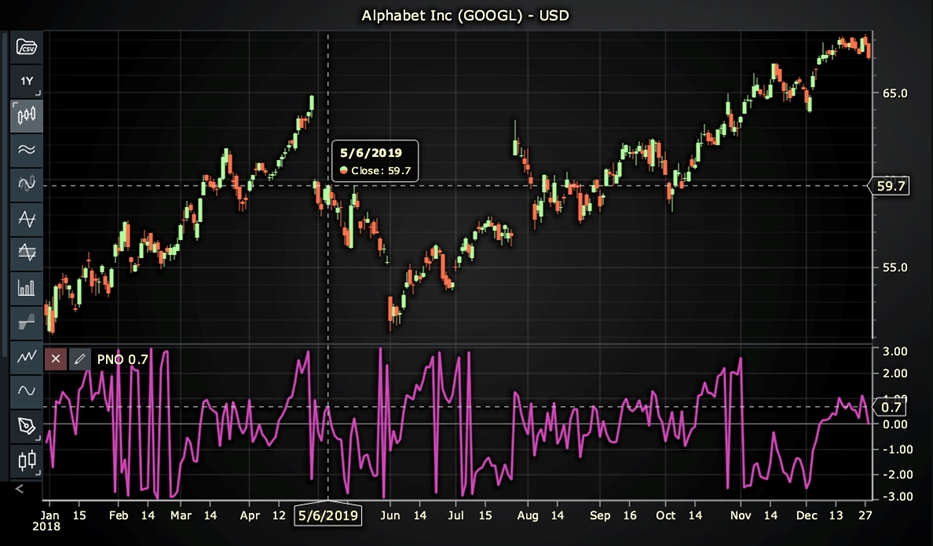
Here’s a detailed breakdown of each section:
A. Importing the Required Libraries:
   const lcjsTrader = require('@arction/lcjs-trader')
   const lcjs = require('@arction/lcjs')
const { Themes } = lcjs- lcjsTrader: This library provides access to the LightningChart JS Trader functionalities, allowing you to create advanced financial charts.
- lcjs: The main LightningChart JS library, used for general charting functionality.
- Themes: A property within lcjs that provides access to pre-built themes. In this case, we are using the darkGold theme to style the chart.
B. Initializing the Trading Chart:
   lcjsTrader.trader(TRADER_LICENSE).then(async (trader) => {
    // Create a trading chart.
const tradingChart = trader.tradingChart({ loadFromStorage: false, colorTheme: Themes.darkGold })trader(TRADER_LICENSE): Initializes the LightningChart JS Trader with the provided license key (TRADER_LICENSE). This is required to access the charting functionalities for financial data.
Note you can request a LightningChart JS Trader trial license, which is free.
tradingChart(): This function creates a trading chart with certain options.loadFromStorage: false: This disables the loading of previously stored chart data from local storage, ensuring a fresh chart setup.colorTheme: Themes.darkGold: This applies the darkGold theme to the chart, which influences the background color, gridlines, and other visual elements.
C. Adding and Customizing the Indicator
       // Add a Prime Number Oscillator indicator
    const pno = tradingChart.indicators().addPrimeNumberOscillator()
    pno.setSource(3)
    pno.setLineColor('#D747BC')
pno.setLineWidth(3)addPrimeNumberOscillator(): PNO finds the nearest prime number to the current price and plots the difference as an oscillator line.
**pno.setSource(3): Sets which values the indicator calculations are based on. In this case, calculations based on Close values.
pno.setLineColor('#D747BC'): Changes the color of the indicator line to pink.
pno.setLineWidth(3): Sets the line thickness of the indicator to 3 pixels. This makes the line more prominent and easier to observe during analysis.
D. Loading Data from a CSV File
    // Reading data from a file.
    await fetch(`${document.head.baseURI}examples/assets/0000/Alphabet Inc (GOOGL).csv`).then((res) => res.text()).then((text) => {
        tradingChart.readCsvString(text, 'Alphabet Inc (GOOGL)')
})fetch(): This function retrieves a CSV file containing historical data for Alphabet Inc. (GOOGL). The CSV file includes pricing information for the company’s stock, which is plotted on the chart.readCsvString(): This function reads the CSV data and interprets it as pricing data for Alphabet Inc. The second argument (‘Alphabet Inc (GOOGL)’) sets the label for the chart, as seen at the top of the chart image.
E. Setting the Currency for the Chart
    tradingChart.setCurrency('USD')
})setCurrency('USD'): This sets the currency of the chart to USD, ensuring that the pricing data is interpreted and displayed in US dollars.
** Enumeration Source in LC JS Trader:
To select which values the indicator calculations are based on.

Advantages and Limitations of the Indicator
Advantages
- Novelty and Uniqueness: The use of prime numbers is less common, which might provide unique insights that other indicators do not.
- Support and Resistance Identification: Provides a mathematical approach to identifying potential support and resistance levels, which can be very objective.
Limitations
- Complexity: Calculating prime numbers near current prices can be computationally intensive, especially for real-time analysis across multiple assets.
- Arbitrary Significance: The practical relevance of prime numbers to market prices is not supported by all traders and can be seen as somewhat arbitrary.
Conclusion
The Prime Number Oscillator offers an innovative way to analyze financial markets through a mathematical lens. While it may not be as widely accepted or understood as more traditional technical indicators, its unique approach to identifying potential market turning points based on prime numbers can offer valuable insights.
Traders looking to add a new dimension to their technical analysis toolkit might find the PNO particularly intriguing. Using LightningChart JS Trader, one can seamlessly integrate and experiment with the Prime Number Oscillator to better understand its implications and utility in real-world trading scenarios.
Continue learning with LightningChart
Create a JavaScript Pie Chart with NodeJS, TypeScript & LightningChart
Written by a human | Updated on April 10th, 2025JavaScript Pie Chart with NodeJS & TypeScript Today, we are going to do a short tutorial on how to generate a pie chart using Node JS, TypeScript, and LigningCharts JS. To see how to get LightningChart JS for...
Real-time data visualization with WebSockets
Written by a human | Updated on April 10th, 2025WebSockets Data Visualization in Real-Time These days it is ever increasingly common that people require web solutions for their applications and services. Data visualization is not an exception to this, as...
Why Performance Matters in Data Visualization?
Written by a human | Updated on April 10th, 2025Performance in Data VisualizationI was doing a Google search a couple of days ago and particularly, I wanted to know what are the options for developers who need to visualize large amounts of data points within...



If you have any questions, feel free to contact us!



©LightningChart Ltd 2026. All rights reserved.