



How to use Kurtosis in trading with LightningChart JS Trader
Article
Assisted by AI
Learn how to use kurtosis technical indicator for developing trading applications with LightningChart JS Trader with high-performance.
Ahmad Omid
Data Science Developer

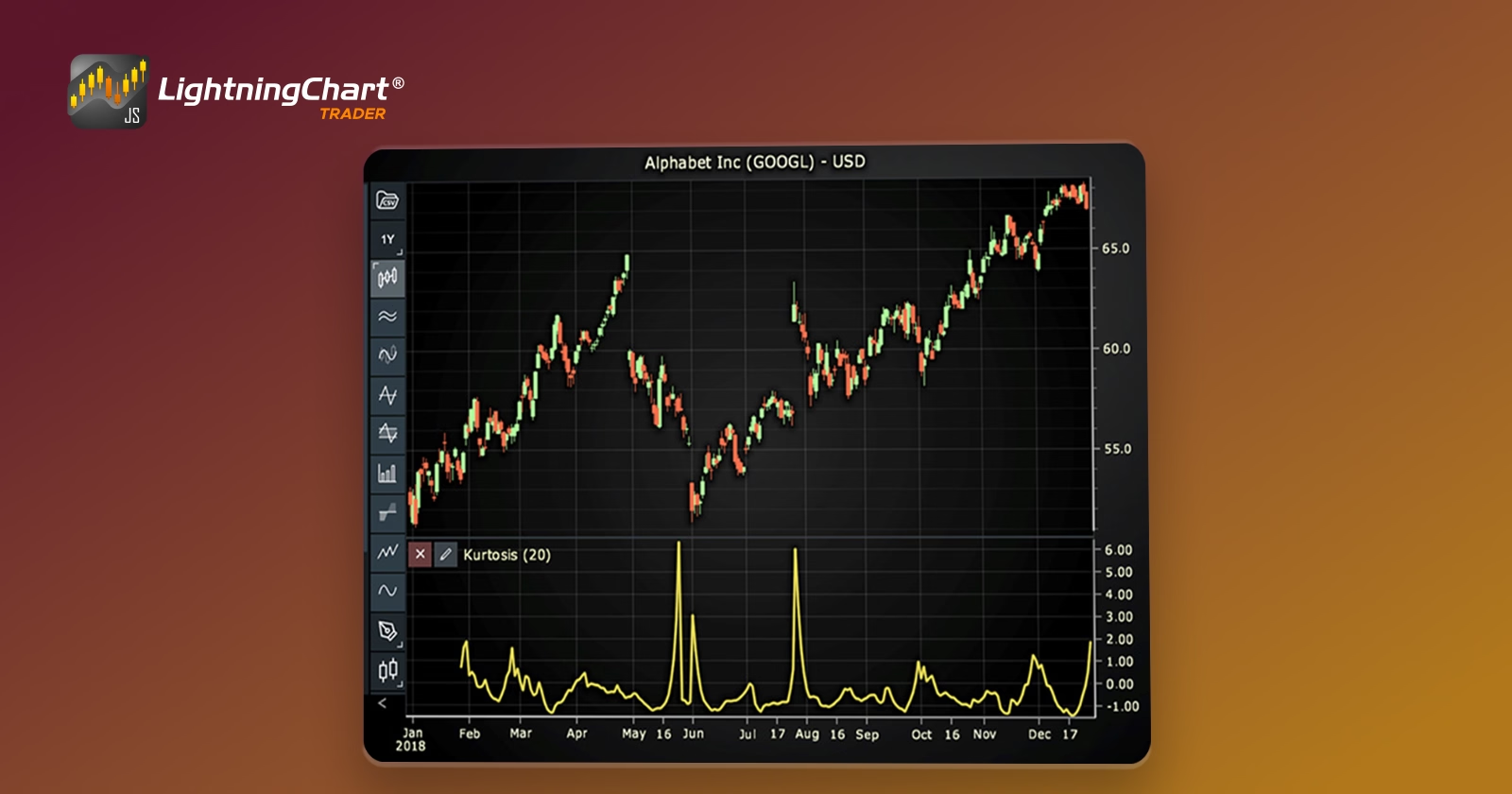
Introduction to Kurtosis in Trading
Kurtosis in trading refers to the statistical measure that describes the shape of a distribution’s tails in relation to its overall shape. In simpler terms, it evaluates how frequently extreme price movements occur in a financial asset’s price history.
While traders often look at mean, variance, or skewness to understand market behavior, kurtosis provides unique insights into the likelihood of sharp price swings.
In financial markets, understanding the behavior of returns is crucial. Kurtosis helps traders assess whether they are operating in a stable environment or one prone to unexpected volatility.
Unlike variance, which measures average dispersion, or skewness, and assesses asymmetry, kurtosis focuses on the intensity and frequency of outlier events, something especially relevant in risk management and volatility forecasting.
Kurtosis Types
There are three main types of kurtosis, each providing a different view of market behavior:
- Mesokurtic: This is the baseline level of kurtosis, represented by a normal distribution. It indicates a moderate level of tail risk. In trading terms, it suggests that asset returns are normally distributed, with rare extreme movements.
- Leptokurtic: Distributions with high kurtosis. They exhibit fat tails and sharp peaks, meaning more frequent extreme price movements. This is critical for traders because it indicates potential for sudden volatility.
- Platykurtic: These distributions have thin tails and flatter peaks. They suggest fewer extreme price deviations and more price stability, which can be ideal for low-risk trading strategies.
Kurtosis and Market Behavior
High kurtosis in trading data often corresponds to volatile market conditions. For instance, during financial crises or unexpected geopolitical events, asset prices can show sudden and severe deviations, resulting in a leptokurtic distribution.
These are periods when kurtosis spikes, alerting traders to the elevated risk. On the other hand, a low kurtosis value typically reflects a stable market with predictable price movements. This can be useful for identifying periods when mean-reverting strategies or passive investment approaches might perform better.
Real-world example
Consider the 2008 financial crisis. Many assets exhibited high kurtosis leading up to and during the crash, signaling an abnormal frequency of sharp losses. Traders who monitored kurtosis could have been better prepared for sudden volatility.
Formula
The basic idea of kurtosis is to measure how often extreme values (very high or very low prices) happen compared to normal fluctuations.
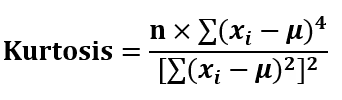
where:
- n = number of data points (e.g., number of closing prices).
- Xi = each individual value (e.g., each price).
- μ = mean (average) of all the values.
- ∑ = sum of the following terms.
Interpretation
- Kurtosis = 3: Normal distribution (Mesokurtic)
- Kurtosis > 3: Fat tails (Leptokurtic)
- Kurtosis < 3: Thin tails (Platykurtic)
Calculation Example
Assume the following closing prices: [100, 102, 98, 105, 95]
- Calculate the mean: (100 + 102 + 98 + 105 + 95) / 5 = 100
- Find deviations from the mean:
- 100 − 100 = 0
- 102 − 100 = 2
- 98 − 100 = -2
- 105 − 100 = 5
- 95 − 100 = -5
- Raise each to the 4th power and sum them:
- 04 = 0
- 02 = 16
- (-2)4 = 16
- 54 = 625
- (-5)4 = 625
- Total = 1282
- Now square each deviation and sum them:
- 02 = 0
- 22 = 4
- (-2)2 = 4
- 52 = 25
- (-5)2 = 25
- Total = 58
- Plug into the formula:
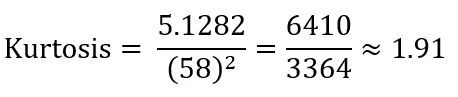
Calculation Interpretation:
- 91 is less than 3, which means Platykurtic, the data has thin tails, fewer extreme outliers, and more price stability.
- If the result was much higher than 3, it would mean the market is showing more extreme swings, a riskier environment.
How to Create the Technical Indicator Using LC JS Trader
Step 1: Get LightningChart JS Trader
To begin, you’ll need access to LightningChart JS Trader. This library provides the tools necessary to create advanced technical indicators, including the Kurtosis Indicator. Visit the LightningChart JS Trader page to download the required components and review the documentation.
Step 2: Review the Interactive Example
LightningChart JS Trader includes interactive examples that demonstrate how to create custom technical indicators. Start by reviewing the documentation, focusing on how to integrate the Kurtosis Indicator into your chart setup. The interactive examples will guide you through the process of setting up the Kurtosis Indicator, from importing the necessary modules to modify the chart settings.
Step 3: Code Explanation
In this step, we will break down the code that creates the chart with the Kurtosis Indicator, as shown in the image, using LightningChart JS Trader. The code demonstrates how to initialize a trading chart, apply the Kurtosis Indicator, and customize its appearance.
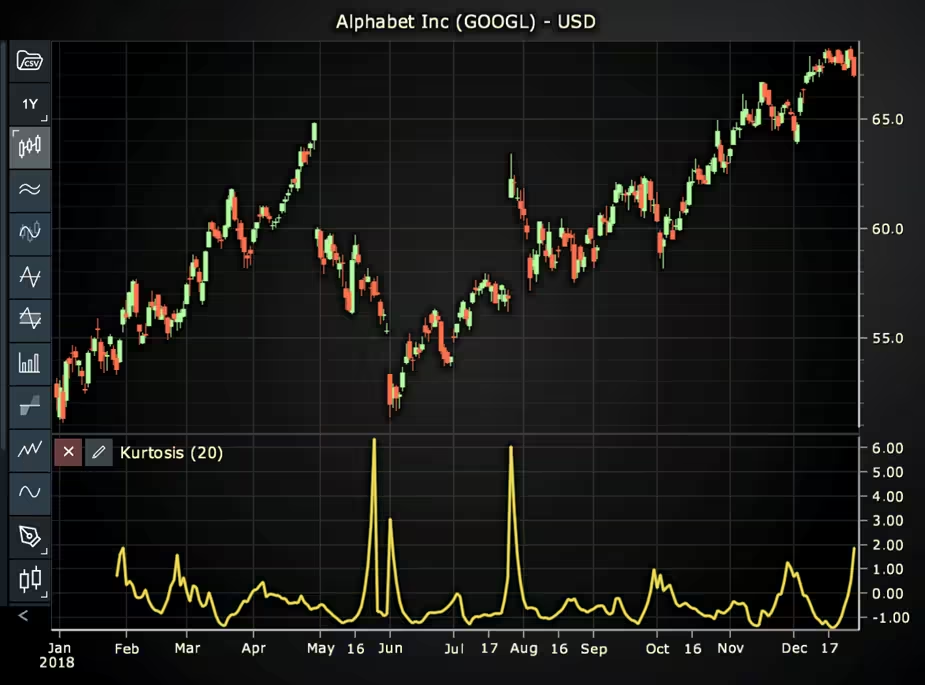
Here’s a detailed breakdown of each section:
A. Importing the Required Libraries:
   const lcjsTrader = require('@arction/lcjs-trader')
   const lcjs = require('@arction/lcjs')
const { Themes } = lcjs- lcjsTrader: This library provides access to the LightningChart JS Trader functionalities, allowing you to create advanced financial charts.
- lcjs: The main LightningChart JS library, used for general charting functionality.
- Themes: A property within lcjs that provides access to pre-built themes. In this case, we are using the darkGold theme to style the chart.
B. Initializing the Trading Chart:
   lcjsTrader.trader(TRADER_LICENSE).then(async (trader) => {
    // Create a trading chart.
const tradingChart = trader.tradingChart({ loadFromStorage: false, colorTheme: Themes.darkGold })trader(TRADER_LICENSE): Initializes the LightningChart JS Trader with the provided license key (TRADER_LICENSE). This is required to access the charting functionalities for financial data.
Note you can request a LightningChart JS Trader trial license, which is free.
tradingChart(): This function creates a trading chart with certain options.loadFromStorage: false: This disables the loading of previously stored chart data from local storage, ensuring a fresh chart setup.colorTheme: Themes.darkGold: This applies the darkGold theme to the chart, which influences the background color, gridlines, and other visual elements.
C. Adding and Customizing the Indicator
    // Add a Kurtosis Indicator
    const ku = tradingChart.indicators().addKurtosis()
    ku.setPeriodCount(20)
    ku.setMovingAverageType(1)
    ku.setSource(3)
    ku.setLineColor('#E8DB54')
ku.setLineWidth(3)addKurtosis(): It measures the “tailedness” of the probability distribution of the price.
ku.setPeriodCount(20): Sets the number of time periods (n) used to calculate the indicator.
**ku.setMovingAverageType(1): Sets the type of Moving Average used in Kurtosis calculations. In this case, 1 represents none, but it is possible to change it using different moving averages.
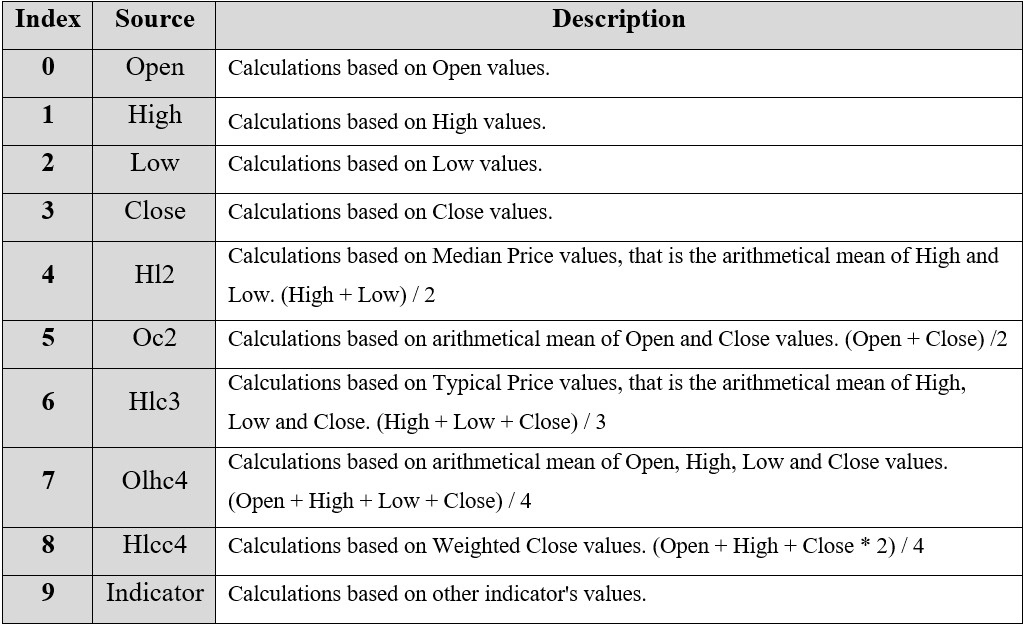
***ku.setSource(3): Sets which values the indicator calculations are based on. In this case, 3 represents the Close value.
ku.setLineColor('#E8DB54’): Sets the color of the indicator line to a shade of yellow.
ku.setLineWidth(3): Sets the width of the indicator line to 3 pixels.
D. Loading Data from a CSV File
    // Reading data from a file.
    await fetch(`${document.head.baseURI}examples/assets/0000/Alphabet Inc (GOOGL).csv`).then((res) => res.text()).then((text) => {
        tradingChart.readCsvString(text, 'Alphabet Inc (GOOGL)')
})fetch(): This function retrieves a CSV file containing historical data for Alphabet Inc. (GOOGL). The CSV file includes pricing information for the company’s stock, which is plotted on the chart.readCsvString(): This function reads the CSV data and interprets it as pricing data for Alphabet Inc. The second argument (‘Alphabet Inc (GOOGL)’) sets the label for the chart, as seen at the top of the chart image.
E. Setting the Currency for the Chart
    tradingChart.setCurrency('USD')
})setCurrency('USD'): This sets the currency of the chart to USD, ensuring that the pricing data is interpreted and displayed in US dollars.
** Enumeration of Moving Average Types in LC JS Trader:
- Exponential Moving Average (EMA): 0
- None: 1 (No moving average applied)
- Simple Moving Average (SMA): 2
- Time Series Moving Average (TSMA): 3
- Triangular Moving Average (TMA): 4
- Variable Moving Average (VMA): 5
- Variable Index Dynamic Average (VIDYA): 6
- Volume Weighted Moving Average (VWMA): 7
- Weighted Moving Average (WMA): 8
- Welles Wilder’s Smoothing (WWS): 9
** Enumeration Source in LC JS Trader: To select which values the indicator calculations are based on.
Advantages and Limitations of the Indicator
Advantages:
- Provides insights into market risk and tail events.
- Useful for risk-adjusted performance analysis.
- Helps detect abnormal price behavior that variance and skewness might miss.
Limitations:
- Sensitive to outliers, which can distort results in small datasets.
- Does not indicate direction of price movement—only intensity.
- Requires context; high kurtosis alone is not always a signal to act.
Conclusion
Kurtosis in trading offers a powerful lens for understanding the frequency and impact of extreme market movements. Unlike traditional measures like variance or skewness, it highlights the potential for tail-risk events, crucial in today’s volatile markets.
Moreover, by using LightningChart JS Trader, traders can not only compute but also interactively explore kurtosis to make smarter, risk-aware decisions. Incorporating kurtosis into your trading strategy can mean the difference between being blindsided by volatility and staying one step ahead.
Continue learning with LightningChart

Trend Lines in Trading
Trend lines are among the simplest yet most powerful tools in technical analysis. They help traders visualize market direction, identify potential support and resistance levels, and make more informed trading decisions. Despite their simplicity, trend lines remain a...

Best Python Charting Library in 2026
Python's charting ecosystem is large, overlapping, and regularly misunderstood. Most comparison guides stop at Matplotlib, Plotly, and Seaborn. This one goes further: it covers what happens when your datasets grow large, your update rates increase, or your chart types...

Best TradingView Charting Library Alternative
TradingView's charting libraries are the most visible option for fintech developers. Visibility is not the same as capability. This guide is for developers who have hit the wall on candle count limits, watermark restrictions, branding requirements, real-time...



If you have any questions, feel free to contact us!



©LightningChart Ltd 2026. All rights reserved.





