








Fractal Chaos Oscillator Theory & Chart Implementation
Article
Explore the Fractal Chaos Oscillator theory and learn how to implement it in software applications for technical analysis.
Ahmad Omid
Data Science Developer

Introduction to Fractal Chaos Oscillator
The Fractal Chaos Oscillator (FCO) is a technical indicator that measures market behavior, offering insights into whether the market is trending or chaotic. With values ranging between 1 (indicating a trending market) and -1 (signifying chaos), the FCO is particularly favored in intraday trading.
In this blog, we delve into the theory behind the Fractal Chaos Oscillator, explain its calculation and interpretation, and demonstrate its implementation using LightningChart JS Trader Interactive Examples.
Overview and History
The Fractal Chaos Oscillator stems from fractal mathematics, a concept that models seemingly chaotic systems using patterns that repeat at different scales. Introduced to financial markets, this theory allows traders to identify patterns amidst market noise and predict potential trends. The FCO specifically quantifies the trendiness or randomness of price movements.
What is the Fractal Chaos Theory?
The Fractal Chaos Theory proposes that markets are not entirely random but exhibit repeating patterns, often obscured by short-term noise. These patterns, or fractals, appear in price movements and help identify trends over various timeframes. The Fractal Chaos Oscillator utilizes this theory to highlight periods of market order (trends) and disorder (chaos).
Difference Between Fractal Chaos Oscillator and Fractal Chaos Bands
While both the Fractal Chaos Oscillator (FCO) and Fractal Chaos Bands (FCB) are derived from the same underlying theory, their applications differ. The FCO quantifies the degree of order or chaos, whereas the FCB visualize price channels based on fractal calculations. You can explore more about FCB in our dedicated article.
Formula & Code
The Fractal Chaos Oscillator formula relies on fractal geometry and moving averages. It is expressed as:

- Price Difference: Measures the net movement over a specified number of periods.
- Fractal Length: A smoothed calculation of the actual distance prices have traveled within those periods.
Example Calculation
Let’s calculate the FCO for a 5-period interval:
- Price Difference: Take the closing price of the last period and subtract the closing price from 5 periods earlier.
- Fractal Length: Sum the absolute differences between each price in the 5-period interval.
- FCO: Divide the Price Difference by the Fractal Length.
For example:
- Closing prices for 5 periods: [100, 102, 101, 105, 107]
- Price Difference: 107 – 100 = 7
- Fractal Length: |100 – 102| + |102 – 101| + |101 – 105| + |105 – 107| = 2+1+4+2 = 9
- FCO: 7/9 ≈ 0.78
In this example, the market shows a moderate trend with an FCO of 0.78.
How to Create the Technical Indicator Using LC JS Trader
Step 1: Get LightningChart JS Trader
To begin, you’ll need access to LightningChart JS Trader. This library provides the tools necessary to create advanced technical indicators, including the Fractal Chaos Oscillator Indicator. Visit the LightningChart JS Trader page to download the required components and review the documentation.
Step 2: Review the Interactive Example
LightningChart JS Trader includes interactive examples that demonstrate how to create custom technical indicators. Start by reviewing the documentation, focusing on how to integrate the Fractal Chaos Oscillator Indicator into your chart setup. The interactive examples will guide you through the process of setting up the FCO Indicator, from importing the necessary modules to modify the chart settings.
Step 3: Code Explanation
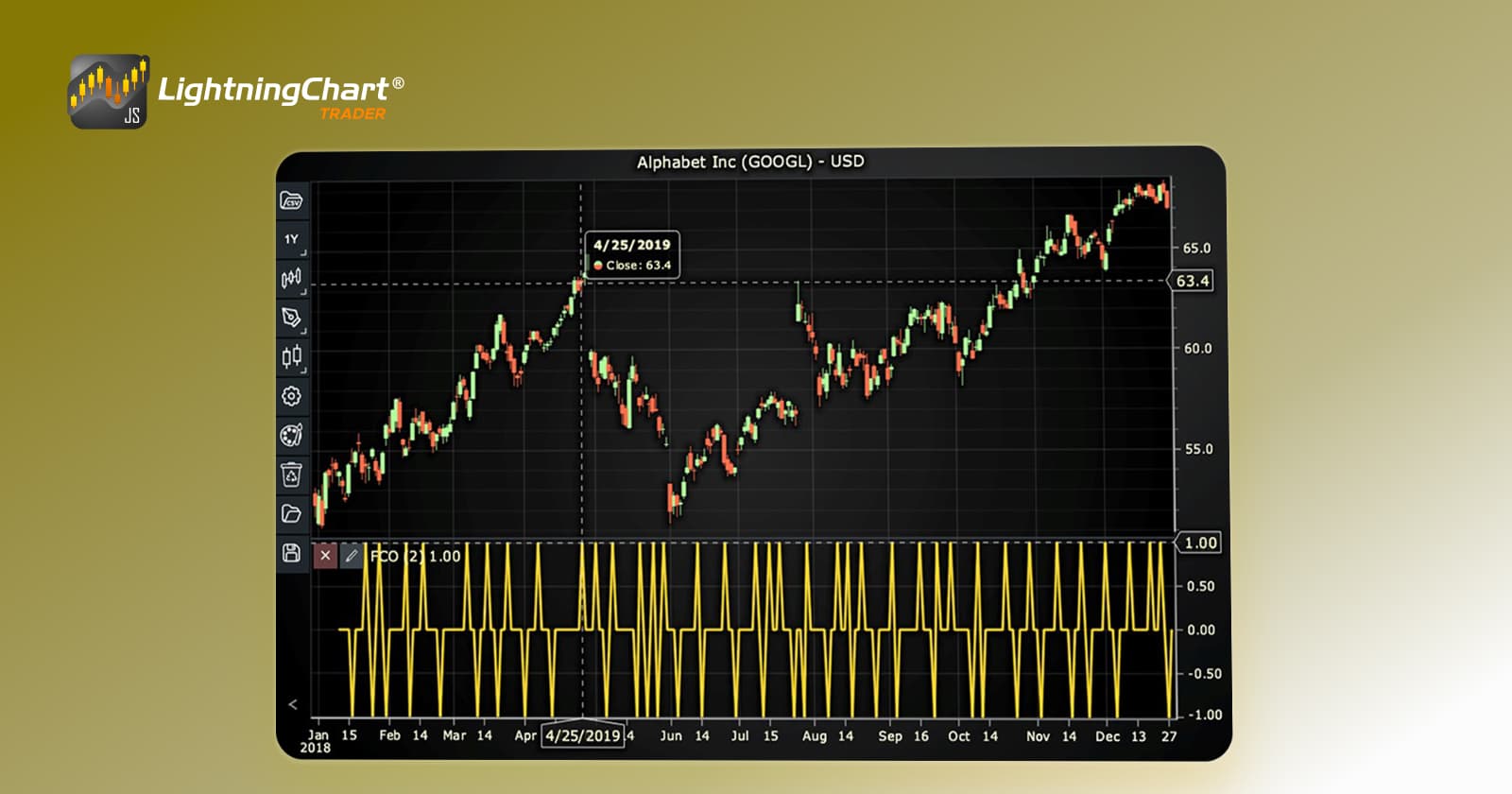
In this step, we will break down the code that creates the chart with the Fractal Chaos Oscillator Indicator, as shown in the image, using LightningChart JS Trader. The code demonstrates how to initialize a trading chart, apply the FCO Indicator, and customize its appearance.

Here’s a detailed breakdown of each section:
A. Importing the Required Libraries:
   const lcjsTrader = require('@arction/lcjs-trader')
   const lcjs = require('@arction/lcjs')
const { Themes } = lcjs- lcjsTrader: This library provides access to the LightningChart JS Trader functionalities, allowing you to create advanced financial charts.
- lcjs: The main LightningChart JS library, used for general charting functionality.
- Themes: A property within lcjs that provides access to pre-built themes. In this case, we are using the darkGold theme to style the chart.
B. Initializing the Trading Chart:
   lcjsTrader.trader(TRADER_LICENSE).then(async (trader) => {
    // Create a trading chart.
const tradingChart = trader.tradingChart({ loadFromStorage: false, colorTheme: Themes.darkGold })trader(TRADER_LICENSE): Initializes the LightningChart JS Trader with the provided license key (TRADER_LICENSE). This is required to access the charting functionalities for financial data.
Note you can request a LightningChart JS Trader trial license, which is free.
tradingChart(): This function creates a trading chart with certain options.loadFromStorage: false: This disables the loading of previously stored chart data from local storage, ensuring a fresh chart setup.colorTheme: Themes.darkGold: This applies the darkGold theme to the chart, which influences the background color, gridlines, and other visual elements.
C. Adding and Customizing the Indicator
    // Add a Fractal Chaos Oscillator indicator
    const fco = tradingChart.indicators().addFractalChaosOscillator()
    fco.setPeriodCount(2)
    fco.setLineColor('#FFDD33')
fco.setLineWidth(3)addFractalChaosOscillator(): FCO measures the trendiness of the market, ranging between 1 (trending market) and -1 (chaotic market). FCO is often used in intra-day trading.
fco.setPeriodCount(2): Sets the number of time periods (n) used to calculate the indicator.
fco.setLineColor('#FFDD33'): Changes the color of the FCO line to yellow.
fco.setLineWidth(3): Sets the line thickness of the indicator to 3 pixels. This makes the line more prominent and easier to observe during analysis.
D. Loading Data from a CSV File
    // Reading data from a file.
    await fetch(`${document.head.baseURI}examples/assets/0000/Alphabet Inc (GOOGL).csv`).then((res) => res.text()).then((text) => {
        tradingChart.readCsvString(text, 'Alphabet Inc (GOOGL)')
})fetch(): This function retrieves a CSV file containing historical data for Alphabet Inc. (GOOGL). The CSV file includes pricing information for the company’s stock, which is plotted on the chart.readCsvString(): This function reads the CSV data and interprets it as pricing data for Alphabet Inc. The second argument (‘Alphabet Inc (GOOGL)’) sets the label for the chart, as seen at the top of the chart image.
E. Setting the Currency for the Chart
    tradingChart.setCurrency('USD')
})setCurrency('USD'): This sets the currency of the chart to USD, ensuring that the pricing data is interpreted and displayed in US dollars.
Advantages and Limitations of the Indicator
The Fractal Chaos Oscillator (FCO) offers several advantages that make it a valuable tool for traders. One of its primary benefits is its ability to clarify market behavior by distinguishing between trending and chaotic conditions.
This simplifies decision-making, especially in intraday trading where quick analysis is critical. Additionally, the FCO adapts in real-time to price changes, providing traders with immediate feedback on the market’s state. Unlike lagging indicators, the FCO reflects market movements as they happen, making it particularly useful for short-term trading strategies.
However, the FCO is not without limitations. Its calculation is relatively complex, requiring precise data and an understanding of fractal geometry, which might pose a challenge for beginners.
Furthermore, in highly volatile markets, the FCO can be overly sensitive, leading to rapid fluctuations that can complicate interpretation. This sensitivity might result in false signals if used in isolation.
Lastly, while the FCO is powerful, it is most effective when combined with complementary tools, such as Fractal Chaos Bands or moving averages, to provide a more comprehensive market analysis. These limitations highlight the importance of using the FCO judiciously and as part of a broader trading strategy.
Conclusion
The Fractal Chaos Oscillator is a powerful tool for traders aiming to understand market behavior, particularly in short-term trading. By quantifying trendiness and chaos, it enables precise analysis of price movements. While its complexity requires a good understanding of fractal theory and technical indicators, the insights it provides are invaluable.
To implement the FCO effectively, LightningChart JS Trader offer a practical environment for visualizing and utilizing this indicator in live market scenarios. By combining it with other tools and sound trading strategies, traders can unlock its full potential in their trading endeavors.
Continue learning with LightningChart
Real-time data visualization with WebSockets
Written by a human | Updated on April 10th, 2025WebSockets Data Visualization in Real-Time These days it is ever increasingly common that people require web solutions for their applications and services. Data visualization is not an exception to this, as...
Why Performance Matters in Data Visualization?
Written by a human | Updated on April 10th, 2025Performance in Data VisualizationI was doing a Google search a couple of days ago and particularly, I wanted to know what are the options for developers who need to visualize large amounts of data points within...

Geospatial data visualization with Google Maps & LightningChart
Written by a human | Updated on April 10th, 2025Geospatial Data Visualization This article showcases and describes a particular use case of LightningChart JS for geospatial data visualization. LightningChart JS is a JavaScript charting tool designed for...



If you have any questions, feel free to contact us!
©LightningChart Ltd 2025. All rights reserved.