








A Guide to Coppock Curve Indicator: Formula & Chart Example
Article
Learn how to implement the Coppock Curve technical indicator in your software applications to detect long-term market trends.
Ahmad Omid
Data Science Developer

What Is the Coppock Curve Indicator?
The Coppock Curve is a renowned technical analysis indicator utilized by traders to identify long-term buy and sell signals. Its unique blend of momentum analysis and weighted moving averages has made it a go-to indicator for investors seeking a deeper understanding of market trends.
In this guide, we’ll delve into the theory behind the Coppock Curve, explore its formula, and demonstrate its application using LightningChart JS Trader.
Brief History
The Coppock Curve was introduced by economist Edwin Sedgwick Coppock in 1962. Initially designed for stock market analysis, it aimed to help investors pinpoint opportune moments to enter the market.
Coppock originally created the indicator with guidance from the Episcopal Church, using it to determine the recovery period for individuals grieving a loss. This concept of recovery inspired the calculation of market momentum.
How Does the Coppock Curve technical indicator work in Trading?
The Coppock Curve functions as a price momentum indicator, primarily geared toward long-term traders. It identifies market turning points by measuring the rate of change (ROC) in prices over two distinct periods and applying a weighted moving average (WMA).
Traders rely on the Coppock Curve to detect when a market has bottomed out, signaling a potential buying opportunity. While its primary focus is on detecting bullish trends, it can also indicate potential market tops.
Formula
The Coppock Curve operates by analyzing price momentum to generate long-term buy and sell signals. Its calculation uses two rate-of-change (ROC) values and a weighted moving average (WMA). Below, we provide a detailed breakdown of its workings, including an example calculation for better understanding.
Calculation
The Coppock Curve is calculated using three steps:
1. Rate of Change (ROC) Calculation
The rate of change measures the percentage change in price over a specified period. It is computed as:

In the Coppock Curve, two ROCs are typically used:
- Long ROC (14 months): Captures long-term momentum.
- Short ROC (11 months): Reflects medium-term momentum.
2. Summing the ROCs
Add the two ROC values to obtain a composite momentum value:
Composite ROC = Long ROC + Short ROC
3. Weighted Moving Average (WMA)
Apply a weighted moving average (WMA) to smooth the composite ROC values. The standard period is 10 months, but this can be adjusted. The formula for WMA is:
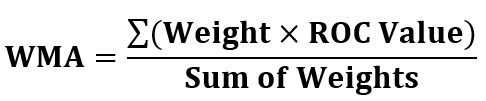
The WMA places more emphasis on recent values, reducing noise and emphasizing trends.
Calculation Example
Let’s calculate the Coppock Curve using the following hypothetical monthly price data:

Step 1: Calculate ROCs
- Long ROC (14 months) using the formula:

- Short ROC (11 months): Similarly, for 11 months:
Composite ROC = Long ROC + Short ROC
Composite ROC = 41.18 + 26.32 = 67.5
-
Step 3: Apply the WMA
Assuming a 10-month WMA with equal weights for simplicity, the WMA is calculated as:
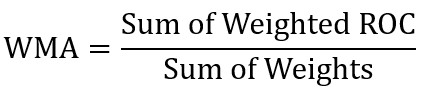
For our case:
- Last 10 months of composite ROC values (hypothetical): 65, 66, 67, 68, 69, 70, 71, 72, 73, 74
- Apply equal weights (1 for each period):

The Coppock Curve value for Month 15 is 71.
Interpretation
- Buy Signal: When the Coppock Curve rises from below the zero line and crosses upward, it signals a potential bullish market. In our example, a value of 71 above zero indicates a positive trend.
- Sell Signal: A downturn in the curve after peaking can signify a weakening trend or potential market top, though it is less reliable for sell signals.
- Zero Line Reference: The zero line serves as a baseline for momentum shifts. When the curve crosses this line upward, it typically indicates a buy opportunity.
Key Components
- Rate of Change (ROC): Reflects the pace of price changes over specific periods, helping to measure market momentum. In other words, it measures the speed and magnitude of the price changes.
- Weighted Moving Average (WMA): Smooths ROC data, highlighting long-term trends while reducing short-term noise to reveal the underlying trend.
- Zero Line: A critical reference point for interpreting market momentum shifts. The baseline serves as a critical reference for buy signals.
By understanding the calculation and interpretation of the Coppock Curve, traders can use it to identify potential buying opportunities and long-term trends effectively. It is especially useful for those who prioritize clarity in long-term market analysis.
How to Create the Technical Indicator Using LC JS Trader
Step 1: Get LightningChart JS Trader
To begin, you’ll need access to LightningChart JS Trader. This library provides the tools necessary to create advanced technical indicators, including the Coppock Curve Indicator. Visit the LightningChart JS Trader page to download the required components and review the documentation.
Step 2: Review the Interactive Example
LightningChart JS Trader includes interactive examples that demonstrate how to create custom technical indicators. Start by reviewing the documentation, focusing on how to integrate the Coppock Curve Indicator into your chart setup. The interactive examples will guide you through the process of setting up the Coppock Curve Indicator, from importing the necessary modules to modify the chart settings.
Step 3: Code Explanation
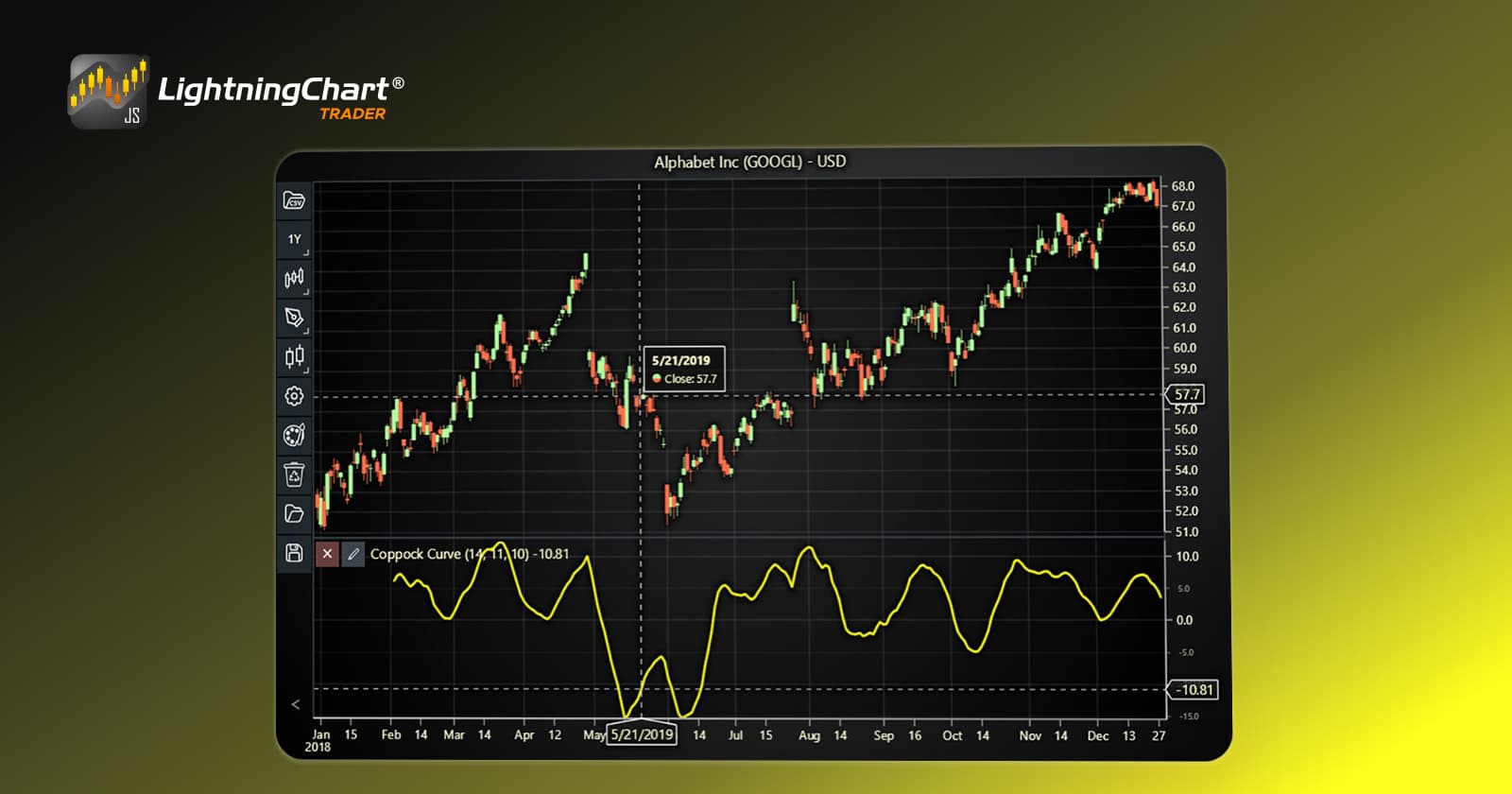
In this step, we will break down the code that creates the chart with the Coppock Curve Indicator, as shown in the image, using LightningChart JS Trader. The code demonstrates how to initialize a trading chart, apply the Coppock Curve Indicator, and customize its appearance.

Here’s a detailed breakdown of each section:
A. Importing the Required Libraries:
   const lcjsTrader = require('@arction/lcjs-trader')
   const lcjs = require('@arction/lcjs')
const { Themes } = lcjs- lcjsTrader: This library provides access to the LightningChart JS Trader functionalities, allowing you to create advanced financial charts.
- lcjs: The main LightningChart JS library, used for general charting functionality.
- Themes: A property within lcjs that provides access to pre-built themes. In this case, we are using the darkGold theme to style the chart.
B. Initializing the Trading Chart:
   lcjsTrader.trader(TRADER_LICENSE).then(async (trader) => {
    // Create a trading chart.
const tradingChart = trader.tradingChart({ loadFromStorage: false, colorTheme: Themes.darkGold })trader(TRADER_LICENSE): Initializes the LightningChart JS Trader with the provided license key (TRADER_LICENSE). This is required to access the charting functionalities for financial data.
Note you can request a LightningChart JS Trader trial license, which is free.
tradingChart(): This function creates a trading chart with certain options.loadFromStorage: false: This disables the loading of previously stored chart data from local storage, ensuring a fresh chart setup.colorTheme: Themes.darkGold: This applies the darkGold theme to the chart, which influences the background color, gridlines, and other visual elements.
C. Adding and Customizing the Indicator
    // Add a Coppock Curve indicator
    const cc = tradingChart.indicators().addCoppockCurve()
    cc.setPeriodCounts(14, 11, 10)
    cc.setSource(3)
    cc.setLineColor('#FBFF14')
cc.setLineWidth(3)addCoppockCurve(): Coppock Curve is a price momentum indicator that is used to identify long-term buy and sell signals. Long and short Rate of Change values and Weighted Moving Average are used in the calculations.
cc.setPeriodCounts(14, 11, 10): Sets the default period counts for long Rate of Change (14), short Rate of Change (11), and Weighted Moving Average(10).
**cc.setSource(3): Sets which values the indicator calculations are based on. In this case, calculations based on Close values.
cc.setLineColor('#FBFF14'): Changes the color of the indicator to a shade of yellow.
cc.setLineWidth(3): Sets the line thickness of the indicator to 3 pixels. This makes the line more prominent and easier to observe during analysis.
D. Loading Data from a CSV File
    // Reading data from a file.
    await fetch(`${document.head.baseURI}examples/assets/0000/Alphabet Inc (GOOGL).csv`).then((res) => res.text()).then((text) => {
        tradingChart.readCsvString(text, 'Alphabet Inc (GOOGL)')
})fetch(): This function retrieves a CSV file containing historical data for Alphabet Inc. (GOOGL). The CSV file includes pricing information for the company’s stock, which is plotted on the chart.readCsvString(): This function reads the CSV data and interprets it as pricing data for Alphabet Inc. The second argument (‘Alphabet Inc (GOOGL)’) sets the label for the chart, as seen at the top of the chart image.
E. Setting the Currency for the Chart
    tradingChart.setCurrency('USD')
})setCurrency('USD'): This sets the currency of the chart to USD, ensuring that the pricing data is interpreted and displayed in US dollars.
** Enumeration Source in LC JS Trader:
To select which values the indicator calculations are based on.

Advantages and Limitations of the Indicator
The Coppock Curve offers several advantages that make it a favored tool among long-term traders. Its primary strength lies in its ability to filter out short-term market noise, allowing traders to focus on long-term momentum trends.
By using a combination of two rate-of-change (ROC) values and a weighted moving average (WMA), it provides a comprehensive perspective on market movements.
This clarity is particularly evident in its buy signals, where the upward crossing of the zero line is straightforward and easy to interpret. Additionally, its reliance on historical price data makes it less prone to false signals compared to many other momentum indicators.
Despite its strengths, the Coppock Curve is not without limitations. One significant drawback is its lagging nature, which arises from its reliance on the WMA.
This characteristic means the indicator may respond slowly to rapid market changes, making it less suitable for short-term or highly volatile trading environments. Another limitation is its lack of emphasis on sell signals. While the Coppock Curve can indicate a market top when the curve peaks and turns downward, this is less reliable than its buy signals.
Furthermore, the default time periods (14, 11, and 10 months) may not suit all markets, requiring customization to align with specific market conditions. This need for adjustment can make it less accessible to novice traders who may struggle with fine-tuning the parameters.
Despite these drawbacks, the Coppock Curve remains a valuable tool for traders focused on identifying long-term market trends and opportunities.
Conclusion
The Coppock Curve indicator offers a robust approach to long-term market analysis, combining rate of change values with a weighted moving average to signal opportune moments for entry.
While its primary focus is on identifying market bottoms and bullish trends, understanding its limitations is equally crucial for effective application. Moreover, by using LightningChart JS Trader, traders can easily create and interpret Coppock Curve charts to enhance their trading strategies.
Embracing the Coppock Curve can empower traders to navigate markets with confidence and precision.
Continue learning with LightningChart

JavaScript Refreshing Spectrum Chart
Written by a human | Updated on April 10th, 2025JavaScript Refreshing Spectrum Chart Hello again, this time I bring a quick but helpful tutorial on how to create a JavaScript refreshing spectrum chart. A spectrum chart is commonly used in reading and plotting...
Horizontal Bar Chart of Russia-Ukraine War Weaponry Data
Written by a human | Updated on April 10th, 2025 JavaScript Horizontal Bar Chart In this article, we aim to respectfully create a JavaScript horizontal bar chart that simulates the weaponry usage on recent war conflicts. While the data have been taken from Kaggle and...
Create a vibration charts application with 2D & 3D spectrograms
Written by a human | Updated on April 10th, 2025JS Spectrogram ApplicationHello, in this article we will create a JS dashboard with 2D and 3D spectrogram charts. The purpose of creating this project is to explain how to create a vibration analysis application that...



If you have any questions, feel free to contact us!



©LightningChart Ltd 2026. All rights reserved.