








What is the Commodity Channel Index Indicator? CCI Indicator
Article
Learn how to implement the Commodity Channel Index indicator in your software applications to calculate deviations from average asset prices.
Ahmad Omid
Data Science Developer


What is the Commodity Channel Index Indicator?
The Commodity Channel Index (CCI) is a versatile technical indicator designed to spot emerging trends, assess their strength, and identify overbought or oversold conditions in financial markets.
It is a momentum-based oscillator that measures the deviation of an asset’s price from its average price over a specified period. It helps traders detect price trends and reversals, signaling when a market may be overbought or oversold. Despite its name, the CCI isn’t restricted to commodities and is widely applied across all financial markets.
Brief History
The CCI was introduced in 1980 by Donald Lambert, who initially designed it for commodity trading. However, its reliability in identifying trends and potential turning points quickly led to its adoption across other markets, including equities, forex, and cryptocurrencies. Today, it remains one of the most popular technical analysis tools.
How to Use the Commodity Channel Index Indicator?
The Commodity Channel Index Indicator is used for several purposes:
- Trend Identification: Positive values indicate an uptrend, while negative values suggest a downtrend.
- Overbought and Oversold Levels: A CCI above +100 may indicate overbought conditions, while below -100 may suggest oversold levels.
- Divergence Signals: Divergences between the price and CCI can warn of potential trend reversals.
What Does Commodity Channel Index Measure?
The Commodity Channel Index measures the relationship between an asset’s current price, its moving average, and the average deviation of its price from that moving average. This measurement provides traders with insights into whether the price is trading unusually high or low compared to historical levels.
Commodity Channel Index vs RSI
While both the commodity channel index indicator and the Relative Strength Index (RSI) are oscillators used to gauge market momentum, they differ in methodology and application:
- CCI focuses on price deviation from a moving average.
- RSI measures the speed and change of price movements.
- CCI is better suited for identifying cyclical price patterns, while RSI excels at identifying overbought and oversold levels.
How to Use Commodity Channel Index in Forex?
In forex trading, the Commodity Channel Index (CCI) is used to:
- Identify entry and exit points based on overbought/oversold levels.
- Spot forex trends to determine buy or sell opportunities.
- Combine with other indicators, such as moving averages, to enhance signal reliability.
Formula
The commodity channel index indicator is calculated using the following formula:

Where:
- Typical Price = (High + Low + Close) / 3
- SMA = Simple Moving Average of the Typical Price
- Mean Deviation = Average of the absolute deviations from the SMA
Interpretation
- Positive CCI values: Indicate bullish momentum and potential uptrends.
- Negative CCI values: Suggest bearish momentum and potential downtrends.
- Extremes: Values above +100 or below -100 signal overbought or oversold conditions, respectively.
Key Components
- Typical Price: Represents the average of the high, low, and close prices.
- SMA: Smoothens the data for clearer trend analysis.
- Scaling Constant (0.015): Standardizes the commodity channel index indicator for comparison across assets.
Calculation Example
We will calculate the CCI for a 5-day period.
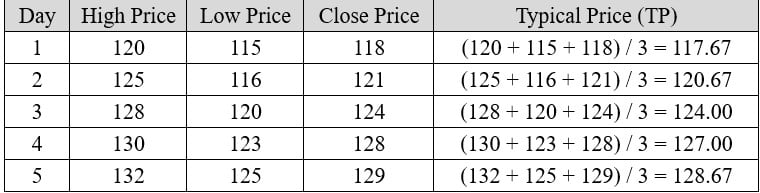
Step 1: Calculate the Simple Moving Average (SMA) of Typical Prices
The SMA for 5 days is:

Step 2: Calculate the Mean Deviation
For each day, calculate the absolute deviation of the Typical Price from the SMA:
Absolute Deviation = ∣ Typical Price – SMA ∣
Absolute Deviation of Day 1 = ∣ 117.67 − 123.60 ∣ = ∣ −5.93 ∣ = 5.93
Absolute Deviation of Day 2 = ∣ 120.67 − 123.60 ∣ = ∣ − 2.93 ∣ = 2.93
Absolute Deviation of Day 3 = ∣ 124.00 − 123.60 ∣ = ∣ + 0.40 ∣ = 0.40
Absolute Deviation of Day 4 = ∣ 127.00 − 123.60 ∣ = ∣ + 3.40 ∣ = 3.40
Absolute Deviation of Day 5 = ∣ 128.67 − 123.60 ∣ = ∣ + 5.07 ∣ = 5.07
Hint: In the calculation of Absolute Deviation, we always take the absolute value of the difference, meaning it will always be positive.

Step 3: Calculate the CCI for Day 5
Using the formula:

Interpretation of the Result
Generally, the Commodity Channel Index (CCI) value of 95.24 indicates that the asset’s price is approaching overbought levels but has not yet entered the overbought zone, which is commonly considered to start at +100.
- Positive Value (Above 0):
- A commodity channel index indicator value of 95.24 shows that the asset’s price is above its moving average, suggesting bullish momentum in the market.
- This positive value indicates that the price is trending upward, but the trend’s strength is moderate rather than extreme.
- Near Overbought Zone:
- The standard thresholds for commodity channel index indicator are:
- +100 or higher: Overbought zone, indicating a potential price reversal or the need to monitor for weakening trends.
- -100 or lower: Oversold zone, signaling possible undervaluation or a trend reversal to the upside.
- The standard thresholds for commodity channel index indicator are:
- At 95.24, the price is close to the overbought threshold (+100), suggesting that traders should monitor the trend closely. A move above +100 could indicate an overbought market and a possible pullback or correction.
- Trend Strength:
-
- This value reflects moderately strong upward momentum. Traders may interpret this as a confirmation of the current uptrend, with a potential opportunity to ride the trend, provided no other reversal signals are present.
Actions Traders Might Take:
- Trend Followers: Traders might look to maintain their long positions, as the trend shows strength but hasn’t reached a critical overbought level.
- Reversal Watchers: Traders monitoring reversals would be cautious, as the CCI is nearing the overbought zone. They might prepare to sell or close positions if the commodity channel index indicator exceeds +100 and price action weakens.
- Confirmation with Other Indicators: Traders may combine the CCI with other tools like RSI or moving averages to confirm the trend and assess whether it aligns with other signals.
In summary, 95.24 indicates strong upward momentum with a trend that is nearing but not yet in the overbought range. It suggests cautious optimism for bullish traders.
How to Create the Technical Indicator Using LC JS Trader
Step 1: Get LightningChart JS Trader
To begin, you’ll need access to LightningChart JS Trader. This library provides the tools necessary to create advanced technical indicators, including the Commodity Channel Index Indicator. Visit the LightningChart JS Trader page to download the required components and review the documentation.
Step 2: Review the Interactive Example
LightningChart JS Trader includes interactive examples that demonstrate how to create custom technical indicators. Start by reviewing the documentation, focusing on how to integrate Commodity Channel Index Indicator into your chart setup. The interactive examples will guide you through the process of setting up the CCI Indicator, from importing the necessary modules to modify the chart settings.
Step 3: Code Explanation
In this step, we will break down the code that creates the chart with the Commodity Channel Index Indicator, as shown in the image, using LightningChart JS Trader. The code demonstrates how to initialize a trading chart, apply the CCI Indicator, and customize its appearance.

Here’s a detailed breakdown of each section:
A. Importing the Required Libraries:
   const lcjsTrader = require('@arction/lcjs-trader')
   const lcjs = require('@arction/lcjs')
const { Themes } = lcjs- lcjsTrader: This library provides access to the LightningChart JS Trader functionalities, allowing you to create advanced financial charts.
- lcjs: The main LightningChart JS library, used for general charting functionality.
- Themes: A property within lcjs that provides access to pre-built themes. In this case, we are using the darkGold theme to style the chart.
B. Initializing the Trading Chart:
   lcjsTrader.trader(TRADER_LICENSE).then(async (trader) => {
    // Create a trading chart.
const tradingChart = trader.tradingChart({ loadFromStorage: false, colorTheme: Themes.darkGold })trader(TRADER_LICENSE): Initializes the LightningChart JS Trader with the provided license key (TRADER_LICENSE). This is required to access the charting functionalities for financial data.
Note you can request a LightningChart JS Trader trial license, which is free.
tradingChart(): This function creates a trading chart with certain options.loadFromStorage: false: This disables the loading of previously stored chart data from local storage, ensuring a fresh chart setup.colorTheme: Themes.darkGold: This applies the darkGold theme to the chart, which influences the background color, gridlines, and other visual elements.
C. Adding and Customizing the Indicator
    // Add a Commodity Channel Index indicator
    const cci = tradingChart.indicators().addCommodityChannelIndex()
    cci.setPeriodCount(20)
    cci.setOverboughtAndSoldLevels(100, -100)
    cci.setLineColor('#FB14FF')
    cci.setFillColor('#FFEB14')
cci.setLineWidth(3)addCommodityChannelIndex(): CCI is designed to spot new trends and weaknesses in them, as well as to watch overbought and oversold levels.
cci.setPeriodCount(20): Sets the number of time periods (n) used to calculate the indicator.
cci.setOverboughtAndSoldLevels(100, -100): Sets the overbought and oversold levels. 100 is Overbought level and -100 is Oversold one.
cci.setLineColor('#FB14FF'): Changes the color of the CCI line to a pink.
cci.setFillColor('#FFEB14'): Sets the color of the area between overbought and oversold levels to yellow.
cci.setLineWidth(3): Sets the line thickness of the indicator to 3 pixels. This makes the line more prominent and easier to observe during analysis.
D. Loading Data from a CSV File
    // Reading data from a file.
    await fetch(`${document.head.baseURI}examples/assets/0000/Alphabet Inc (GOOGL).csv`).then((res) => res.text()).then((text) => {
        tradingChart.readCsvString(text, 'Alphabet Inc (GOOGL)')
})fetch(): This function retrieves a CSV file containing historical data for Alphabet Inc. (GOOGL). The CSV file includes pricing information for the company’s stock, which is plotted on the chart.readCsvString(): This function reads the CSV data and interprets it as pricing data for Alphabet Inc. The second argument (‘Alphabet Inc (GOOGL)’) sets the label for the chart, as seen at the top of the chart image.
E. Setting the Currency for the Chart
    tradingChart.setCurrency('USD')
})setCurrency('USD'): This sets the currency of the chart to USD, ensuring that the pricing data is interpreted and displayed in US dollars.
Advantages and Limitations of the Indicator
Advantages
- Versatility: Applicable to various markets and timeframes.
- Trend Analysis: Helps identify both emerging trends and potential reversals.
- Overbought/Oversold Levels: Assists in timing entry and exit points.
Limitations
- False Signals: Like many oscillators, the CCI can generate false positives in volatile or choppy markets.
- Lagging Nature: As a derivative of price data, it may lag behind real-time market movements.
- Subjectivity: Interpretation varies depending on user-defined parameters, such as the look-back period.
Conclusion
The Commodity Channel Index (CCI) is a versatile and reliable technical indicator, widely used for identifying trends, gauging market momentum, and spotting overbought or oversold conditions. With a solid understanding of its formula, applications, and limitations, traders can effectively integrate the CCI into their strategies for better decision-making.
To enhance the utility and visualization of the Commodity Channel Index Indicator, leveraging libraries like LightningChart JS Trader can be a game-changer. LightningChart JS Trader provides high-performance, interactive charting capabilities that allow traders to:
- Visualize the CCI in real-time with smooth, dynamic updates.
- Combine CCI with other indicators for a holistic view of the market.
- Analyze trends efficiently, even in large datasets, thanks to its unparalleled rendering speed.
- Customize indicators and charts to suit individual trading strategies.
By incorporating the Commodity Channel Index into a robust visualization library like LightningChart JS Trader, traders can make more informed decisions, streamline their analysis, and gain a competitive edge in dynamic financial markets.
Continue learning with LightningChart

JavaScript Refreshing Spectrum Chart
Written by a human | Updated on April 10th, 2025JavaScript Refreshing Spectrum Chart Hello again, this time I bring a quick but helpful tutorial on how to create a JavaScript refreshing spectrum chart. A spectrum chart is commonly used in reading and plotting...
Horizontal Bar Chart of Russia-Ukraine War Weaponry Data
Written by a human | Updated on April 10th, 2025 JavaScript Horizontal Bar Chart In this article, we aim to respectfully create a JavaScript horizontal bar chart that simulates the weaponry usage on recent war conflicts. While the data have been taken from Kaggle and...
Create a vibration charts application with 2D & 3D spectrograms
Written by a human | Updated on April 10th, 2025JS Spectrogram ApplicationHello, in this article we will create a JS dashboard with 2D and 3D spectrogram charts. The purpose of creating this project is to explain how to create a vibration analysis application that...



If you have any questions, feel free to contact us!



©LightningChart Ltd 2026. All rights reserved.