



Chande Forecast Oscillator: Formula & Charts For Trading Strategies
Article
Learn how to implement the Chande Forecast Oscillator in your fintech application development to analyze asset price movements and momentum.
Ahmad Omid
Data Science Developer

Introduction to the Chande Forecast Oscillator Indicator
The Chande Forecast Oscillator (CFO) is a technical analysis tool developed by Tushar Chande. Tushar Chande, a prominent figure in the field of technical analysis, introduced the CFO as part of his research into momentum-based trading strategies. Chande’s work often focused on creating tools that simplify decision-making in volatile markets.
The CFO became popular for its straightforward calculations and effectiveness in various market conditions. It provides insights into the momentum and direction of price movements by comparing the closing price of an asset to its forecasted price based on an n-period linear regression.
Displayed as a percentage, this oscillator helps traders identify potential entry and exit points by evaluating the divergence between current and forecasted prices.
How Is Chande Forecast Oscillator Used in Trading?
The CFO oscillates around the zero line, with positive values indicating that the current price is above the forecasted price, and negative values suggesting it is below. This behavior makes the CFO useful in assessing whether an asset is overbought or oversold, helping traders design strategies that capitalize on price movements.
Trading Strategies
Simple Zero Line Cross Trading Strategy
One of the most straightforward uses of the Chande Forecast Oscillator trading strategy is to track zero-line crossovers:
- Buy Signal: When the CFO crosses above the zero line, it suggests that the asset’s price may be gaining upward momentum.
- Sell Signal: When the CFO crosses below the zero line, it signals potential downward momentum.
This strategy works best in trending markets, where momentum is more likely to be sustained over time.
Reversal From Extreme
Another Chande Forecast Oscillator strategy involves trading reversals from extreme levels:
- Overbought Levels: When the CFO reaches significantly high positive values, it may signal an overbought condition, increasing the likelihood of a price correction.
- Oversold Levels: Conversely, low negative CFO values may indicate an oversold condition, suggesting a potential rebound.
This method works well in range-bound markets where price tends to revert to the mean.
Using Support and Resistance
The CFO can also be used in conjunction with support and resistance levels to refine trade entries and exits:
- If the oscillator aligns with a key resistance level while in overbought territory, traders may anticipate a reversal or breakout.
- Similarly, if it coincides with a support level during an oversold condition, it could strengthen the case for a price rebound.
Combining CFO readings with support and resistance provides additional confirmation and reduces false signals.
Formula
The formula for the Chande Forecast Oscillator is as follows:

Where:
- Closing Price: The most recent closing price of the asset.
- Forecasted Price: The value derived from an n-period linear regression line.
The result is expressed as a percentage, making it easier to compare across different assets and timeframes.
General Interpretation
The COG helps traders visualize price momentum and potential reversals through the following key features:
- Turning Points: When prices deviate significantly from the COG line, a reversal may occur.
- Crossovers: Intersections between the COG line and the signal line mark buy or sell opportunities.
- Momentum Analysis: The slope of the COG line indicates the strength of price movements.
LightningChart JS Trader provides a clear visualization of these elements, aiding traders in decision-making.
Interpretation of the example
- Positive CFO Values: Indicate that the current price is trading above the forecasted value, often signaling bullish sentiment.
- Negative CFO Values: Suggest that the price is below the forecasted value, pointing to bearish sentiment.
Key Components
- n-Period Linear Regression: Determines the forecasted price by fitting a straight line through the price data over a specified period.
- Oscillation Around Zero: The CFO’s movement above or below zero helps traders gauge the prevailing trend and momentum.
How to Create the Technical Indicator Using LC JS Trader
Step 1: Get LightningChart JS Trader
To begin, you’ll need access to LightningChart JS Trader. This library provides the tools necessary to create advanced technical indicators, including the Chande Forecast Oscillator Indicator. Visit the LightningChart JS Trader page to download the required components and review the documentation.
Step 2: Review the Interactive Example
LightningChart JS Trader includes interactive examples that demonstrate how to create custom technical indicators. Start by reviewing the documentation, focusing on how to integrate the Chande Forecast Oscillator Indicator into your chart setup. The interactive examples will guide you through the process of setting up the CFO Indicator, from importing the necessary modules to modify the chart settings.
Step 3: Code Explanation
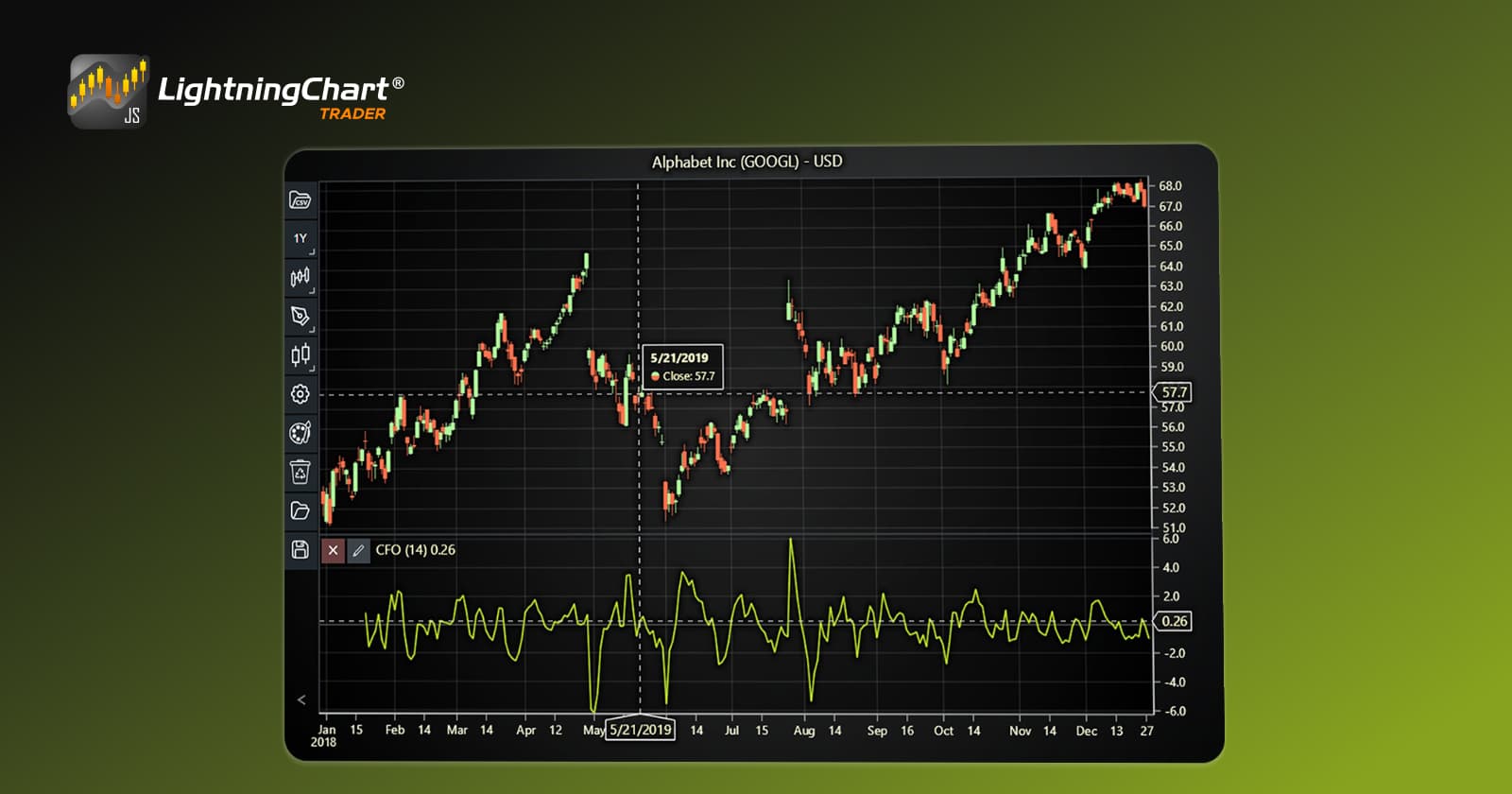
In this step, we will break down the code that creates the chart with the Chande Forecast Oscillator Indicator, as shown in the image, using LightningChart JS Trader. The code demonstrates how to initialize a trading chart, apply the CFO Indicator, and customize its appearance.

Here’s a detailed breakdown of each section:
A. Importing the Required Libraries:
   const lcjsTrader = require('@arction/lcjs-trader')
   const lcjs = require('@arction/lcjs')
const { Themes } = lcjs- lcjsTrader: This library provides access to the LightningChart JS Trader functionalities, allowing you to create advanced financial charts.
- lcjs: The main LightningChart JS library, used for general charting functionality.
- Themes: A property within lcjs that provides access to pre-built themes. In this case, we are using the darkGold theme to style the chart.
B. Initializing the Trading Chart:
   lcjsTrader.trader(TRADER_LICENSE).then(async (trader) => {
    // Create a trading chart.
const tradingChart = trader.tradingChart({ loadFromStorage: false, colorTheme: Themes.darkGold })trader(TRADER_LICENSE): Initializes the LightningChart JS Trader with the provided license key (TRADER_LICENSE). This is required to access the charting functionalities for financial data.
Note you can request a LightningChart JS Trader trial license, which is free.
tradingChart(): This function creates a trading chart with certain options.loadFromStorage: false: This disables the loading of previously stored chart data from local storage, ensuring a fresh chart setup.colorTheme: Themes.darkGold: This applies the darkGold theme to the chart, which influences the background color, gridlines, and other visual elements.
C. Adding and Customizing the Indicator
    // Add Chande Forecast Oscillator indicator
    const cfo = tradingChart.indicators().addChandeForecastOscillator()
    cfo.setPeriodCount(14)
    cfo.setSource(3)
    cfo.setLineColor('#C5F028')
cfo.setLineWidth(3)addChandeForecastOscillator(): CFO measures the difference between the closing price and the forecasted price of a n-period linear regression.
cfo.setPeriodCount(14): Sets the number of time periods (n) used to calculate the indicator.
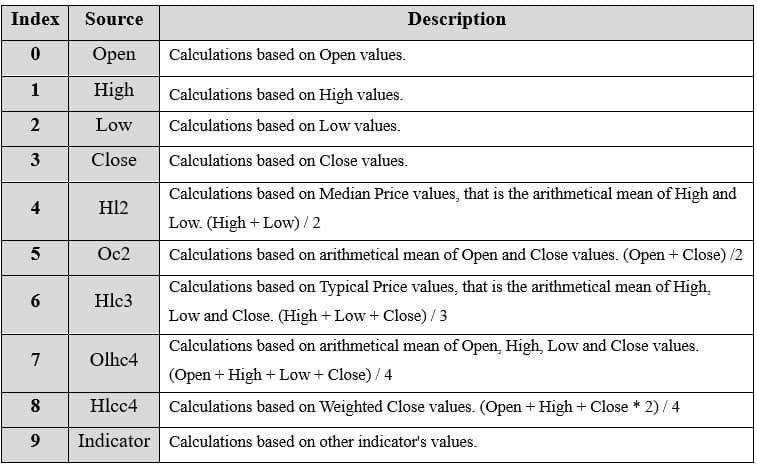
**cfo.setSource(3): Sets which values the indicator calculations are based on. In this case, calculations based on Close values.
cfo.setLineColor('#C5F028'): Changes the color of the CFO line to a shade of green.
cfo.setLineWidth(3): Sets the line thickness of the indicator to 3 pixels. This makes the line more prominent and easier to observe during analysis.
D. Loading Data from a CSV File
    // Reading data from a file.
    await fetch(`${document.head.baseURI}examples/assets/0000/Alphabet Inc (GOOGL).csv`).then((res) => res.text()).then((text) => {
        tradingChart.readCsvString(text, 'Alphabet Inc (GOOGL)')
})fetch(): This function retrieves a CSV file containing historical data for Alphabet Inc. (GOOGL). The CSV file includes pricing information for the company’s stock, which is plotted on the chart.readCsvString(): This function reads the CSV data and interprets it as pricing data for Alphabet Inc. The second argument (‘Alphabet Inc (GOOGL)’) sets the label for the chart, as seen at the top of the chart image.
E. Setting the Currency for the Chart
    tradingChart.setCurrency('USD')
})setCurrency('USD'): This sets the currency of the chart to USD, ensuring that the pricing data is interpreted and displayed in US dollars.
** Enumeration of Moving Average Types in LC JS Trader: To select which values the indicator calculations are based on.
Advantages and Limitations of the Indicator
Advantages
- Simplicity: Easy to calculate and interpret, making it accessible for traders at all levels.
- Versatility: Can be applied across different asset classes, including stocks, forex, and cryptocurrencies.
- Complementary Tool: Enhances other technical indicators when used in conjunction with trendlines, moving averages, or support and resistance.
Limitations
- Lagging Nature: As it relies on historical data, the CFO may lag during highly volatile markets.
- False Signals: In choppy or sideways markets, zero-line crossovers may generate whipsaws, leading to inaccurate signals.
- Dependence on Parameters: The effectiveness of the CFO depends on selecting the right period length for the linear regression, which can vary across markets.
Conclusion
The Chande Forecast Oscillator is a valuable tool for traders seeking to harness momentum-based strategies. Whether you’re employing a Chande Forecast Oscillator trading strategy based on zero-line crossovers, reversals from extreme levels, or support and resistance, this indicator can provide critical insights into market trends.
However, like any technical tool, its effectiveness improves when combined with other indicators and sound risk management practices. By mastering its nuances, traders can enhance their decision-making process and optimize their trading outcomes.
Continue learning with LightningChart

Trend Lines in Trading
Trend lines are among the simplest yet most powerful tools in technical analysis. They help traders visualize market direction, identify potential support and resistance levels, and make more informed trading decisions. Despite their simplicity, trend lines remain a...

Best Python Charting Library in 2026
Python's charting ecosystem is large, overlapping, and regularly misunderstood. Most comparison guides stop at Matplotlib, Plotly, and Seaborn. This one goes further: it covers what happens when your datasets grow large, your update rates increase, or your chart types...

Best TradingView Charting Library Alternative
TradingView's charting libraries are the most visible option for fintech developers. Visibility is not the same as capability. This guide is for developers who have hit the wall on candle count limits, watermark restrictions, branding requirements, real-time...



If you have any questions, feel free to contact us!



©LightningChart Ltd 2026. All rights reserved.





